Short-shipment alerts — know the moment a supplier ships less than you ordered
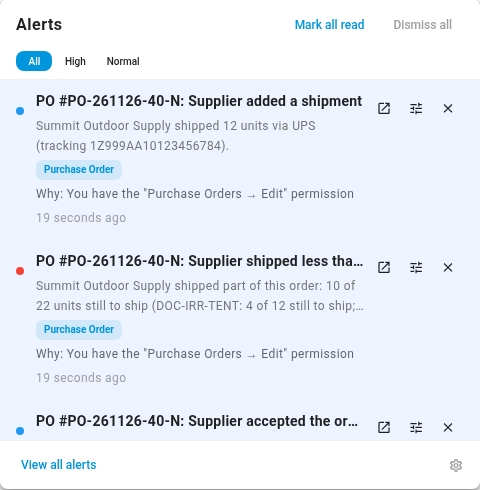
A supplier ships 8 tents instead of 12, or none of the kettles, and the first anyone hears of it is when the delivery is counted, or when a customer order can't be filled. Until now, a shipment that covered only part of a purchase order raised the same Supplier Added a Shipment alert as one that covered all of it. The new Supplier Shipped Less Than Ordered alert calls out short shipments, so you can chase the rest while there's still time.
✨ What this means for you:
- Short ships aren't silent. The alert is raised whenever a supplier records a shipment that leaves quantity unshipped on the order.
- Every short line, spelled out. It lists each line that's short and how many units are still to ship, for example: 10 of 22 units still to ship (TENT-4S: 4 of 12 still to ship; KETTLE-17: 6 of 10 still to ship).
- Wherever your buyers work. It's on by default with high priority, and you can send it by email or to a Slack channel, as it happens or in a digest.
- No noise on full shipments. A shipment that ships everything left on the order doesn't raise it.
How it works
The alert fires when a supplier records a shipment on the supplier portal, with a bulk tracking upload, or from the link in your purchase order email, including on dropship orders. It goes to the people who can edit purchase orders, and it links straight to the order, where the shipment status reads Partially Shipped.
Where to find it
- In SKU.io: the bell at the top of any page.
- By email or Slack: Settings → Alerts & Notifications → Alert Preferences. Search for less than ordered, then tick Email or Slack.
Full guide: Get alerted when a supplier ships short