Damage capture and vendor claims — record a damaged item in one step and claim it back
A torn seam at the register, a crushed box on the shelf: damaged items are small, constant and easy to lose track of. Creating an RMA for every one is too much work, so they get binned, the stock count drifts, and the money the supplier owes you is never claimed. Damage capture records a damaged item in one step. It moves the unit to a blemished SKU so it stops counting as sellable stock and records the loss in your books. If the supplier should pay for it, it raises a draft credit claim with them in the same step.
✨ What this means for you:
- One step, no RMA first: record a Customer return or an item Damaged on our shelf from the product page, the RMA list or the receive station.
- Stock stays honest: the damaged unit moves to a blemished SKU, generated for you, so it no longer counts as sellable.
- Claim it back from the supplier: tick Claim it from the vendor and a draft credit claim is created with the product's default supplier.
- Refund the customer in the same step with an optional cash credit, linked to the sales order it came from.
Capture it in one window
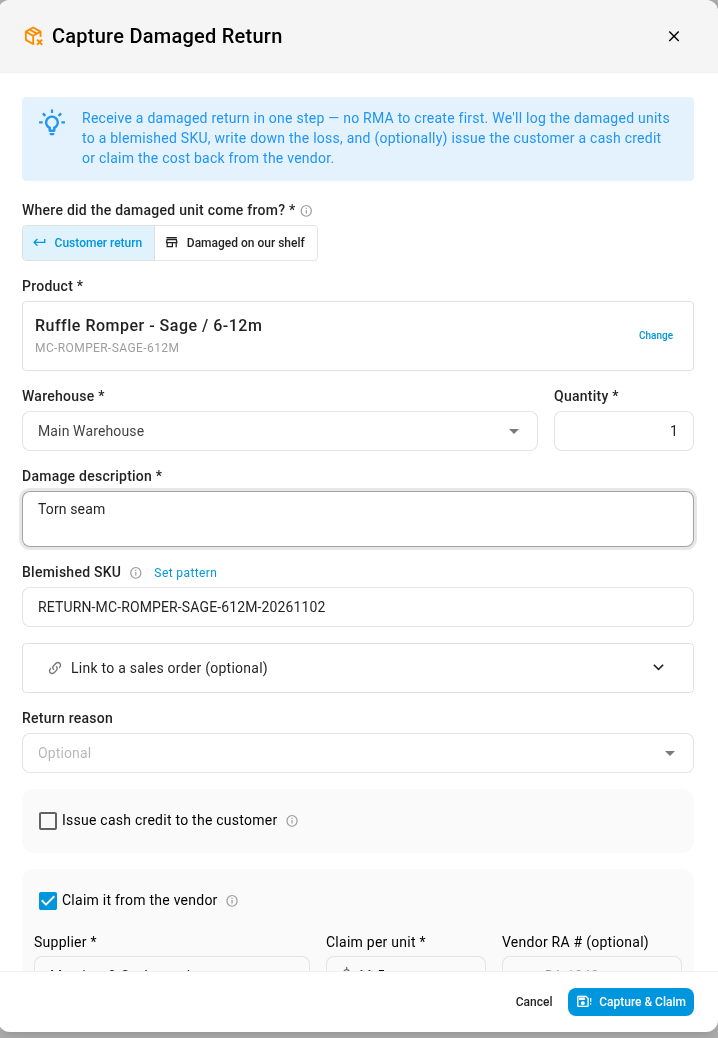
Open the product, click Actions and choose Capture Damage, or Damaged at Register → Claim from Vendor for an item you'll claim from the supplier. Say where it came from, enter the quantity and a short damage description, and leave the blemished SKU blank to have one generated. For a customer return, you can link the sales order, a return reason and a credit to refund the customer.
To claim it back, tick Claim it from the vendor. The product's default supplier is filled in, so check the claim amount per unit and add the supplier's return authorisation number if you have one.
Tracked, not trashed
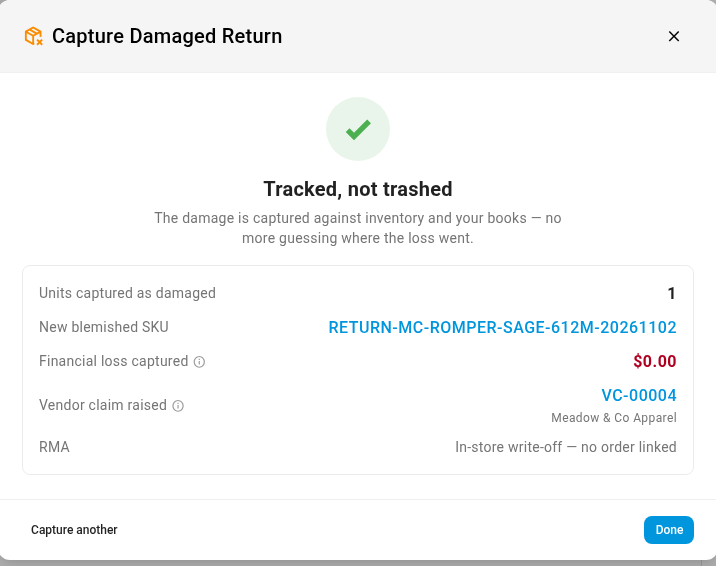
Click Capture & Claim. The confirmation shows the units captured, the new blemished SKU, the loss recorded and the vendor claim raised. Capture another records the next item for the same product. The claim lands as a draft credit on the supplier's Payables → Credits panel, marked as a damage claim and linked back to the product or return. Nothing posts until you authorise it, once the supplier agrees, and authorising writes the damaged unit off stock once.
Where to find it
- From a product: PIM → Products → (the product) → Actions → Capture Damage (or Damaged at Register → Claim from Vendor).
- From returns and receiving: the same window opens from the RMA list and the receive station.
- Follow up the claim: Contacts → Suppliers → (the supplier) → Payables → Credits.
Full guide: Capture damaged items and claim from the vendor