Supplier holds — mark a product unavailable at a supplier until a date
Suppliers often tell you a product is out for a while: it's out of stock at their end, production is delayed, it's being reprinted, or it isn't released yet. Until now there was nowhere to put that. Planning kept suggesting orders the supplier couldn't fill, open purchase orders kept their old dates, and customers saw no date at all. Supplier holds fix that. Mark a product unavailable at one supplier until a day, a month or a quarter, pick a reason from your own list, and planning, purchase orders and the dates your customers see all follow it. A hold never quietly expires: when its date passes, it waits for someone to confirm a new date or mark the product available.
✨ What this means for you:
- No more orders a supplier can't fill. Demand planning, MRP and replenishment switch to another supplier while one is on hold, or push the arrival out when there's no other supplier.
- Dates that match what the supplier told you. Record "February 2027" or "Q1 2027" when that's all you know, or tick Date unknown.
- Open purchase orders move with the hold. Placing a hold offers to move the expected delivery of open purchase orders to the new earliest arrival.
- Holds that never go stale. A hold whose date has passed shows as Due — confirm until someone acts on it, and every slip of the date is counted.
- An honest date for customers. When no other supplier can ship the product, customers see a message such as Reprinting — expected March 2027.
- Your own notifications. SKU.io sends no email of its own. A workflow trigger and a webhook let you tell customers, your team or another system in your own words.
Mark a product unavailable
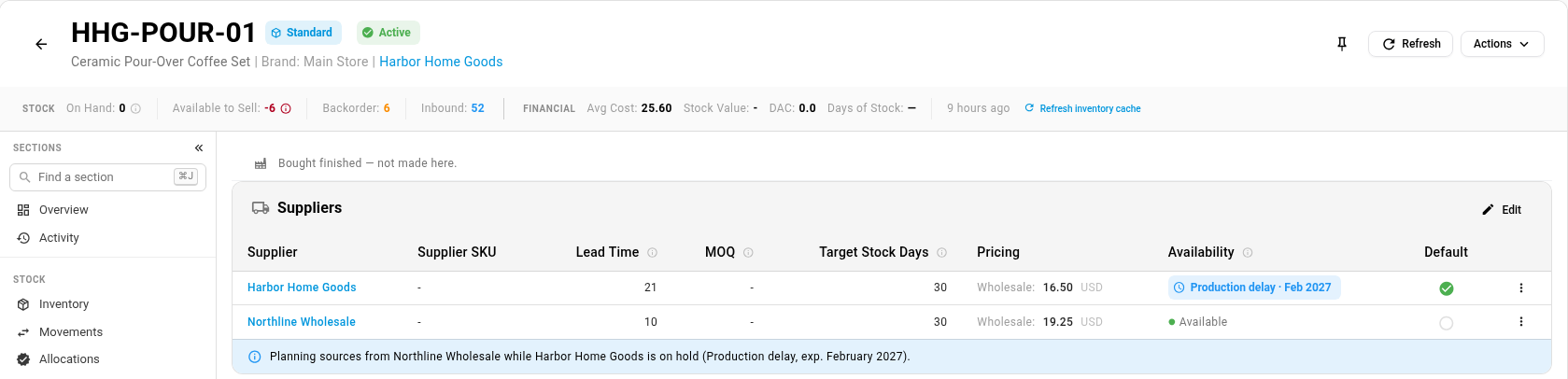
Open the product's Suppliers section. Each supplier has its own Availability, so one supplier being out doesn't stop you buying from another. On the supplier's row, open the ⋮ menu and choose Mark unavailable….
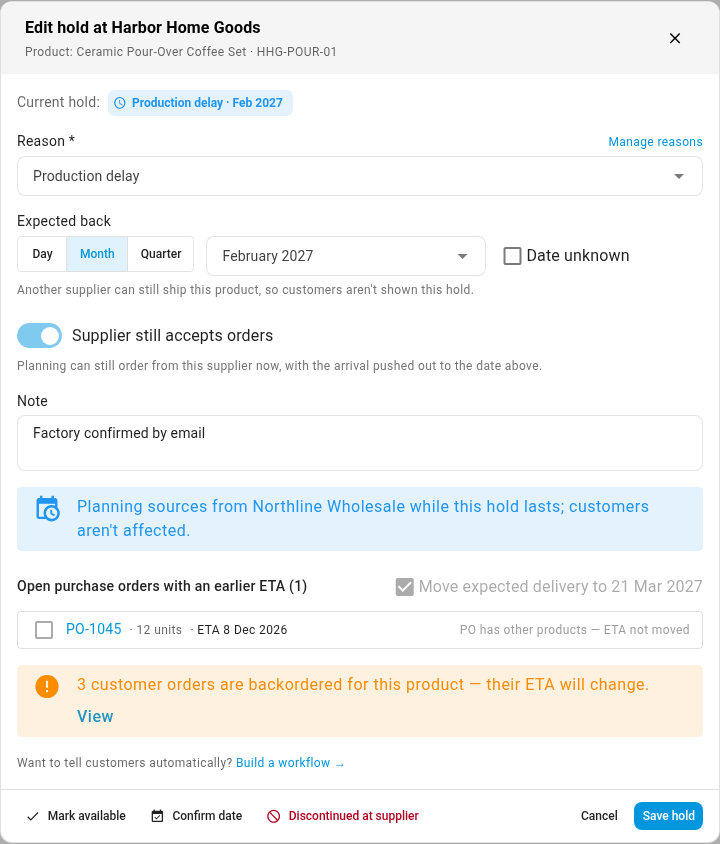
In the dialog, pick a Reason, set when it's Expected back (Day, Month or Quarter), and choose whether the Supplier still accepts orders. It's on unless you turn it off, for suppliers that take orders now and ship them when stock is back. Before you save, the dialog shows what planning will do, what customers will be told, which open purchase orders it can move, and how many customer orders are waiting on the product.
What planning does
Demand planning, MRP and replenishment all read the same hold:
- Another supplier can still ship the product: planning orders from that supplier while the hold lasts.
- Every supplier is on hold, and the supplier still accepts orders: planning keeps ordering from them, with the lead time stretched to the earliest arrival.
- The supplier won't take orders until then: planning waits, and doesn't suggest buying from them before the product is available again.
Once a hold's date passes, planning goes back to normal straight away, even before anyone confirms a new date. Receiving stock of the product from that supplier ends the hold by itself.
Every hold in one place
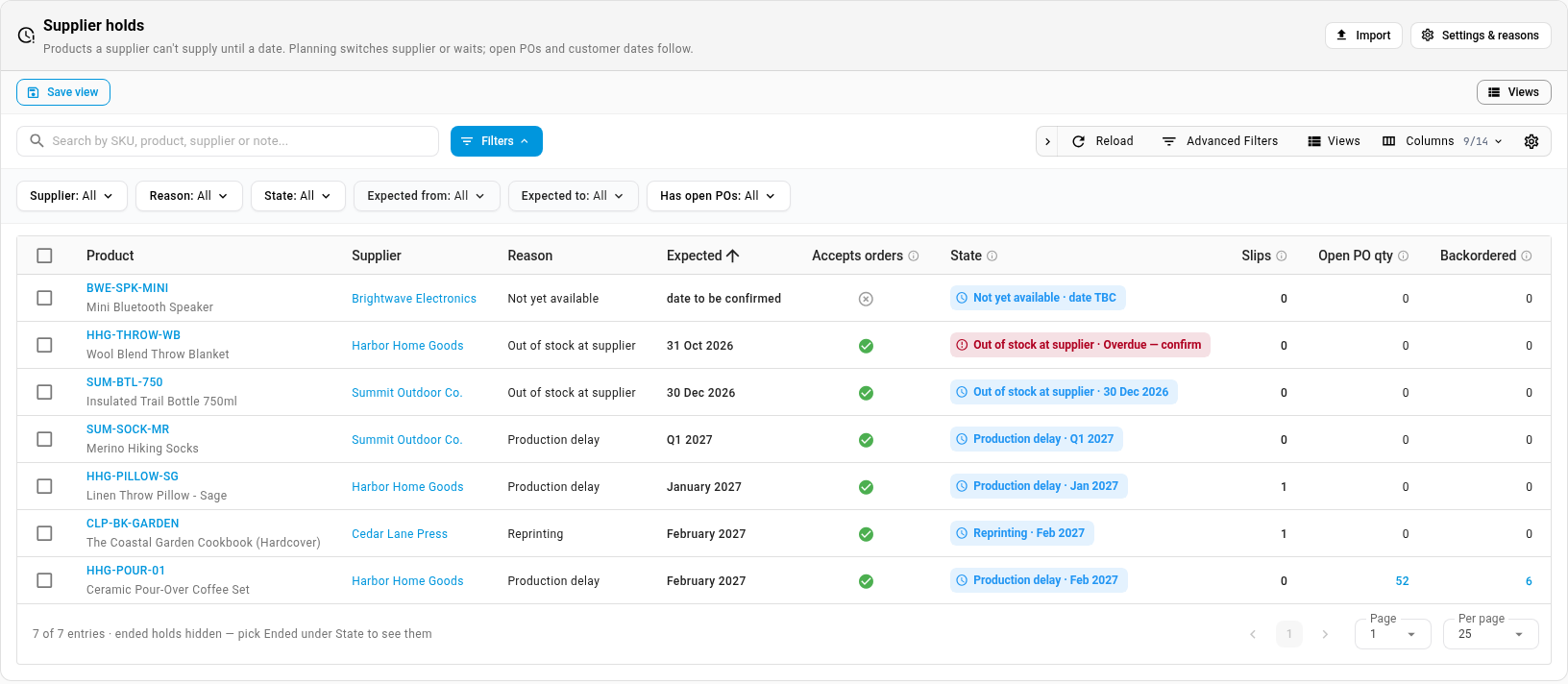
Orders → Supplier Holds lists every hold with its reason, expected date, state, slips, open purchase order quantity and backordered quantity. Filter by supplier, reason, state, expected date or open purchase orders, and right-click a hold to edit it, confirm the date, pick a new date, mark it available, or mark the product discontinued at that supplier. Import adds or updates holds from a file.
Your reasons, your settings, your customer message
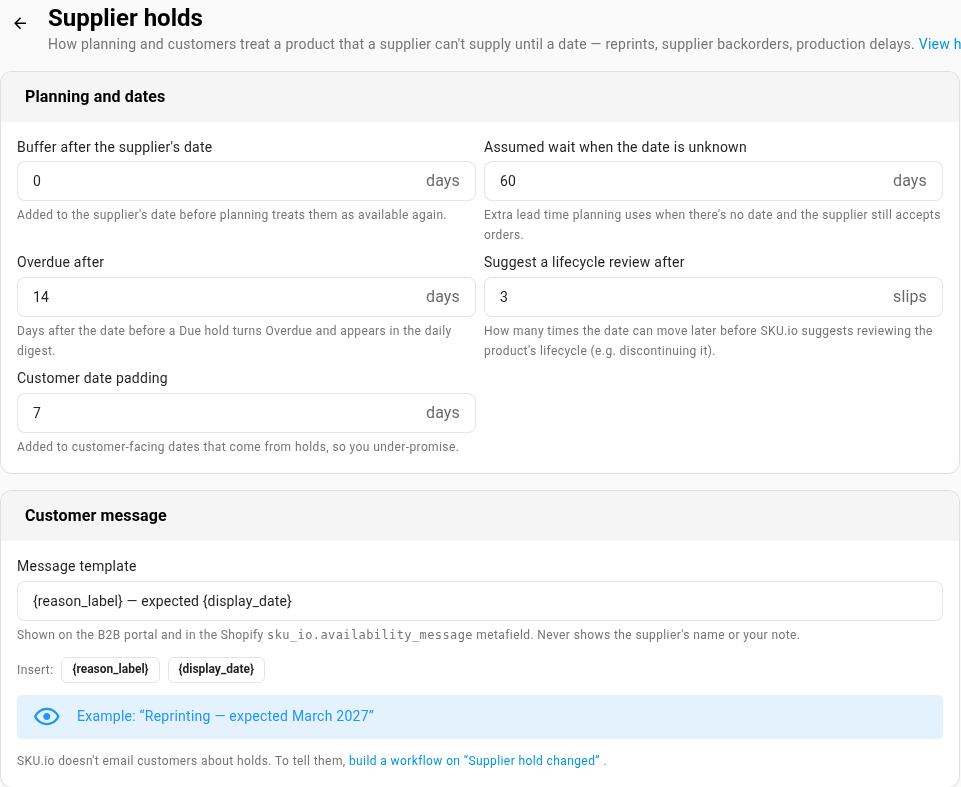
Settings → Purchasing → Supplier Holds holds the reason list and the planning and customer settings. The reasons start as Out of stock at supplier, Production delay, Reprinting, Not yet available, Temporarily withdrawn and Other. Rename them, add your own, or archive the ones you don't use. Import aliases map a supplier's own codes onto your reasons, so an imported file can use them.
What customers see
Customers see a hold only when they'd otherwise get no date: the product is out of stock, nothing on order covers it, and every supplier that could ship it is on hold. Then they get the earliest arrival plus your Customer date padding, at the same precision as the supplier's date, for example Reprinting — expected March 2027. That date reaches:
- the availability-date API;
- the customer portal, where the product can still be backordered;
- your Shopify store, through the
sku_io.*back-in-stock metafields, including a newsku_io.availability_message; - backordered customer orders that nothing on order covers.
The message never includes the supplier's name or your note.
Tell people in your own words
SKU.io doesn't email anyone about holds. Instead, every hold that is placed, revised, confirmed, falls due or ends fires the Supplier Hold Changed workflow trigger. It carries the hold, the product, the supplier and the customer orders waiting on it, so a workflow can send your own email template, post to your team, or anything else. To reach another system, subscribe to the supplier_product.availability_changed webhook. The product and supplier-product APIs also return each product's supply status and hold.
Where to find it
- On any product: Suppliers section → ⋮ on a supplier's row → Mark unavailable…
- Every hold: Orders → Supplier Holds
- Reasons and settings: Settings → Purchasing → Supplier Holds
Full guide: Mark a product unavailable at a supplier