Amazon deferred transactions — held sales, fees and taxes book in the month they happened
Amazon holds the money for most orders until seven days after delivery, often called DD+7, and holds invoiced business orders even longer. The settlement that finally pays it out dates every sale, fee and tax on the day Amazon releases it. So an order that ships on October 28 lands in November's books, and every month-end close needs a manual journal to put it back. Amazon deferred transactions does that for you. At each month end, SKU.io books everything Amazon is still holding into the month it happened, reverses it on the 1st, and gives you one tab that shows what Amazon holds, why, and when it releases.
✨ What this means for you:
- Sales, fees and taxes land in the month they happened, even when Amazon pays them out weeks later.
- Your settlements don't change. Their lines, totals and deposits stay exactly as they were, so deposit matching works as before.
- No opening balance to work out. Only orders held from your start month on are booked. What Amazon still holds from before that month is shown separately, and never posted.
- Nothing is counted twice. Lines that already reached your books another way, such as revenue booked when the order shipped, or sales tax mapped to a balance sheet account, are left out.
- One tab answers "what is Amazon holding?", by month, by reason and by order, with a CSV export.
- The close checklist checks the balance for you every month.
- Included at no extra cost, with no add-on to install.
Turn it on once
Under Amazon → Finance → Settlement Mappings, the Amazon deferred transactions card shows how much Amazon is holding right now. Set it up by choosing an account for the balance (SKU.io suggests creating Amazon Deferred Balances) and a start month. Before it turns on, SKU.io checks that your Amazon settlements can actually post, and lists what to fix if they can't. Months that have already ended get their journal straight away. The current month stays a draft, rebuilt every night as Amazon sends new transactions, and posts once the month ends.

See every month on the Deferred tab
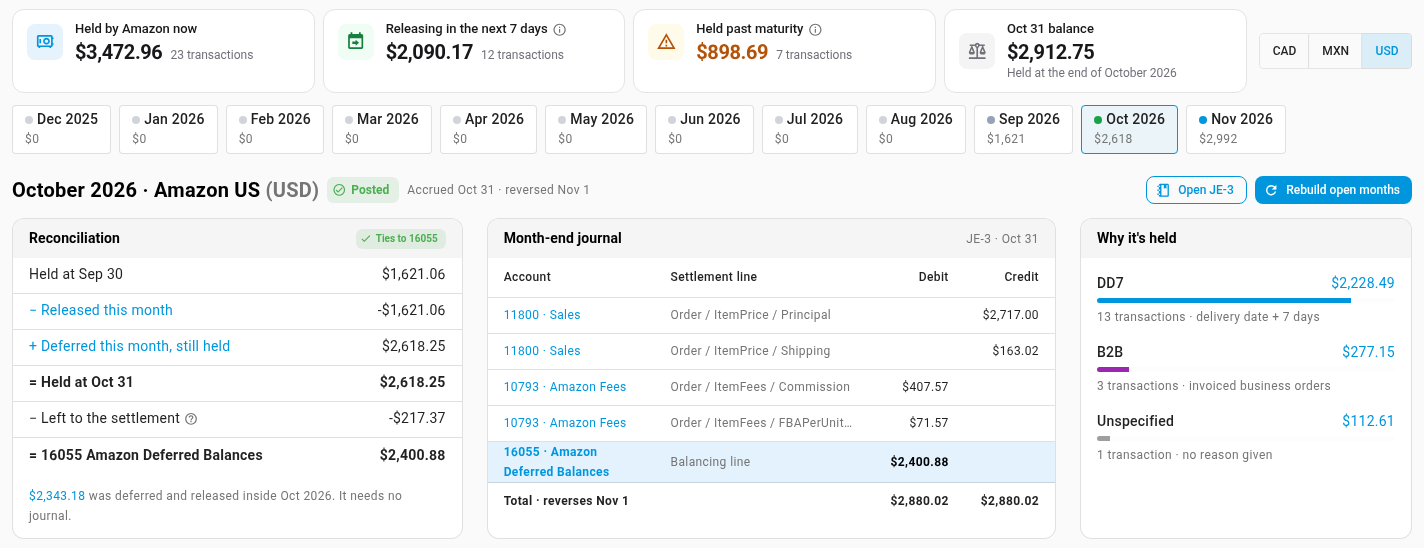
The new Deferred tab on Amazon Finance starts with four figures: what Amazon is holding now, what's releasing in the next 7 days, what's held past maturity (Amazon is late paying it out), and last month's closing balance. Pick a month from the strip below, and three cards explain it:
- Reconciliation rolls the previous month end's balance forward to this month end, and shows that it ties to your Amazon Deferred Balances account.
- Month-end journal lists every line, from held sales and shipping to their fees, with the balancing line to Amazon Deferred Balances. It links to the journal itself.
- Why it's held splits the balance by Amazon's reason: DD7 (delivery date plus 7 days), B2B (invoiced business orders) or Unspecified.
Accounts with sales in more than one currency get a row per currency, such as CAD, MXN and USD.
Find the orders behind any figure
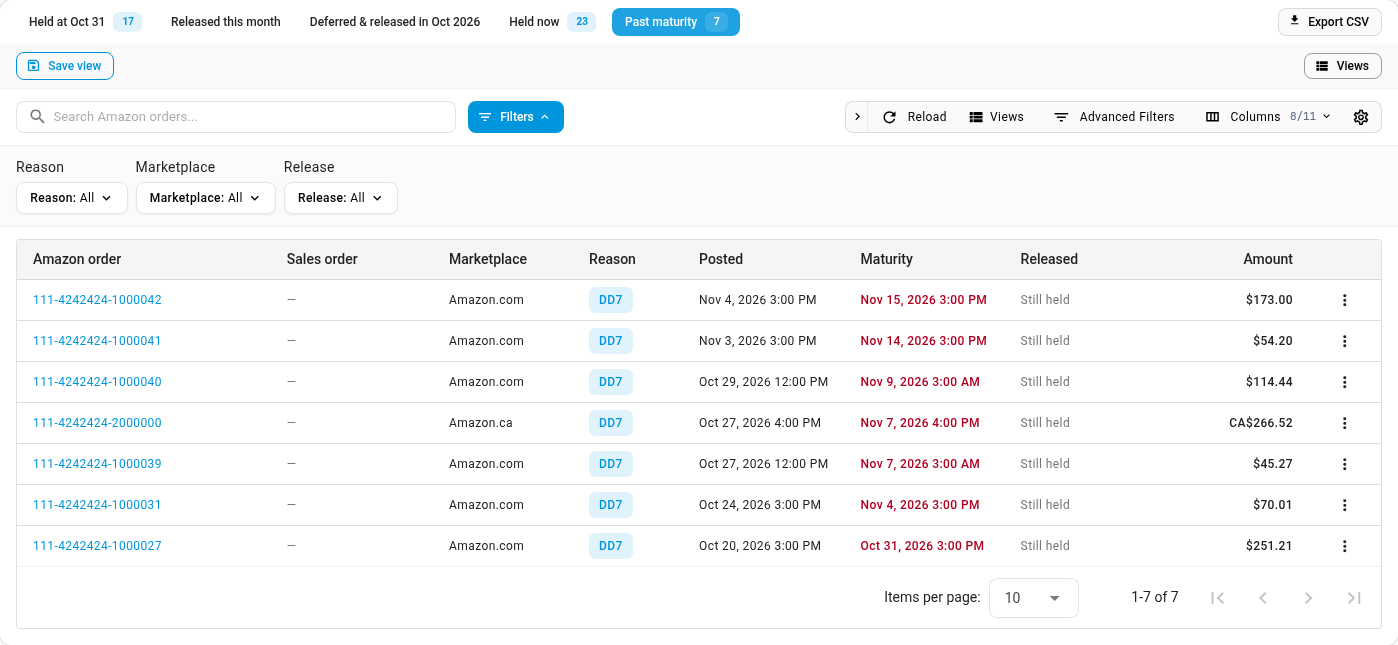
Every figure on the tab opens the Amazon orders behind it: what was held at month end, what released this month, what was held now or past maturity, and what was held from before your start month. Each row shows the reason, when it was posted, its maturity date, and when Amazon released it and in which settlement. Filter by reason, marketplace or release, and click Export CSV to download the list.
When Amazon's release record is missing
Amazon normally sends a release record when it pays out a held order, and SKU.io pairs them by order, shipment, transaction type and amount. When that record is missing, as is common for business liquidations, SKU.io looks in the settlement report itself. A payout line for the same order and amounts proves Amazon paid it, and SKU.io dates the release by that settlement. Held transactions that arrive with no order id at all are released automatically 30 days after their maturity date. You can also mark how one was paid yourself, from its row in Past maturity.
Foreign currencies, without FX noise
Each held transaction is booked at your exchange rate for the day it happened. A sale that Amazon holds across two month ends is therefore booked at the same amount both times, and moves nothing between them. When Amazon finally pays it out, the settlement uses its own rate. SKU.io posts the difference to FX Realized Gain/Loss on the day of that settlement, so the release month gets no extra sales. That difference appears as FX on release on the month's reconciliation and month-end journal. If FX Realized Gain/Loss isn't mapped yet, the tab says so and links to the mapping.
Checked at every close
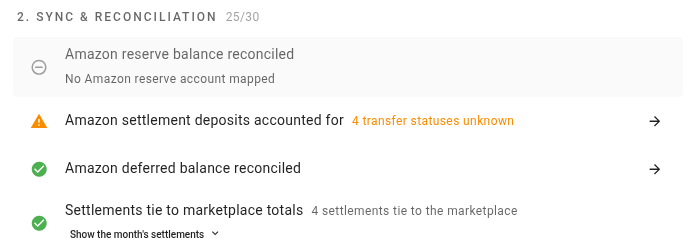
The close checklist gains Amazon deferred balance reconciled. It compares your Amazon Deferred Balances account with what Amazon held at month end, and passes when they match. It also warns you about two things: held transactions with no order id that are still waiting 14 days past maturity, and a settlement whose exchange rate changed after it posted while a missing landed-cost bill stops it from rebuilding.
Where to find it
Go to Apps & Integrations → Amazon → Finance. Turn it on from the Amazon deferred transactions card on the Settlement Mappings tab, then review each month on the Deferred tab. The balance check is on each month's checklist under Accounting → Close.
Full guide: Book Amazon deferred transactions in the right month