Pinnacle deliveries and shipping-method routing — one warehouse, the right provider for every order
When one 3PL runs both your parcel shipping and your large-item home deliveries, a warehouse never has just one way out. Metro deliveries go to the delivery team, while FedEx parcels ship from the 3PL's own warehouse system. Until now a warehouse in SKU.io had a single shipping provider, so the other half of the orders had to be split off by hand. Two things change that. The new Pinnacle integration sends your home deliveries to Metropolitan Warehouse & Delivery (MWD) and tracks them back. Shipping-method routing lets one warehouse send each shipping method to the provider that should handle it.
✨ What this means for you:
- Home deliveries handled end to end: each fulfillment order is registered with MWD as a delivery. The tracking number comes back straight away, and the order is marked shipped when MWD picks it up.
- The right provider for every order: one routing rule sends, say, FedEx Home Delivery to your warehouse system while everything else goes to Pinnacle, all from the same warehouse.
- Always know why: every fulfillment order shows which provider will ship it and why: a routing rule, the warehouse default or a one-off choice you made on that order.
- Labels and BOL on demand: download a fresh copy of the delivery labels (PDF or ZPL) or the bill of lading whenever you need to reprint.
- No silent surprises: if MWD cancels a delivery after it was marked shipped, for example because the recipient refused it, you get an alert to follow up.
Send home deliveries to MWD
Connect Pinnacle with the credentials MWD gives you, then map each of your shipping methods to the Pinnacle delivery type MWD should perform, such as threshold or white-glove. Auto-match maps the obvious ones for you, and a Will send column previews exactly what each method sends. Set the warehouse's shipping provider to your Pinnacle connection and you're live.
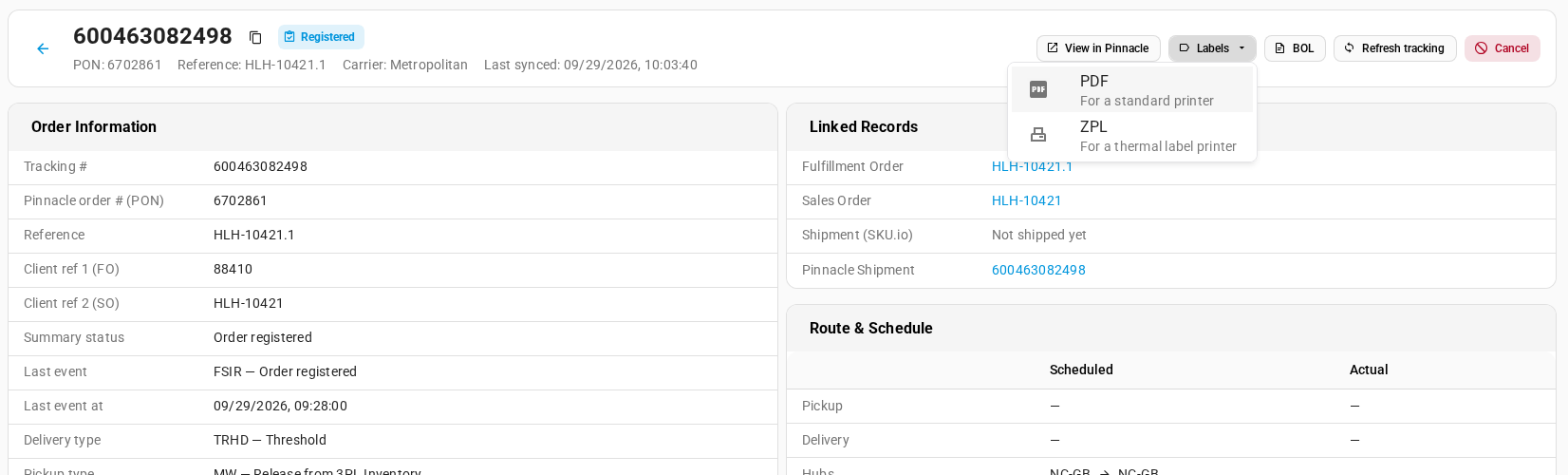
Once an order is submitted, its Delivery status shows the latest tracking events from MWD. The tracking number links to the full Pinnacle order.

Route shipping methods to a different provider
A warehouse still has one default provider, and now you can add routing rules on top of it. Each rule sends one shipping method to a different provider. Here, FedEx Home Delivery from MWD's Greensboro warehouse goes to MWD's warehouse system through Trackstar, and Everything else keeps going to Pinnacle.
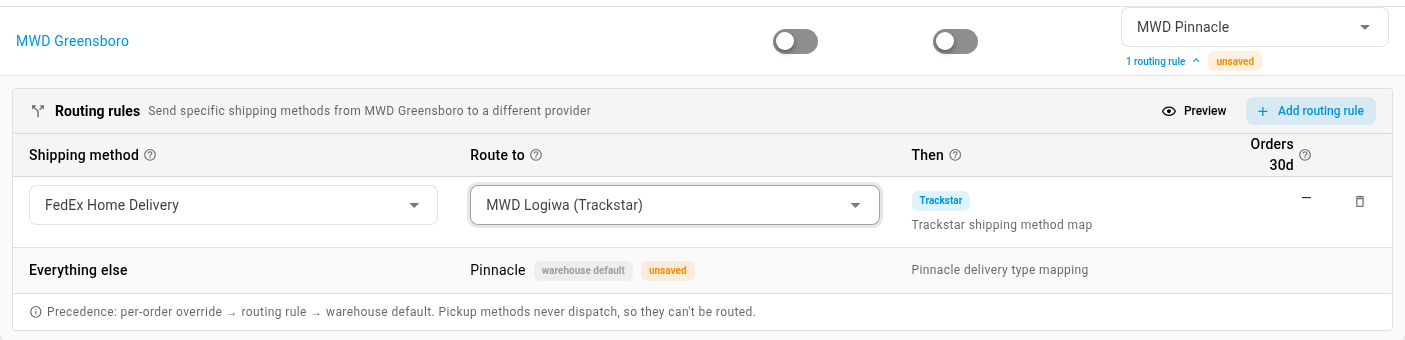
Rules work with any provider you've connected, not just Pinnacle. A rule applies to orders that haven't been sent yet. On a single order you can still pick a different provider, and that one-off choice wins over any rule.
See who ships each order, and why
Every fulfillment order's Dispatch panel names its Shipping provider, and Resolved by explains the choice. An edit rules link takes you straight back to the rule that made it.

Reprint labels and the BOL
Each Pinnacle order has Labels and BOL buttons. Labels come as a PDF for a standard printer or ZPL for a thermal label printer, fetched fresh from Pinnacle each time.
If some of your products need a different item type than the rest, such as furniture versus appliances, choose a product attribute as the Item type attribute on the connection's settings. Each product then sends its own type to MWD.
Where to find it
- Connect Pinnacle: Apps & Integrations → search Pinnacle.
- Routing rules: Settings → Fulfillment → Fulfillment Dispatch, on the warehouse's Shipping Provider & Routing column.
- Who ships an order: Orders → Fulfillments, open an order, then the Dispatch panel.
Full guide: Set up Pinnacle (MWD) deliveries · Dispatch to a fulfillment provider