Channel attributes and metafields — the fields only your channel has, finally in your catalog
Every channel has a standard set of product fields, and then it has yours. The care instructions you added as a Shopify metafield. The country_of_manufacture and warranty_months attributes your Magento store has carried for years. That data is real, it's maintained, and until now SKU.io imported none of it — it read the fields every channel has and dropped everything else on the floor, leaving you to re-enter it by hand or accept a catalog that knows less than your storefront does. Channel attributes closes that gap. SKU.io now discovers the attributes your channel actually sends, shows you how many products carry each one and what the values look like, and lets you point them at any SKU product field — either once, when a product is first created, or on every sync, with drift detection watching for changes.
✨ What this means for you:
- Shopify metafields and Magento custom product attributes are discovered automatically — no schema setup, no field list to maintain.
- Every attribute shows how many of your products carry it and up to three real sample values, so you can tell a genuine attribute from an app's leftovers before you map it.
- Map an attribute to any SKU product field — a catalog attribute, the title, a weight, a price tier — and the channel's value lands there.
- Need a catalog attribute that doesn't exist yet? Type the name, press Enter, and SKU.io creates it for you.
- Map at creation time to fill new products from the channel, or in Content Sync to keep them current and get flagged when the channel edits them.
- Clean values on the way in — strip a channel-specific SKU prefix, trim a trailing size code, join two fields together — without touching them afterwards.
- Nothing is mapped by default. An attribute you don't map is ignored entirely.
Two places to map, and they do different jobs
This is the part worth getting right up front, because the two surfaces look similar and behave very differently.
Field Mappings decides what fills a SKU product the first time it's created from a channel listing. It runs once per product, at creation, and then it's done. It's the widest of the two — it can reach almost any SKU field.
Channel Attributes, inside Content Sync, decides what keeps flowing after the product exists. Those mappings are applied on every sync, and the ones that land on fields Content Sync governs are also compared against your catalog, so a merchandiser editing the material in Shopify raises a reviewable change instead of a silent divergence.
Most teams want both: Field Mappings to get a new product populated, Channel Attributes to keep it honest.
Discovering what your channel actually sends
Open a channel's Products page and select Field Mappings, and the channel's own vocabulary is already there beside its standard fields — grouped as Metafields on Shopify and Custom Attributes on Magento, each labelled with how many of your products carry it.
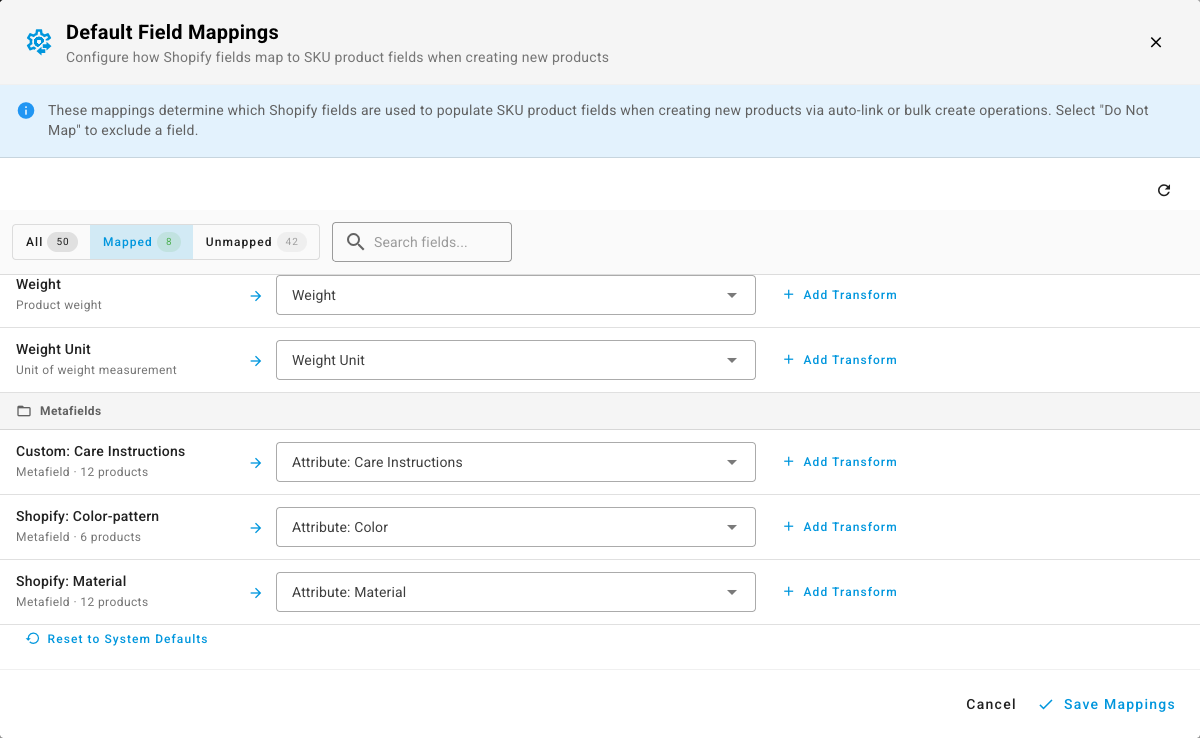
Shopify metafields read the way you named them: custom.care_instructions shows as Custom: Care Instructions, shopify.material as Shopify: Material. Magento attribute codes are title-cased from the code itself — country_of_manufacture as Country Of Manufacture. Filter to Unmapped after a first sync and you're looking at exactly what the channel is sending you that SKU.io is currently throwing away — which is usually where the useful merchandising data has been hiding.
None of this comes from asking the channel for a schema. SKU.io builds the list from the products it has already synced, which means what you see is what your store genuinely uses, not every field the platform theoretically supports.
Clean the value on its way in
Channel data rarely arrives in exactly the shape your catalog wants. A transform reshapes it during import, so you're not fixing the same thing by hand every time a product is created.
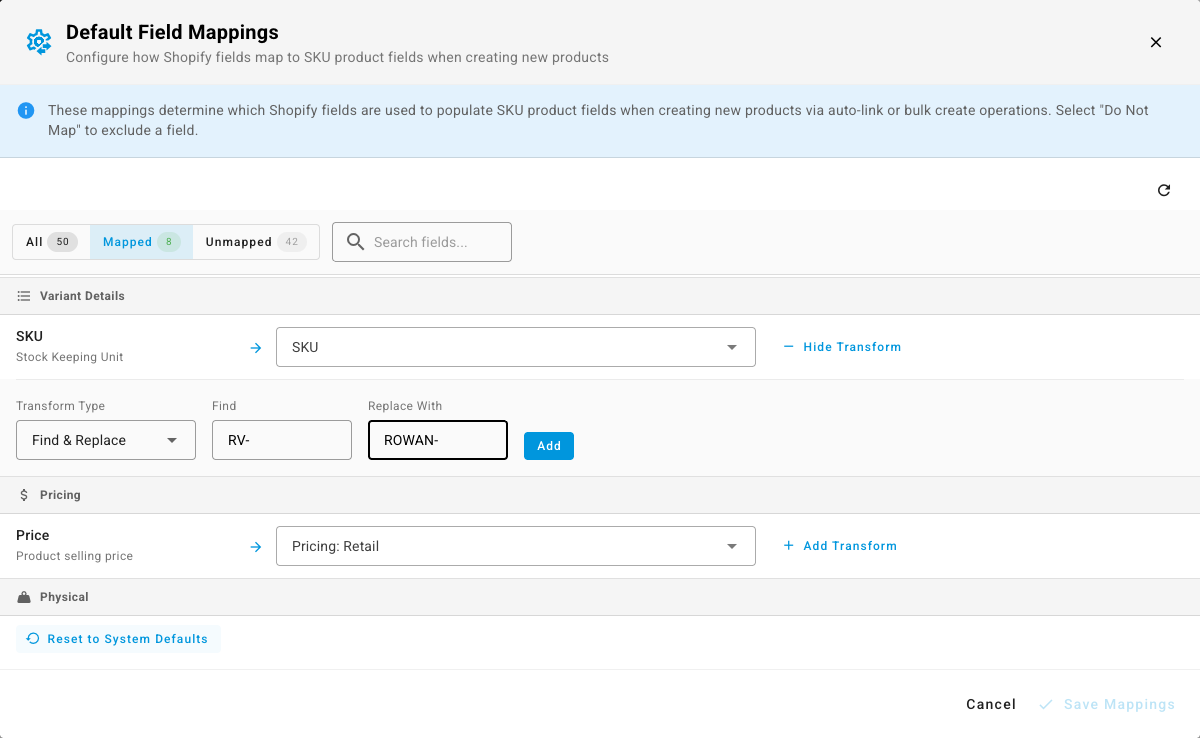
Pick a mapped row, select Add Transform, and choose what to do: Remove Text deletes every occurrence of a string, Find & Replace swaps one for another, Remove from Beginning and Remove from End trim a fixed number of characters, and Append Field joins another channel field on with a separator you choose. Stack more than one and they run in order. Transforms are available on Amazon, BigCommerce, eBay, Shopify, TikTok Shop, Walmart and WooCommerce.
Keep them current, and catch the edits
The other half lives at the bottom of a channel's Content Sync settings tab. Same vocabulary, different job: these mappings run on every sync.
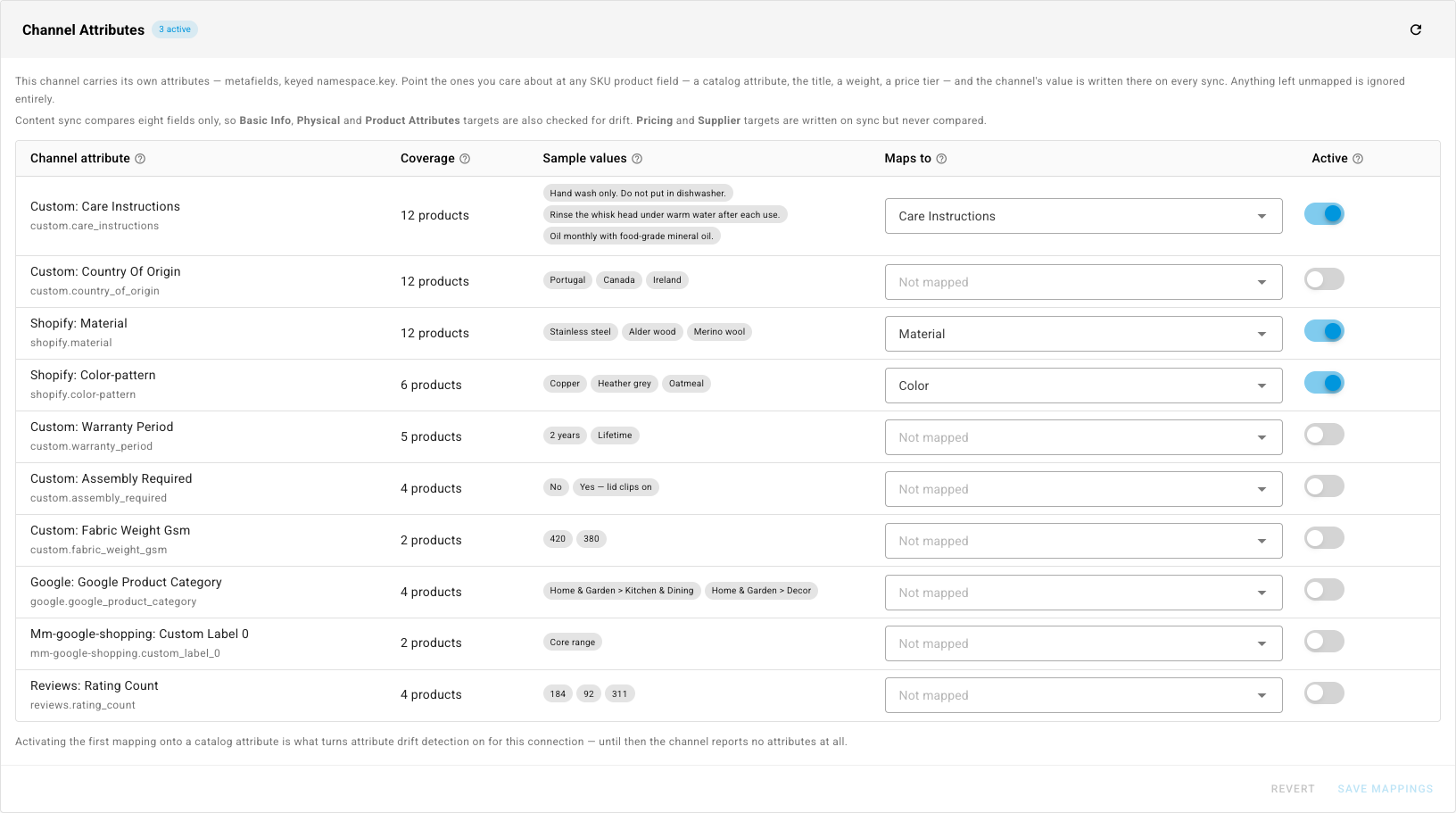
Each row tells you what you need to decide with: Coverage — how many of your synced products carry it, so an attribute on 12 of 12 is obviously worth mapping and one on 2 probably isn't. Sample values — up to three real values pulled from your own listings, so you see what you'd be importing before you commit. Then pick a target in Maps to and switch the row Active.
Targets that Content Sync governs — Basic Info, Physical, and Product Attributes — are written on sync and compared, so a change on the channel side shows up in the Content Sync inbox like any other drift, with the before and after side by side. Pricing and supplier targets are written but never compared; the panel labels them written, not compared so you're never guessing which you picked.
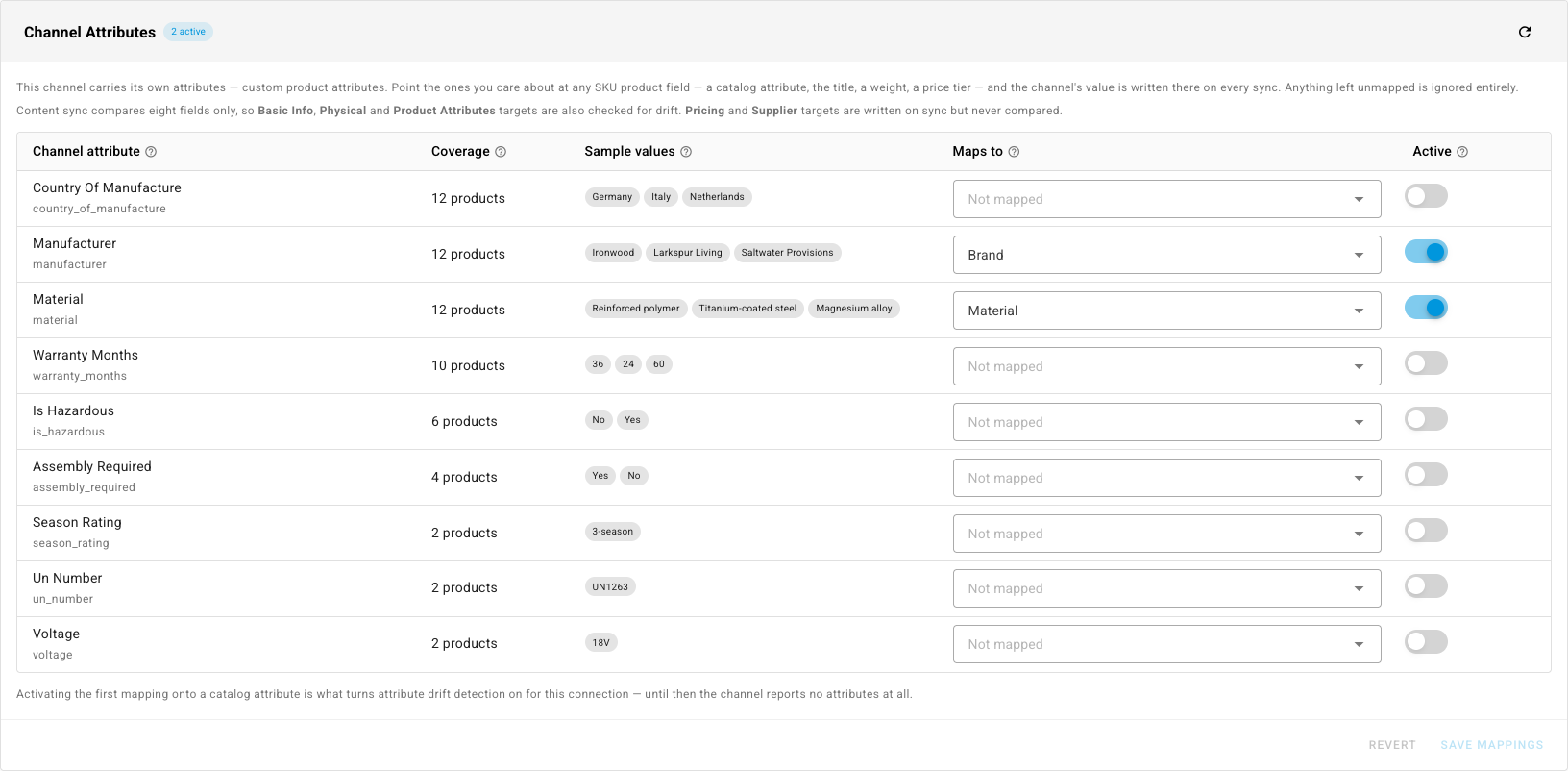
Magento stores get the same treatment for their custom product attributes: point Manufacturer at Brand, material at a Material catalog attribute, and leave the shipping-compliance codes you don't maintain in SKU.io unmapped.
One thing to know: on Magento 2, custom attributes are available in Field Mappings at product creation but not in Channel Attributes, so a Magento 2 custom attribute can fill a SKU field when the product is created but can't be watched for drift afterwards. Shopify metafields and Magento 1 custom attributes can be. The eight governed content fields sync normally on Magento 2 either way.
Where to find it
Creation-time mapping: Apps & Integrations → your channel → Products → Field Mappings. Ongoing mapping and drift detection: Apps & Integrations → your channel → Settings → Content Sync → Channel Attributes. Mappings are saved per connection, so two Shopify stores can map differently.
Full guides:
- Map channel fields to SKU products — everything that happens at product creation, including transforms and the per-channel differences.
- Review and apply channel content changes — Channel Attributes, drift detection, and the rest of Content Sync.