Wholesale line sheets — a PDF for buyers or an Excel order form, from your catalog
Before a buying season, wholesale teams rebuild the same document by hand: export the products, paste in photos, look up each buyer's prices, and lay out the sizes and colours for every style. Then a buyer asks for a spreadsheet they can order from, and it starts again. Wholesale line sheets build both from your catalog in one step: a PDF line sheet with photos, wholesale prices and MSRP, or an Excel order form with one row per variant and a quantity column for the buyer to fill in.
✨ What this means for you:
- Start from what you already have. Build a line sheet from the products you ticked, the Products list's current filters, a saved view, or a catalog.
- The right prices for the buyer. Pick a customer and SKU.io uses their pricing tier, or choose the tiers for the wholesale price and MSRP yourself, in the currency you need.
- Every variant in one place. Each style lists its variants in a grid of options, such as Colour and Size, with its MOQ and case pack.
- A cover page that sells. Add a title, payment terms, order minimum, ship window, terms and a contact.
- An order form buyers can return. The Excel order form has a quantity column and line and order totals.
Choose the products and the format
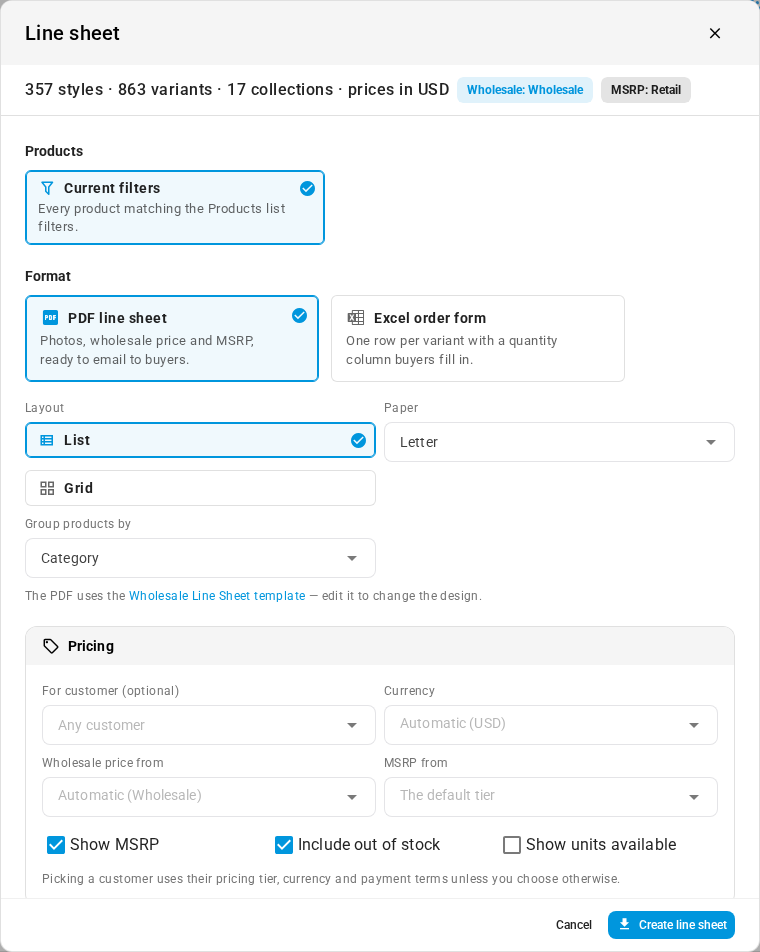
On the Products list, click Line sheet in the toolbar, or tick products and use the bulk actions. You can also start from a catalog's page. Pick where the products come from, then choose PDF line sheet or Excel order form. For a PDF, choose a List or Grid layout and Letter or A4 paper, and group the products by category or brand.
Price it for the buyer
Under Pricing, pick a customer to use their tier, or leave For customer empty and choose Wholesale price from and MSRP from yourself. Choose a Currency, and decide whether to Show MSRP, Include out of stock products and Show units available.
Send it
Fill in the cover page, click Create line sheet, and download the file from the job tray when it's ready. To change how the PDF looks, edit the Wholesale Line Sheet template under Settings → PDF Templates.
Where to find it
Go to Products and click Line sheet, or open a catalog and click Line sheet there. You need permission to export products.
Full guide: How PDF templates work