US duty rates from USITC, and HTS code and Duty % on every PO line
Tariffs change often, and a duty rate typed into a spreadsheet months ago quietly turns every landed-cost estimate into a guess. SKU.io now checks the US duty rates you use against the official USITC tariff schedule, shows you every difference before anything changes, and puts the HTS code and duty rate on each purchase order line where buyers see them.
✨ What this means for you:
- Rates checked against the source. Sync from USITC compares every US HTS code in use with the published schedule. A daily check runs whenever USITC publishes a new revision.
- You decide what changes. Differences become review items, such as Changed in schedule or New in schedule, each with its effect on open purchase orders' duty estimates. Nothing reprices until you click Accept. Keep mine is remembered, so the same item isn't raised again.
- Automatic when you trust it. Turn on automatic updates to apply exact base-rate changes as soon as they're published, with an alert and an Undo.
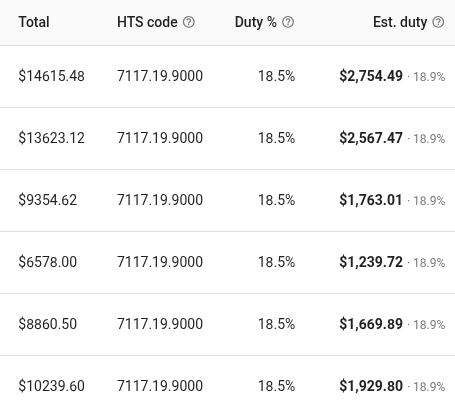
- HTS code and Duty % on PO lines. Two new columns on a purchase order's lines show the code each line is bought under and its duty rate before entry fees, next to Est. duty. They're in the PO with Line Items export too, and the built-in purchase order PDF prints them under each item. A customized PDF template offers a one-click Insert HTS code & Duty %.
- Defaults per product type. Give a product type a Default HTS code and Default country of origin. Its products that have none of their own use them for duty estimates, and show an inherited from type chip.
Where to find it
- Settings → Purchasing → Duty Rates → Sync from USITC to review the schedule, and its Settings tab for automatic updates.
- The HTS code and Duty % columns in a purchase order's column picker.
- Edit on a row of Settings → Products → Product Types for duty defaults.
Full guides: Keep duty rates accurate · Estimate duty on purchase orders · Build your product type tree