Price sync — change a price in SKU.io and the channel actually hears about it
There has been a Master of Price setting on your sales channels for a long time, and on all but one of them it did less than it looked like it did. Setting it to SKU.io stopped the channel's price from overwriting yours on the way in — but it never sent anything out. You'd change a price in SKU.io, watch the channel keep charging the old one, and have no way to tell the difference between "it hasn't run yet" and "it was never going to run".
Price sync closes that loop. On Amazon, BigCommerce, eBay, Faire, Magento 1, Magento 2, Shopify, Square, Temu, TikTok Shop, Walmart and WooCommerce, SKU.io now publishes your price to the channel on a schedule you choose — behind guardrails that stop a bad number reaching a marketplace, and with a run history that tells you what happened to every listing.
✨ What this means for you:
- One price, everywhere. Set a price once against a pricing tier and let each channel receive it, instead of repricing the same product in twelve admin panels.
- A typo can't reach a marketplace. A price floor, a price ceiling and a maximum-change-per-run limit are checked before anything is transmitted. A $4.50 price under a $5.00 floor is refused, not published.
- Preview before you commit. A dry run shows you exactly what would be sent, listing by listing, without sending it.
- Know where you stand at a glance. A pricing page per channel shows what SKU.io holds, what the channel holds, and the difference — so "out of sync" is a number you can see, not a suspicion.
- Every run is auditable. Each listing in a run is marked pushed, blocked, skipped or failed, with the reason in plain English, and the whole run exports to CSV.
- One awkward listing doesn't force you to weaken everything. A single listing can carry its own guardrails without changing the rules for the rest of the catalogue.
Decide who owns the price, then fence it in
Everything starts on the channel's Pricing Sync tab. Master of Price decides which side wins, the pricing tier decides which of your prices is the one to send, and the guardrails decide what is allowed out.
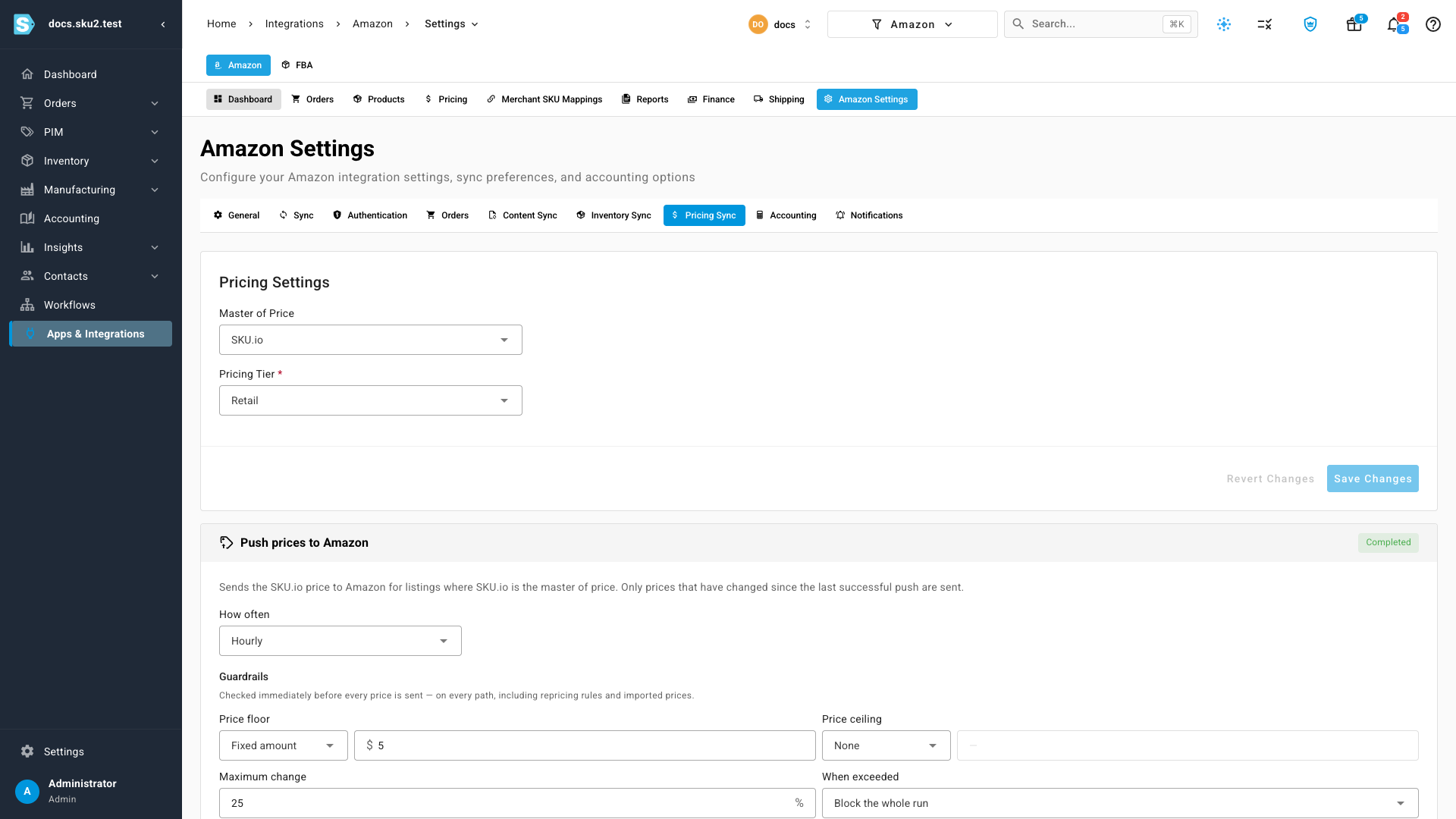
The guardrails are the part worth reading twice. Price floor and price ceiling say what a price is allowed to be; maximum change says how far it may move in one run — the tripwire that catches a decimal point in the wrong place, a bad import, or a repricer that has gone strange. When something exceeds the limit you choose what happens: skip only that listing and carry on, or block the whole run, which is the safer setting when a large move usually means something upstream is wrong.
Then pick how often it runs. Manual pushes are always available; the schedule is for the day-to-day.
See exactly where you stand before you push
Each channel gets a Pricing page comparing your price against the channel's, listing by listing.
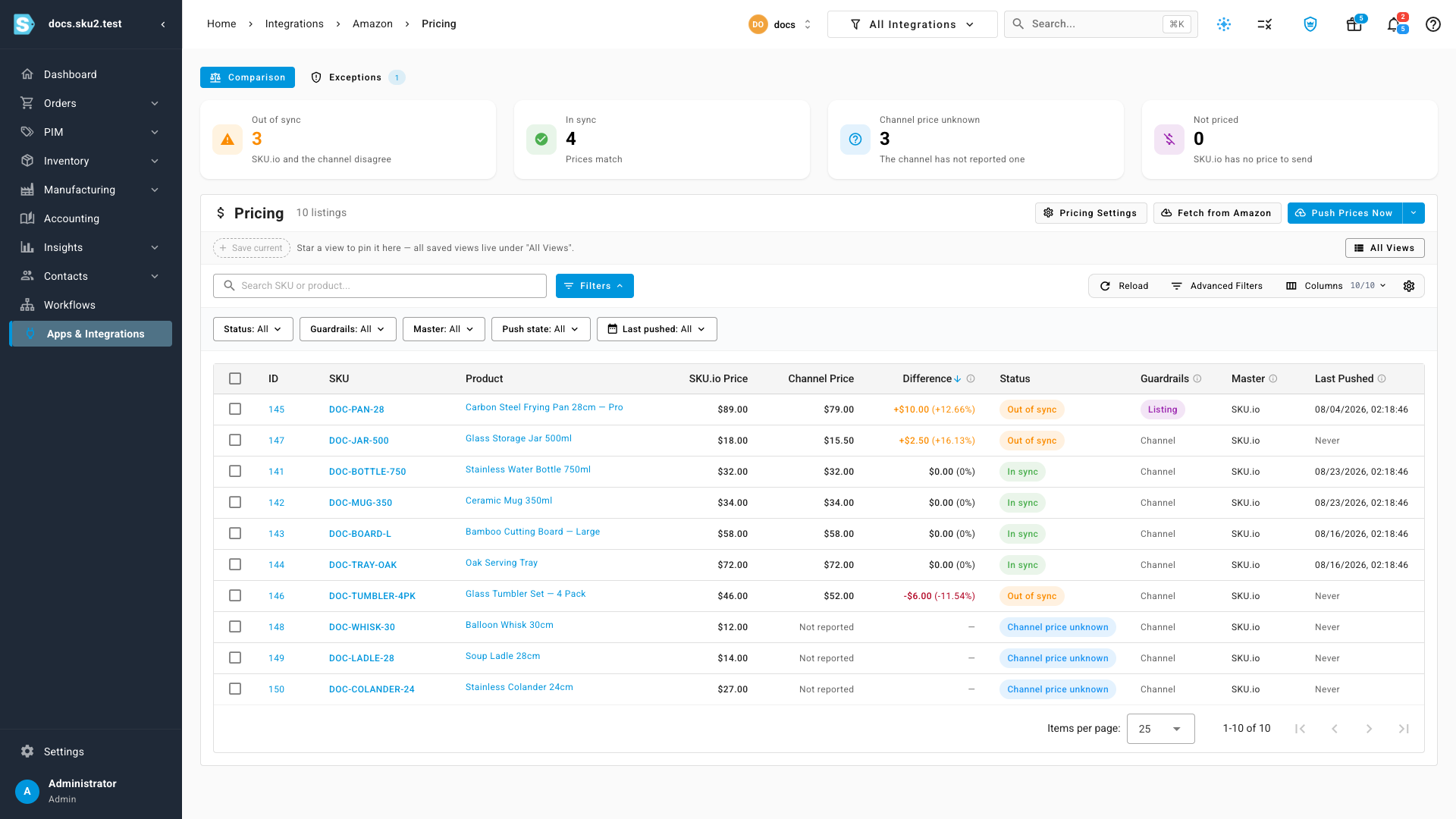
The four cards divide the catalogue between them, so the numbers always add up to what you're looking at. Channel price unknown is its own state on purpose — it means the channel hasn't told us its price yet, which is a genuinely different situation from being out of sync, and Fetch from Amazon (or whichever channel you're on) resolves it on demand.
Filter by status, by whether a listing has its own guardrails, by which side owns the price, or by when it was last pushed. Preview changes runs the whole thing as a dry run and shows you the result before a single price leaves SKU.io.
Every run says what it did, and why
A push is not a black box. Open any run and each listing tells you what happened to it and the reason.
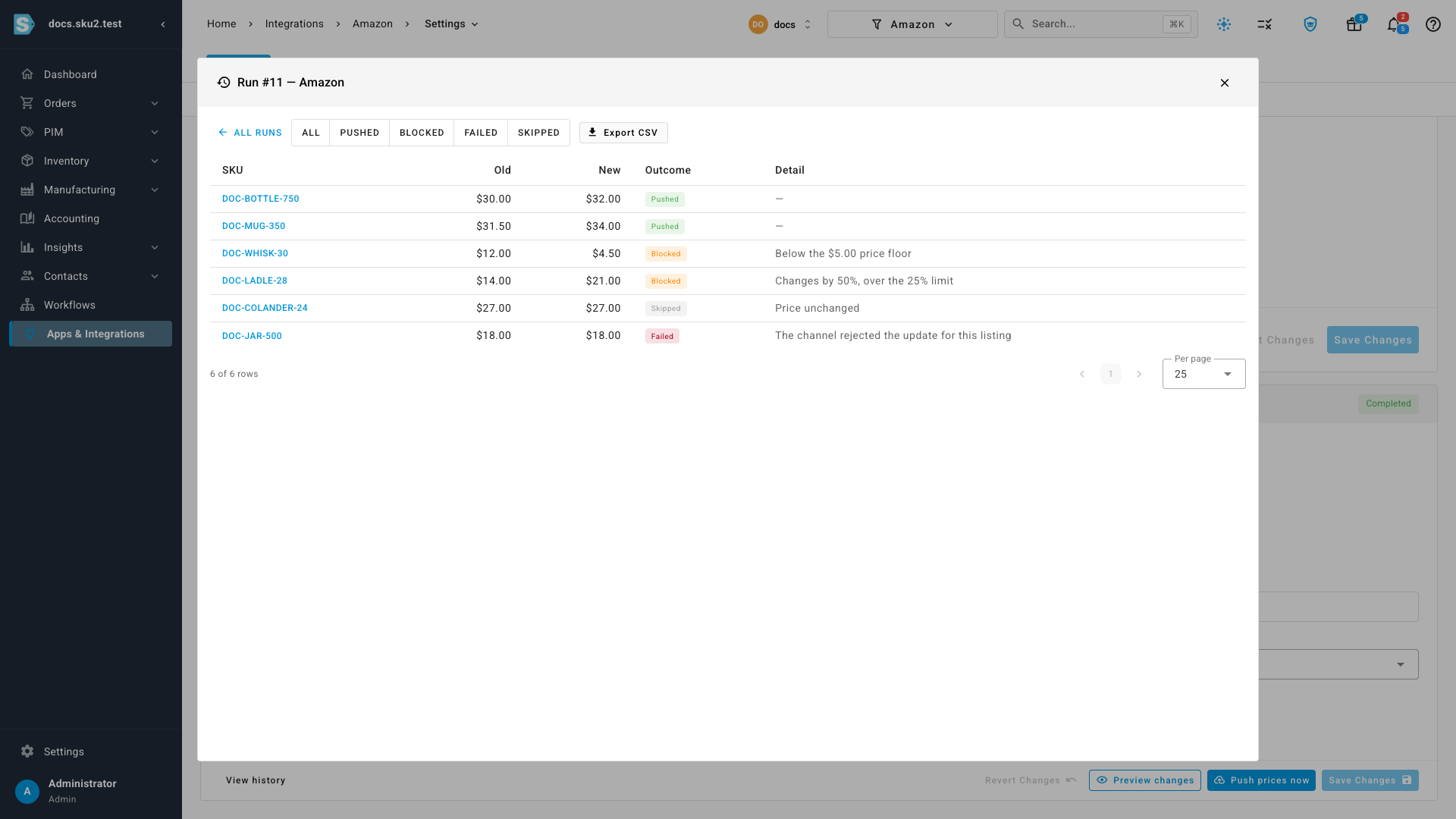
"Below the $5.00 price floor" and "Changes by 50%, over the 25% limit" are the answer to why didn't my price go out — no support ticket required. Filter a run to just the blocked or failed rows, page through a large one, and export the lot to CSV when you want it in a spreadsheet.
If a legitimate repricing is genuinely larger than your limit — a real $20 to $100 move — you can raise the maximum change for that one push from the arrow beside Push Prices Now, without editing the channel setting and having to remember to put it back.
When one listing needs its own rules
Occasionally one product doesn't fit the channel's guardrails: a premium line that lives above the ceiling, or a clearance item that needs to go below the floor. Rather than loosening the rules for everything, give that listing its own set of guardrails from the pricing page, and it will be used in place of the channel's whenever that listing is evaluated.
Every exception is listed on the channel's Exceptions tab, with who created it and when — so a rule someone added for one sale in March is visible in June instead of quietly living on.
Where to find it
Apps & Integrations → your channel → Settings → Pricing Sync for Master of Price, the pricing tier, the schedule and the guardrails. The comparison table, the preview, the run history and the exceptions register are on the same channel's Pricing page.
Full guide: Sync prices with your sales channels — a 4:45 walkthrough plus the written steps, from choosing which side owns the price through to reading a run and setting a per-listing exception.