3PL inventory comparison — know your 3PL's stock matches yours, every day
Your 3PL counts the stock on its shelves, and SKU.io keeps its own count of the same stock. When the two drift apart, you either sell stock that isn't there or hide stock you could be selling — and comparing them by hand is unreliable, because orders keep shipping while you look. 3PL inventory comparison checks the two against each other automatically, every day, warehouse by warehouse. It rewinds SKU.io to the exact moment the 3PL counted, so a shipment in flight never shows up as a false difference. Where the 3PL is right, you accept its count and SKU.io creates the stock takes for you.
✨ What this means for you:
- One page for every 3PL — Odoo 3PL, ShipBob, ShipHero, Shipfusion, Trackstar and VeraCore all compare the same way, with the same screens.
- No false alarms — SKU.io's side is rewound to the 3PL's count time, so orders shipped since then don't count as differences.
- Runs on its own — a comparison every day at 06:00 by default, or hourly or every 6 hours if you prefer. Click Run comparison now whenever you want a fresh one.
- See why, not just what — open any product to see SKU.io's stock movements around the comparison and hints such as unshipped orders or stock in transit.
- Fix it in a click — accept the 3PL's count and SKU.io creates one stock take per warehouse, dated at the comparison time, so nothing that moved since then is disturbed.
- Alerts when a whole warehouse is wrong — for example, when the 3PL reports nothing at all in a warehouse where SKU.io holds stock.
Every 3PL on one page
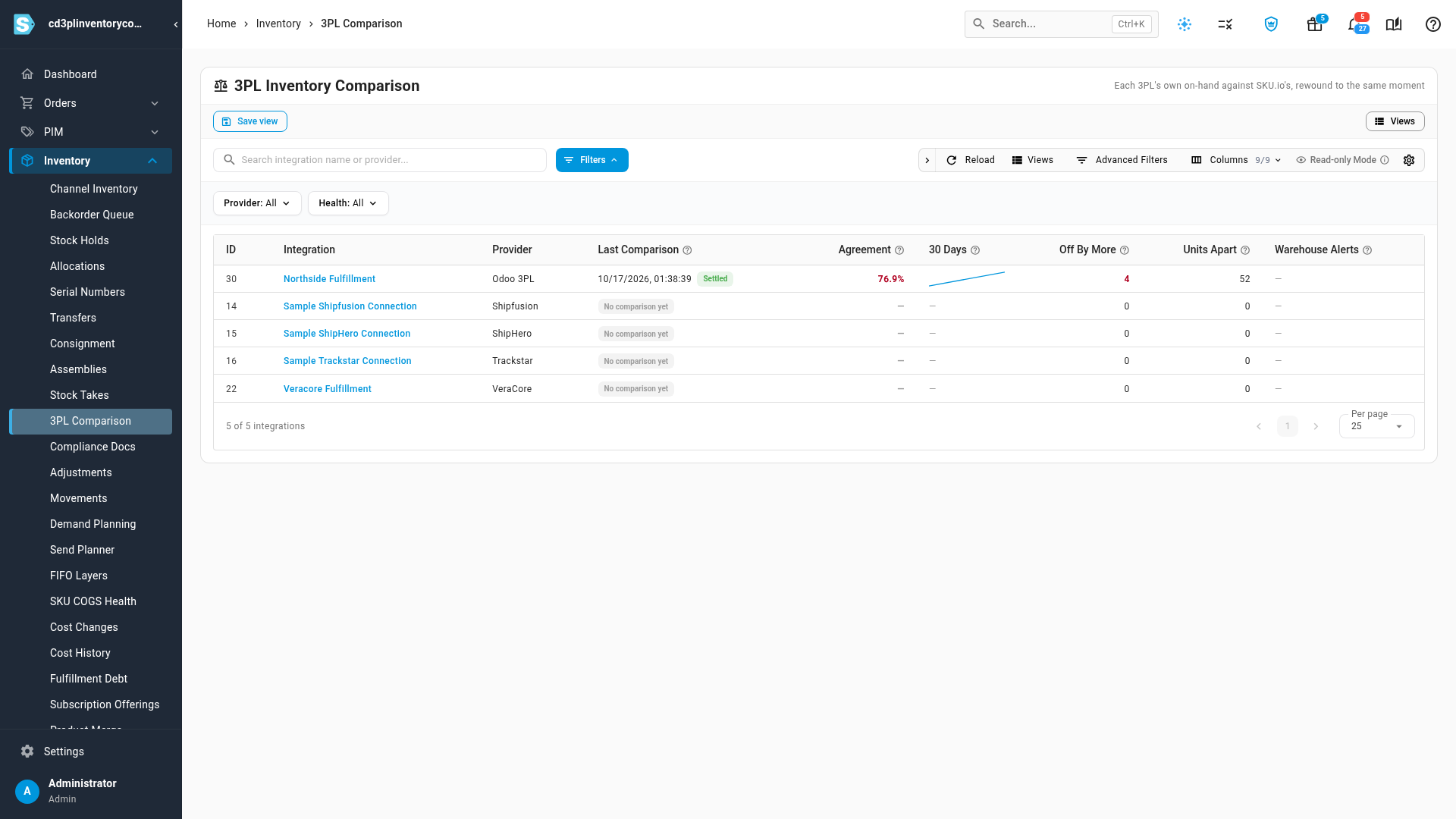
Inventory → 3PL Comparison lists each 3PL connection with its latest comparison, its agreement, a 30-day trend, how many products are off by more than your tolerance, and any warehouse alerts. Filter by provider or health to find the connections that need you.
The same moment on both sides
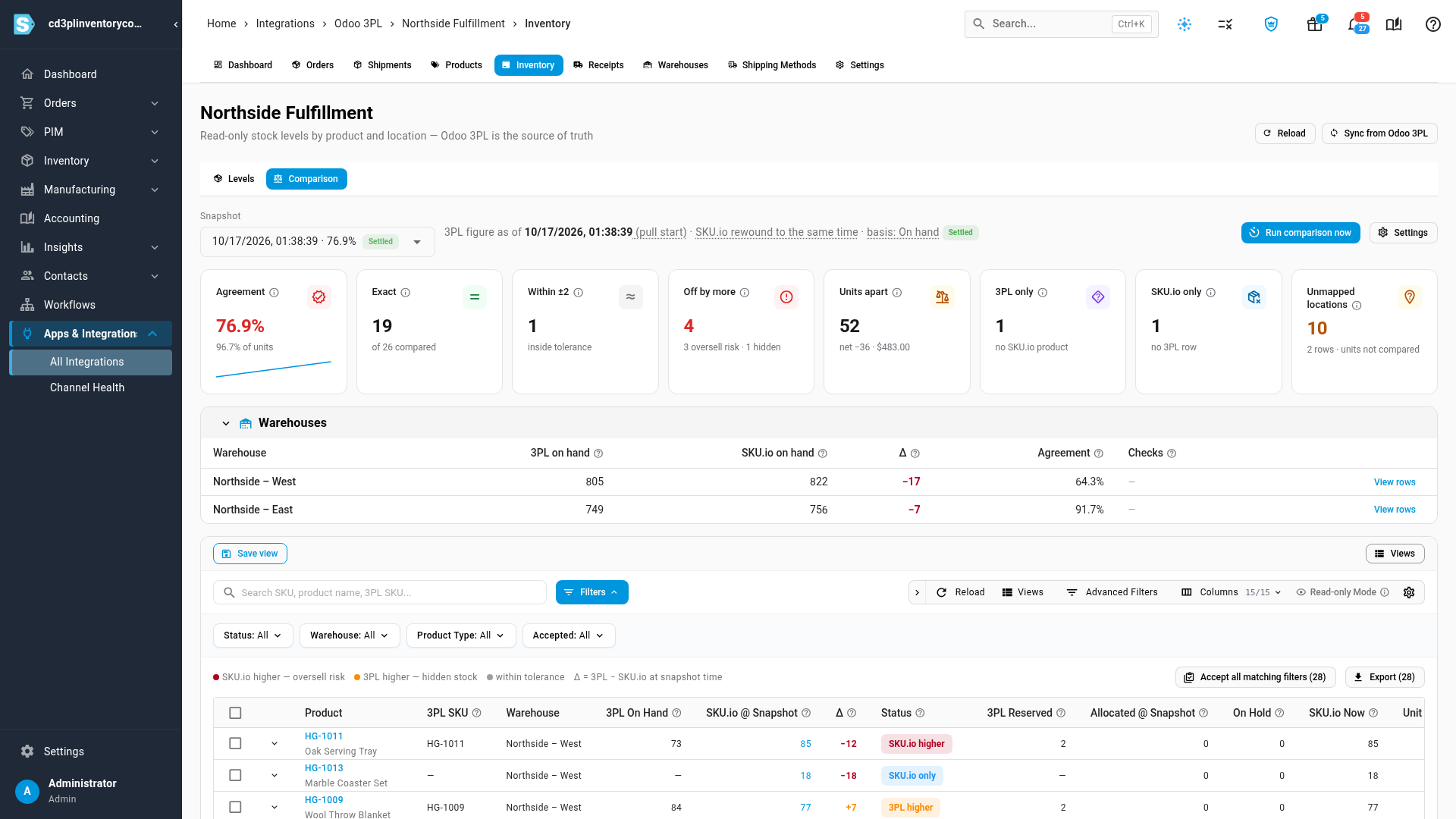
Open a connection and its Comparison tab shows the latest comparison at a glance: the agreement, how many products match exactly or within tolerance, how many are off and in which direction, and the value of the difference at cost. A breakdown by warehouse sits underneath, followed by every product, with SKU.io's count at the snapshot time beside the 3PL's.
Products where SKU.io thinks it has more than the 3PL holds are flagged red, because that's where you could oversell. Products where the 3PL holds more are flagged amber, because that's stock your channels could be selling.
Find out why a count differs
Click any row to see SKU.io's stock movements for that product from two days before the comparison until now, with the comparison point marked. You also see how the difference has looked over recent comparisons, plus hints that usually explain a gap.

Accept the 3PL's count
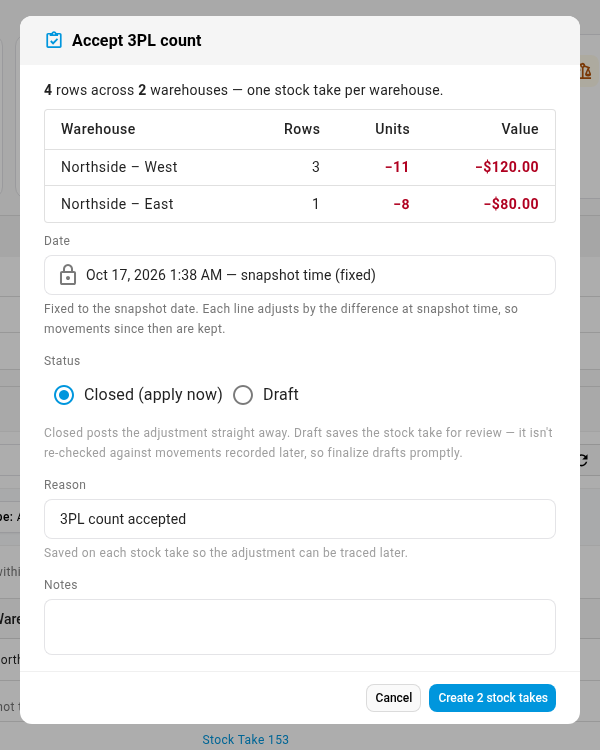
When the 3PL is right, tick the rows, or accept everything your filters show, and click Accept 3PL count. SKU.io shows the totals per warehouse, then creates one stock take for each, either applied straight away or saved as a draft for you to review first. Each accepted row links to its stock take, so the adjustment is always traceable.
You can also export the comparison to CSV, and change the schedule, the tolerance and the alerts for each 3PL in Settings.
Where to find it
- All your 3PLs: Inventory → 3PL Comparison.
- One 3PL: open the integration, go to its Inventory page and click Comparison. This replaces the separate discrepancy views some 3PL integrations had before.
Full guide: Compare 3PL inventory with SKU.io — including a 3-minute video walkthrough.