Inventory debt — ship the order when the stock is in your hands but not in your books
The delivery landed this morning and the cartons are on the dock. The customer's order is packed. But the receipt hasn't been keyed in yet, so SKU.io says you have zero on hand — and it refuses to ship. Until now, the only way out was to fix the paperwork first while the customer waited, or to let a sales channel ship it behind SKU.io's back and quietly lose track of the stock. Inventory debt replaces that with a deliberate choice: ship it now, record exactly what you owe and what it will roughly cost, and let the next receipt settle the difference — automatically, oldest debt first — with your books correct at every step in between.
✨ What this means for you:
- Ship Anyway on a backordered line sends the goods now and records the shortfall as a claim — units, warehouse, estimated cost, and the reason you gave.
- Nothing is hidden. Every unit you owe is a real movement in the product's stock history, and the Fulfillment Debt report shows all of it: how much, how old, what it was booked at, and what's already been repaid.
- It repays itself. When the stock lands, the receipt settles the oldest claim first, in the same step as the receipt — no separate job, no one to remember.
- Your books stay right. Cost of sale posts at the estimate on ship day; the difference from the real cost posts as a dated variance when the receipt arrives. A dedicated clearing account carries the gap, so inventory never goes negative on the balance sheet.
- It's off by default, and you decide where it's allowed — per tenant, per warehouse, and per product, with a permission on who can say yes.
Ship it, and say why
When a line is backordered and the policy allows it, the line offers Ship Anyway. Fill in the shipment as normal, and SKU.io stops you once with a prompt that names what it's about to do: how many units have no stock behind them, what they'll be costed at and where that estimate came from, and roughly how much cost is being recognised now. Give a reason — it's kept with the claim and read months later — and the shipment goes out.
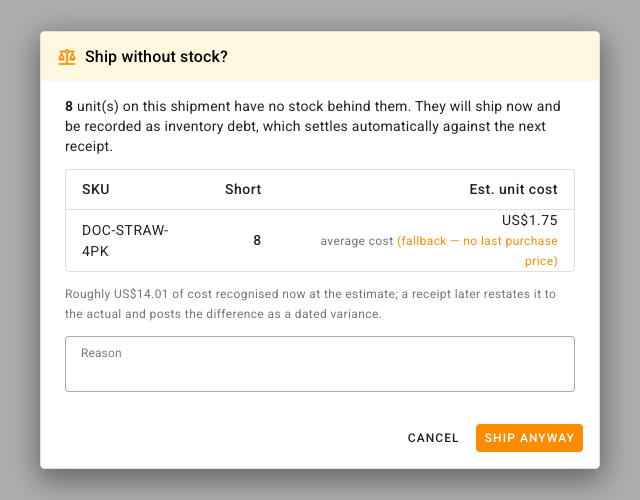
If the estimate can't come from your preferred source — a product that has never been purchased, say — the prompt tells you which fallback it used instead, so a guessed cost never looks like a known one.
One report for everything you owe
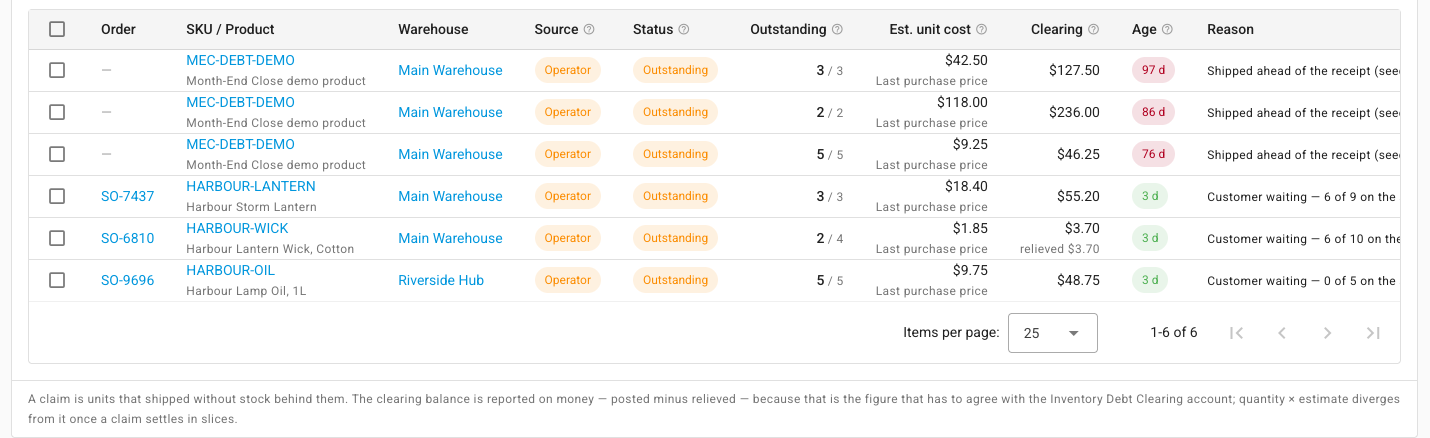
Inventory → Fulfillment Debt is the single view of your exposure. The top cards give you the money — what's sitting in the clearing account, how old the oldest claim is, how many have passed 30 days. Below them, every outstanding claim: the order, the product, the warehouse, who or what created it, how much of it is still owed, and how much has already been repaid.
Shipments a sales channel made that SKU.io couldn't match to a product sit in their own section, Shipped, Not on the Ledger, with the reason for each — and a channel SKU you never intend to map can stay there indefinitely without blocking anything else on the order.
Repaid by the next receipt — or on your say-so
You don't normally settle a claim. When stock arrives for that product at that warehouse, the receipt repays the oldest outstanding claim first, restates the cost to what the stock really cost, and posts the difference. The claim moves to Settled on its own.
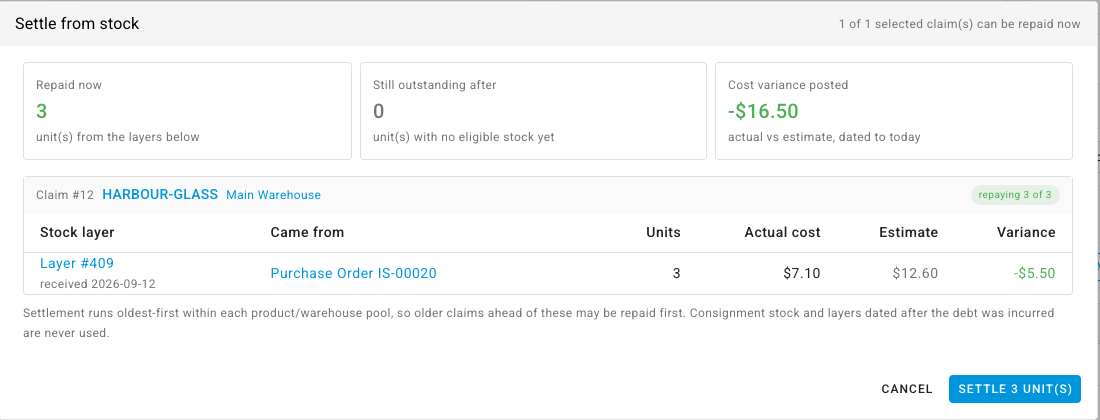
When you'd rather not wait — a receipt has landed but you want to see exactly which stock will be used before it's committed — tick the claims and choose Settle from Stock. The preview walks the same stock in the same order the real settlement would, and shows you the units, the actual cost, and the variance before you confirm.
For debt that no delivery will ever repay — the stock was on the shelf all along and the count was wrong — Create Catch-Up Stock Take raises a draft count per warehouse, pre-filled with the owed units, that clears the claims when you finalise it.
The close knows about it
Outstanding debt is a provisional cost of sale, so month-end close treats it as a blocking check by default: Inventory debt settled reports how many claims are still owed and the balance behind them. Unlike most blocking checks, it can be closed over — someone holding the override permission writes a reason, and it's recorded against the period along with the exposure at that moment. Or turn the block off in Settings and it becomes a warning you acknowledge instead.
Where to find it
- Settings → Inventory → Inventory Debt — the policy (Block, Warn, or Allow), the cost-estimate order, whether a reason is required, and whether outstanding debt blocks the close. Per-warehouse policy is on each warehouse's settings page; a per-product switch can keep specific products at Never negative.
- Accounting → Nominal Code Mappings — map Inventory Debt Clearing to a liability account before switching the policy on; SKU.io won't let you enable it without one.
- Inventory → Fulfillment Debt — the report, with Settle from Stock and Create Catch-Up Stock Take.
- Orders → Sales Orders → Advanced Filters → Order Info → Fulfillment Debt — every order that still owes stock.
Full guide: Inventory debt — twenty pages covering every step, from turning it on to closing a month with debt outstanding, two of them with narrated walkthroughs.