Living Catalog — see every content change your channels make, and decide who wins
Importing a product from a channel has always been a one-time snapshot. Someone retitles a listing in Seller Central, swaps in a better photo, corrects a weight from pounds to grams — and SKU.io never hears about it. Months later your catalog and your channels have quietly drifted apart, and nobody can say which side is right. The usual workaround is a spreadsheet and a lot of squinting. Living Catalog replaces it: SKU.io now watches the content on your mapped listings, records exactly which fields changed on the channel side, and hands you a review queue instead of a mystery. Nothing is overwritten behind your back — you decide, per field, whether your catalog or the channel is the source of truth.
✨ What this means for you:
- Every channel-side content change lands in one inbox, broken out field by field — not "this product changed" but "the weight changed from 5.4 kg to 5600 g".
- You set the source of truth per field group: your catalog wins, the channel wins, or two-way.
- Nothing touches your catalog until you look at it. Review the before/after, then Apply or Ignore.
- A channel-side bulk edit that hit 40 listings is one row and one Approve all click, not 40 reviews.
- Let safe fields like weight and images apply automatically while the product title waits for a human.
- When both sides changed the same field, you get an explicit choice — never a silent overwrite.
- One listing needs different rules than its channel? Override it in place, without touching the channel.
- Every applied change is reversible, and the full history is filterable, comparable, and exportable.
- Need the differences that were already there before you switched it on? Run a full comparison on demand.
- Optionally block publishing to a channel until the content that channel requires is actually filled in.
One inbox for every content change
PIM → Content Sync is the queue. Cards across the top count what's waiting — Pending, Conflicts, Errors, and how many listings are affected — and the sidebar carries a badge so you notice new drift without going looking for it.
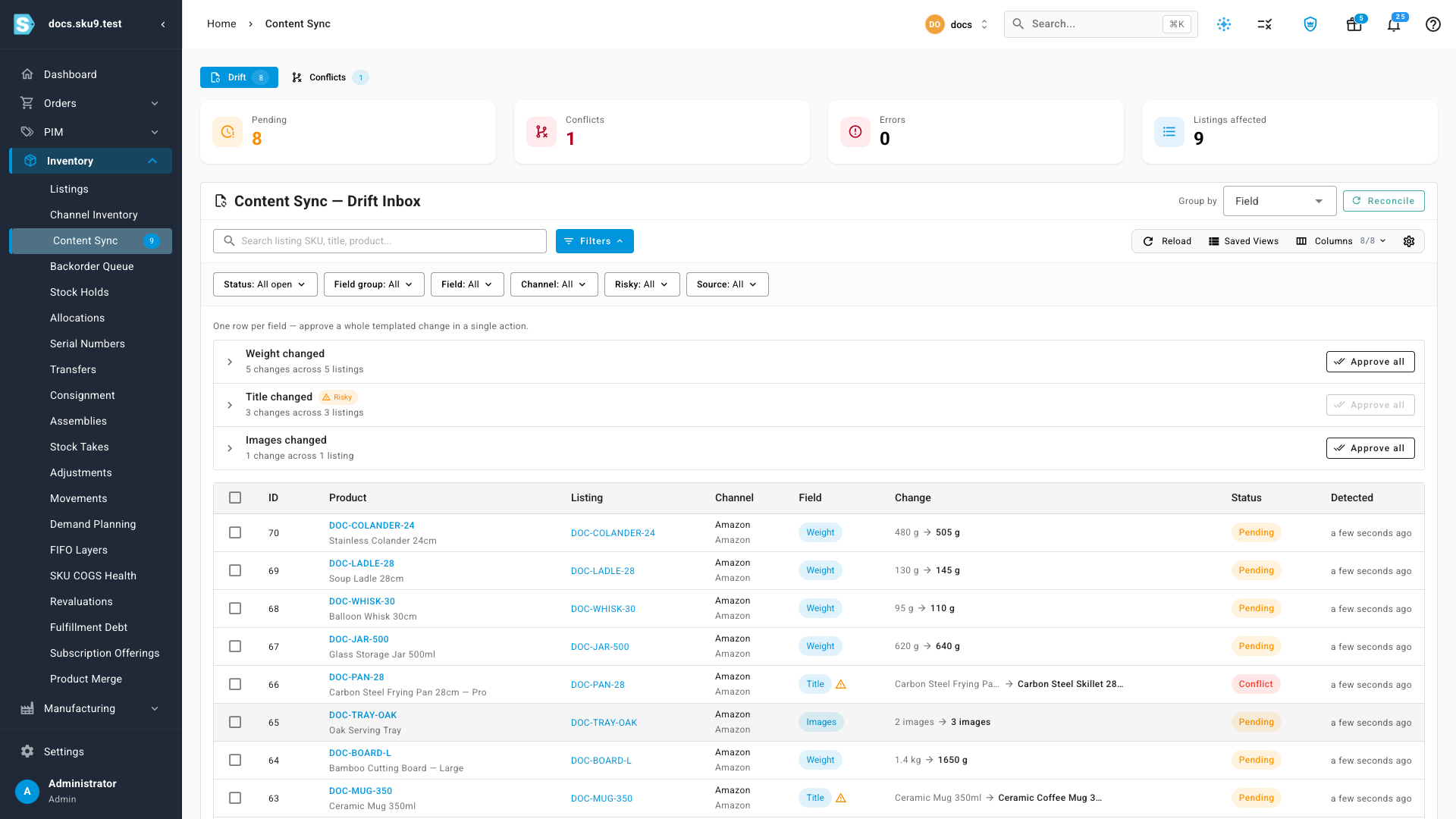
Each row is a single changed field, with the old value, the new value, which channel it came from, and when it was detected. Filter by status, field group, channel, riskiness, or source; search by SKU, product name, listing title, or the change ID itself. The field that carries the most marketing weight — the product Title — is flagged risky, so it can't be waved through in a bulk action by accident.
Approve a whole templated change in one click
Channel-side edits are rarely one-offs. A supplier re-weighs a range, an ops teammate reformats every title, a photographer re-shoots a category — and forty listings change the same field on the same afternoon. Grouping turns that into a single decision.
Set Group by to Field (the default) and each bucket becomes one row: "Weight changed", "5 changes across 5 listings", and an Approve all button that applies the whole batch as a background job you can watch in the job tray. Click the bucket itself to focus the feed on just those changes.
Risky fields stay out of it by design. Group by Field and the Approve all button on the Title changed bucket is disabled outright — "Risky fields have to be reviewed listing by listing." Group by Field group and Approve all quietly skips the risky fields inside the group and applies the rest.
Review the diff before you accept it
Click any row and the review drawer opens with the catalog value on the left and the incoming channel value on the right — rendered for the kind of field it is, so you're reading the change and not hunting for it.
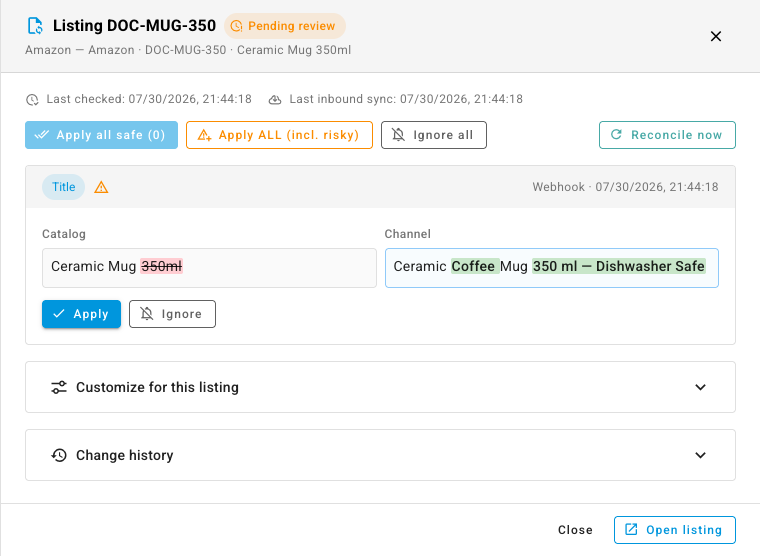
Titles and brands highlight the individual words that were added and removed, so a one-word retitle doesn't read as a full rewrite — and if only spacing or markup moved, it says so instead of showing you a diff. Image changes come as thumbnail strips with the removals and additions called out. Attributes list only the keys that actually changed. Weights and dimensions carry their units, and applying converts them: a channel that says 1650 g writes 1.65 kg into a catalog that tracks kilograms.
Apply or Ignore field by field, or clear the whole listing at once: Apply all safe takes the low-risk changes and leaves the flagged ones alone, Apply ALL takes everything including the risky fields, and Ignore all dismisses the lot. An ignored change stays dismissed until the channel value genuinely changes again — the same edit won't resurface on every re-check. Reconcile now re-checks that listing against the channel on the spot.
You decide who owns each field
Content sync is off by default on every channel, and turning it on doesn't change a single value — it starts watching. Open Apps & Integrations → your channel → Settings → Content Sync.
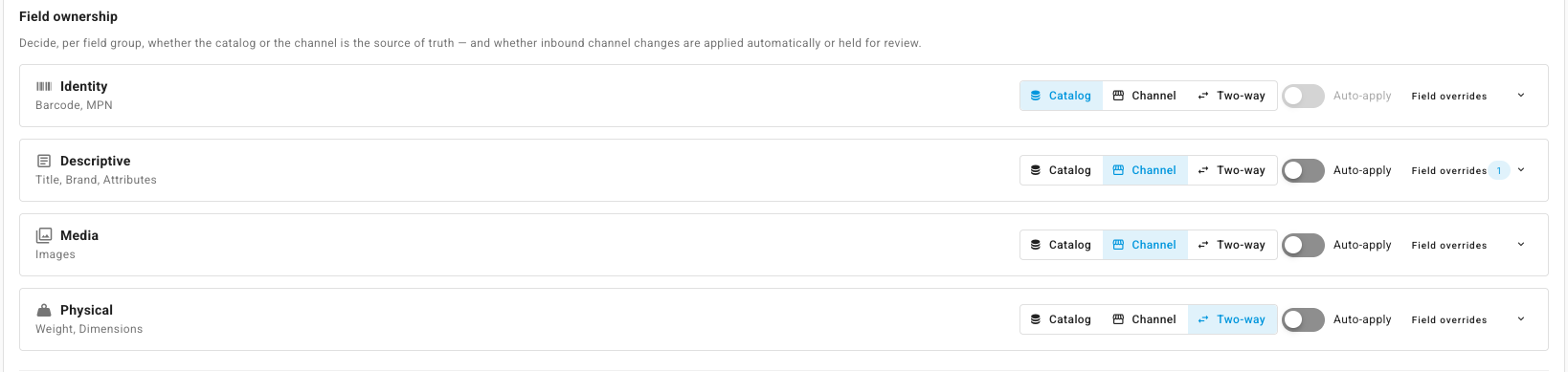
Eight fields are governed, grouped so you can set ownership once: Identity (Barcode, MPN), Descriptive (Title, Brand, Attributes), Media (Images), and Physical (Weight, Dimensions). For each group, pick who owns it — Catalog, Channel, or Two-way — and whether inbound changes auto-apply or queue for review. Need one exception inside a group? Open Field overrides and set that single field differently. You can also choose how often listings are re-checked as a backstop to real-time webhooks, and let SKU.io fill genuinely empty catalog fields from the channel automatically — filling a gap is not the same risk as overwriting curated copy.
One thing worth knowing: switching content sync on baselines the listing content as it stands right now. Differences that already existed aren't dredged up retroactively — only changes made from that point on are flagged as drift. You're starting from a clean inbox, not inheriting years of history.
When you do want the whole picture
That clean-inbox default is the right one day to day, but it has a corollary: a difference that was already there when you switched content sync on stays invisible, because the channel never moved. If you imported your products from Shopify and only started governing attributes or dimensions later, a normal re-check has nothing to report — it's comparing against a baseline that already contained the mismatch.
Full comparison is the answer. Open the arrow beside Reconcile and pick it, and SKU.io ignores the baseline entirely: it diffs every governed field against your catalog as things stand right now, whether or not the channel content has changed since the last check. Pre-existing gaps surface as ordinary pending changes you can review, apply, or bulk-approve exactly like any other drift.
It's there on both scopes — Reconcile now → Full comparison in the review drawer for a single listing, and Reconcile → Full comparison in the inbox for a channel or the whole tenant. Because it reports every difference rather than only the new ones, scope it with the channel filter when you're backfilling; a tenant-wide pass can raise a lot at once, and the confirmation says so before it starts.
…and one listing can disagree with its channel
Channel settings are the default, not a straitjacket. When a single SKU needs different treatment — one hero product whose title you never want touched — expand Customize for this listing in the review drawer and set ownership or auto-apply for that listing alone. A chip at the top tells you where it stands: "Inherited from Amazon defaults" or "3 customizations on this listing", and Reset to channel defaults hands it back.
Overrides are sparse, not snapshots. Only what you explicitly change is stored, so everything you leave alone keeps tracking the channel — later changes to the channel's defaults still flow through.
When both sides changed
Set a field to two-way and eventually both sides will edit it between syncs. SKU.io refuses to guess.
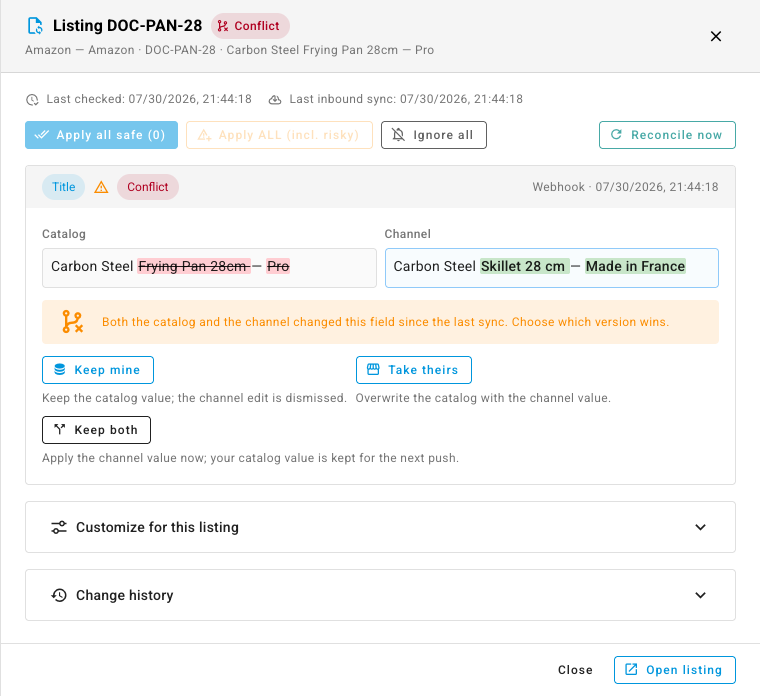
The field is marked Conflict and held until you choose: Keep mine keeps your catalog value and dismisses the channel edit, Take theirs overwrites with the channel value, and Keep both takes the channel value now while preserving your version for the next outbound push. Whichever you pick, the other value is recorded rather than discarded.
Nothing is one-way
Change history at the bottom of the review drawer is the full audit trail for a listing's content — applied, auto-applied, ignored, superseded, conflicted, errored, and rolled-back entries, each with who resolved it and when. Filter it by field, status, who detected it, who resolved it, and a date range.
It reads outcomes, not attempts: a change that never wrote to your catalog shows its before → after struck through, so an ignored suggestion can't be mistaken for an applied one. Tick two entries on the same field and Compare versions shows the value that field held after each — read-only, so nothing you do while comparing can touch the catalog. Anything that did write gets a Roll back button that restores the value it replaced, and the rollback is itself recorded, with a button that reads Undo rollback. Export the filtered history as CSV when someone needs it in a spreadsheet.
Stop incomplete products from shipping to a channel
The same content rules can work in the other direction. Turn on Block publishing when required content is missing at the bottom of a channel's Content Sync settings and pick what that channel insists on — Barcode, Images, Dimensions, whatever it needs.
From then on, publishing a listing to that channel checks the catalog product first, and if anything required is empty the publish job fails naming the exact gap: "Blocked by the content governance gate — this product is missing Barcode, Images." The gate is deliberately outbound only. Inbound content is never blocked, because inbound content is how an incomplete product gets filled in.
Where to find it
The inbox lives at PIM → Content Sync — beside the other surfaces that own product content. Turn it on per channel from Apps & Integrations → your channel → Settings → Content Sync, where you'll also find field ownership, auto-apply, and the governance gate.
Full guide (with a 1:40 video walkthrough): Review channel content changes