New webhook events: stock levels, shipment tracking, partial receipts and record updates
If you connect SKU.io to a storefront, a 3PL portal, a data warehouse or Zapier, webhooks used to tell you about new records and a few big moments, but not much in between. Stock could move all day without a word, so you polled for levels. An order shipped in two boxes sent one webhook with no tracking number. A partial receipt looked the same as a finished PO, and a renamed product or corrected customer email never reached the other system. Six new webhook events close those gaps. Each one is signed, retried and logged like every other SKU.io webhook, and the busy ones are batched so a big receipt never floods your endpoint.
✨ What this means for you:
- Stop polling for stock. Stock Level Changed fires whenever a product's stock at a warehouse moves, for any reason: a receipt, a sale, an allocation, an adjustment, a transfer or a 3PL sync.
- Tracking for every box. Shipment Sent fires once per shipment, with its tracking number and link, so you can tell the customer each parcel is on its way.
- Know when a PO is only part-way in. Purchase Order Partially Received fires when a receipt leaves some of the order still to come.
- Keep other systems in step. Product Updated, Customer Updated and Sales Order Updated fire when the details those systems care about change.
- No floods. Busy events are batched into one delivery per product per warehouse, or per record.
- Receipts you record in SKU.io now send their events. Receiving a purchase order in the app now sends Goods Received (
purchase_order.received) every time, as receipts recorded any other way already did.
Pick from the new events
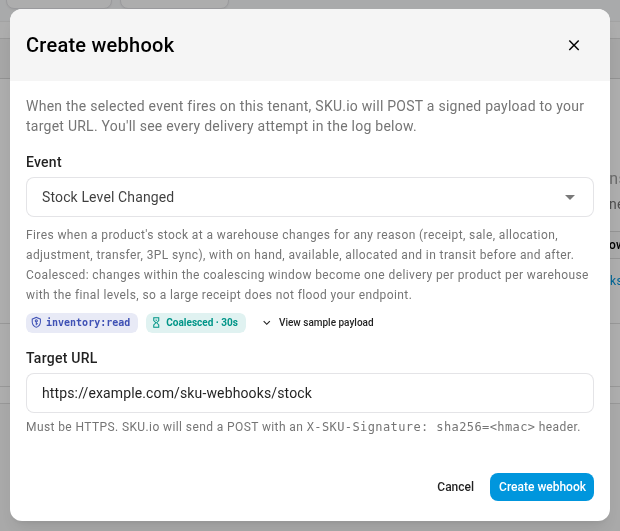
Go to Settings → Developer → Webhooks and click Create Webhook. The new events sit in their groups in the Event list, next to the ones you already use. Under each event, a chip shows the read scope it needs. Batched events also show a Coalesced chip with their window. Hover over the chip to see what the batching does.
| Event | Fires when |
|---|---|
| Stock Level Changed | A product's stock at a warehouse changes, with on hand, available, allocated and in transit, before and after |
| Shipment Sent | Each shipment of an order ships, with its tracking number, tracking link, carrier and lines |
| Purchase Order Partially Received | A receipt leaves some of the purchase order still to come |
| Product Updated | A product's SKU, name, barcode, MPN, brand, type, parent, weight or dimensions change |
| Customer Updated | A customer's name, email, phone, company, store, pricing tier or email opt-out changes |
| Sales Order Updated | An order's status, customer, shipping address, shipping method or dates change |
Batched so a big receipt stays one delivery per product
Stock Level Changed collects changes for 30 seconds, then sends one delivery per product per warehouse with the final levels and the previous ones. You never have to keep your own running totals. Receiving a 2,000-line purchase order sends one delivery per product, not one per line. If stock moves and moves back inside the window, nothing is sent. The three update events batch the same way over 10 seconds and send the record as it is when it's delivered.
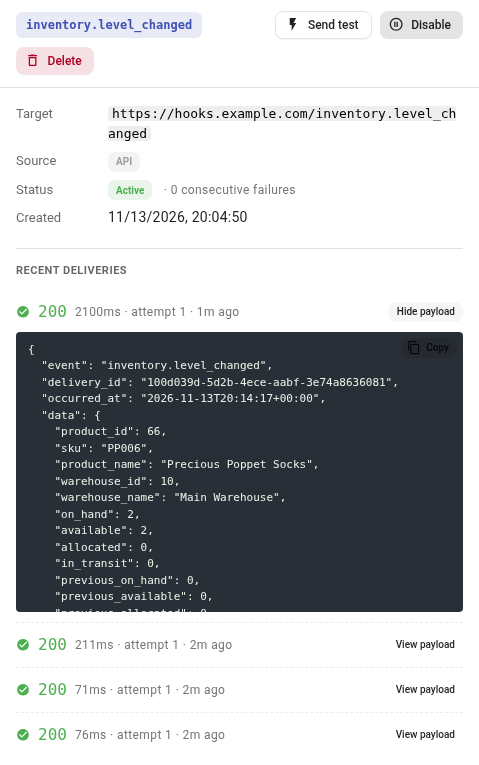
Every attempt shows in the subscription's delivery log, so you can open any delivery and read exactly what your endpoint received.
Signed like every other webhook
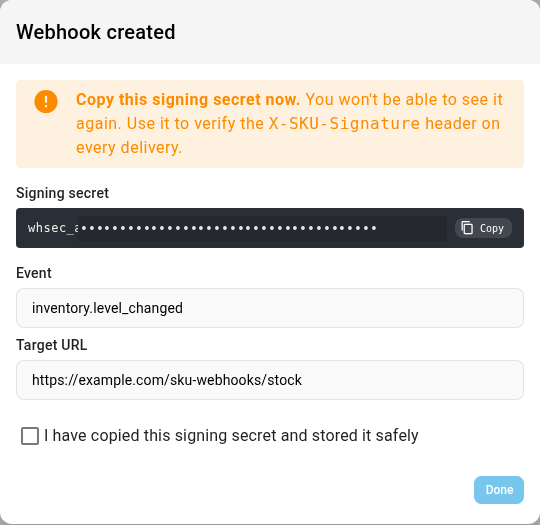
The new events use the same envelope, retries and signature as the rest. When you create a subscription, SKU.io shows its signing secret once. Every delivery carries an X-SKU-Signature header, an HMAC-SHA256 of the raw body keyed with that secret, so your endpoint can reject anything that didn't come from SKU.io. The guide has ready-to-paste checks in PHP, Node and Python.
Where to find it
Go to Settings → Developer → Webhooks and click Create Webhook. Connected apps can also subscribe to the new events through the API.
Full guide: Subscribe to webhooks · see also Monitor webhook deliveries