Tariffs & duty — know your import duty before the broker's bill arrives
Import duty is often one of the biggest costs on a product, and one of the last to show up. Your customs broker bills it weeks after the goods land, as one lump sum for the whole entry, so until then your margins look better than they really are. Then the bill arrives and you have to work out which products it belongs to. Tariffs & duty closes that gap. Keep a table of duty rates by HS code, country of origin and destination, and SKU.io estimates the duty on every purchase order line. The estimate follows the goods to the inbound shipment and the receipt, and can go into stock cost the day they arrive. When the broker's bill comes in, SKU.io shows you how close the estimate was.
✨ What this means for you:
- See the duty before you buy: every purchase order line shows its estimated duty, worked out from the product's HS code and country of origin and the destination warehouse's country.
- Real-world tariffs, handled: base rates, stacked additional duties such as Section 301 and Section 232, free-trade-agreement rates, and per-entry fees such as the Merchandise Processing Fee all work the way customs charges them.
- Margins that are right from day one: turn on capitalisation and the estimated duty goes into stock cost at receipt, so cost of goods carries its duty even before the bill arrives.
- The broker's bill clears the estimate: the bill is shared across the lines by estimated duty. Only the difference moves, and only on stock you still hold.
- Rates you can trust: SKU.io flags rates that are overdue for a check or that your bills keep missing. You can re-check them with AI on your own API key.
An estimate on every purchase order line
Give your products an HS code and a country of origin, add your duty rates under Settings → Purchasing → Duty Rates, and purchase orders gain an Est. duty column. Each line shows the amount and the effective rate. SKU.io also says when it had to guess: a line flagged Origin assumed used the supplier's country, and a line it can't estimate shows why, with a Fix link. Orders where the supplier clears import, such as DDP, correctly show no duty owed.
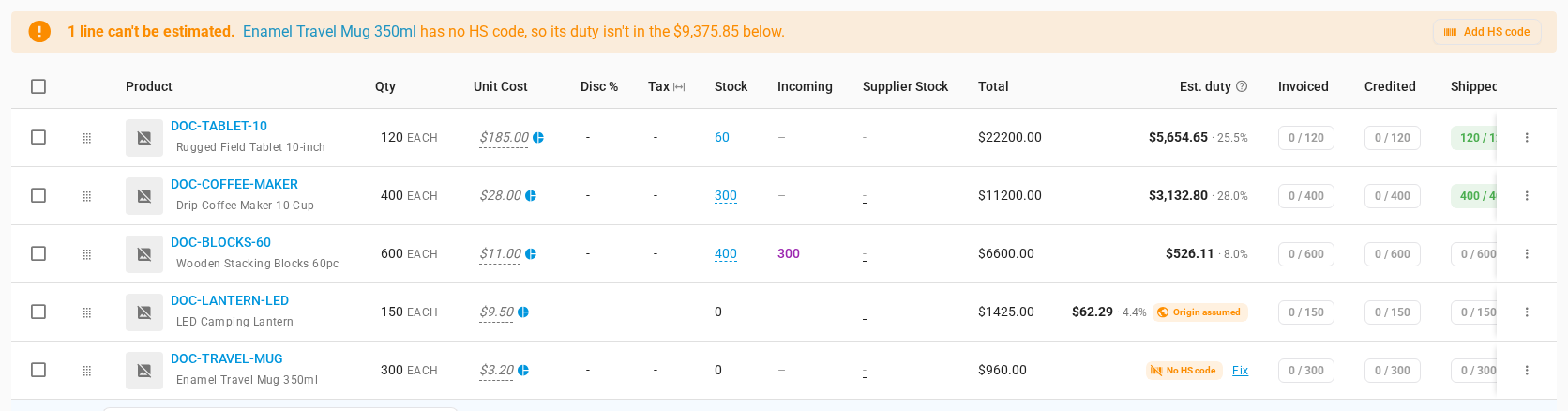
When goods ship, the inbound shipment's Customs card works the estimate out again for exactly what's on board. It uses the customs entry date, the mode of transport and the entry's own fees. At receipt, the estimate is booked and frozen, so you always compare the bill with what you expected at the time.
From estimate to broker's bill, on one card
Enter the broker's bill from the Customs card. SKU.io shares it across the shipment's lines by estimated duty, and the card shows the whole story in four tiles: Estimated, Booked at receipt, Billed and Variance.
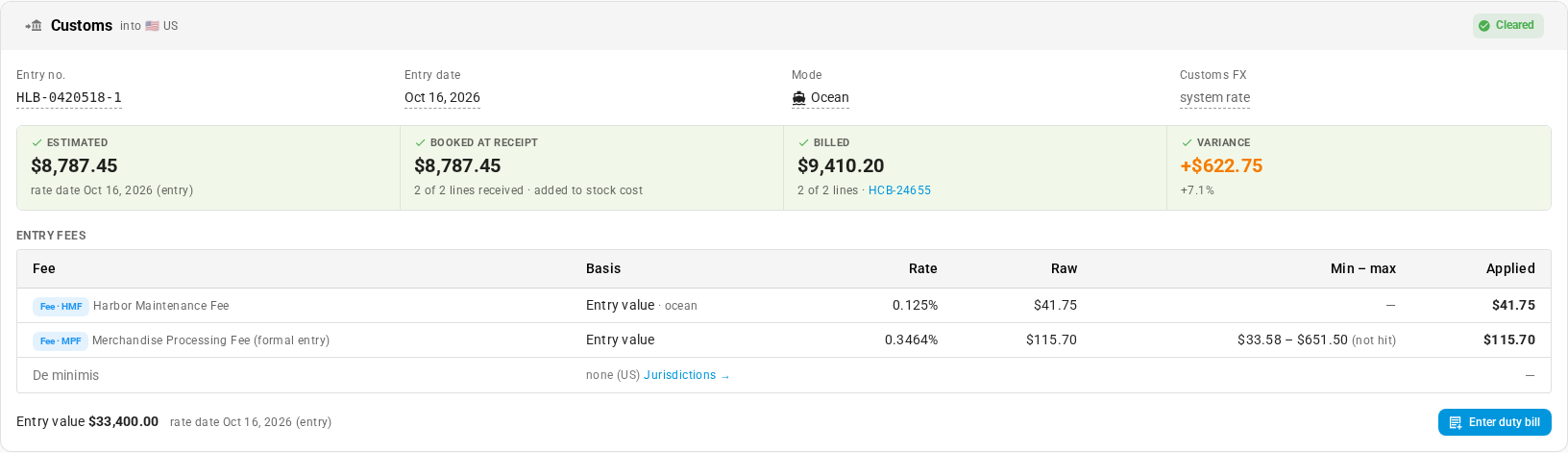
Capitalisation is a separate setting and off by default, so you can use the estimates before they touch your books. Turn it on and the estimate is held in an accrued customs duty account until the bill clears it.
Every shipment, reconciled
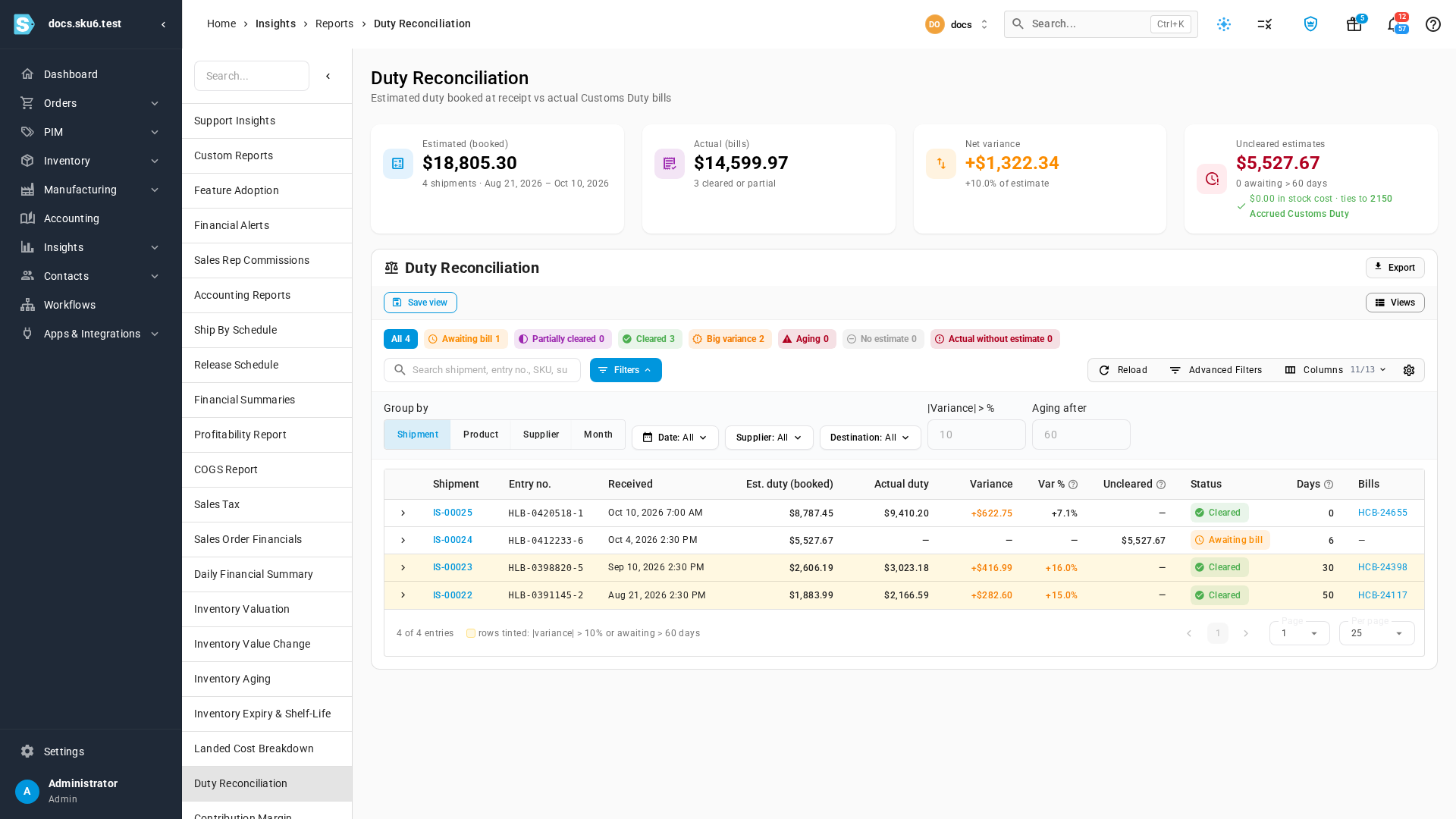
The new Duty Reconciliation report lists every shipment's booked estimate next to its actual duty. Shipments that are still waiting on a bill, or that missed by more than your threshold, stand out. Group it by shipment, product, supplier or month to see where your estimates drift.
Keep your rates honest, with AI if you want it
Tariffs change, so the Rate accuracy panel tells you which rates are verified, which are due for review, which are expiring, and which are drifting, meaning your broker's bills keep coming in above or below them. Open a drifting rate to see the bills behind it.
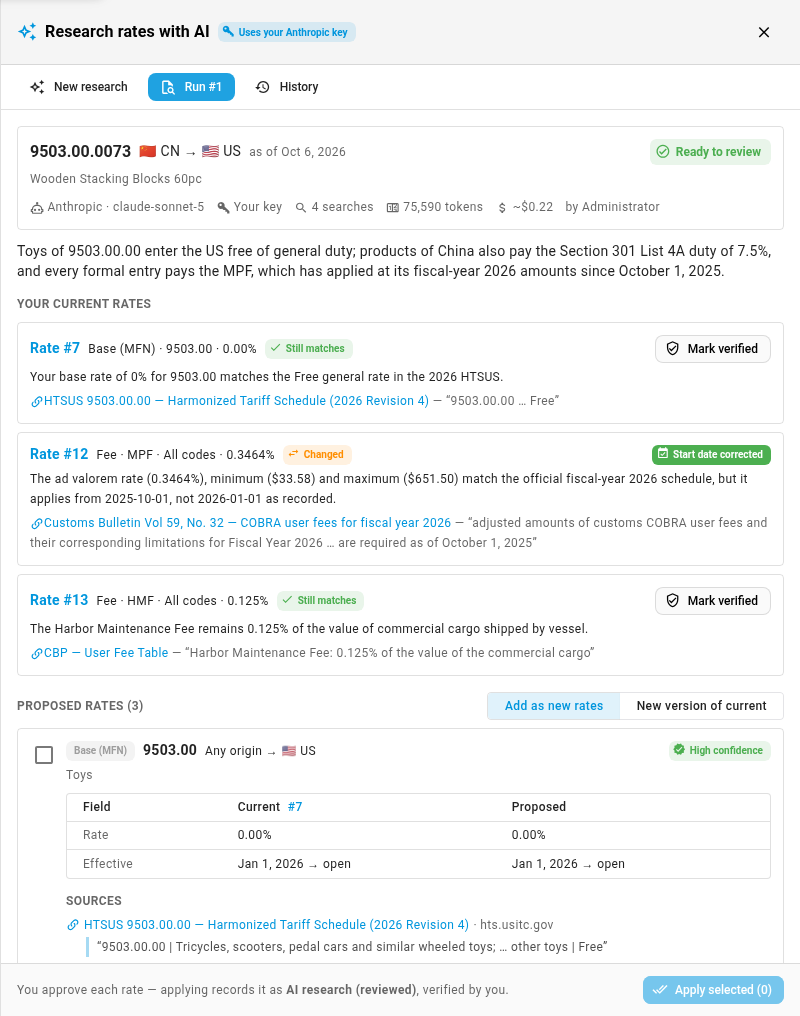
To re-check a rate, Research with AI searches official tariff sources and puts its proposals next to your current rates, each with a quote from its source. Nothing changes until you approve it. Research runs on your own AI provider key, and each run shows its cost.
Where to find it
- Set up rates: Settings → Purchasing → Duty Rates. Add rates one at a time or import a spreadsheet, and use Test a rate to check how they combine.
- See estimates: the Est. duty column and Estimated duty card on any purchase order, and the Customs card on any inbound shipment.
- Capitalise duty: Settings → Purchasing → Landed Cost Estimates → Capitalise estimated customs duty.
- Reconcile: Insights → Reports → Duty Reconciliation.
- Full guide: Duties & Tariffs. It has five step-by-step guides, each with a short video.