Inbound freight estimates — freight in your stock cost from the day goods arrive
Freight bills rarely arrive with the goods. A forwarder's invoice can land weeks after the container is unloaded, and until then your stock cost is missing its freight: margins look too good on everything you sell in the meantime, then swing when the bill finally lands. Some freight never gets entered at all. Inbound freight estimates close that gap. SKU.io now estimates the freight on every purchase order and inbound shipment from your freight rates, a forwarder's quote, or what your own past bills say. It can put that estimate into stock cost the moment goods are received, and each freight bill then clears its estimate instead of changing your costs a second time.
✨ What this means for you:
- Stock carries its freight from the day it arrives, so margins don't swing when the bill shows up weeks later.
- Every purchase order and shipment shows its expected freight and where the number came from: a rate, a quote, or a rate learned from your own bills.
- Entering a freight bill shows exactly what it clears, which month it lands in, and what posts to your books, before you save.
- One score tells you whether every shipment received this month has its freight accounted for, and lists the ones that don't.
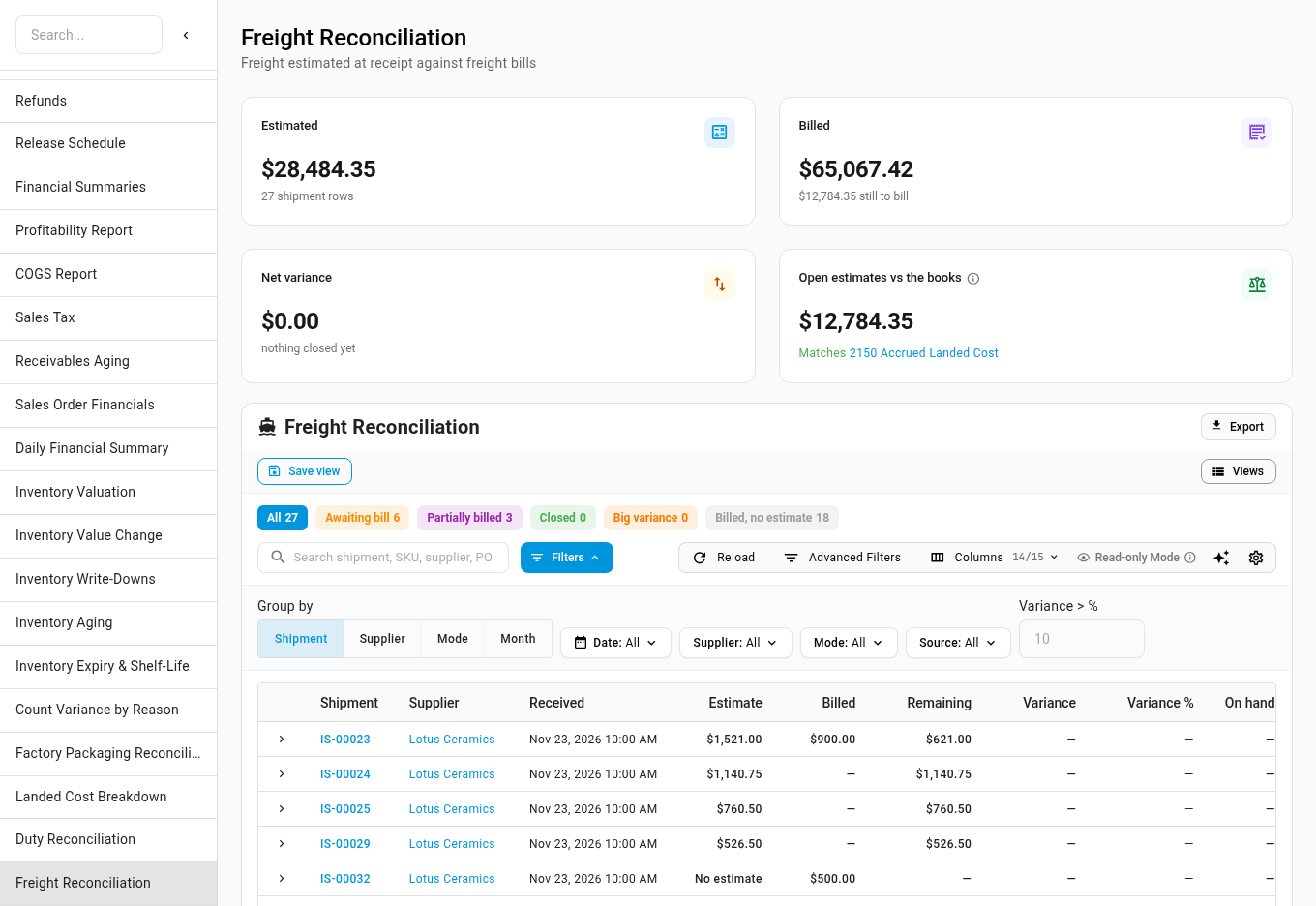
- A reconciliation report compares estimates with real bills, and ties the open estimates to your Accrued Landed Cost account.
- Landed cost that goes into stock can no longer be coded to a profit and loss account by mistake, and past bills that did can be repaired.
Freight on every order and shipment
Each purchase order and inbound shipment has a Freight card next to Customs. It shows the estimate, what's been billed, what's left, and the variance, with a bar for how much is billed. The source line says where the estimate came from, so nobody has to guess. Accept a forwarder's quote and the shipment uses it, split across the shipments it covers. If no bill will ever come, mark it No freight expected and say why.
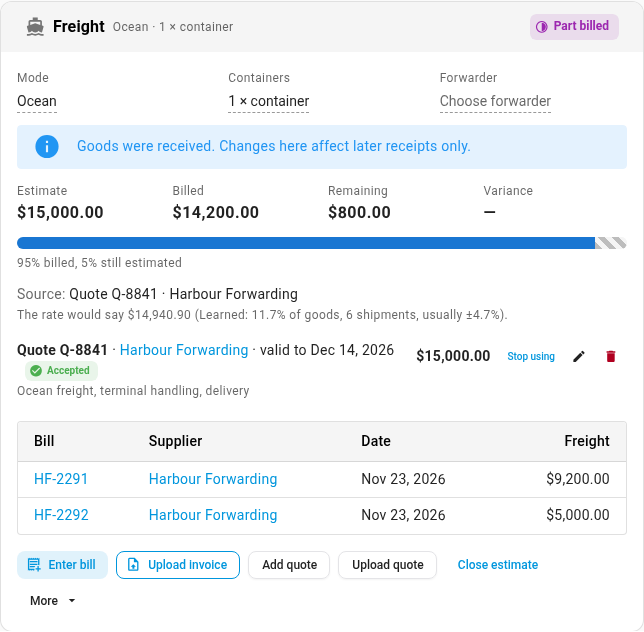
Rates live under Settings → Purchasing → Freight Rates: a percent of goods, a price per kilogram, per unit or per container, for a supplier, a mode, a lane or a single product. You can also let SKU.io learn rates from the freight bills you've already entered. It tests each learned rate against your past shipments and shows how close it would have come, so you choose which ones to use.
Bills that clear their estimate
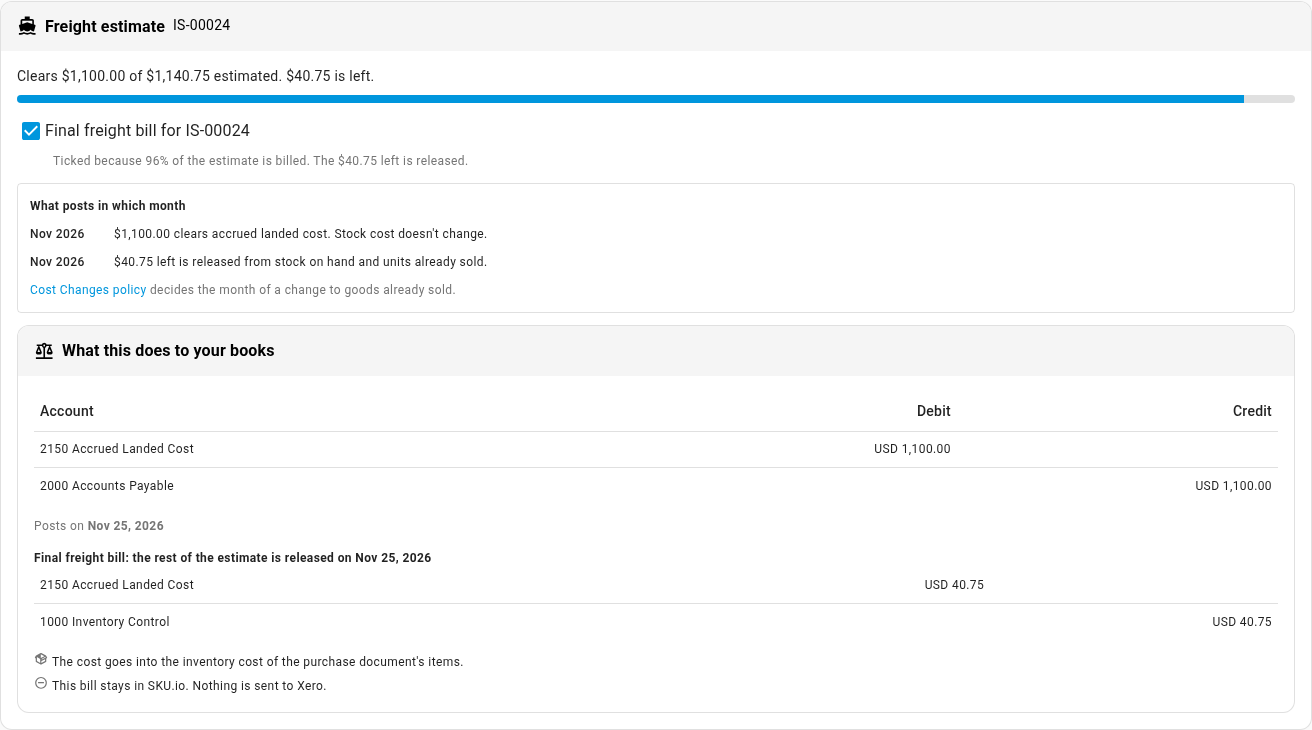
When you enter a freight bill, the Freight estimate panel shows how much of the estimate it clears and what's left. Once most of the estimate is billed, it ticks Final freight bill for you, and the rest is released when you save. You see what posts in which month and the journal lines before anything is saved.
Nothing slips through at month end
The Freight missing view on Inbound Shipments scores the month: how many received shipments have their freight billed, estimated, marked as not expected, or paid by the seller. Anything left is listed, so you can enter the bill or add an estimate before you close.

Insights → Reports → Freight Reconciliation compares each estimate with its bills, by shipment, supplier, mode or month, and flags variances over the threshold you choose. Its tie-out card checks that the open estimates match your Accrued Landed Cost account.
Where to find it
Turn it on under Settings → Purchasing → Landed Cost Estimates → Freight. Every account starts with freight estimates off. Choose Show only to see estimates on orders and shipments without posting anything, or Post to put them into stock cost at receipt. Then set up your rates under Settings → Purchasing → Freight Rates.
Full guide: Inbound Freight Estimates