Reserve incoming PO stock — promise part of a purchase order to one sales order
A wholesale account orders 200 units, and you have 500 on a purchase order due in three weeks. Until now, SKU.io could show that order as covered by the PO, but coverage was a forecast, not a promise. When the stock arrived, it went out by backorder priority, and a newer or higher-priority order could take the units you'd promised. You can now reserve part of an incoming PO line for a specific sales order. Reserved units go to that order first, the moment the PO is received.
✨ What this means for you:
- A promise you can keep. Reserve 200 of a 500-unit PO line for one order, and receiving the PO fills that order before anything else, including ship-with-preorder.
- Start from either side. Use Reserve for sales order… on the PO line, or Reserve from incoming PO… on the sales order line. Both dialogs show how much is free to reserve.
- Move shelf stock too. If the order already holds units on the shelf, you can put those back on sale and have the order wait for the PO instead.
- Always visible. A reserved PO line shows a purple lock chip with each order and quantity, and so does the sales order line. The Backorder Queue has a Reserved from PO filter and column.
- No silent surprises. A reservation ends on its own if the PO is closed or cancelled, the line is lowered or deleted, or the order moves warehouse. Each ending is logged on the sales order, and whoever made the reservation gets an email. Lowering a PO line below what's reserved asks you to confirm first.
How it works
Open a purchase order, open a line's ⋮ menu and click Reserve for sales order…. Tick the orders to reserve for, adjust each Qty, and click Reserve. To start from the order instead, open the sales order line's menu and click Reserve from incoming PO…, then pick the PO. Click a reserved chip to change the quantity or Unreserve it. The order then goes back to the normal backorder queue at its current priority.
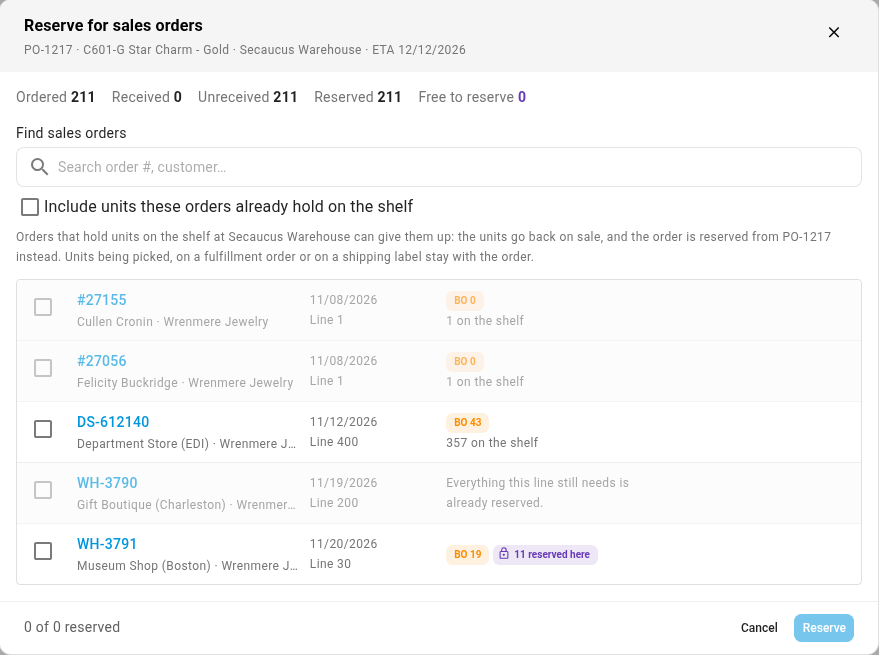
You need permission to edit both purchase orders and sales orders.
Where to find it
The ⋮ menu on a purchase order line or a sales order line, and the Reserved from PO filter on Inventory → Backorder Queue.
Full guide: Reserve incoming PO stock for a sales order