Inventory write-downs: value year-end stock at what it will really sell for
At year end, some of your stock is worth less than it cost. A range was discontinued, a season went slowly, or a product now sells for less than you paid for it. Until now, SKU.io gave you no clean way to record that: a manual recost changed the cost of units you had already sold, and a journal posted by hand in your accounting software left SKU.io's stock value out of step with your books. Inventory write-downs fix that. You choose the stock, pick how to lower its value, check every line and the journal entry, and post it. The quantity doesn't change, past orders keep their cost, and the loss posts to its own account with a reason and a note.
✨ What this means for you:
- Write down a whole group of stock at once. Choose stock by warehouse, supplier, brand, category, tag, product lifecycle, layer age, days without a sale or days of supply, and see the count and value as you go.
- Four ways to lower the value. Take a percentage off, set a new unit cost, write down to net realizable value (the expected selling price minus the costs to sell), or apply a percentage for each age band.
- Check every line before you post. A step-by-step form ends in a preview where you can change any layer's new unit cost and watch the totals and the journal update.
- Sold stock keeps its cost. Only the units on hand at the effective date are written down, so the cost of goods sold and margins on past orders stay the same.
- Your books stay in step. Each write-down books its own journal entry, which syncs to Xero or QuickBooks Online, so SKU.io's stock value still matches your inventory account.
- Reverse it when value recovers. Reversals follow your accounting standard, and never restore more than was written down.
- Year-end disclosure in one report. See what was written down and reversed in a fiscal year, by reason, warehouse and supplier, and export it for your accountant.
Choose the stock to review
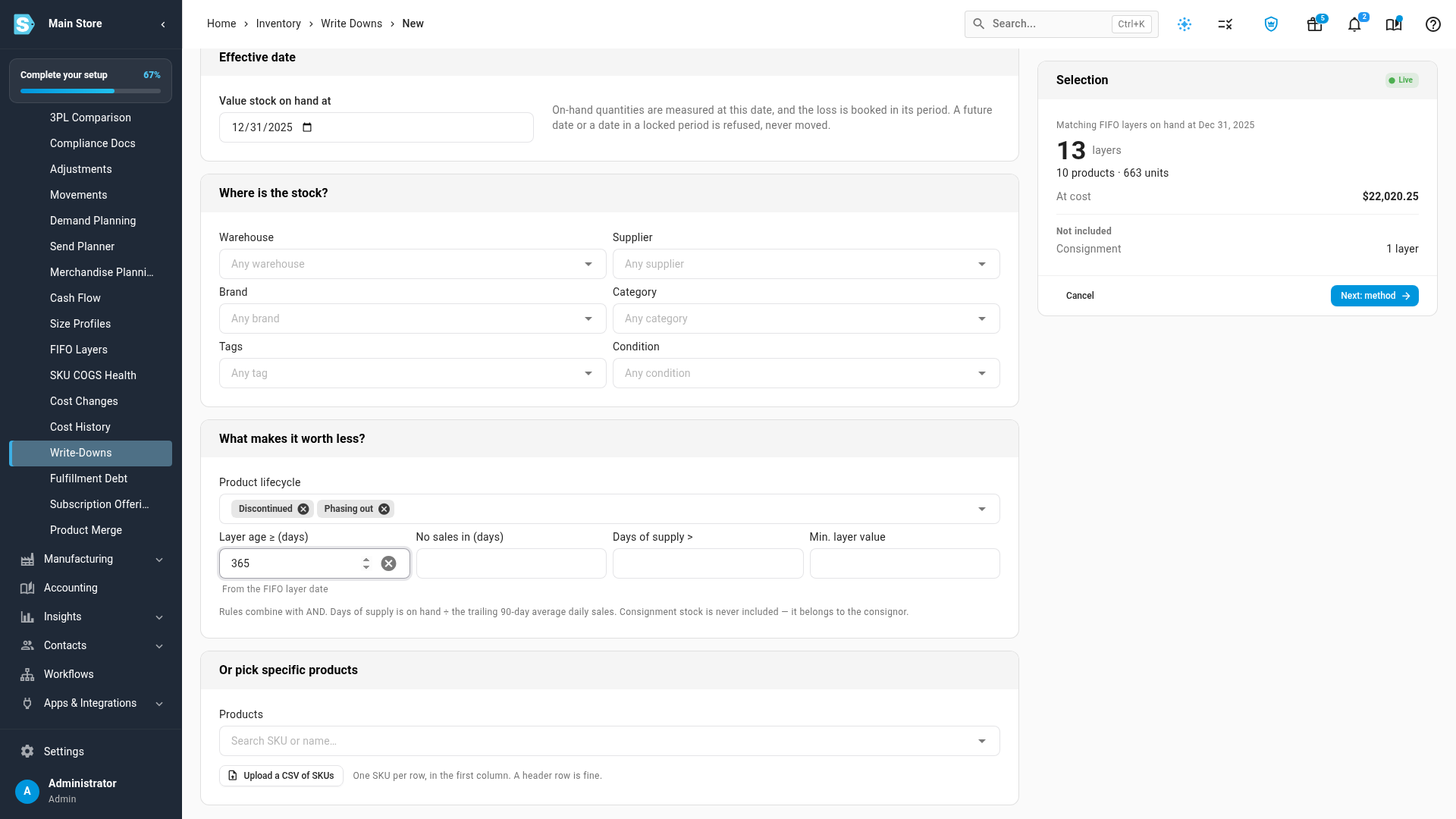
Start a write-down from Inventory → Write-Downs → New write-down. First, set the date you're valuing stock at, usually the last day of your financial year. SKU.io measures what was on hand on that date and books the loss in that period. A future date, or a date in a locked period, is refused rather than quietly moved into another year.
Then narrow down the stock. Where is the stock? filters by warehouse, supplier, brand, category, tags and condition. What makes it worth less? filters by product lifecycle (such as Discontinued and Phasing out), layer age, days without a sale, days of supply, and a minimum layer value. You can also pick specific products or upload a CSV of SKUs. The Selection panel counts the matching FIFO layers, products, units and value at cost as you go. Consignment stock is never included, because it belongs to the consignor.
Pick a method, a reason and your evidence
Choose how to lower the value: Reduce cost by a %, Set a new unit cost, To net realizable value or By age bucket. For net realizable value, take the expected selling price from the product's default price, a price list, your recent average selling price, or prices you enter or upload, and set your costs to sell as a percentage plus an amount per unit. Layers already at or below their net realizable value are skipped. The price and costs used are saved on each line as evidence.
Every write-down needs a reason (NRV below cost, Obsolete / discontinued, Slow-moving, Damaged (still saleable) or Other) and a note explaining the decision. You can attach supporting documents, such as a clearance offer or a price list.
Preview, adjust and post
Click Calculate, and SKU.io saves a draft and opens the preview. Cards show the value before and after and the total write-down. Notes tell you which layers were skipped and how many units sold after the effective date will be re-costed when you post. Expand a product to see its layers and type a different New unit cost on any one of them. The line is marked edited, and the subtotals, cards and Journal preview update straight away. Untick Include to leave a layer out.
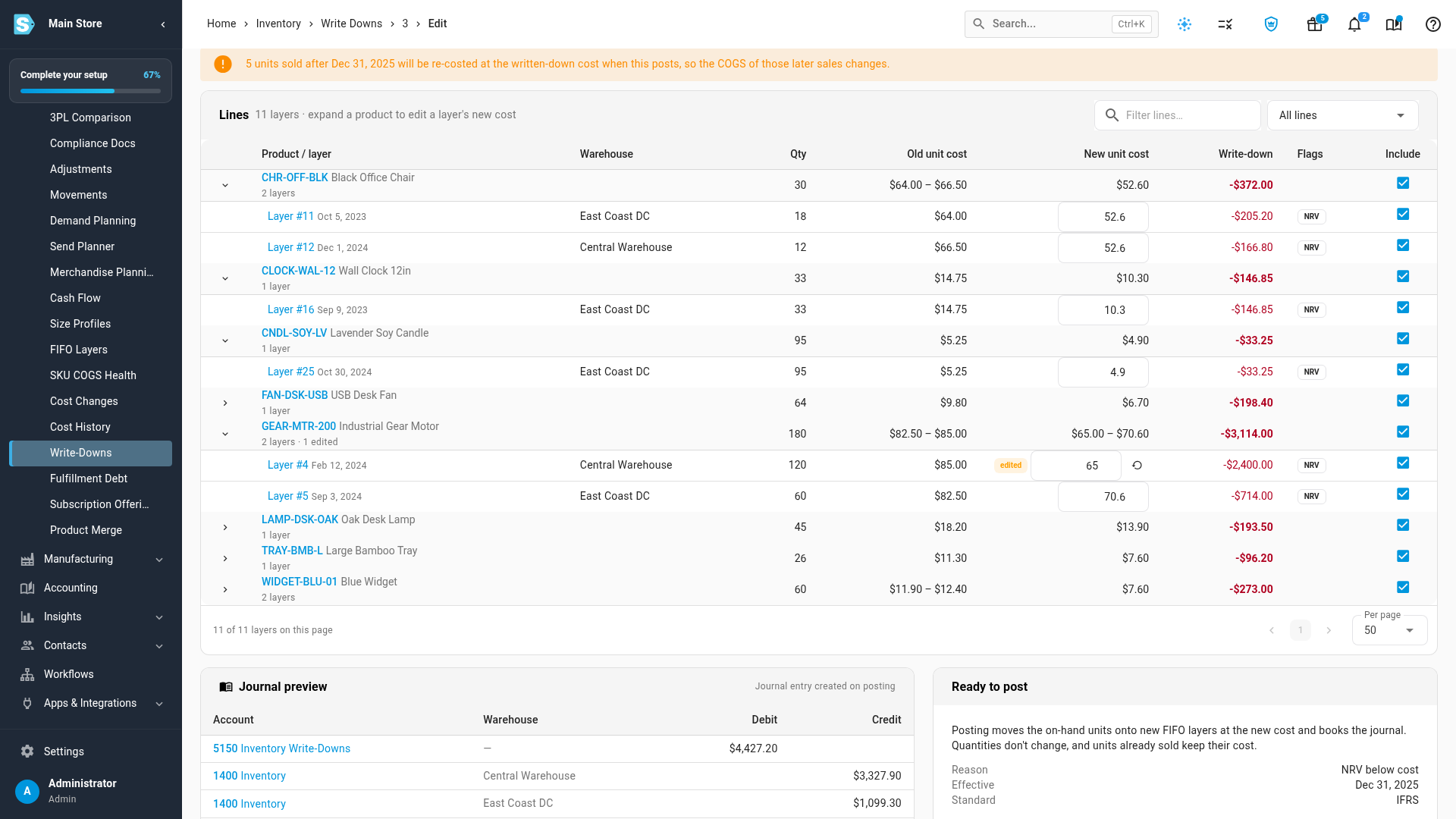
When it looks right, click Post. Large write-downs can need a second pair of eyes: above your approval threshold, the button reads Submit for approval, and someone else with approval rights approves it. Posting runs in the background. Each layer's on-hand units move onto a new FIFO layer at the new cost, keeping the original layer's date, lot and bins, so FIFO order and aging don't change.
Reverse a write-down when value recovers
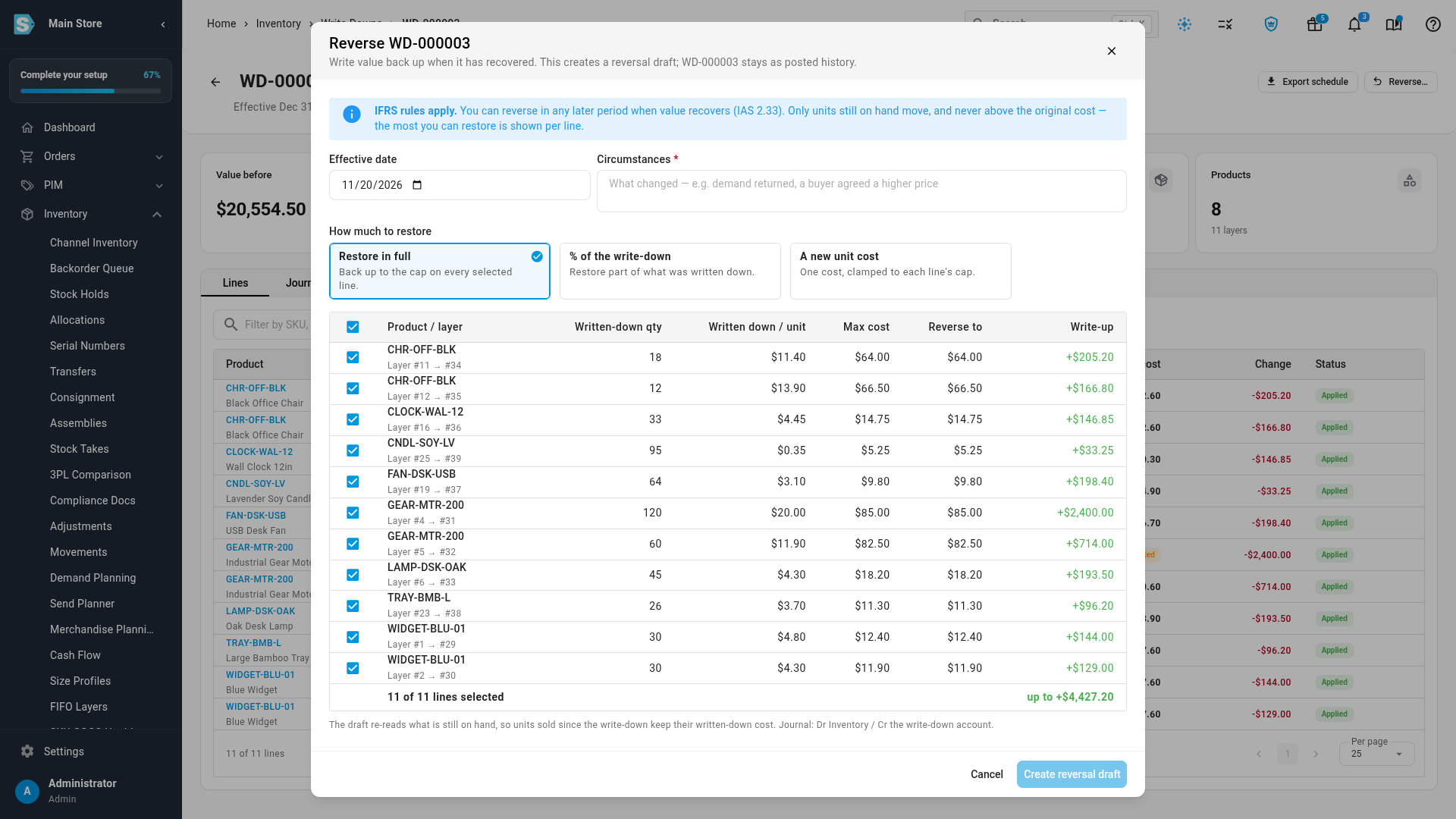
If prices recover, open a posted write-down and click Reverse…. Choose to restore it in full, restore a percentage of the write-down, or set a new unit cost, and record what changed. Each line shows the most you can restore. A reversal never takes a unit above its original cost and never restores more than was written down.
What you're allowed to reverse depends on your Inventory valuation standard, a setting on your account. It starts from your company's country: US GAAP for US companies, ASPE for Canadian companies, and IFRS everywhere else. You can change it in your accounting settings. Under IFRS and ASPE you can reverse a write-down in a later period. Under US GAAP the written-down cost becomes the new cost at the year end, so a reversal is only allowed within the same fiscal year.
Report it at year end
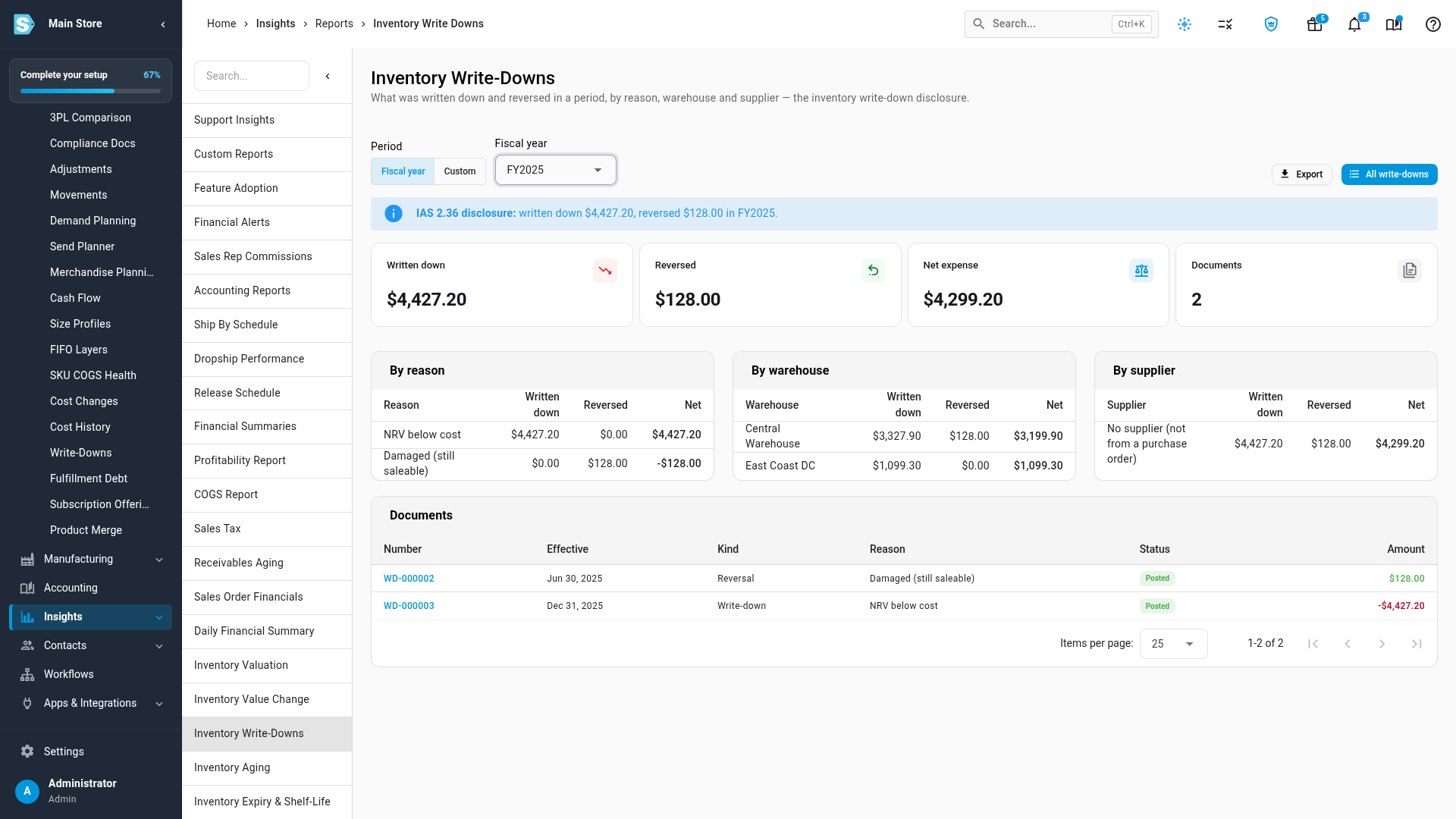
The Inventory Write-Downs disclosure report totals what was written down, what was reversed and the net expense for a fiscal year or a custom period. It breaks the figures down by reason, warehouse and supplier and lists every document. Export the report for your accountant, or use Export schedule on any write-down for its line-by-line detail, including the selling-price evidence.
Where to find it
- Write-downs: Inventory → Write-Downs, then New write-down.
- Start with the stock already chosen: Write down… on the Inventory Valuation report, Write down on a FIFO layer, Write down stock on a product's COGS tab, or the write-down action on the Inventory Aging report.
- Settings: your valuation standard, approval threshold and default age bands are on the Inventory write-downs card in Accounting → Settings → General. Choose where write-downs post under Nominal Code Mappings → Inventory Write-Downs (NRV).
- Disclosure report: Disclosure report on the Write-Downs list, or Insights → Reports → Inventory Write-Downs.
Full guide: Write down inventory at year end