
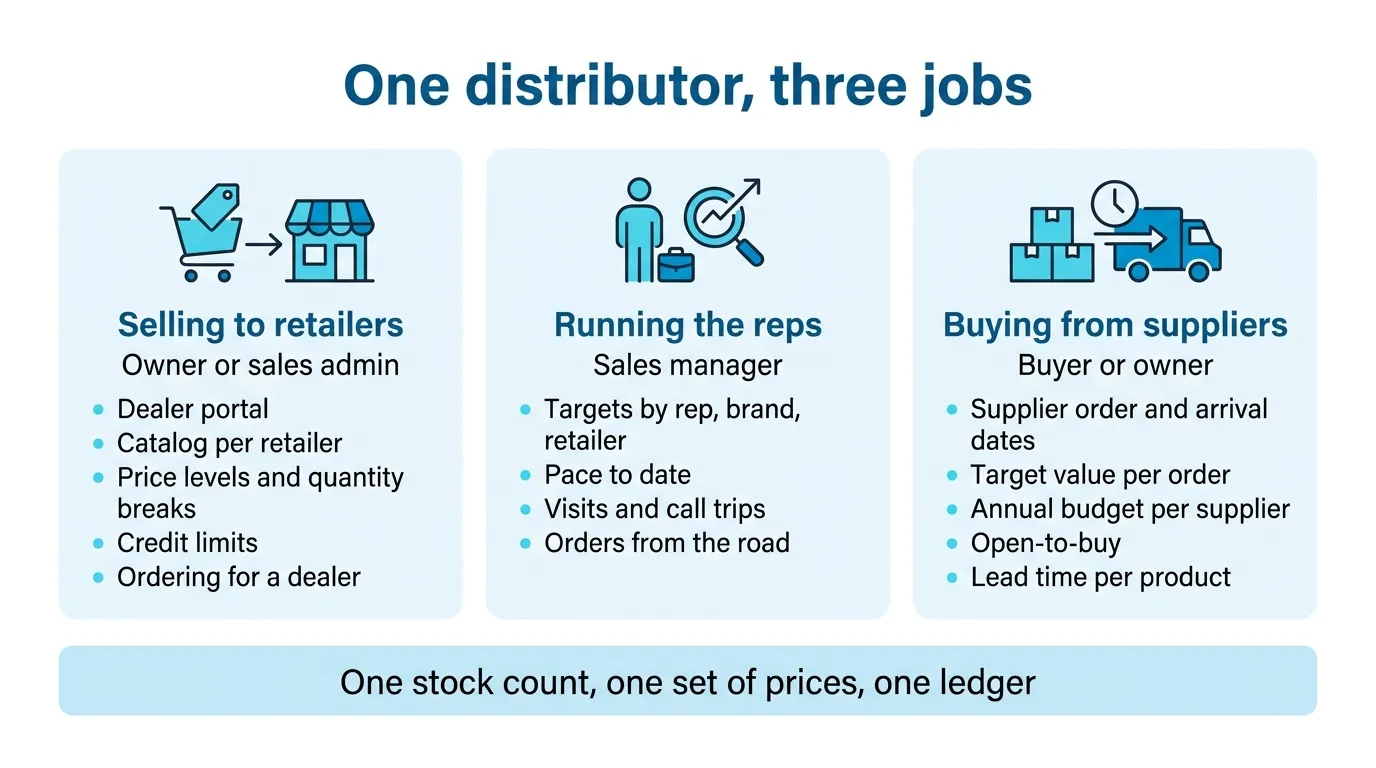
A multi-brand distributor does three jobs, and most software is built for one of them. It sells to retailers on terms, at a price that depends on who is buying and how much. It runs reps who visit those retailers and have targets by brand. And it buys months ahead from brands that set their own order dates, lead times and minimums. Good wholesale distribution software runs all three off the same stock and the same prices. The “20 best distribution ERPs” lists mostly score the warehouse and the accounting, and skip the reps and the buying calendar.
I have a stake in this twice over. I founded SKU.io, so weigh what I say about it accordingly. I also run a second company that resells other brands’ products, and until this year it had no wholesale program at all. When I started one, I built the dealer site myself, by having an AI agent write it against our own API, in the same colors as our Shopify store but separate from it. Then I sat in the admin screens deciding which catalogs each dealer gets, what discount level, and whether the discount should step up once an order passes a certain size. One dealer got a special price of its own on top of its level, and that is worth deciding early: a price list with many exceptions is the one nobody can keep straight. I also decided how dealers pay. We take wire, not PayPal, because card fees on a wholesale order come straight out of a thin margin.
Below is what I’d check if I were choosing software for a distributor again.
Written November 2026. Product behavior is checked against our own user documentation, linked in “How we checked this page” at the bottom.
Which should you choose?
- Choose SKU.io if you buy stock from several brands, sell it to independent retailers on terms through reps or a portal, and probably sell some of it online too, on Shopify, Amazon or a marketplace. That last part is where most distribution software is thin.
- Choose a distribution ERP with a full warehouse module if your hard problem is the warehouse floor: hundreds of pickers, delivery routes with your own trucks, or route accounting. NetSuite and Acumatica are built for that, and so are the food-distribution systems.
- Look at Zoho Inventory or inFlow if you sell under about $1M a year on one channel. We’re more system than you need.
- Stay with spreadsheets and Shopify’s own B2B if you have a handful of wholesale accounts and one person who knows every price.
A nine-minute tour of all three jobs in one system, on an outdoor gear distributor we made up:
Watch on YouTube. Narrated with an AI voice; the distributor, its people and its numbers are made up.
Chapters:
- 0:00 One system for a multi-brand distributor
- 1:02 Buying on your suppliers’ calendar
- 3:48 Selling to your dealers
- 6:24 Running the field team
- 8:13 The manager’s team view
- 8:39 Kits
- 8:49 Recap
What makes a multi-brand distributor different
A brand that sells some wholesale has one catalog and one supplier, itself. A distributor has a dozen brands, each with its own price list, its own minimums and its own idea of when you are allowed to order. Each of the distributor’s retailers carries some of those brands and not others. So the same product has a different price, a different availability and sometimes a different rep depending on who is looking at it.
The checklists you find for this subject list inventory, orders, warehouse, invoicing and reporting. All true, and you’d get the same list for a brand, a retailer or a 3PL. What I hear from distributors is narrower. How does a rep standing in a store know they’re behind on one brand and ahead on another? How does the buyer know that the order going out today has to last until the next container, months away?
I’ve split it by job, because in most distributors a different person owns each one.
Selling to retailers
A four-minute walkthrough of this job: the dealer portal, catalogs, quantity breaks, credit limits and an order placed for a dealer.
Watch on YouTube. Narrated with an AI voice; the distributor, its people and its numbers are made up.
The owner or the sales admin usually owns this one: orders in at the right price, from retailers you trust with credit, without anyone retyping them. My own setup came down to a few questions per account. What products can they see? What price level are they on? If they buy on credit, what’s the limit?
The failure I hear about most is the portal nobody uses. A parts maker that does about 40% of its business wholesale told me their storefront’s B2B feature “burned a lot of our customers and they don’t even want to try it again. So they just email us the purchase orders.” Prices came out wrong and the net-30 terms didn’t show. Once that happens, every order is typed in by hand again.
What to look for here:
- A portal per retailer, not a public wholesale store. Each retailer logs in and sees its own catalog, its own prices and its own stock, and reorders last month’s order in one click. The parts maker above is the reason I think the portal has to be easier than email, or retailers go back to email.
- Catalogs by brand or category. A retailer that only carries three of your brands should only see those three. In SKU.io a catalog is a set of include and exclude rules by product, brand or category, and the exclude always wins.
- Price levels and quantity breaks in one place. Who the retailer is sets the level, and how much they buy sets the break. I want the margin under every price before anyone sees it, which is how we lay out price levels and quantity breaks.
- Levels that move with spend. If a retailer’s spend over the last 12 months qualifies them for the next level, the system should notice, so nobody has to remember. SKU.io checks every night and either proposes the move for your approval or makes it. See moving a dealer up a price level when they spend more.
- Credit limits that apply everywhere. The limit and any credit hold should apply to a portal order and to an order your own staff place. The retailer should see its open balance and available credit. See credit limits for wholesale customers.
- Your rep can place the order as the retailer. Plenty of retailers will never type an order themselves. “None of our customers would ever enter in their own orders,” an operations lead at a food distributor told me. “It’s only our sales reps.” The rep should be able to open that retailer’s own portal and order at that retailer’s prices. See when your rep places the order for the retailer.
Two related problems are already written up on this site: why wholesale orders still end up in email, and the sales tax filing that misses your wholesale orders.
Running a field sales team
A four-minute walkthrough of this job: targets by rep, brand and dealer, pace to date, and a rep’s day of visits.
Watch on YouTube. Narrated with an AI voice; the distributor, its people and its numbers are made up.
An operations director at a multi-brand distributor told me what he wanted: “I need to keep my sales reps honest.” Revenue targets per rep weren’t enough. He wanted them by brand and by category too, so a rep halfway through the year can see they’re only a fifth of the way there on one brand, without asking anyone.
Most inventory software hands this to a separate CRM, and that’s where it falls apart. The CRM has the visits. The inventory system has the sales. Seeing one rep’s sales on one brand against their target means exporting both and matching them up in a spreadsheet, usually after the quarter it would have helped.
In SKU.io a sales target belongs to the rep and can be set for a month, a quarter or a year, overall or for one retailer, one brand, one category, or one brand at one retailer. It’s part of the core product, not an add-on. The useful number is the pace, not the percentage. Sixty percent of target on the 20th of the month and sixty percent on the 29th are different conversations, so the screen shows where the rep should be today and what they need per day from here. I go through how to set them in sales targets by rep, brand and retailer.
Then there’s the rep’s day. Distributor reps don’t move deals through pipeline stages. They see the same retailers on a cycle and come back with orders. The CRM module, which is a paid add-on, opens on a My Day screen with the next stop, the visits due and the rep’s own target pace. Field sales CRM for wholesale distributors covers what a rep does with it, and planning call trips covers picking a three-day run from the retailers who are overdue for a visit. The one I’d fix first, though, is stock: two reps entering orders at night against the same spreadsheet will oversell, and taking orders on the road without overselling is about that.
Buying on your supplier’s calendar
A five-minute walkthrough of this job: order dates, arrival dates, the next order against its target, and the year’s budget.
Watch on YouTube. Narrated with an AI voice; the distributor, its people and its numbers are made up.
A distributor doesn’t reorder when stock runs low. It orders when the brand takes orders, sometimes a season ahead, and that order has to last until the next one lands. The same operations director described his buying the way most distributors do. “We generally agree a purchase budget for the year” with each supplier. There’s a minimum per order below which the freight isn’t worth paying, and stock arrives on a few agreed dates a year. His hardest part, he said, was “getting the stock in in an economical manner so that our margins are where our margins need to be.”
I know this one from my reseller’s side. In April our reorder forecast suggested a small order for one brand we hadn’t bought in months, and the supplier’s minimum turned that small order into about a year of stock. Cash was tight and the nearest stockout was weeks away, so we waited. The forecast was right about the pace and had nothing to say about the minimum. Knowing what to order, and when is the longer version of that story.
So the buyer, or often the owner, needs:
- Order dates and arrival dates per supplier. Pin the dates a supplier takes orders, or the dates stock is agreed to arrive, and size each order to last until the next arrival. In SKU.io the forecast shows a 12-month plan of every planned order. See ordering on your supplier’s dates.
- An annual budget and a target value per order. The plan should show what you’ve committed on purchase orders, what’s planned and what’s left for the year, and whether this order is on its target value. See an annual purchase budget per supplier.
- Open-to-buy by category or brand. For seasonal ranges, a budget built from planned sales and planned ending stock, with open purchase orders subtracted in the month they arrive. A buyer at a multi-brand store told me what she uses it for: “By looking at my open to buy, I might push it out one month on this brand and then get this one earlier.” See open-to-buy for distributors.
- Lead time per product, not just per supplier. Some lines from the same supplier come by air and some by sea. The more specific setting should win. See lead time per product and the lead time calculator.
- What’s on the water. What you ordered, when it lands and what you still owe should live with the purchase order, not in a separate shipping sheet. See stock on the water.
Our purchasing features page covers the forecast underneath all of this.
Questions to ask any vendor in a demo
Bring your own data and ask them to do these on screen, not in slides:
- Log in as one of your retailers. Does it see only its brands, at its price level, with its credit available?
- Place an order as that retailer from your side. Does the credit hold still apply?
- Move a retailer up a level because of its spend. Who has to remember to do it?
- Show one rep’s target on one brand, and how far behind pace they are today.
- Plan next season’s order with a supplier that only takes orders a few times a year. Does the order last until the next arrival, and does it hit the minimum?
- Set a different lead time for one product that comes by air. Does the forecast use it?
- Sell the same unit on Shopify and to a retailer on the same day. Does the available count drop in both places?
The last one is where a pure distribution ERP usually stops. If you sell online as well as wholesale, it matters more than anything else on the list.
What SKU.io doesn’t do
It isn’t a warehouse-floor system for hundreds of pickers, and it doesn’t run delivery routes for your own trucks. It isn’t your accounting system: it posts invoices, bills and cost of goods to your accounting software, and bank reconciliation stays there. The CRM module is an add-on, not part of every plan. And it is built for operators between about $1M and $50M a year. If you’re bigger and need a large ERP with your own IT team, look at NetSuite or Acumatica.
If you’re a multi-brand distributor and some of this sounds like your week, book a call with me. Bring the price list, the rep target sheet and the buying plan you use now.
How we checked this page
This lists the facts on this page about SKU.io that you can open and check yourself, plus the recorded calls the quotes come from. Prepared by Kalvin Mizzi, founder, SKU.io. Last checked . SKU.io behavior was read off our own user documentation on the date shown. Call quotes are from recorded sales calls, unattributed.
| Claim | Source | Plan or version | Checked | How we know |
|---|---|---|---|---|
| A portal catalog is a set of include and exclude rules by product, brand or category, so each retailer sees only its range. | sku.io | — | Vendor documented | |
| Buyers can keep saved lists and reorder a past order from the portal. | sku.io | — | Vendor documented | |
| Quantity breaks for every pricing tier are managed per product, with the lowest margin any price earns shown beside them. | sku.io | — | Vendor documented | |
| SKU.io checks each customer's spend every night against a ladder of pricing tiers and proposes the tier move for approval or applies it. | sku.io | — | Vendor documented | |
| Each customer has payment terms and a credit limit, with open balance and available credit shown. | sku.io | — | Vendor documented | |
| Staff can place an order in a customer's own portal at that customer's prices, and the credit limit and holds still apply. | sku.io | — | Vendor documented | |
| Sales targets can be set per rep for a month, quarter or year, overall or for one retailer, brand or category, with expected-to-date and pace shown. | sku.io | — | Vendor documented | |
| Field CRM is a paid add-on, off by default. | sku.io | — | Vendor documented | |
| My Day shows a rep's next stop, today's visits, customers due for a visit and the rep's target pace. | sku.io | — | Vendor documented | |
| A call trip is planned from the customers due for a visit, sorted into driving order, and each day opens as a route in Google Maps. | sku.io | — | Vendor documented | |
| A supplier can have pinned order dates or arrival dates, each order is sized to last until the next arrival, and a 12-month plan lists every planned order, with an annual purchase budget and a target value per order. | sku.io | — | Vendor documented | |
| Open-to-buy = planned sales + planned markdowns + planned end-of-period inventory − beginning inventory − on-order, by category or brand, with open purchase orders counted in the month they are due. | sku.io | — | Vendor documented | |
| Lead time can be set per product, overriding the supplier's default lead time. | sku.io | — | Vendor documented | |
| Quotes from a parts maker selling about 40% wholesale, an operations lead at a food distributor, an operations director at a multi-brand distributor, and a multi-brand buyer, all unnamed. | Recorded sales calls (internal archive) | — | Recorded call |