
Backorder Handling for Just-in-Time E-commerce Operations
Overstocking to avoid stockouts ties up cash in inventory that sits on shelves. Ordering just in time frees that cash — but only if backorders are tracked precisely. Done by hand, that tracking breaks down: missed orders, duplicate purchase orders, customers asking where their shipment is.
sku.io automates the whole loop — from backordered sale to purchase order to release — and shows you the state of every backorder at each step.
What a backorder is in sku.io
A backorder is a sales order line that can’t be fulfilled from available stock at the time of sale. It gets covered by a purchase order, and released by a positive inventory event — usually the purchase order receipt.
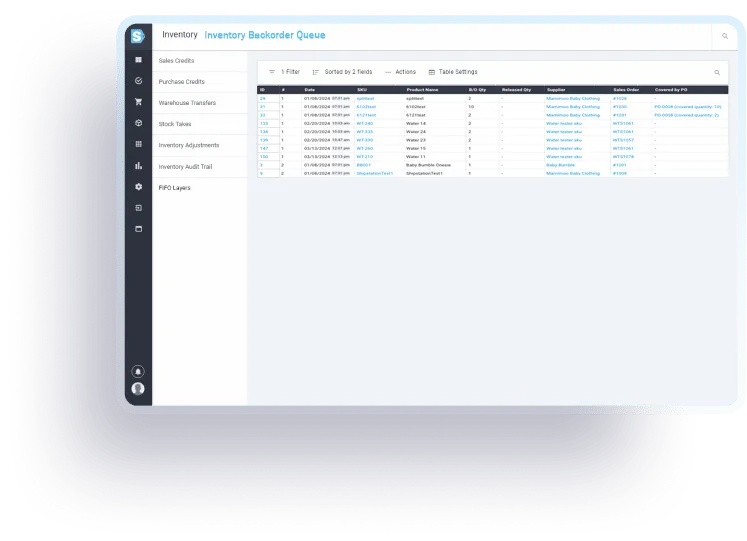
Automated purchasing from backorder demand
sku.io creates purchase orders from your backorder needs automatically, up to three times a day. You can enable automatic submission to suppliers, and split purchase orders by brand when a multi-brand distributor requires it.
Coverage you can see
Every backorder shows which purchase order covers it, and every purchase order shows which backorders it will release — with ETAs. That answers the two questions that eat up management time: “is this already on order?” and “when can I tell the customer it ships?” It also prevents the duplicate ordering that happens when nobody is sure.
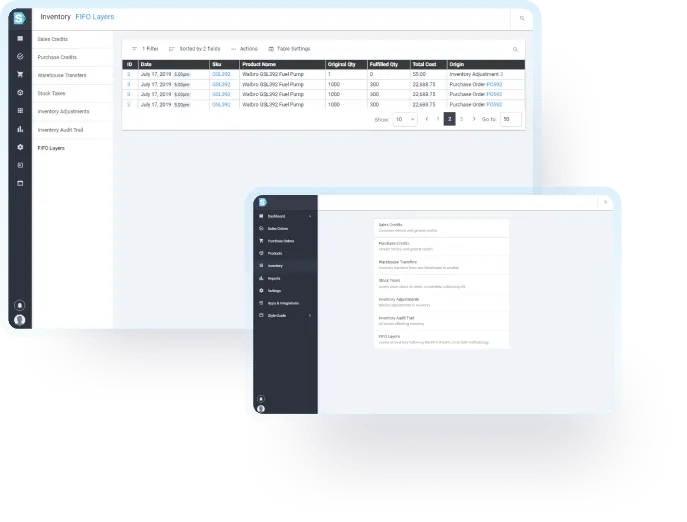
Release, history, and reallocation
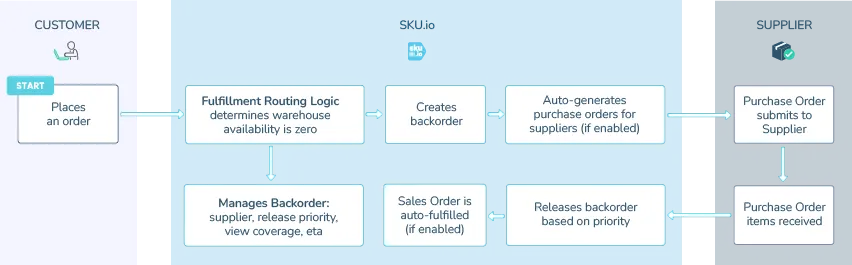
- Release management — backorders release on a FIFO basis by default, with a release queue you can reorder by customer urgency and per-SKU supplier selection when a product has multiple suppliers
- Release history — every release is tied to the positive inventory event that caused it, so there’s an audit trail from sale to receipt
- Reallocation after release — released inventory can be moved to a different backorder when priorities change
- Sales order filtering — filter sales orders by backorder status and by purchase order release, including orders fulfillable by incoming inventory, so you can process shipments before stock physically hits the shelf
Frequently Asked Questions (FAQ)
1. What does SKU.io consider as a backorder?
A sales order line that is not fulfillable based on available stock at the time of the sale. A backorder gets covered by a purchase order, and released by a positive inventory event (most likely a purchase order receipt).
2. How does SKU.io automate the backorder purchasing process?
SKU.io creates purchase orders up to three times a day, based on your backorder needs. You can enable automatic submission to suppliers and split purchase orders by brand if you order from multi-brand distributors that request that separation.
3. How does automatic submission of Purchase Orders work?
SKU.io sends purchase orders as PDF attachments via email, with an optional CSV attachment of the line items. If your suppliers require different forms of submission (API, FTP, etc.), we can quote you on a custom integration.
4. Can SKU.io provide real-time updates on backorder status and coverage?
Yes. One click shows which purchase orders cover specific backorders and vice versa, including estimated times of arrival (ETAs) for planning and customer communication.
5. What makes SKU.io’s backorder release management different?
The FIFO (first-in, first-out) release queue is customizable, so you can prioritize by customer urgency. You can select different suppliers for specific SKUs when a SKU has multiple suppliers, and the relationship between each backorder and the purchase order expected to release it is always visible.
6. Is it possible to re-allocate inventory after a backorder has been released?
Yes. Released backorders can be re-allocated to different sales orders when a different order becomes the priority.
7. How does filtering sales orders by backorder status improve order management?
You can focus on orders that are fulfillable by incoming inventory and start fulfilling them from an incoming shipment before stock is physically restocked.
8. Will SKU.io integrate with my existing e-commerce platform?
SKU.io integrates with the leading e-commerce platforms and marketplaces, so you can connect your existing sales channels with minimal setup time.
9. How does SKU.io help in reducing inventory costs?
Precise visibility and automated backorder management let you hold less stock without missing sales, which cuts storage costs and frees cash. A just-in-time model is hard to run by hand; the automation is what makes it practical.
10. Can I customize SKU.io to fit my business needs?
Yes. If what’s described here doesn’t match your exact business model, we take on custom development — tell us the workflow and we’ll quote it plainly.
See it on real data
In a 15-minute demo, the founder walks you through the backorder system and can dig into the specific workflows or inventory issues in your company. Book a demo.