
SKU.io Features
Make smart purchase decisions at the right time
A demand planning grid that shows its math — sales velocity, lead times, days of cover — and turns forecasts into purchase orders in one click.
Book a Demo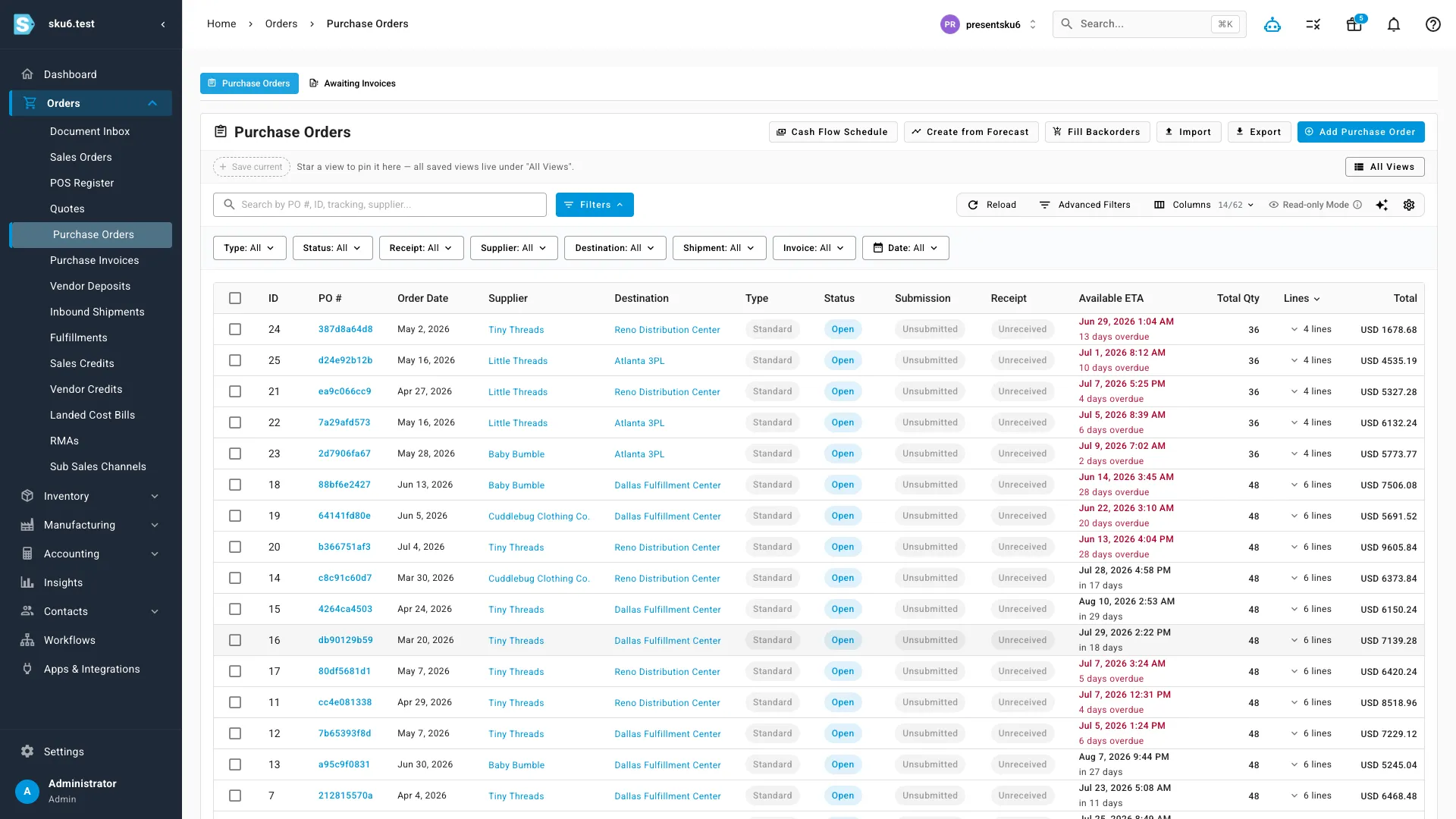
What sets this apart
Vendor deposits, finally a first-class object
Prepayments tracked against supplier bills, with a cash due schedule, cash-flow forecast, supplier exposure, and aging reports. If you have ever been surprised by a six-figure balance bill from a supplier, this is the feature other ERPs told you was impossible.
ETAs with teeth
Every purchase order carries a live ETA with overdue flags in red — plus a cash-flow schedule and fill-backorders view on the same screen. The question when does it land and what does it cost us this month stops requiring a spreadsheet.
From forecast to purchase order in one click
The demand planning grid crunches velocity, lead times, MOQs, and case packs — with the math shown — and builds the POs when you approve. The recommendation is auditable, not an oracle.
Reordering from a spreadsheet means guessing, and guessing shows up as dead stock on one SKU and a stockout on another. sku.io puts the whole purchasing decision on one screen — demand, lead time, incoming stock, supplier availability — and lets you act on it in one click.
A demand planning grid that shows its math.
For every SKU, the grid lays out sales velocity, trend by period, seasonality, supplier lead time, days of cover, and what’s already on order — and computes a suggested reorder quantity from those inputs, in the open. Every number is visible and every number can be overridden. It works the way your planning spreadsheet did, except the data is live and the arithmetic is done for you.
From forecast to purchase order in one click.
Accept the suggested lines and sku.io drafts purchase orders grouped by supplier, ready to send as a PDF or a line-by-line CSV. For routine replenishment, set automation rules that raise POs when stock crosses a reorder point — the predictable buying happens without waiting on you.
Know what the supplier has before you order.
Set up a data feed and sku.io pulls your suppliers’ stock levels automatically. Suppliers without a feed can mark items in or out of stock in the portal, or you can flag items manually. Either way, you order against known availability instead of finding out about a backorder two weeks after the PO went out.
Suppliers do their own data entry.
The supplier portal lets vendors update availability, maintain product attributes, and type tracking numbers directly onto unshipped purchase orders — which matters most in dropship, where tracking needs to reach the customer in hours, not after an email chase. Every supplier record keeps the history alongside it: emails, phone notes, and past POs in one place.
Purchasing that can see your sales orders.
Because purchasing lives in the same system as orders and inventory, sku.io shows which backordered sales orders each incoming PO line will cover, and receiving releases those orders for shipment the moment stock arrives. How that receiving flow works is covered on the supply chain page.
Keep looking
The rest of the platform
Every part of the platform runs on the same ledger as this one — the same stock, the same costs, the same events.
- Inventory Management Every unit, every warehouse, on one auditable ledger
- Product Information Management One product record, mapped to every channel listing
- Sales Channel Management Shopify, Amazon, Walmart, eBay — no per-channel fee
- Order Management One queue, routed to your warehouse, 3PL, or MCF
- Direct Sales & B2B Wholesale and DTC from one pool of stock
- Supply Chain Management Forecast, purchase, receive, assemble, handle returns
- Business Intelligence Drill from any number to the records behind it
- Purchasing Optimization Demand planning that shows its mathYou're reading this one
- Accounting FIFO COGS and clean journals to Xero or QuickBooks
Ready to see SKU.io in action?
Bring your real numbers and the messy questions — we'll walk the system against an operation like yours, not a slide deck.
Book a DemoFounder-led demo · 2-day onboarding · no onboarding fees