
Field Sales CRM for Wholesale Distributors: A Rep's Day, Not a Pipeline
A distributor’s field rep doesn’t close deals. They visit the same dealers on a cycle and take reorders, so a field sales CRM for a distributor has four jobs: say which dealers are due a visit, show what happened last time, take the order at that dealer’s prices against live stock, and set the follow-up. A pipeline of deals does none of those. In SKU.io that’s the CRM module, a paid add-on that is one part of running a field sales team.
A four-minute walkthrough of running a field sales team, on an outdoor gear distributor we made up. The part on a rep’s day starts at 1:37, and each rep seeing only their own dealers at 2:42.
Watch on YouTube. Narrated with an AI voice; the distributor, its people and its numbers are made up.
A dealer never closes
SKU.io’s own sales run on a pipeline CRM, and it suits us. Someone books a demo, the deal moves through stages, it closes won or lost, and it leaves the board.
I wouldn’t give one to a distributor’s reps. The gift shop a rep sold to in March is the shop they want to sell to again in May, and stages like Qualified and Proposal mean nothing there. The rep wants to know when someone last walked in, what the store bought, and what they promised to do about it. In my CRM every one of those dealers would be a deal marked won and forgotten.
Why does the CRM need to sit on the stock?
Most distributors who have a CRM run it beside the inventory system. The rep takes the order in the CRM, and a sync passes it across later. That means the rep is working from a copy of two things: the stock and the price list.
The stock copy is how reps oversell. Two reps read the same number, both promise it, and the sync finds out afterwards. The price copy fails more quietly. A general CRM holds a price per product, maybe per customer, and drops whatever rule it wasn’t built to carry: a dealer’s tier, a quantity break, a price that changes with the order size. The order reaches the warehouse at the wrong price, someone fixes it by hand, and the dealer gets a corrected invoice.
My view is that for a distributor this outweighs everything else a CRM does. A rep can live without a nice activity feed. They can’t live with promising stock that isn’t there at a price the office then changes.
What the CRM module does
It runs on the same customers, prices and stock as the rest of SKU.io, so there is nothing to sync.
The last step of a visit is the one that matters. The rep checks out, picks how it went (order placed, quote requested, follow-up needed), and the order or quote starts right there, at that dealer’s prices, while they’re still standing in the store. Reorder these turns the dealer’s last order into a new one at today’s prices, and since an order entered against live stock claims the stock when it’s approved, two reps can’t sell the same case twice. Around that sit a phone screen called My Day with today’s stops, a list of dealers due for a visit with the never-visited ones on top, notes, and a follow-up task due a week out. A planned visit can repeat every few weeks, which is how a call cycle gets set.
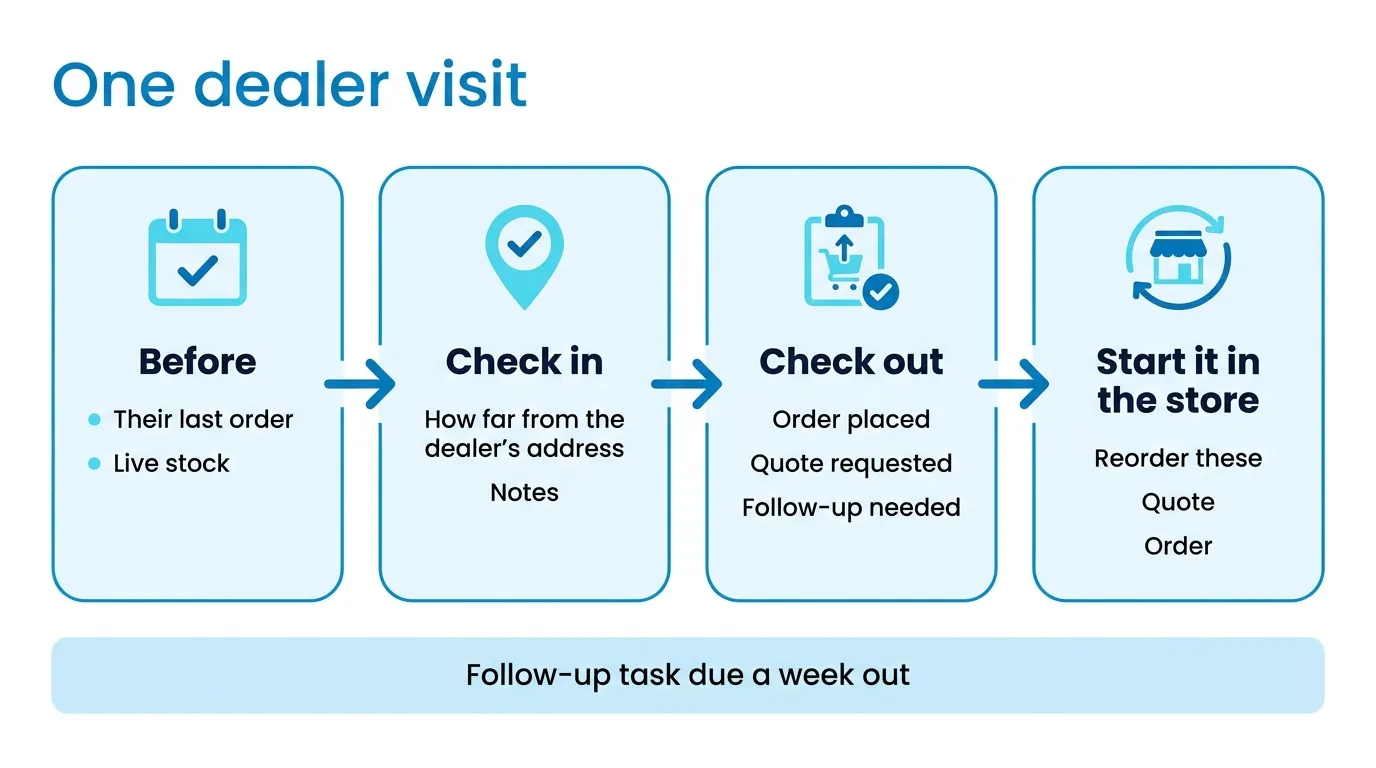
If the phone shares its location, check-in also records how far the rep is from the dealer’s address, and a rep a long way off gets an “away from address” chip. It doesn’t block the visit. Some managers will want it to. I think a manager who needs GPS to trust a rep has a problem software won’t fix.
For reps who travel, a few days of visits become a call trip, with a time on each stop and a sort button that keeps the first stop first and then always drives to the nearest next one. It’s a dumb rule. It won’t find the shortest route and it doesn’t know about the dealer who only sees reps before ten, but a rep can predict it and move a stop by hand. The call trip guide covers the rest.
On the CRM screens a rep sees the dealers whose default rep they are. Orders, invoices and reports aren’t limited that way, so if your reps must never see each other’s sales figures outside the CRM, know that before you start.
How many dealers can one rep cover?
Do this arithmetic before you set a single repeating visit. The numbers here are made up. A rep has 120 dealers. You put the 40 best on a four-week cycle and the other 80 on eight weeks. That’s 10 visits a week from the first group and 10 from the second, so 20 a week, or 4 a day over five days.
Four a day is fine in a city and too many across a rural territory where stops are an hour apart. If the sum comes out higher than the rep can drive, the answer is longer cycles for the small accounts, or a second rep. It isn’t a better route. I’d also be stricter than most about who gets the short cycle: a dealer earns four weeks by what they buy, not by how much the rep likes visiting them.
What to set up before the first rep goes out
Three things, in this order. Put every dealer on the right price tier and quantity breaks, because every order from a visit prices through them. Set the default rep on every dealer, because that decides whose My Day the dealer shows up on and whose numbers their orders count toward. And decide whether reps approve orders in the store or leave drafts for the office. A draft holds no stock, so I’d have them approve in the store.
The other way to run wholesale is a portal the dealers order from themselves. If your dealers will do that, it’s cheaper than a rep. The CRM module is for the business where the rep is the order form.
Who doesn’t need it
There’s no pipeline in the module, so reps who mostly hunt new accounts are better off with a pipeline CRM like mine. Two reps who know every dealer by name probably don’t need it at all, and a single-channel store under $1M with no reps is better served by Zoho Inventory or inFlow.
Bring one rep’s week of visits to a demo and we’ll walk through it on the call.