
Sales Targets by Rep, Brand and Retailer, and Reading Pace to Date
A distributor’s sales target is a number for a period, set at the level you actually manage: the rep overall, one retailer, one brand, one category, or one brand at one retailer. Halfway through the period, read pace rather than the percent reached: where the rep should be by today, how far off they are, and what they need a day from here to finish. Targets are one piece of running a field sales team in SKU.io, and every account has them, with or without the CRM module.
The two reps below are made up, and so are their numbers. They show what the screen tells you and what to do about it.
A four-minute walkthrough of running a field sales team, on an outdoor gear distributor we made up. The part on setting targets starts at 0:36.
Watch on YouTube. Narrated with an AI voice; the distributor, its people and its numbers are made up.
A rep 200 days into the year
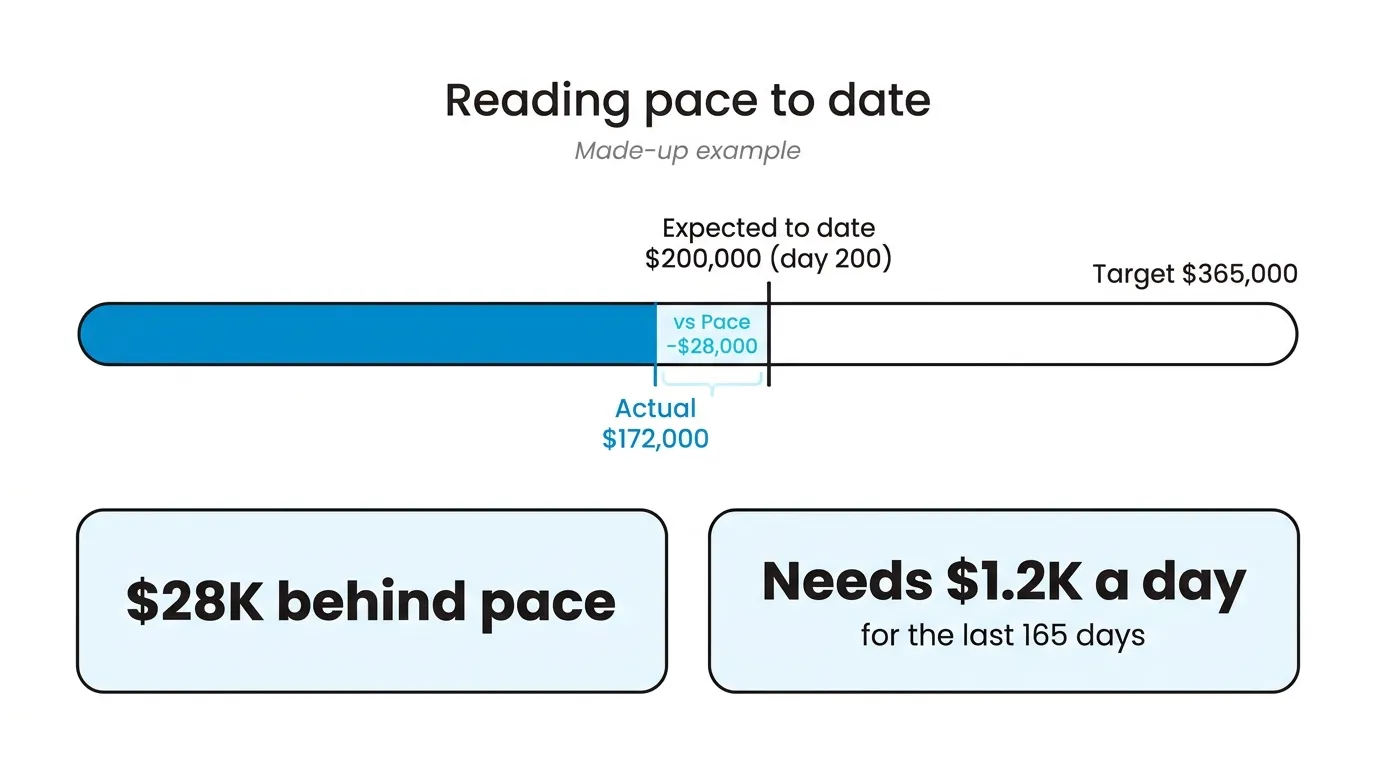
Rep one has a year target of $365,000, which is $1,000 a day. After 200 days, Expected to Date is $200,000. They have sold $172,000.
That’s 47% of target, and the % of Target chip is red, because it goes red below 70%. Ignore it. Halfway through a year, a rep who is exactly on track sits at 50% and gets a red chip too. The chip is for a finished period. While the period runs, the numbers to read are vs Pace, which is actual minus expected, here −$28,000, and the line under it. With $193,000 left to sell in 165 days, the Pace bar reads “$28K behind pace” and “Needs $1.2K a day for the last 165 days.”
$1.2K a day against a starting $1K is a hard ask, not a lost year. The useful next step is finding where the $28,000 went. Click the rep’s name to open their retailers and group by retailer and brand. Usually the gap is one or two rows: a store that stopped ordering a brand, or a big account that moved its order into next quarter. The first is a visit to plan. The second is fine, and you’ll stop worrying about it once you see it.
The rep who looks fine
Rep two is a hair ahead of pace overall. Their target for the brand you took on this year is $48,000. After the same 200 days, Expected to Date for that brand is about $26,300, and they have sold $9,400. That row is about $16,900 behind and now needs about $234 a day for the rest of the year, against the $132 a day it started at.
On rep two’s overall row, none of that shows. One big retailer reordering the brand that sells itself covers it. You’d find out when the supplier asks why sell-in is short, by which point the season is over. A brand target puts it on the screen in the first quarter instead.
What to do about rep two isn’t a warning. Look at which of their retailers carry your other brands and not this one, and make those the next visits.
Which targets to set, and who sets them
Fewer than you think. An overall year number per rep, and a target for each brand you’ve committed to a supplier for. Retailer targets only for the accounts you’d discuss by name in a review. Each target is a number someone has to defend in that review, and with fifty per rep, none get discussed. The levels don’t have to add up: each view is compared only with targets at its own level, so rep two can have an overall number and a brand target that covers a slice of it. The targets guide has the screens.
Set the brand number from what you committed to buy from the supplier, worked back to what you need to sell. Not from last year’s sales of that brand. Last year tells the rep what’s easy. The commitment tells them what the business needs, and a rep who beats an easy number while the warehouse fills up with that brand hasn’t done the job.
Let reps propose their own retailer targets, since they know which stores are growing. Keep the brand targets with whoever signed the supplier commitment. A rep who sets their own brand number will pick one they can hit.
Expected to Date is a straight line, which is a real limit. If most of your bookings land in two pre-season months, a year target shows everyone behind in spring and ahead in autumn. Use quarter targets sized to the season and the line is fair again.
With two reps and one brand, all of this fits in a spreadsheet with four numbers in it, and that’s what you should use.
What counts as a sale?
The same thing that counts for commission. By default that’s fulfilled orders, counted on the day they were fulfilled: product sales before returns, without shipping or tax. The performance report and the commission report show the same total and change together if you change the setting.
Leave that default alone, even though some sales managers won’t like it. A rep who books a big pre-season order in February that ships in May gets the credit in May, and the work happened in February. But a booked order that never ships, because the stock came in short or the store cancelled, was never a sale. You want the rep chasing the shipment, not collecting on the booking.
Actuals also depend on every order being credited to someone. At my other company, which resells other brands’ products, one brand’s line on our sales report by brand and channel once showed zero for a month. It wasn’t zero: those were wholesale orders keyed in by hand, filed under a different channel. Pace is only as good as that. In SKU.io an order is credited to the rep who placed it or to the customer’s default rep, so set a default rep on every retailer before you set a single target.
Where reps see it
Reps see their own numbers on My Targets, never another rep’s, and a strip on their My Day screen shows the year pace. Those screens are part of the CRM module, a paid add-on covered in field sales CRM for distributors. Orders a rep places from a visit count against their target without anyone re-keying them. Each retailer’s own page also lists every rep’s targets for that store, which is the place to set them during an account review.
If your Monday review is still someone copying actuals out of a sales report into a sheet, book a demo and bring last quarter’s targets. We’ll load your reps from it while we talk.