
What Should Your Inventory System Post to QuickBooks Online?
Your inventory system should post three things to QuickBooks Online: cost of goods sold when stock ships, the value of stock when it arrives, and the supplier bills that pay for it. It should post your sales only when nothing else already does. Most of the mess people describe to me comes from that last part. An operations lead told me that before she joined, invoices and bank deposits got mixed together in her company’s QuickBooks, and income was overstated by about $400,000 in one year.
Which setup fits you?
- QuickBooks on its own, if you sell on one channel, have a short product list and no warehouse or 3PL to reconcile. QuickBooks Online can track inventory itself. In my experience, below about $1M a year a separate inventory system is mostly cost. If you need one anyway, inFlow or Zoho Inventory is the cheaper step up.
- A settlement tool for sales, and the inventory system for cost, if most of your revenue is marketplace and Shopify orders and your bookkeeper already reconciles to payouts with A2X or something like it. The settlement tool posts sales and fees. The inventory system posts cost of goods sold, receipts and bills, and nothing else.
- The inventory system for everything, if you invoice wholesale customers, need accounts receivable on those invoices, or want sales and cost of goods sold side by side per channel.
- A mix by channel, if some channels pay you out daily and some every two weeks. That’s what I do in my own store. The reason is below.
The sources for every fact here, including the help pages and the calls I quote, are at the bottom with the date each was checked.
Where the line sits
A bookkeeper setting up an e-commerce practice asked me this on a demo in August. He had just finished his A2X certification and wanted to know which side of the ledger an inventory system owns. My answer on the call, word for word:
“Typically what we would push to a Xero or a QBO is top level transactions of sales invoices. Sometimes yes, sometimes no. Sometimes people say no and then they have [A2X] push. The sales invoices, purchase invoices almost always. And then COGS entries is like the other big thing where anytime inventory got fulfilled, you’re going to do a debit, COGS, credit inventory.”
I’d say the same thing today. Here’s what each kind of event becomes in QuickBooks Online when SKU.io posts it.
| When this happens | Who should post it | What lands in QuickBooks Online |
|---|---|---|
| An order is sold | The inventory system or your settlement tool. Never both. | An invoice, or the settlement tool's own sales entry |
| Stock ships | The inventory system | A journal entry: debit cost of goods sold, credit inventory |
| Stock is received on a PO | The inventory system | A journal entry: debit inventory, credit accrued purchases |
| A supplier or freight bill arrives | The inventory system | A bill, which clears accrued purchases into accounts payable |
| A count is adjusted or stock is written off | The inventory system | A journal entry |
| Rent, payroll, bank reconciliation | QuickBooks | Nothing from the inventory system |
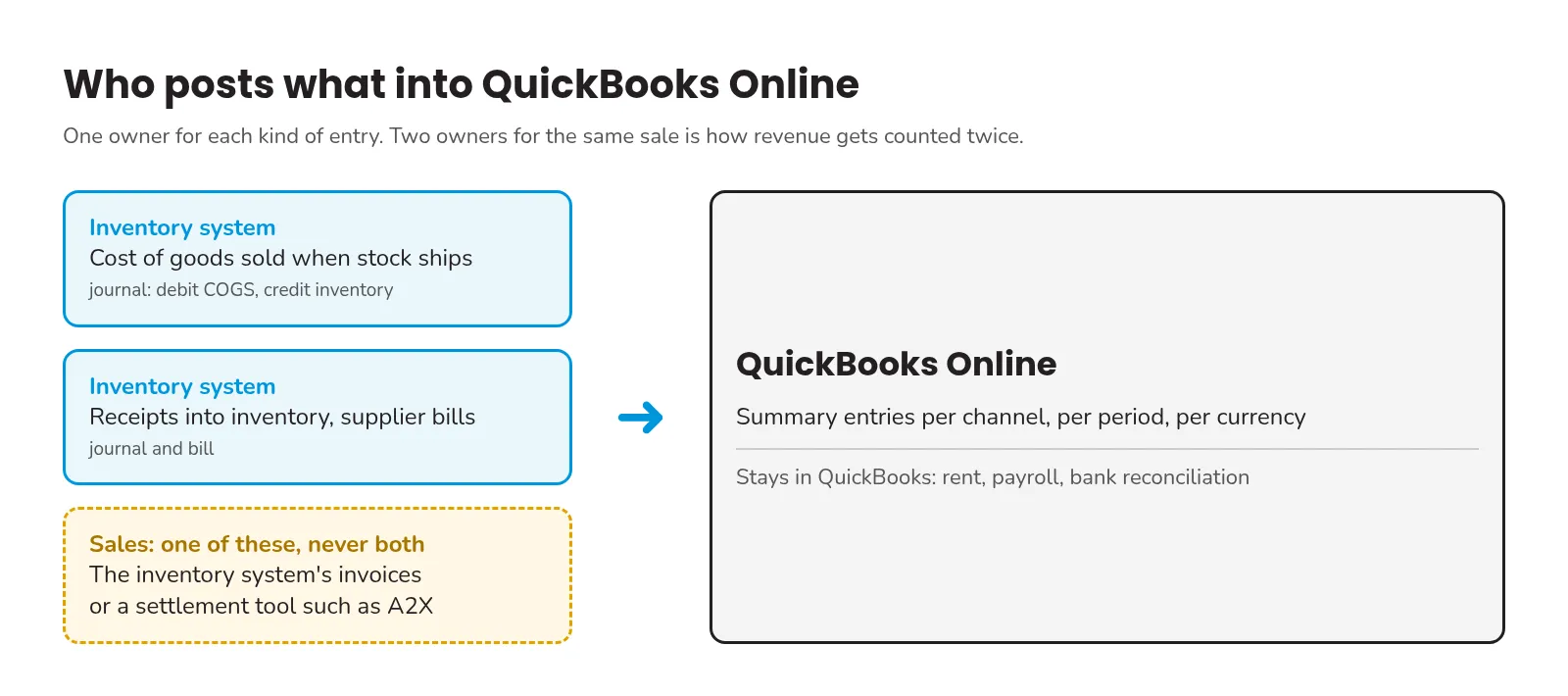
The receipt and the bill don’t double up, because they meet in a clearing account. The receipt puts the stock into inventory against accrued purchases the day it arrives. The bill, which often comes weeks later, moves that amount from accrued purchases to accounts payable. If your clearing account isn’t close to zero for old POs, a bill or a receipt is missing.
The cost of goods sold row is the one QuickBooks can’t do well alone, because it needs the cost of the actual units that shipped. In SKU.io every receipt opens a cost layer, freight and duty are spread onto it as landed cost, and a shipment draws from the oldest layers first. The journal carries the cost of the units that actually left, freight and duty included.
One journal per channel per month, not one invoice per order
Nobody wants ten thousand Shopify invoices in QuickBooks. The usual fix is summary entries, and most tools in this category offer some version of it. Bookkeep, for example, posts sales as one journal per currency per day and summarizes cost of goods sold into one daily journal.
We group by three things: the period, the sales channel and the currency. You choose per-document, daily or monthly for each kind of entry. A month of Shopify shipments becomes one journal, and so does a month of Amazon shipments, so each channel keeps its own revenue and cost in your books.
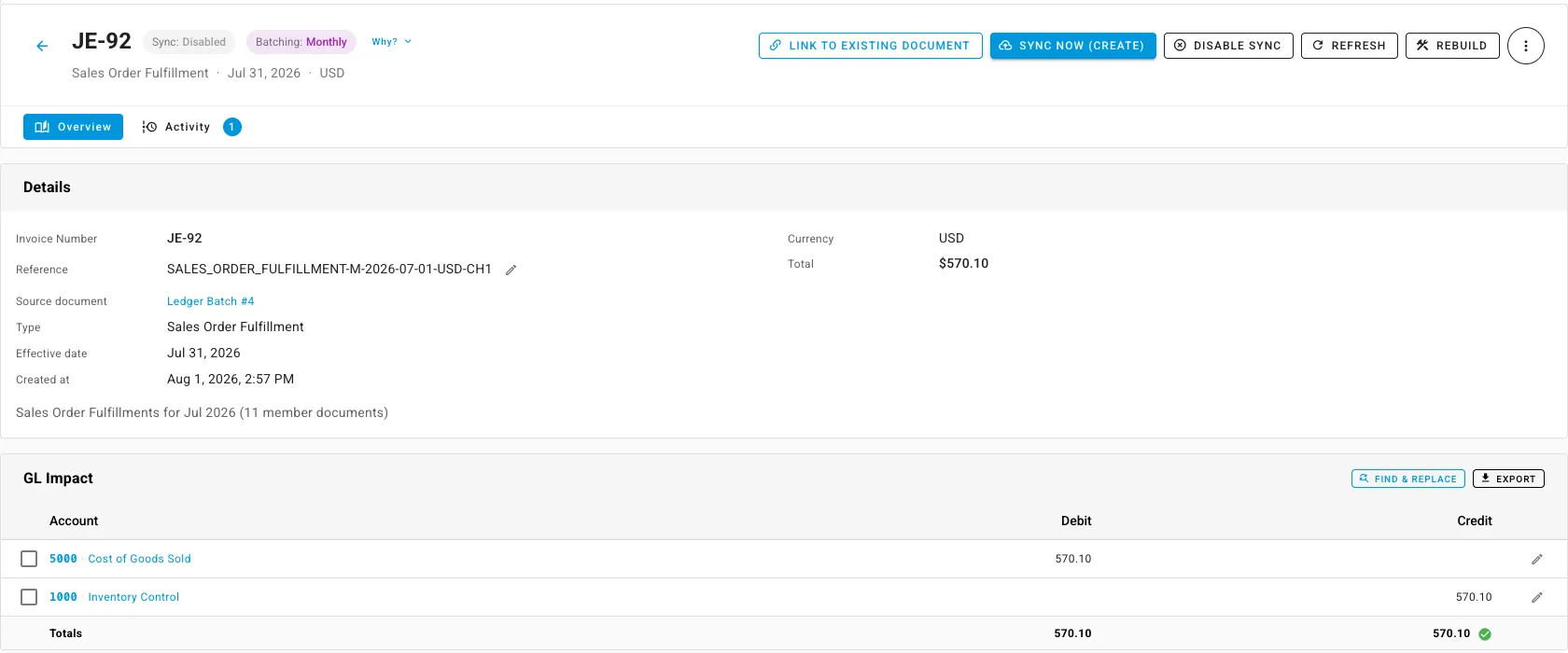
A monthly batch stays open for 72 hours after the month ends, and a daily batch for 24, so a marketplace that reports yesterday’s orders this morning still lands them in the right month. If you close your books on the first, the batch will look unfinished for those three days. It isn’t late.
How a company overstates income by $400,000
On an onboarding call last year I was showing an operations lead the setting I use in my own store. For Shopify and eBay I turn off invoice sync. For Amazon I leave it on. My reason, as I said it on the call:
“Amazon, you know, they deposit every two weeks, unlike Shopify and eBay, which deposit daily. So two weeks is material difference. You know, one day is not like a material difference.”
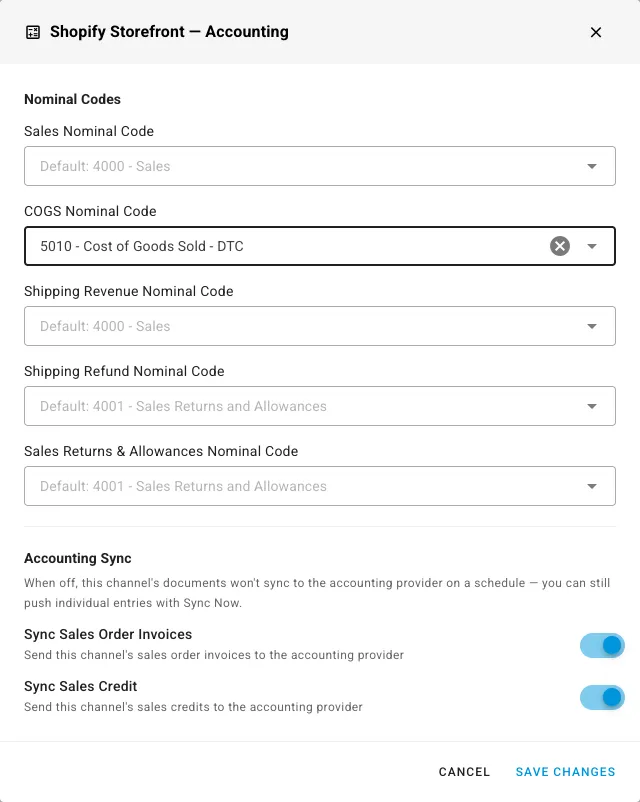
In my store, Shopify and eBay pay out daily, so booking those sales from deposits is close enough and far simpler. Amazon pays me every two weeks, and two weeks of Amazon sales is too much to leave out of a month, so Amazon gets invoices. The Shopify and eBay invoices are still created in SKU.io. They just never go to QuickBooks. Your payout schedules may not be mine, so check them before you copy this.
“Otherwise you’re going to mix and match between deposits and, you know, multiple sales order invoices, which is a pain,” I told her. She already knew:
“That’s why we don’t. … Predating me, something like that was happening and we ended up overstating our income by like $400,000 one year that we took years to like, fix.”
The same sales reached QuickBooks twice, as invoices and again as deposits, and it took them years to unwind.
A settlement tool can cause the same thing. A2X’s guide for using A2X with Unleashed says sales and fees should come from A2X and cost of goods sold from Unleashed, and that the setup exists to avoid duplicate transactions. Our onboarding guide says the same thing in plainer words: if you use A2X, turn off direct-to-consumer income posting in SKU.io, or your revenue is counted twice.
The third way is harder to spot. QuickBooks Online can track inventory itself, and once it does, it updates inventory automatically as you sell. If that’s on and your inventory system also posts cost of goods sold, two systems are relieving the same stock. Pick one owner for inventory and turn the other off.
Why your Shopify sales won’t tie to QuickBooks
An owner I spoke with in 2022 put the symptom as plainly as anyone has:
“I can’t get my Shopify sales numbers exactly tied to my QuickBooks sales numbers. And that to me is an issue.”
Usually the two numbers measure different things. Shopify reports sales when the order happens. If QuickBooks gets its revenue from bank deposits, it sees money after fees and refunds, days later. Both can be right and still never match line for line.
What fixes it is deciding which one QuickBooks is supposed to reflect, and making exactly one system post it. If you want order-level sales in QuickBooks, post invoices, summarized per channel, and leave deposits as payments against them. If you want QuickBooks to follow the bank, post from deposits or a settlement tool and keep the invoices out.
A founder on a call that same year described the half-built version. His books were in Xero, not QuickBooks, but the same thing happens in either. His inventory system pulled sales and cost of goods sold into Xero, “but no other fees,” and the vendor’s advice for reconciling was that he was “going to have to keep track of these thousands of invoices and then match it to the payout.” Invoices went across. Nobody owned matching them to the money.
The date that has to match
The step I see skipped most is the one I stress on every demo. When you start an inventory system, you pick an inventory start date: the day it begins counting stock. Here is how I said it to that bookkeeper:
“The day before the inventory start date is where the inventory value on your QBO or Xero needs to match SKU.”
If those two numbers disagree on day one, every month after inherits the gap, and nobody can tell which side is wrong. QuickBooks has a version of the same idea: it counts an inventory product’s quantity from its as-of date.
Three habits keep it honest after that:
- Connect accounting about 30 days after you go live, not on day one, so early fixes to your operations do not become journal corrections.
- Connect on the first of a month with automatic sync off. Post one test batch, reconcile it, then turn sync on.
- Compare the two inventory numbers on a schedule. SKU.io compares them day by day against the inventory accounts in QuickBooks Online or Xero, refreshes the recent days every night, and proposes an adjusting journal when they drift. Whatever you use, someone should be looking at that number.
What about Amazon FBA stock?
Keep it in its own inventory account. Stock at Amazon is still yours, but you cannot count it, Amazon moves it between buildings, and it reaches you only through Amazon’s reports.
We value FBA stock from cost layers built from Amazon’s own inventory ledger, separately from your warehouse layers. Each country’s FBA stock location posts to its own inventory account, so your balance sheet shows what is sitting at Amazon apart from what is on your own shelves. If you are reconciling FBA by hand today, this page on Amazon’s ledger explains why its two reports disagree.
Is SKU.io the right fit for this?
We’re a fit if you sell on more than one channel, hold stock in more than one place, and want cost of goods sold, receipts and bills to reach QuickBooks Online or Xero without someone keying them. If you already use A2X and only want the cost side from us, that works too. Our own onboarding guide walks through it.
We’re not the right fit for a single-channel shop under about $1M. QuickBooks’ own inventory, or inFlow or Zoho Inventory, will cost far less and do what you need.
The full picture of what we post is on our accounting page. If you want me to walk through your own chart of accounts and channels, book a call.
How we checked this page
These are the facts on this page that you can check yourself: vendor and Intuit help pages, our public documentation, and the recorded calls I quote. Each row says where it came from and when we looked. Prepared by Kalvin Mizzi, founder, SKU.io. Last checked . Vendor and Intuit help pages were loaded on the date shown and the statement was read off the page. Our own behavior is checked against our public documentation, which describes the version running in production. Call quotes are verbatim from recorded calls; customers and prospects are not named.
| Claim | Source | Plan or version | Checked | How we know |
|---|---|---|---|---|
| A2X's guide for using A2X with Unleashed says e-commerce sales and fees go to the accounting system from A2X, and cost of goods sold goes from the inventory system, and that its recommended setup is there to avoid duplicate transactions. | support.a2xaccounting.com | A2X help center article, written 20 July 2023 | Vendor documented | |
| Bookkeep posts sales to QuickBooks Online as one journal entry per currency per day, and summarizes cost of goods sold into one daily journal entry. | bookkeep.com | — | Vendor documented | |
| QuickBooks Online can track inventory itself; once an inventory product is set up, QuickBooks updates inventory automatically and does not count sales or purchases from before its as-of date. | quickbooks.intuit.com | Intuit help article, US | Vendor documented | |
| In SKU.io, sales order invoices sync to QuickBooks Online as invoices, supplier and landed cost bills as bills, sales credits as credit memos, and fulfillment cost of goods sold, receipts, adjustments, transfers and FBA postings as journal entries. | sku.io | SKU.io docs, last verified 6 October 2026 | Vendor documented | |
| In SKU.io a PO receipt posts debit Inventory Control, credit Accrued Purchases, and the supplier bill posts debit Accrued Purchases, credit Accounts Payable. | sku.io | SKU.io docs, last verified 18 July 2026 | Vendor documented | |
| In SKU.io every receipt opens a FIFO cost layer, freight and duty are prorated onto it as landed cost, and a shipment draws its cost of goods sold from the layers it actually consumes, oldest first. | sku.io | SKU.io docs, last verified 12 July 2026 | Vendor documented | |
| The inventory start date is the day SKU.io begins counting stock; movements dated before it are history that predates your books in SKU.io. | sku.io | — | Vendor documented | |
| High-volume postings such as fulfillments can be rolled into one summary entry per period, per sales channel, per currency, set per entry type as per-document, daily or monthly. | sku.io | SKU.io docs, last verified 12 August 2026 | Vendor documented | |
| A monthly batch stays open 72 hours after the month ends, and a daily batch 24 hours, so late documents still land in the right period. | sku.io | SKU.io docs, last verified 12 September 2026 | Vendor documented | |
| Each sales channel has its own switches for whether its sales order invoices and sales credits are sent to the accounting provider. | sku.io | SKU.io docs, last verified 9 September 2026 | Vendor documented | |
| Our onboarding guide says: if you use A2X, disable direct-to-consumer income posting in SKU.io, because leaving both on double-counts revenue; connect accounting about 30 days after go-live, on the first of a month, with auto-sync off until a test batch reconciles. | sku.io | — | Vendor documented | |
| SKU.io values FBA stock from FIFO cost layers built from Amazon's own inventory ledger, and each country's FBA stock location posts to its own inventory account. | sku.io | SKU.io docs, last verified 6 October 2026 | Vendor documented | |
| Inventory reconciliation compares SKU.io's inventory value with the balance of the inventory accounts in QuickBooks Online or Xero day by day, refreshes the recent days every night, and proposes an adjusting journal for a gap. | sku.io | SKU.io docs, last verified 6 October 2026 | Vendor documented | |
| Quotes from my own calls: the inventory start date rule and what we push to QuickBooks or Xero (a demo with a bookkeeper, 21 August 2026), and which channels I sync invoices for in my own store and why (Amazon pays every two weeks, Shopify and eBay daily; an onboarding call, 3 September 2025). | Recorded sales and onboarding calls (internal archive) | — | Recorded call | |
| Operator quotes: income overstated by about $400,000 in one year after both invoices and deposits reached QuickBooks (an operations lead, 2025); Shopify sales that never tie to QuickBooks (an owner, 2022); a Xero integration that left thousands of invoices to match to payouts (a founder, 2022). | Recorded sales and onboarding calls (internal archive) | — | Recorded call |