
Open-to-Buy for Distributors: The Formula, Worked at Cost
Open-to-buy tells you how much you can still spend on a brand or a category this month: planned sales, plus planned markdowns, plus the stock you want left at month end, minus the stock you start with, minus what’s already on order for the month. If you’re a distributor, do it at cost, and count each purchase order in the month the goods arrive. Most of the work is in that second part.
A distributor buying forward agrees a ship window with each brand months ahead, and that window decides which month’s budget the order eats. Move one window and two months change. The owner of a multi-brand shop put the need in one line: “By looking at my open to buy, I might push it out one month on this brand and then get this one earlier.” It’s one part of buying on your suppliers’ calendar.
A five-minute walkthrough of buying on your suppliers’ calendar, on an outdoor gear distributor we made up. The part on open to buy starts at 3:40.
Watch on YouTube. Narrated with an AI voice; the distributor, its people and its numbers are made up.
Old stock pays for the next buy
At my other company, which resells other brands’ products, we had a big order due with one supplier in April, and it had to be one big purchase order. In December I was worried we wouldn’t have the money for it. The money had to come from selling through stock we already had. So I asked for anything over 365 days old to go to eBay auction, on the items where the brand let us sell under its minimum advertised price, and set the goal at nothing over 365 days. That’s the markdowns row in an open-to-buy, and why I’d never plan it as zero.
You need one when several brands are competing for the same money in the same season. If you reorder from a handful of suppliers when stock runs low, keep the spreadsheet. Under $1M a year on one channel, you don’t need this either. Zoho Inventory or inFlow will do.
One brand, one month
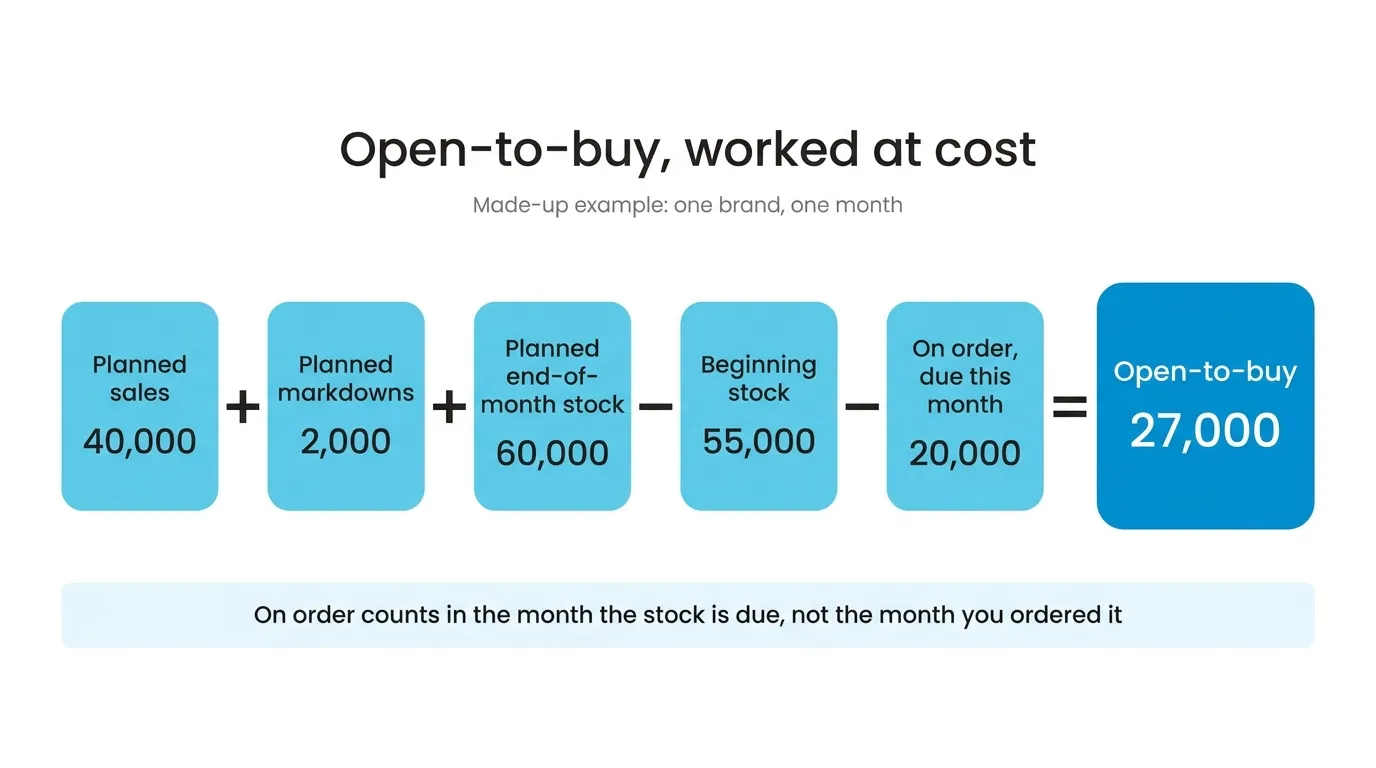
Made-up numbers for one brand, all at cost:
| Part | At cost |
|---|---|
| Planned sales | 40,000 |
| Planned markdowns | 2,000 |
| Planned end-of-month stock | 60,000 |
| Beginning stock | 55,000 |
| On order, due this month | 20,000 |
| Open-to-buy | 27,000 |
40,000 + 2,000 + 60,000 − 55,000 − 20,000 = 27,000.
The 2,000 of markdowns is the line my eBay auctions would sit on. Beginning stock is last month’s ending stock. On order comes from your open purchase orders, by the month they’re due to arrive, which is how SKU.io works it out.
Now the brand writes to say that 20,000 order will leave a month late. You change its expected arrival. It drops out of this month’s on-order, so this month goes from 27,000 to 47,000, and next month has 20,000 less. That’s the push-out from the quote, done on the order instead of in a second spreadsheet.
The “get this one earlier” half only works if the row is a category, not a brand. Say the same numbers are a category row, now at 47,000 after the delay. Pull a 15,000 order from a second brand in that category forward into this month and the row still has 32,000 left. On brand rows the two moves never meet, which is the main reason I’d plan by category once you carry more than a few brands that sell into the same shelf.
If the lead time on those products is wrong, the order lands in the wrong month to begin with, so I’d fix lead times before I trusted any month in the grid.
Why at cost, not retail?
A lot of open-to-buy guides are written for stores and plan at retail value. In a store the markup is fairly steady across a department, so retail works as a stand-in for money. A distributor sells the same item at different price levels to different retailers. Plan at retail and you blur the one number the brand actually invoices you. You can flip the grid to units or retail whenever you like, but I’d set the budget at cost.
Paying for it
When you pay changes what you can spend in a month more than the sales plan does. Some brands give terms, some want payment on receipt, and a forward buy can carry a deposit months before the goods arrive.
Open-to-buy doesn’t know about terms; it counts goods when they arrive. If the month’s cash only allows 30,000, put that in as a cap and the row shows 30,000 instead of 47,000, whichever is lower. And write the order against the budget the day you place it at a show, not the day the brand confirms, or two buyers will spend the same 30,000.
If you’ve agreed a fixed amount for the year with one supplier, that’s a different limit: an annual purchase budget per supplier. Open-to-buy starts from your sales plan and doesn’t care which supplier fills it.
The first season
Seed planned sales from last year if last year was normal, and from the forecast if it wasn’t. For ending stock, be careful with stock-to-sales in the month before your busy season: it sets ending stock as a multiple of that month’s sales, so a quiet month leaves you thin right when you need to be full. I’d put that row on weeks of supply, or type the month in by hand.
When a month goes red, move an order before you cut one. A brand will usually take a later ship date. A cut order can cost you the allocation next season.
There’s also a switch that holds back purchase orders that would take a category over budget. I’d leave it off for the first season. Until the plan has met real sales once, it blocks orders for the wrong reasons, and buyers who get blocked for the wrong reasons learn to override everything. Compare plan to actual for a season first.
If you buy forward from several brands, book a demo and bring last season’s buy. We’ll seed a season from it and see which months go red.