
A B2B Ordering Portal Your Retailers Will Actually Use
A parts seller who does about 40% of his business wholesale tried moving those accounts onto his storefront’s B2B feature. Discounts came and went, the net 30 terms misbehaved, and a buyer couldn’t change a ship-to address. “It burned a lot of our customers and they don’t even want to try it again,” he told me. “So they just email us the purchase orders.”
A retailer will use a portal if it shows only what they can buy, at the price they agreed, and lets them repeat last month’s order. Get the price wrong on their first look and they go back to email for a long time. I’ve written about where that email ends up.
Here’s the order I’d set one up in for selling to retailers, and where the time goes.
A four-minute walkthrough of selling to retailers, on an outdoor gear distributor we made up. The part on the dealer portal starts at 0:36.
Watch on YouTube. Narrated with an AI voice; the distributor, its people and its numbers are made up.
Catalogs first, because they’re the slowest to get right
Catalogs decide what each dealer can see, and every rule in one is a decision somebody has to make. I run a second company that resells other brands’ products, and before I started a dealer program there I went through every brand we carry and asked which ones made sense to sell wholesale. Only one product line did. So dealers get the catalogs for that line and nothing else. The first account on it was a shop that already bought from us wholesale, and its first portal order went straight into SKU.io as a sales order.
The supplier behind that line sells far more than we stock. In powersports I had suppliers with 300,000 SKUs. I was never going to sell most of them, but I wanted a B2B customer to be able to order one. So the rest of that supplier’s range sits on a special order list synced from a Google Sheet, priced for a three-to-six-month lead time, and none of it is in our product list. When a dealer orders from it, we buy it on our next order from the supplier, already sold. That’s how I’d handle any long tail: off the catalog, on a list.
A catalog is a set of include and exclude rules by brand, category or product, and the excludes win.
Say one of your accounts is a café. Include the coffee brand. Include the Drinkware category. Exclude the Discontinued lifecycle state. That café sees every bag of that coffee and every mug you stock, none of what you’ve stopped making, and next month’s new tumbler shows up without anyone editing the catalog. I’d write rules by brand and category and keep product-level rules for exceptions, because a list of individual products is out of date the day you add something.
I’d start each retailer narrow and add brands when they ask. Plenty of distributors would rather show everything and hope a store finds something new. I disagree. A buyer scrolling past brands they can’t sell stops trusting that what’s on the screen is meant for them. Decide before you invite anyone which retailers stay off which brands, too. That exclude rule is easy on day one and awkward to take away from a store that’s already ordering.
Price, terms and credit stay on the customer
The portal should read the price level and quantity breaks, payment terms and credit limit from the customer record, not keep its own, so the account looks the same through the portal, a rep or an email. Our dealers’ pricing level, payment terms, minimum order and resale information all sit on the customer. Keep a special price on the portal and another on the customer, and sooner or later a rep quotes one, the portal charges the other, and the retailer notices.
Tell buyers about reorder on day one
Reorder needs no setup, so nobody thinks to mention it to buyers. Most wholesale orders repeat, and a buyer who has to rebuild a long order every month will email it instead. Reorder puts a past order’s lines back in the cart at today’s prices, a saved list does the same for a standing order, and Quick Order is there for a buyer who already knows the SKUs. Reorder and saved lists go in the invite email, above anything about browsing.
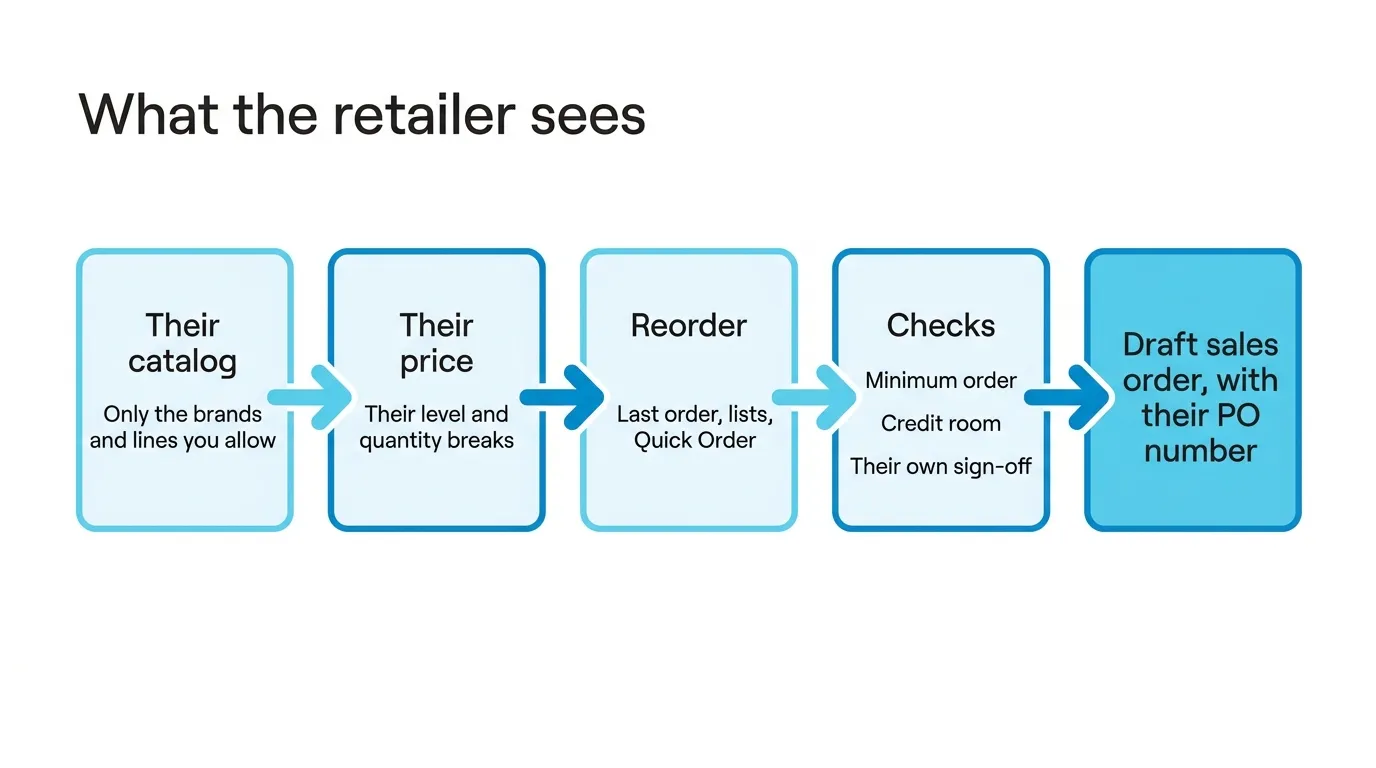
At checkout the order has to clear three checks: your minimum order, the retailer’s credit room, and their own sign-off if their company wants a colleague to approve it. Then you get a draft sales order with their PO number on it, and nothing moves until someone approves it. Keep that for new accounts. A wrong price or a missing catalog rule shows up in the first few orders, and you want a person to see it before the warehouse does.
Do you need one?
If you have three wholesale accounts, I wouldn’t build a portal. A shared spreadsheet or Shopify’s own B2B will do, and under about $1M on one channel Zoho Inventory or inFlow will fit you better than we do. It starts to pay when you sell to dozens of retailers at different prices, from stock that’s also selling somewhere else.
If that’s you, book a demo and I’ll show you the portal the way one of your retailers would see it.