
Ordering on Your Supplier's Dates: Size Each Order to the Next Arrival
If a supplier only takes orders on certain dates, or you’ve agreed with them when stock will land, size each order to last until the next arrival and no further. Pin the dates, set the lead time, and let the order cover demand from its own arrival to the next one, plus a few safety days, after what’s already on order. A reorder point can’t do that, because it doesn’t know another order is coming.
The usual setup: you buy from a brand a few times a year, on arrivals agreed in advance. A forecast built on lead times and transit times sees the next order and the stock already on open purchase orders. It doesn’t see the orders your plan says you’ll place later in the year. So every time you run it, it suggests stock the next shipment was going to bring. The year adds up to far more than you meant to buy.
It shows up for anyone buying on their suppliers’ calendar. If you reorder from a supplier whenever stock dips and it turns up in a week, you don’t have it, and a reorder point in a spreadsheet (or inFlow) is all you need.
A five-minute walkthrough of buying on your suppliers’ calendar, on an outdoor gear distributor we made up. The part on supplier order dates starts at 0:35.
Watch on YouTube. Narrated with an AI voice; the distributor, its people and its numbers are made up.
Why one days-of-stock setting fails
Take a brand with arrivals on 1 March, 1 May and 1 October (dates made up). The order that lands on 1 March has to last 61 days. The one that lands on 1 May has to last 153. A single days-of-stock setting gives both the same cover, so the first order is too big and the second runs out in the summer.
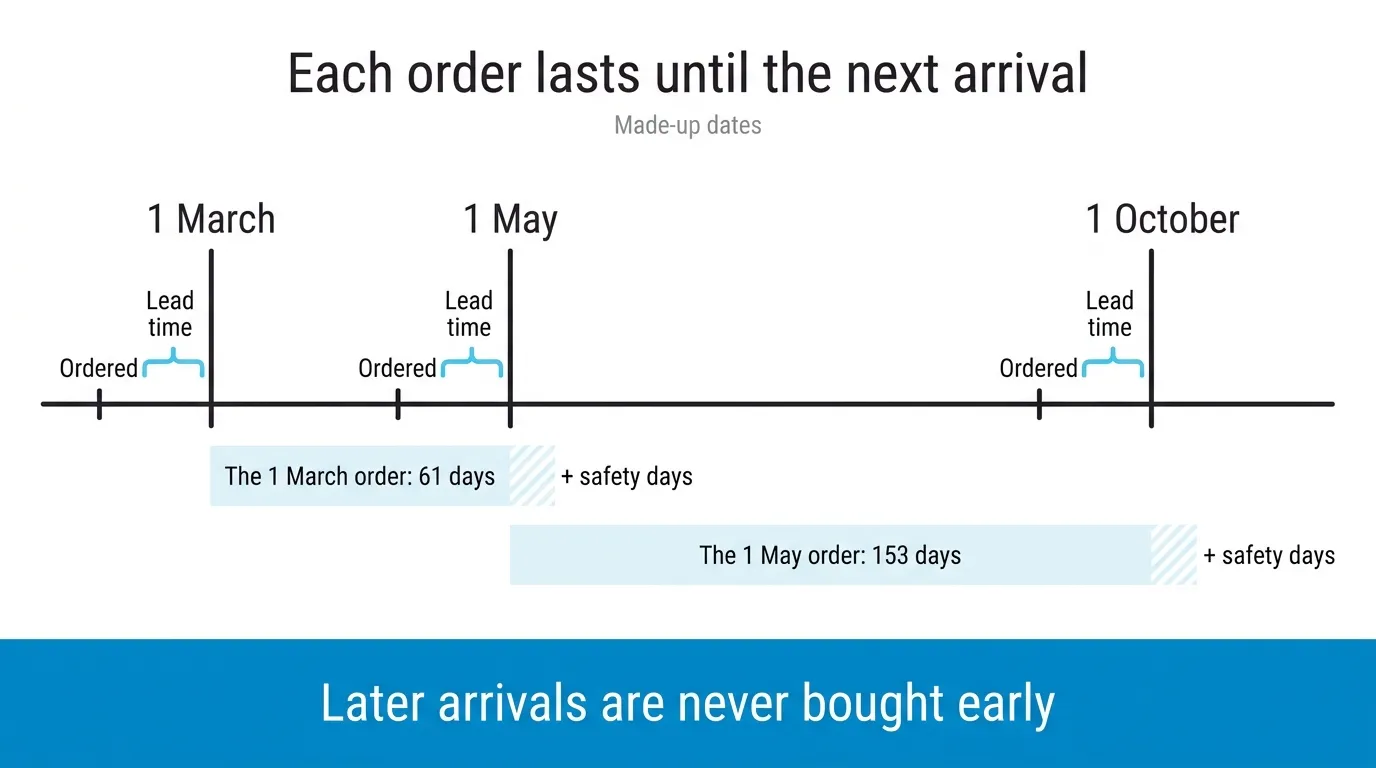 Each order is placed a lead time before it lands and covers only the stretch to the next arrival.
Check cover product by product
I also run a company that resells other brands’ products. We placed an opening order with a baby-products brand that has a long lead time. By January sales were picking up, and the order as a whole looked like about 12 months of stock, which is still a lot. One of its most popular items had already sold out. That supplier has no minimum, so I wanted that item reordered on its own, as a small order. With a lead time that long I never want to run out, because it can ruin the relationship with the supplier.
A brand total can say you’re covered for a year while your best seller is gone. Size the order to the next arrival item by item, and when one item runs short early, top it up on its own rather than pulling the whole order forward.
What do you set on the supplier?
You tell SKU.io whether that supplier is ordered on a steady rhythm, on the supplier’s own order dates, or on arrival dates you agreed, or none of those. Order dates and arrival dates are a lead time apart, so put the lead time in first; products that come by air keep their own. The guide has the clicks.
Order dates or arrival dates comes down to what the brand commits to. If they give you a window to order in, use order dates. If you’ve agreed when goods arrive and the timing of the order is yours, use arrival dates. Given the choice, I’d always plan on arrivals. Your customers never see the day you ordered.
When you build a forecast, the order that’s due covers demand up to the next planned arrival, plus safety days, after stock already on open purchase orders. Order before the date and it only tops you up until that order lands.
A product setting that asks for more days of stock can’t push the order past the next arrival; if you want more cushion, it goes in safety days.
Set the safety days from how late that brand’s shipments usually run, not a round number. If they’re usually a week late, that’s seven. If one order in three misses by a month, safety days won’t save you, and you need another arrival in the plan.
Next year on one screen
Behind the forecast there’s a 12-month plan, one line per planned order: its dates, whether it’s been ordered, how long its stock lasts and roughly what it’s worth. Placed orders show their real total, the next one the live suggestion, and the rest are projected from demand. I’d have it open on any call with a brand about next year’s shipments, because they’ll ask about the year, not the next order.
Raise the purchase order from the plan and the date locks to it. If the order has no expected arrival yet, it takes the planned one, which is what puts it in the right month of your open-to-buy and dates it in your list of stock on the water. Delete the order and the date unlocks.
The dates don’t roll over
You add the dates yourself, three at a time if they’re evenly spaced. They don’t repeat into the next year. After the last one, the supplier goes back to days of stock and the forecast asks for the next date. It’s a small job once a year, best done the day you agree next year’s shipments with the brand, while the email is still open.
If you plan a few suppliers like this in a spreadsheet now, book a demo and bring next year’s dates for one of them. We’ll load them and open the 12 months.