
Reps Taking Orders on the Road Without Overselling
Field reps oversell because they take orders against a copy of the stock: a shared spreadsheet, last night’s export, or a sales app that syncs into the inventory system later. The fix is for the rep’s order to go into the same system that holds the stock, at the dealer’s own prices, and to claim the stock the moment it’s approved. In SKU.io a rep orders from the dealer visit or opens the dealer’s own portal to order for them, and approval allocates what’s on the shelf and backorders what isn’t. It’s the piece of running a field sales team where a copy of the data costs the most.
A four-minute walkthrough of running a field sales team, on an outdoor gear distributor we made up. The part on the stock a rep sees at the dealer starts at 2:17.
Watch on YouTube. Narrated with an AI voice; the distributor, its people and its numbers are made up.
Eleven at night, two reps, one spreadsheet
The clearest description I’ve heard came from an operations lead at a food business that sells to restaurants through its own reps:
“When our wholesale reps are entering orders at 11 o’clock at night as their chefs are getting them in… we tend to oversell because they’re both looking at the spreadsheet, but obviously they’re not going to sit there and deduct every single product as they’re entering orders.”
Each rep read a number that was true when they read it. Neither order showed up in the spreadsheet until somebody remembered to subtract it, and at 11 at night nobody does.
The fix sounds obvious: put the orders into the system that holds the stock, and it can’t sell what isn’t there. The catch is in when. If reps take orders all week and someone enters them on Friday, the system still oversells, just with better records of it. It only protects stock that it hears about at the moment the rep promises it. So the real question for a distributor isn’t which software, it’s whether the rep can enter the order at the counter.
The other way reps get it wrong: price
Stock isn’t the only thing a separate sales app loses. Any app that keeps its own copy of the price list carries only the rules it was built to carry. A dealer’s tier, a quantity break, a price that drops at a case: whichever one the copy is missing, the order lands at the wrong price, and the office corrects it by hand after the dealer has already agreed to a number.
Wherever a rep orders has to price from the same tiers and quantity breaks as every other order for that dealer. That rules out any phone app that keeps its own price list, and it’s the reason I’d take a plainer screen on the real data over a nicer one on a copy.
Two places a rep can type the order
The first is the visit itself, in the CRM module (a paid add-on, covered in field sales CRM for distributors). Before the rep walks in, the visit shows the dealer’s last order and how much of each product is in stock now. Reorder these turns that last order into a new sales order at the dealer’s prices today, not at what they paid last time, and the rep edits from there. That’s the one I’d expect reps to use most, because so many dealer orders are last month’s order with two lines changed.
The second is the dealer’s own portal. Some dealers will place their own orders there. Plenty of distributors tell me theirs never will and the rep is the order form, so Order as this dealer opens the portal as one of the dealer’s buyers: their catalog, their prices and breaks, their stock. The rep builds the cart and places it, or leaves it for the buyer to finish. I’d use this one when the dealer is standing next to the rep and wants to scroll the range. One warning for reps who can see costs: the session opens with Show margins on, so switch it off before turning the screen around.
Either way the order prices through the dealer’s tier and quantity breaks, the dealer’s credit limit still applies, and the order is credited to the rep, so it counts toward their sales targets, and an order raised from a visit links back to that visit.
What approval does to the stock
A draft order doesn’t hold anything. Approval does. When a sales order is approved, SKU.io works through it line by line (how allocations work). Stock on hand at that warehouse is allocated to the line, which lowers Available, the number every other order sees. Whatever can’t be covered from stock becomes a backorder, linked to an incoming purchase order when there is one.
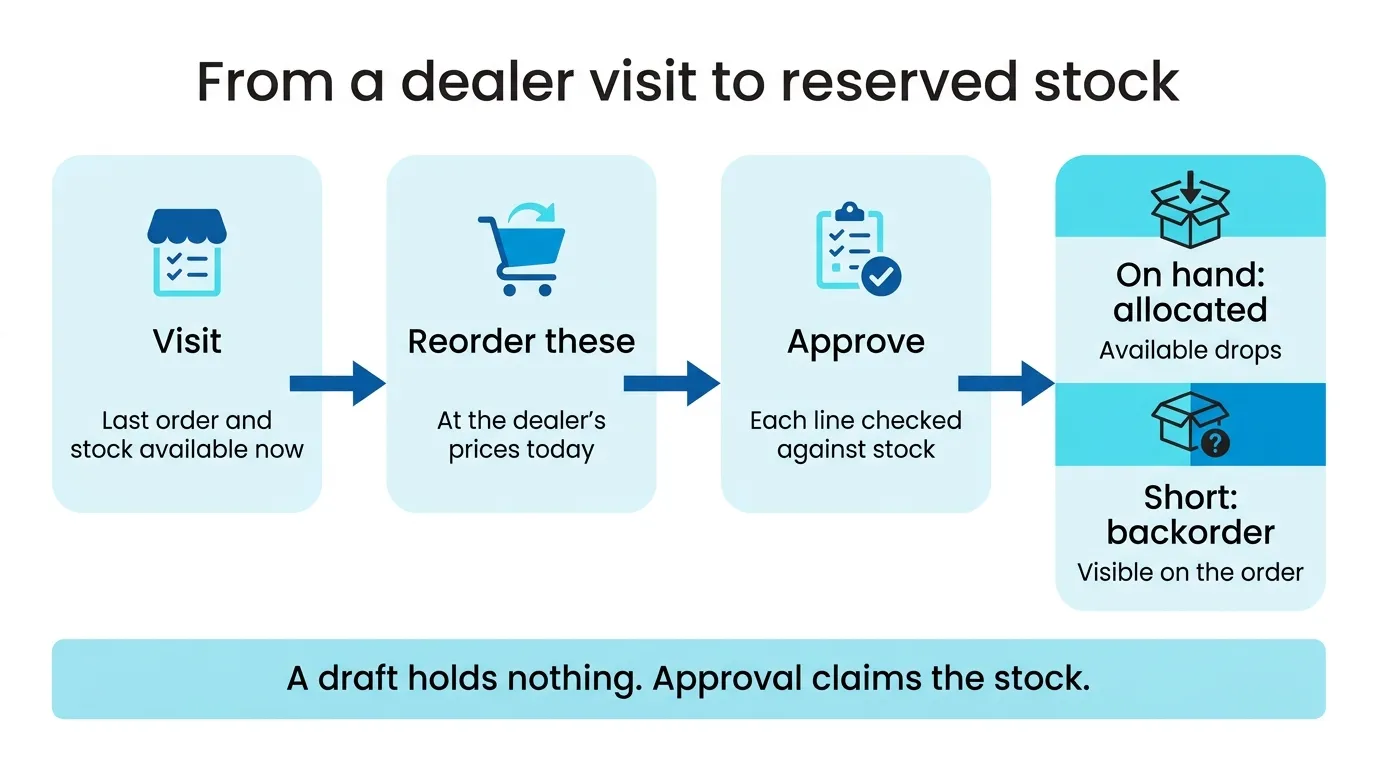
“It won’t let you oversell” needs one qualification. SKU.io lets you approve a line it can’t fill, because sometimes the dealer wants it on backorder. What it won’t do is sell the same unit twice. If two reps order the last twelve units at eleven at night, whoever approves first gets them, and the second order shows the shortfall as a backorder on that line. The rep sees it on the order. Then it’s a conversation about a backorder now, instead of a short box a week later.
That’s why I’d tell reps to approve in the store when the dealer says yes, not batch the drafts for the evening. A draft sitting in a rep’s queue holds nothing, so two of them can still promise the same units.
With one rep and a handful of wholesale accounts, typing the order in the same afternoon is fine, and I wouldn’t pay for any of this. A single-channel store under $1M doesn’t have the problem at all; Zoho Inventory or inFlow will hold its stock for less. Where it pays is the business in the quote at the top: several reps, nights, a shared sheet. If that’s yours, book a demo and bring one night’s texts. We’ll enter them as reorders on the call and you can watch Available move.