Hold an acknowledgment when an order isn't in stock
An acknowledgment (855) tells a retailer you accept its purchase order. By default SKU.io accepts every line as soon as the order imports, whatever you have in stock. Turn on Send only when in stock for a retailer, and its acknowledgment goes out by itself only when every line is in stock. When a line is short, SKU.io holds the acknowledgment and alerts you, and the retailer hears nothing until you decide.
Before you begin
- Connect SPS Commerce.
- Turn on Send order acknowledgments (855) to SPS Commerce on the connection's Sync settings. If SPS Commerce acknowledges your orders with its Auto-Acknowledge feature, have SPS Commerce turn that off first, or the retailer gets two acknowledgments for each order. See Send order acknowledgments (855).
- The retailer is listed under Trading partner. It appears there after its first purchase order, or once you add it by ID.
Turn it on for a retailer
- Go to Apps & Integrations, search for SPS, and choose SPS Commerce.
- Open your connection, then click Settings.
- Under Settings, click Trading Partners, and scroll to the Order acknowledgments (855) card.
- On the retailer's row, turn on Send only when in stock.
- Click Save Changes.
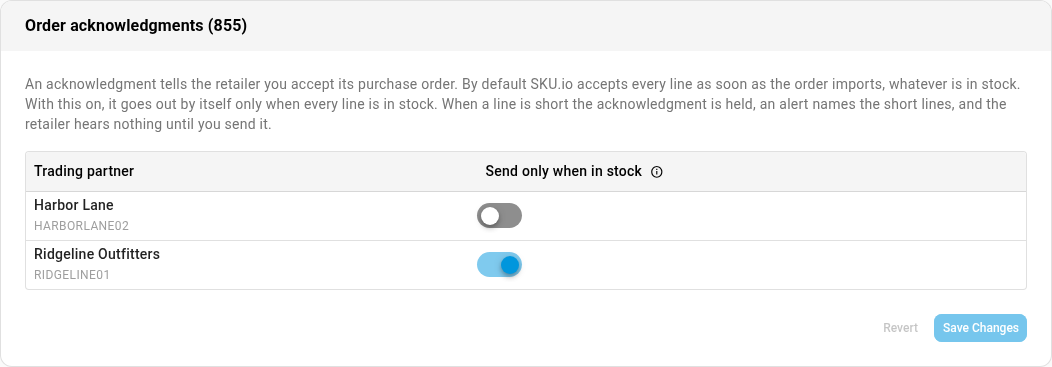
It's off for every retailer until you turn it on, including a new retailer. When the connection doesn't send acknowledgments, the card says the setting has no effect yet and links to the Sync tab.
What counts as in stock
A line is in stock when its sales order has units on hand set aside for everything the acknowledgment accepts. Units already shipped count too.
| These don't count | Why |
|---|---|
| Stock on its way to you | It isn't on hand yet |
| A dropship line your supplier ships | It's your supplier's stock |
| Stock in an Amazon-managed warehouse | SKU.io doesn't set it aside for the order |
| A pre-order product before its release date | It can't ship yet |
| A line you reduced or removed on the sales order | The acknowledgment would still accept what the retailer ordered |
A purchase order split by store or distribution center is checked across all its sales orders. A bundle is in stock only for as many as its scarcest component makes.
Deal with a held acknowledgment
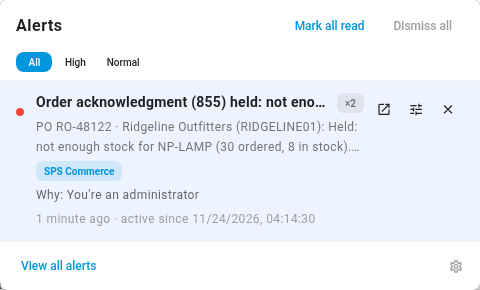
When a line is short, SKU.io raises an Order acknowledgment (855) held: not enough stock alert that names the purchase order, the retailer and the short lines.
On the connection's Documents page the acknowledgment shows Held (not in stock). Hover over the status to see what's short.
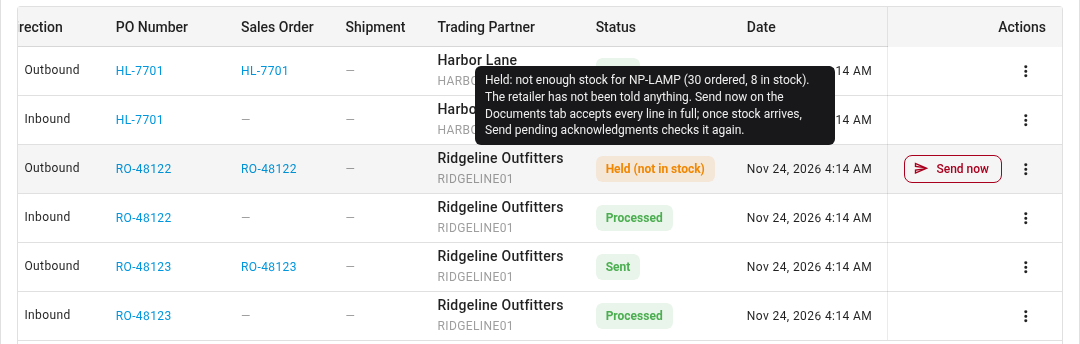
A held acknowledgment is never sent by itself, even after stock arrives. Check the retailer's EDI guide for how soon it expects one.
Send it once the stock is there
- Open your connection, and click Purchase Orders in the list of sections on the left.
- Click Send pending acknowledgments.
SKU.io checks each held acknowledgment again. One whose lines are all in stock now is sent. One that's still short stays held, and the message says how many, for example Sent 1 acknowledgment, 1 held: not enough stock.
Accept the order anyway
Do this when you know you can fill the order, for example from a delivery due before the ship date.
- Open your connection, click Documents in the list of sections on the left, and find the held acknowledgment.
- Click Send now on its row.
- Read Accept this order in full?, and click Accept and send.
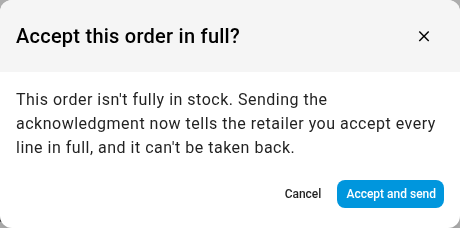
The retailer is told you accept every line in full, and that can't be taken back. SKU.io never sends a backordered or partly accepted line. If you can't fill a line, agree the change with the retailer first.
Resend failed, for several documents at once, skips held acknowledgments, because each one is its own decision.
When a hold ends
The alert clears when the acknowledgment is sent. It also clears if you turn off Send order acknowledgments (855) to SPS Commerce, which changes a held acknowledgment to Not sent.
Turning off Send only when in stock doesn't send anything by itself. A held acknowledgment stays held until you use Send pending acknowledgments or Send now.
Next steps
- Choose what SPS Commerce sends
- Track and resend SPS Commerce documents
- Handle purchase orders from SPS Commerce
Video transcript
An acknowledgment is your yes to a retailer's purchase order. By default, SKU sends it at once, whatever you have on the shelf. You can make it wait for stock, retailer by retailer. In your connection's settings, under Trading Partners, find Order acknowledgments. Turn on Send only when in stock for the retailer, then click Save Changes. When a line is short, SKU keeps the acknowledgment back. An alert names the short products. Open Documents, and look for Held, not in stock, on the order's row. Hover over it for the reason. The retailer has heard nothing yet. If you know you can fill the order, click Send now. Read the question first. It accepts every line in full, and it can't be taken back. Click Cancel, and nothing is sent. Nothing goes out by itself later, even after your stock arrives. When you're ready, open Purchase Orders, and click Send pending acknowledgments. SKU checks every one again. The short ones stay held.