Set a retailer's document rules
Some retailers set rules of their own for ship notices (856) and invoices (810): a ship notice that only goes once the truck has the shipment, a load number in a fixed format, location numbers with their leading zeros. Retailer document rules turns each rule on for the retailers that ask for it. A retailer with none chosen is unaffected.
These rules follow how a retailer described its requirements. The file layouts behind them are not confirmed with SPS Commerce. Until SPS Commerce confirms them against the retailer's real 856 and 810 specifications, don't use these rules for a live retailer. The first real files may need changes in SKU.io before they work.
Before you begin
- Connect SPS Commerce. A retailer appears in the settings after its first purchase order arrives, or once you add it by ID under Flow by retailer.
- Have the retailer's 856 and 810 guides to hand. Choose only the rules they ask for.
Choose a retailer's rules
- Go to Apps & Integrations, search for SPS, and choose SPS Commerce.
- Open your connection, then click Settings.
- Scroll to the Retailer document rules card.
- Find the retailer under Trading partner, and open its Rules list.
- Choose each rule the retailer's guides ask for.
- Click Save Changes.
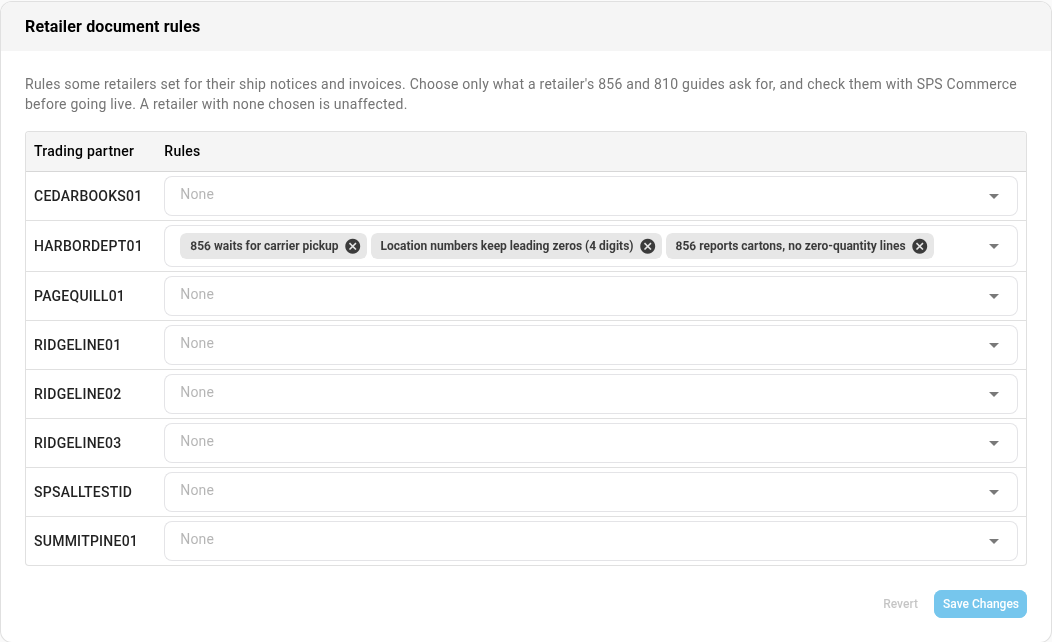
The rules
| Rule | What it does |
|---|---|
| 856 reports cartons, no zero-quantity lines | The ship notice always lists cartons, whatever the shipment's ship notice structure, and leaves out lines that shipped nothing. The ship notice waits until packing is finalized |
| 856 waits for carrier pickup | The ship notice is held until someone records the carrier pickup, and it's dated the pickup day. See Record a carrier pickup |
| Ship notice number is a TMS Shipment ID (S + 9 digits) | The shipment needs the retailer's load number, an S followed by 9 digits, in Ship notice / load #. The ship notice is held until it has one. One ID can cover shipments to several distribution centers |
| Each freight 856 needs its own bill of lading | A freight shipment's ship notice is held until the shipment has its own Bill of lading #. A UPS shipment doesn't need one |
| UPS: one 856 per carton | A UPS shipment goes out as one ship notice per carton. The invoice follows once every carton's ship notice has gone |
| Location numbers keep leading zeros (4 digits) | Store and distribution center numbers go out as 4 digits, for example 0089, on the ship notice and the invoice |
| 810 per shipment, destination in ST and BY | The invoice names the destination as both the ship-to and the buying party. An invoice that bills more than one shipment isn't sent |
When a rule holds the ship notice, the invoice for that shipment waits for it too.
SKU.io works out UPS from the shipment's carrier, its SCAC (UPSN, UPSS or UPSC), or a shipping method or carrier name with UPS in it. UPS Freight counts as freight, not UPS.
UPS: one 856 per carton can't be combined with a retailer on the combined 857. See Send a retailer a combined 857.
On the Receive only flow, SKU.io sends no ship notice, so the ship notice rules don't hold anything there.
Fill in a load number or bill of lading
When a rule needs a value on the shipment:
- Open the shipment, and click its Cartons tab.
- Under Freight details, fill in Ship notice / load # (for the TMS Shipment ID), or Bill of lading #.
- Click Save packing. The freight details save with it.
A load number in the wrong format is refused with: This retailer's ship notice number is its TMS Shipment ID: S and 9 digits, for example …
A held ship notice
When a rule holds a shipped shipment's ship notice, SKU.io raises a Ship notice held alert and sends an email with an Open the shipment button. The message names the purchase order, the retailer and the shipment, then says what's missing.
| Message ends | What to do |
|---|---|
| This retailer takes the ship notice only after the carrier has the shipment. Record the carrier pickup on the shipment's Cartons tab and the ship notice is sent then. | Record the carrier pickup when the truck leaves |
| Ship notice number … isn't a TMS Shipment ID. Enter the S and 9 digits from the retailer, for example …, in the Freight details on the shipment's Cartons tab and the ship notice is sent then. | Fill in Ship notice / load # as above |
| This retailer needs a bill of lading on every ship notice. Enter this shipment's own bill of lading in the Freight details on its Cartons tab and the ship notice is sent then. | Fill in Bill of lading # as above |
The same message shows on the shipment's Cartons tab, and the ship notice step reads held. Once the missing piece is in, the ship notice goes out and the alert resolves.
An invoice that bills more than one shipment, for a retailer with 810 per shipment, destination in ST and BY, raises an Invoice 810 not sent alert: Invoice … bills more than one shipment, and this retailer takes one 810 per shipment. Void it and invoice each shipment on its own. Void the invoice, then invoice each shipment on its own. The alert closes when the invoice is voided.
Next steps
- Record a carrier pickup
- Ship multi-store purchase orders by store: one order per distribution center.
- Pack and label SPS Commerce shipments
- SPS Commerce reference