Handle an SPS shipping advice alert
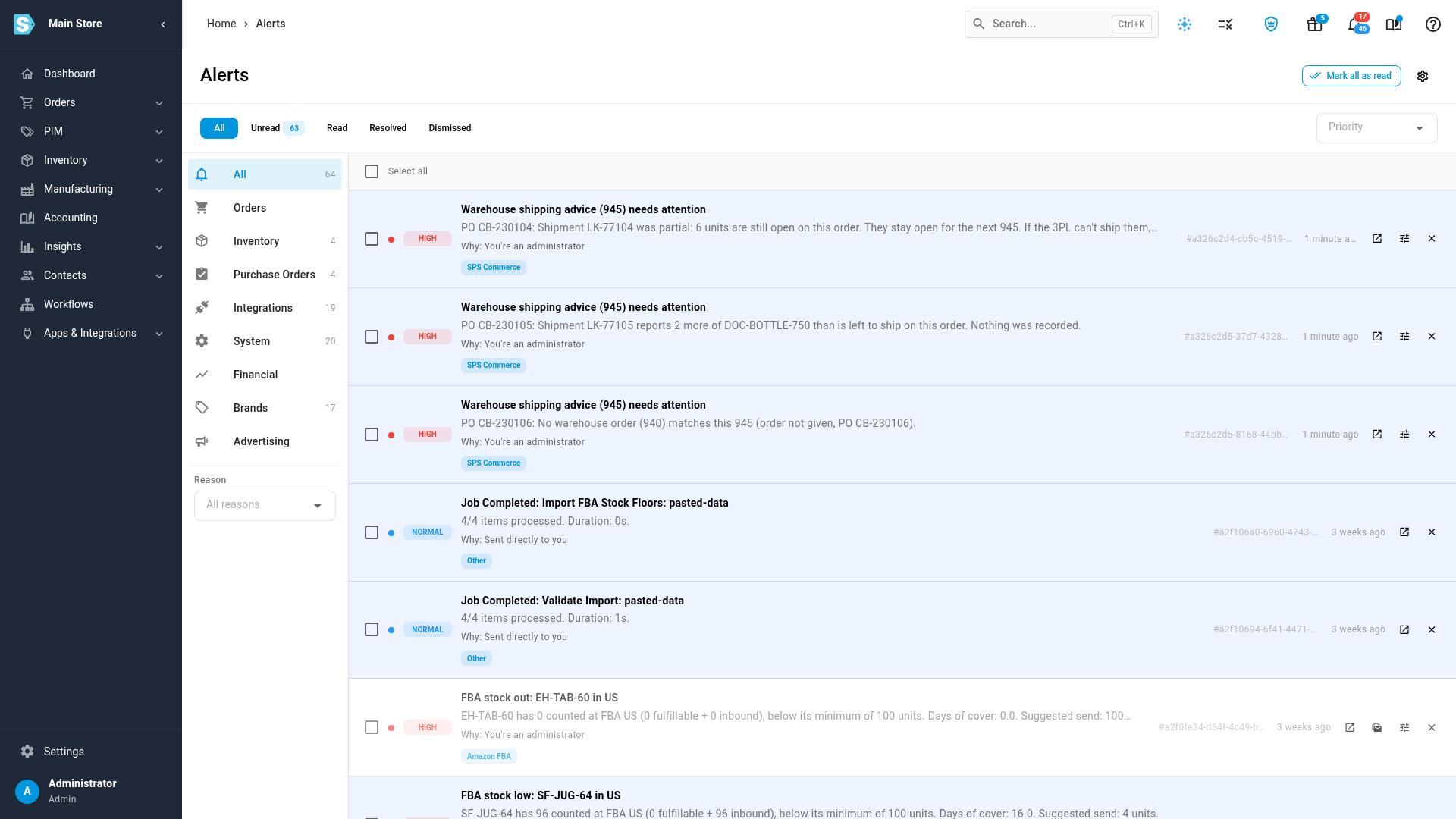
When a 3PL's shipping advice needs a person, SKU.io raises a high-priority alert titled Warehouse shipping advice (945) needs attention and sends an email. There are two kinds: a short-ship, where the 3PL shipped less than it was asked to, and shipping advice that failed, where nothing was recorded for that shipment.
The 940 and 945 file layouts are not confirmed with SPS Commerce. Don't use this flow for a live retailer until SPS Commerce provides the real layouts. How a real 3PL reports a short-ship or a cancelled order may also change what you see here. See Send SPS orders to a 3PL by warehouse order.
Before you begin
- You need to receive the alert. See Choose which alerts your team gets.
Open the alert
- Click the bell at the top of the screen, then click View all alerts.
- Read the message under the title. It starts with the purchase order number and says what's wrong.
- Click the open button (a box with an arrow) on the alert to go to the connection's Documents tab.
The email's Open EDI documents button goes to the same place. For more on working with alerts, see Read and act on alerts.
A short-ship
The message reads: Shipment <ID> was partial: 6 units are still open on this order. They stay open for the next 945. If the 3PL can't ship them, cancel or re-route what is left.
What did ship is recorded. What didn't ship stays open, and SKU.io cancels nothing by itself.
- Ask the 3PL whether the rest is coming.
- If it is, do nothing. The next shipping advice records it.
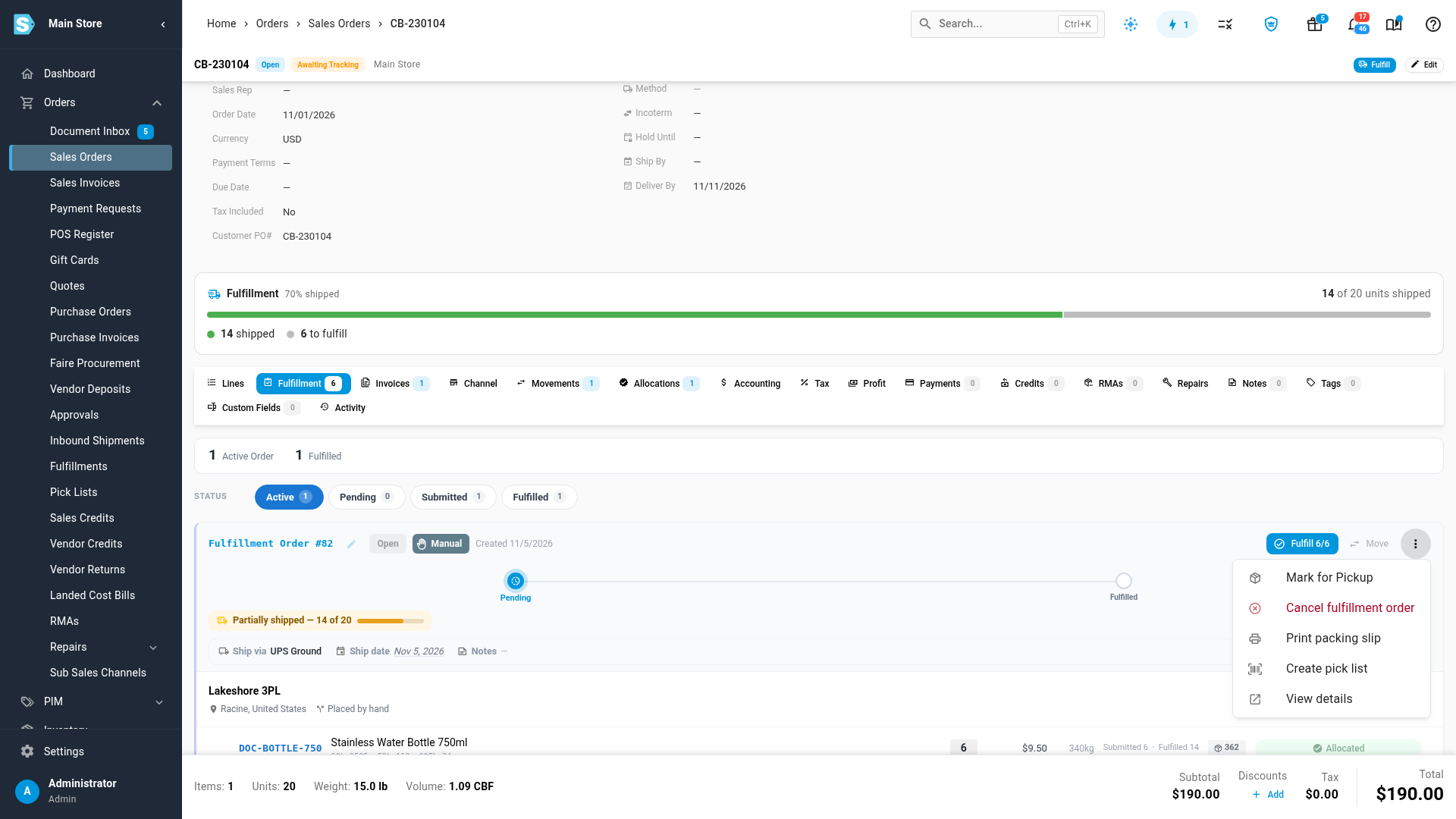
- If it isn't, open the sales order and click its Fulfillment tab.
- On the fulfillment order, open the ⋮ menu and choose Cancel fulfillment order.
SKU.io sends the 3PL a cancellation for what hasn't shipped. To ship the rest from somewhere else, cancel it first: Move isn't available on an order the 3PL already has.
If Cancellations is off for that warehouse, SKU.io refuses and shows: <Warehouse> doesn't take cancellation 940s. Contact the 3PL to stop this order, then void it locally.
A short-ship alert stays open after the rest ships. Dismiss it once you've dealt with it.
Shipping advice that failed
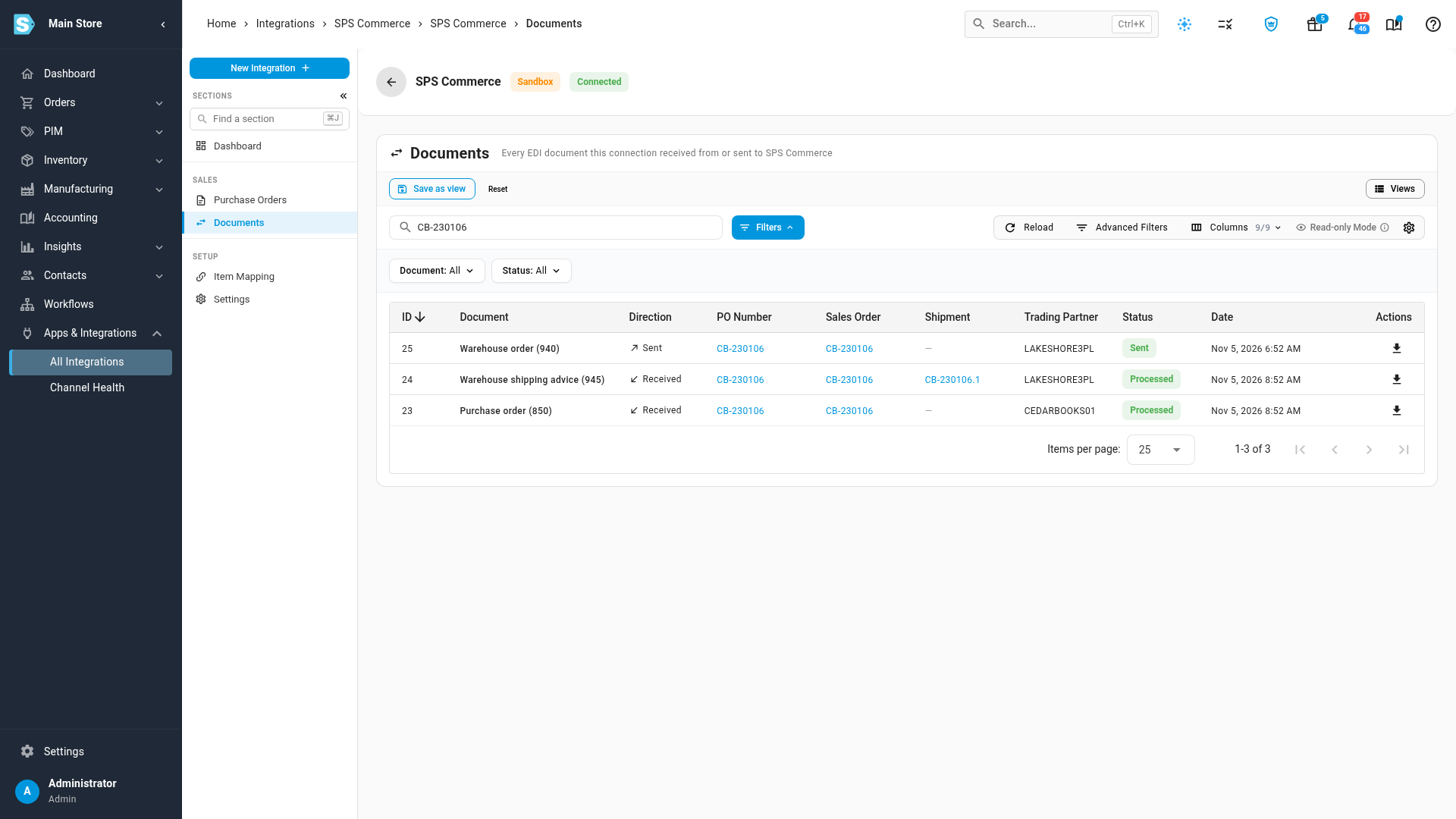
Nothing is recorded for a shipment SKU.io can't apply. The document shows Failed, and the alert carries the same message you see when you hover over Failed.

- Find the message below and fix the cause.
- On the Documents tab, click Process again, if the table says to.
- Click Reload after a moment.
When the status changes to Processed, the shipment is recorded and the alert resolves on its own.
Process again re-reads the file SKU.io already has. When the file itself is wrong, it fails the same way, so ask the 3PL to send a corrected one instead. A corrected file arrives as a new document. Dismiss the old alert once it's in.
| Message | What it means | What to do |
|---|---|---|
| No warehouse order (940) matches this 945 (order …, PO …). | SKU.io has no warehouse order for it, often because the order hadn't been released yet | Release the order, then click Process again. If it isn't your order, ask the 3PL |
| Several warehouse orders are open for PO … and this 945 doesn't say which one it answers. | One purchase order has more than one open warehouse order | Ask the 3PL to resend it naming the order |
| Shipment … reports 2 more of … than is left to ship on this order. Nothing was recorded. | The 3PL reports more than is left. Nothing from that shipment is recorded | Check with the 3PL. Ask for a corrected file |
| Shipment … has an item that isn't on the warehouse order: …. | It names an item the 3PL wasn't asked to ship | Check with the 3PL what shipped. Ask for a corrected file |
| The 3PL reports shipment … shipped, but this order was cancelled in SKU.io. Check with the 3PL what left the warehouse, and record it by hand if it shipped. | The goods may have left after you cancelled | Check with the 3PL. If they shipped, record the shipment by hand |
| Shipment … has tracking number …, which is already on shipment …, so nothing was recorded for it. Check with the 3PL. If it is a separate shipment, record it by hand. | A new shipment reuses a tracking number | Check with the 3PL. If it's a separate shipment, record it by hand |
| Shipment … reports nothing shipped. Check with the 3PL, then cancel or re-route what is left. | Every quantity on the shipment was zero | Check with the 3PL, then cancel what's left |
| This 945 has no shipment ID, so it can't be recorded safely. Ask the 3PL to resend it with one. | SKU.io can't tell whether it's a repeat without an ID | Ask the 3PL to resend it |
| This 945 has a ship date that can't be read: …. | The date isn't readable | Ask the 3PL to resend it |
| Failed to parse the 945 shipping advice: … | The file can't be read | Ask the 3PL to resend it. Process again re-reads the same file |
| The order behind warehouse order … no longer exists. | The order was deleted after the warehouse order went out | Check with the 3PL what shipped |
| This 945 stopped partway through several times, so SKU.io stopped retrying it. Check whether its shipment was recorded, then use Process again. | SKU.io tried three times and stopped | Check the order, then click Process again. A shipment already recorded isn't recorded twice |
Record a shipment by hand
Use this only when a message tells you to, or after the 3PL confirms a shipment SKU.io can't apply. On the sales order's Fulfillment tab, click Fulfill on the fulfillment order and enter what shipped. Don't do this for a shipment that's still coming as shipping advice, or it could be counted twice.
Next steps
- Read SPS warehouse orders and shipping advice
- Send SPS orders to a 3PL by warehouse order
- SPS Commerce reference
Video transcript
When a 3PL's shipping advice needs a person, you get a high priority alert and an email. The title is always the same, and the message says what's wrong. This one is a short-ship. The 3PL shipped part of the order, and six units are still open. They wait for the next shipping advice, and nothing gets cancelled. If the 3PL can't ship the rest, stop it from the order's Fulfillment tab. In this menu, Cancel fulfillment order is the option you want. SKU.io tells the 3PL to stop what's left. A failed one records nothing until you act. On the Documents tab, hover over the status to read why. Here no warehouse order matched, because this order hadn't been released yet. It's released now, so click Process again. Give it a moment, then click Reload. The status changes to Processed, the shipment is recorded, and the alert resolves on its own.