NuORDER
NuORDER is the wholesale ordering platform where your retailers' buyers place orders with your brand. Connecting your NuORDER brand portal to SKU.io turns each retailer order into a sales order you fulfill like any other, and keeps NuORDER showing what you can ship and what has shipped.
Get started
Before you begin, you need admin access to your NuORDER portal, an API consumer key and consumer secret from NuORDER's Admin → API Management, and permission to add integrations in SKU.io. Then work through these steps in order:
- Connect NuORDER and approve SKU.io in NuORDER.
- Map NuORDER warehouses and send stock, before retailers start ordering.
- Link NuORDER sizes to SKU.io products.
- Set up NuORDER order, shipping and email settings.
After that, the day-to-day guides cover the orders, shipments and checks that need you.
What moves each way
| Direction | What moves | When |
|---|---|---|
| In from NuORDER | Retailer orders, once they reach the status you choose (Approved or Pending) | Every 15 minutes, or when you click Refresh from NuORDER on the Orders page |
| In from NuORDER | Changes the retailer or your team make to an order later, including cancellations | With the same order check |
| In from NuORDER | Shipments recorded in NuORDER instead of SKU.io, with their tracking | With the same order check |
| In from NuORDER | Your catalog: every style, color and size | Once a day, or when you click Refresh from NuORDER on the Products page |
| Out to NuORDER | Available-to-sell stock for each NuORDER warehouse you choose stock warehouses for, plus future quantities from open purchase orders when you turn that on. A new connection sends none until you choose | Every minute, whenever the number changes |
| Out to NuORDER | Each shipment, with its tracking numbers | As soon as the shipment is fulfilled in SKU.io |
| Out to NuORDER | Units you cancel on the sales order | When you cancel them, if Send Cancellations to NuORDER is on |
| Out to NuORDER | The Processed status and your SKU.io order number | As soon as the sales order is created, if those settings are on |
Nothing else goes back. SKU.io never changes NuORDER's styles, images or prices, so you keep managing your line sheets and price sheets in NuORDER.
NuORDER is an order source, not a payment processor, so it sends no payouts or fees. The connection's Accounting settings tab points you to Channel Accounting, where you choose the accounts NuORDER sales post to. See Use different accounts per sales channel.
Where to find it
Go to Apps & Integrations → All Integrations. NuORDER is listed under Sales Channels. Open it to reach the NuORDER pages, grouped in the section menu on the left. Some pages, such as Fulfillments and Settings, have tabs of their own.
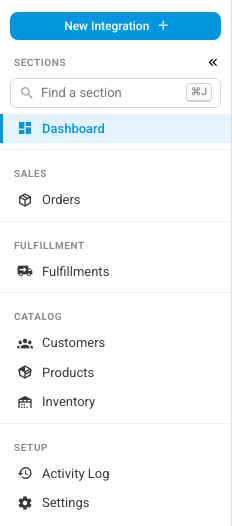
| Page | What you do there |
|---|---|
| Dashboard | Check when each sync last ran, what needs your attention, and the connection's health |
| Orders | See every NuORDER order, and create or update its SKU.io sales order |
| Fulfillments | Follow each shipment to NuORDER, and send or retry the ones that didn't go |
| Customers | See the retailers that order from you, and the SKU.io customer each one became |
| Products | Link each NuORDER size to a SKU.io product |
| Inventory | Compare SKU.io stock with what NuORDER was last sent, and push it now |
| Activity Log | See every change SKU.io made to NuORDER records, and every change it couldn't make |
| Settings | Change the connection, orders, shipping, warehouse, catalog and accounting settings |
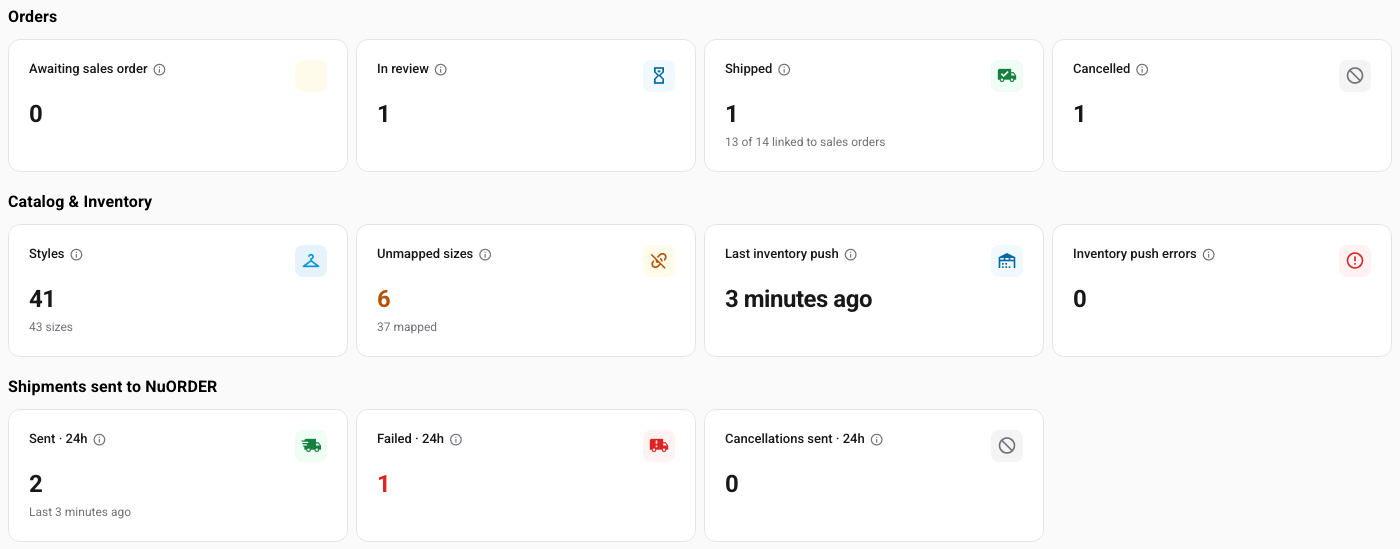
The Dashboard's cards are the quickest way to spot work: orders waiting in review, sizes that aren't linked yet, and shipments NuORDER refused. Each card opens the matching list.
You can connect more than one NuORDER portal, for example one per brand. Each portal is its own connection with its own settings. Pick the one you're working on from the selector at the top of the page. See Manage a connected app for what every connection has in common.
Guides in this section
| To… | Go to… |
|---|---|
| Understand how orders, stock and shipments move between NuORDER and SKU.io before you set anything up | How NuORDER works with SKU.io |
| Connect your NuORDER brand portal with its API keys and approve SKU.io in NuORDER | Connect NuORDER |
| Choose which SKU.io warehouses ship each NuORDER warehouse's orders, and which stock NuORDER is offered | Map NuORDER warehouses and send stock |
| Link each NuORDER size to a SKU.io product, so orders allocate stock and stock goes back to NuORDER | Link NuORDER sizes to SKU.io products |
| Decide when a NuORDER order becomes a sales order, what SKU.io tells NuORDER, which shipping method each order gets and which emails retailers receive | Set up NuORDER order, shipping and email settings |
| Create and update sales orders from NuORDER orders, and fix a change SKU.io couldn't apply | Handle NuORDER orders |
| Make sure shipments and cancellations reach NuORDER, and retry one that failed | Send shipments and cancellations to NuORDER |
| Read the dashboard and Activity Log, test the connection, and pause or delete it | Monitor and manage the NuORDER connection |
| Download your NuORDER sizes as a spreadsheet | Export NuORDER products |
| Look up an order status, an Orders column or filter, a panel on the order page, or a column on the Customers page, and see your retailers | NuORDER orders and customers reference |
| Look up a product status, an inventory push result, or a fulfillment's NuORDER status | NuORDER products, inventory and fulfillments reference |
Related guides
| To… | Go to… |
|---|---|
| Follow a refresh, import or push while it runs in the background | Follow background jobs |
| Check every connection's sync health in one place | Check a connection's sync health |
| Understand how SKU.io handles orders from every sales channel | How channel orders sync |