Use the Receive only flow for a 3PL
Some 3PLs already get a retailer's orders another way, and already send the retailer its ship notices. Receive only lets SKU.io take that retailer's purchase orders and send its invoices without getting in the way: SKU.io sends the 3PL nothing, keeps the stock reserved, and records each shipment when the 3PL's shipment confirmation comes back.
The file layouts behind this flow are not confirmed with SPS Commerce. That includes how the 3PL's shipment confirmation reaches SKU.io, and what it contains. Until SPS Commerce confirms them, don't put a live retailer on Receive only. The 3PL warehouses card shows the same warning. The first real files may need changes in SKU.io before they work.
What SKU.io sends on this flow
| Document | Sent? |
|---|---|
| Warehouse order (940) to the 3PL | No. The 3PL gets the order outside SKU.io |
| Acknowledgment (855) to the retailer | No, unless part of the purchase order is at a warehouse on another flow |
| Ship notice (856) to the retailer | No. The 3PL sends it, whatever Ship notices (856) sent by says |
| Inventory advice (846) to the retailer | No |
| Invoice (810) to the retailer | Yes, once per recorded shipment |
SKU.io doesn't send these orders a warehouse cancellation (940) either, because the 3PL never got a warehouse order from SKU.io.
Before you begin
- Connect SPS Commerce.
- Create the 3PL's warehouse in SKU.io, if you haven't already.
- Get these from SPS Commerce or the 3PL:
- The 3PL's SPS trading partner ID.
- Every trading partner ID the retailer sends its purchase orders (850s) from. Some retailers use more than one.
- Make sure SKU.io's stock at the 3PL's warehouse is accurate. A shipment confirmation can only be recorded against stock SKU.io has reserved.
- Set up the rest before the retailer's first purchase order arrives. The order of the steps below matters.
Step 1: Link the 3PL's warehouse
- Go to Apps & Integrations, search for SPS, and choose SPS Commerce.
- Open your connection, then click Settings.
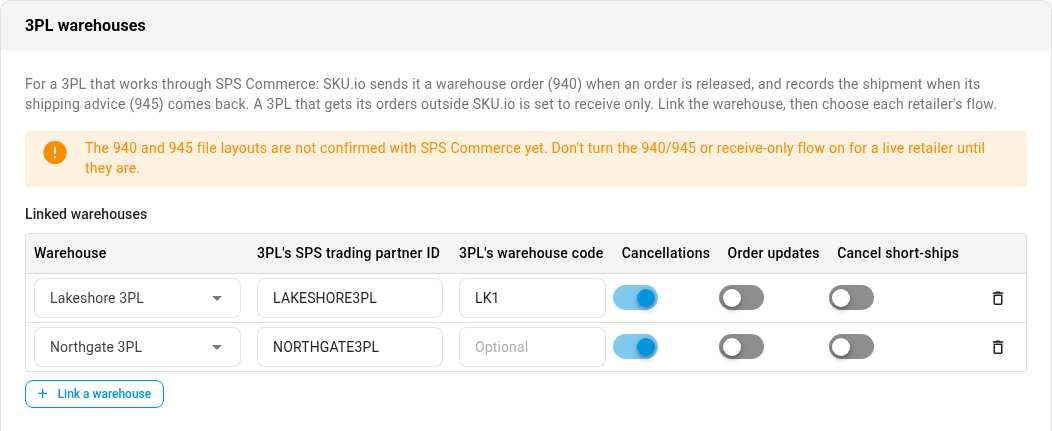
- Scroll to the 3PL warehouses card.
- Click Link a warehouse.
- Under Warehouse, choose the 3PL's warehouse.
- Enter the 3PL's SPS trading partner ID.
Step 2: Set every trading partner's flow in one save
Once any retailer on the connection is on Receive only, SKU.io can't tell whether a new sender is that retailer using another ID. So it holds every trading partner without a chosen flow: their purchase orders aren't turned into sales orders, and nothing is sent for them. Set every partner in the same save to avoid that.
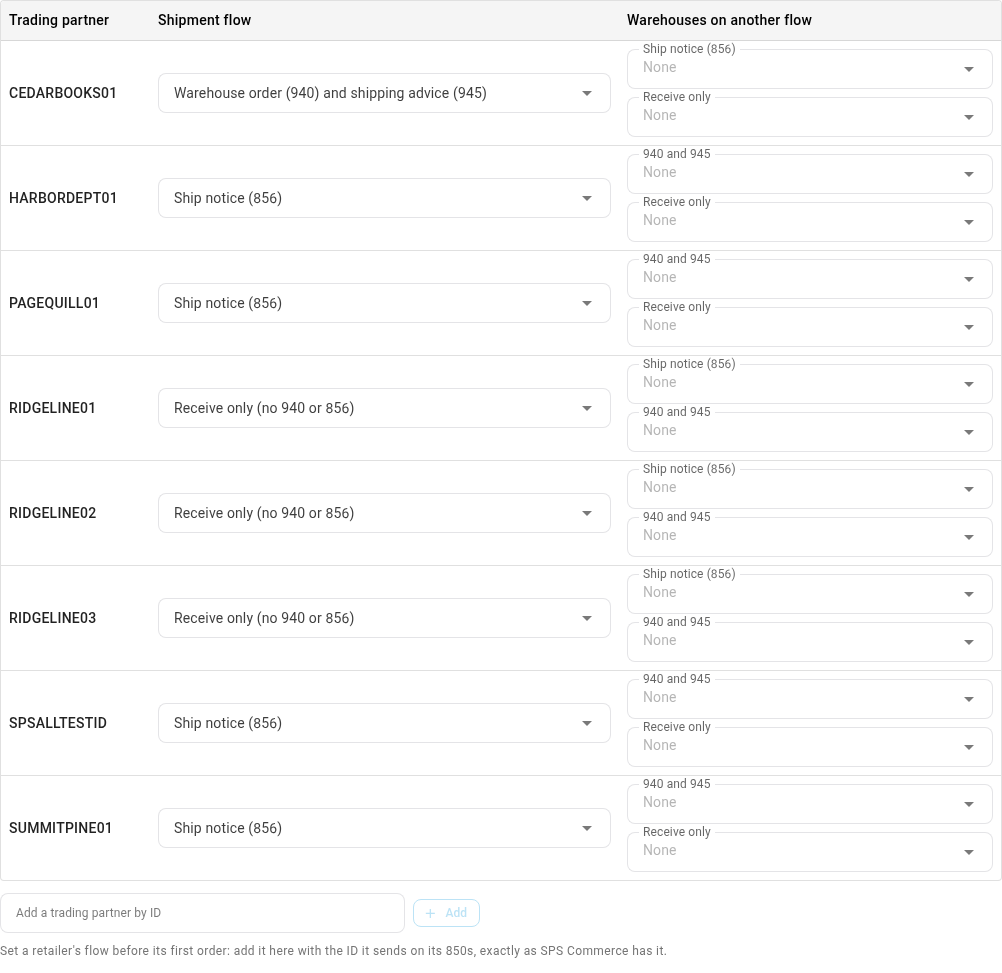
- Under Flow by retailer, if the retailer hasn't sent you a purchase order yet, type its ID in Add a trading partner by ID, exactly as SPS Commerce has it, and click Add. Do the same for every other ID it sends from.
- For each of the retailer's IDs, set Shipment flow to Receive only (no 940 or 856).
- For every other trading partner, choose its Shipment flow. Most stay on Ship notice (856). A partner with no flow shows Choose a flow, and the message Nothing is created or sent for this partner until you choose.
- If the retailer also ships from warehouses that aren't with this 3PL, list them under Warehouses on another flow, in the picker for the flow they use.
- Click Save Changes.
If a warning appears when you save
If a trading partner still has no flow, SKU.io asks first: Hold these trading partners? It names each partner it would hold.
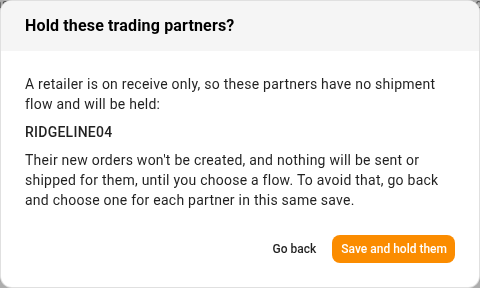
- Click Go back, choose a flow for each partner it names, and save again. This is almost always what you want.
- Click Save and hold them only if you mean to hold those partners. Their new purchase orders wait, and nothing is sent for them, until you choose a flow.
When you choose a held partner's flow later, its waiting purchase orders become sales orders by themselves.
Step 3: Route the retailer's orders to the 3PL
The retailer's orders must be released to the linked warehouse. Set your warehouse routing so they land there. An order released to a warehouse that isn't linked is refused, because SKU.io sends this retailer no ship notice, so nobody would ship it.
If the retailer sends its distribution center as the buying party rather than the ship-to, set that too. See Choose where a retailer's ship-to address comes from.
What a held order looks like
When the order is released to the linked warehouse, SKU.io sends nothing. Instead:
- The fulfillment order shows Submitted — awaiting shipment, and its stock stays reserved.
- On these orders the shipment button reads Fulfill by hand, and it's never the main button. It records a shipment by hand and sends the 3PL nothing.
- A note on the sales order says why: This order reaches its 3PL outside SKU.io, so SKU.io sent the 3PL nothing and sends no ship notice (856). Its stock stays reserved until the 3PL confirms the shipment, and a per-shipment invoice (810) follows that confirmation.
SKU.io treats an order the same way even if nobody releases it, because the 3PL has it either way.


How a shipment is recorded
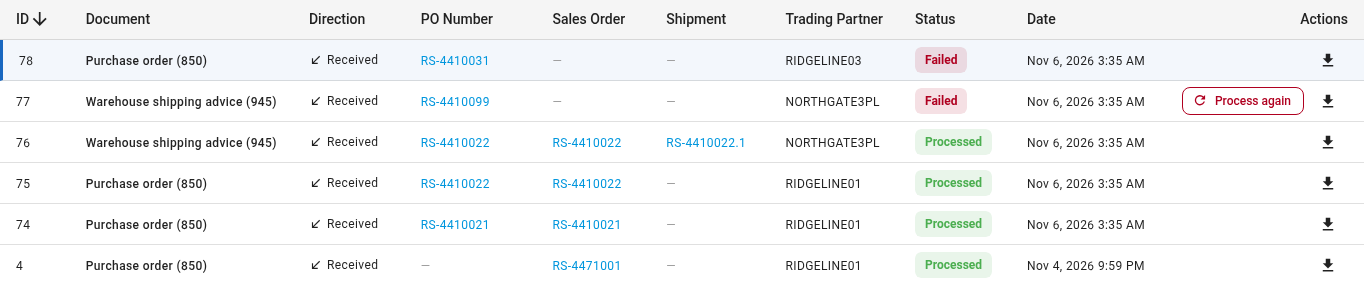
When the 3PL ships, its shipment confirmation arrives on the connection's Documents tab. SKU.io finds the order by its purchase order number, records the shipment with its tracking, and takes the stock out of inventory. Then it sends the retailer the invoice (810) for that shipment.
- Part of the order shipped: what shipped is recorded. The rest stays open for the next confirmation.
- The same shipment arrives twice: nothing more is recorded, and no second invoice goes out.
- One file covers several purchase orders: each is recorded on its own order.
When something needs you
SKU.io raises an alert and sends an email. The alert's message starts with the purchase order number and says what's wrong. To find the document, open the connection's Documents tab and search for that number.
| Alert title | Message starts | What to do |
|---|---|---|
| No shipment confirmation from the 3PL | Order … still has units open with its 3PL, and SKU.io hasn't had a shipment confirmation for them in 14 days. | Check with the 3PL. If it shipped, record the shipment by hand on the order's Fulfillment tab with Fulfill by hand |
| Order changed while with the 3PL | Order … changed in SKU.io, but its 3PL gets its orders outside SKU.io and still has the old version. | Tell the 3PL about the change. SKU.io can't |
| New trading partner needs a shipment flow | Choose a shipment flow for trading partner … in the SPS Commerce settings. | Choose its flow under Flow by retailer, and save. Its purchase order then becomes a sales order by itself |
| Warehouse shipping advice (945) needs attention | No order in SKU.io matches this shipment confirmation (PO …), so nothing was recorded. | If the purchase order hasn't arrived, or failed, fix that. Then click Process again on the confirmation |
| Warehouse shipping advice (945) needs attention | PO … has no order at a warehouse linked to the 3PL on this retailer's receive-only flow. | Move the order to the linked warehouse, then click Process again |
| Warehouse shipping advice (945) needs attention | PO … is at the 3PL's warehouse, but SKU.io has no stock reserved for it… | Bring SKU.io's stock at that warehouse up to date, then click Process again |
| Warehouse shipping advice (945) needs attention | PO … has several orders that could take shipment …, and it doesn't say which. | Record it by hand on the right order. SKU.io doesn't guess |
| Warehouse shipping advice (945) needs attention | This order has a shipment recorded by hand, so SKU.io can't tell whether shipment … is that one or a new one… | If it's a new shipment, record it by hand too. Otherwise dismiss the alert |
| Warehouse shipping advice (945) needs attention | Shipment … was partial: … units are still open on this order. | Nothing, if the rest is coming. Otherwise ask the 3PL |
| Nothing sent: no shipment flow | Shipment … has nothing sent for it, because this trading partner has no shipment flow yet. | Choose the partner's flow. Then send what's owed from the shipment or the Documents tab, because choosing a flow doesn't send it by itself |
| 855 held back | The 855 for PO … wasn't sent, because the order has no warehouse or its trading partner no flow yet. | Once it has, send it with Send Acknowledgment if the retailer expects one |
A document SKU.io wrote before you moved the retailer onto Receive only, such as an acknowledgment or ship notice, isn't sent. It fails on the Documents tab with a reason such as This 856 was not sent, because this retailer is on receive only and SKU.io only sends it the 810., and offers no Resend.
For the other shipping advice messages, see Handle an SPS shipping advice alert.
Cancel an order
SKU.io can't cancel an order at the 3PL, because the 3PL got it outside SKU.io.
- Contact the 3PL and ask it to stop the order.
- Open the sales order, and click its Fulfillment tab.
- On the fulfillment order, open the ⋮ menu and choose Cancel fulfillment order.
- Choose Void from SKU.io only, and click Void.
If you leave Void from SKU.io & <3PL> selected, SKU.io refuses: Fulfillment order #… could not be recalled. followed by why, and selects Void from SKU.io only for you. Click Void again.
The fulfillment order is voided in SKU.io only, and its stock is released. The sales order's units go onto a new fulfillment order that hasn't been released, so cancel or edit the sales order too if they aren't shipping. If the 3PL ships the old order anyway, its shipment confirmation fails with a message that the order was cancelled. Record it by hand if the goods left.
Next steps
- Handle an SPS shipping advice alert
- Read SPS warehouse orders and shipping advice
- Send SPS orders to a 3PL by warehouse order: the flow for a 3PL that takes its orders from SKU.io.
- SPS Commerce reference