
The “best multichannel inventory software” lists mostly test one thing: whether a sale on TikTok Shop lowers the number Walmart shows. That matters, and most of the tools they list can do it. If you sell on Shopify, Amazon, Walmart and TikTok Shop, there’s a second thing to test. Three of those channels run their own warehouses (Amazon FBA, Walmart WFS and Fulfilled by TikTok), and every unit you send to one of them comes off the shelf your other channels sell from. So the software also has to decide how much of your warehouse each network gets, and how much stays home for the orders you ship yourself.
I founded SKU.io, so weigh what I say about it accordingly. I’ve also sold online since 2008, and at my other company we sell on Shopify, Amazon, Walmart and TikTok Shop today. My views below on buffers and sends come from running that business, not from building the product.
Written November 2026. SKU.io behavior is checked against the product’s code and our user docs; marketplace rules and other vendors’ prices against their own pages. Both are linked in “How we checked this page” at the bottom.
Which should you choose?
- Stay with your store’s own connector (Shopify Marketplace Connect, or each marketplace’s app) if you’re under about $1M a year, most sales come from one channel, and you ship everything yourself. Marketplace Connect covers Amazon, Walmart, Target Plus and eBay, with the first 50 synced orders a month free and a $99 monthly cap. TikTok Shop isn’t on its list, so TikTok runs from its own app.
- Choose Zoho Inventory or inFlow if you’re a smaller single-warehouse seller who mainly needs one count and purchase orders. Zoho’s Standard plan is $29 a month billed annually, with a free plan for 50 orders; its pages list Shopify, Amazon and Walmart. inFlow Inventory’s Lite plan is $99 a month billed annually, with Walmart through a partner connector. Neither lists TikTok Shop.
- Look at Linnworks if you list on many marketplaces, including outside the US, and listing and order volume is the main job. Its integrations page lists Shopify, Amazon, Walmart and TikTok. It doesn’t publish prices.
- Choose SKU.io if you’re past about $1M, ship some orders yourself, use at least one of FBA, WFS or FBT, and want each network’s send planned from the same stock your channels and wholesale orders use. It starts at $1,000 a month.
- Switching probably isn’t worth it if a 3PL or a single network ships nearly everything. Then the network holds the count and there’s little left to split.
Where one product can sit
Any of the four channels can sell from your own warehouse. Three of them can also hold your stock in theirs.
| Channel | Ships from your warehouse | Ships from its own network | What it checks you on |
|---|---|---|---|
| Shopify | Yes: you send the quantity | No network of its own | Your own customers |
| Amazon | Merchant-fulfilled offers: you send the quantity | FBA: Amazon keeps the count | Its own seller performance targets on the orders you ship |
| Walmart | Seller-fulfilled: you send the quantity | WFS: Walmart keeps the count | Cancellation rate of 2% or below; out-of-stock counts against you |
| TikTok Shop | Seller-shipped: you send the quantity | FBT: TikTok keeps the count, and ships from it first | In transit within 2 business days, or it's late |
Units at FBA, WFS or FBT mostly sell on their own marketplace. Units on your own shelf are shared by every listing you ship yourself, and every send to a network comes out of them too.
Amazon’s Multi-Channel Fulfillment and Walmart’s Multichannel Solutions can ship another channel’s order out of their stock, and SKU.io can route an order to either. That’s a choice made per order. The channels still don’t share one count.
The number each channel is sent
When the number a channel is sent doesn’t come from stock that’s actually free, each channel sells as much as it can until someone notices. An operations lead at one multichannel brand told me that with nobody watching, they had oversold a single channel by a thousand units. The opposite also happens: a channel sent too little shows out of stock while the product sits on your shelf.
SKU.io builds the number in three steps. I’m using it as the example because it shows what to ask any vendor.
- Available to sell. On-hand stock in the warehouses that channel may sell from, less what’s allocated to open orders, on hold or not sellable, less open backorders. Backorders come off because those customers ordered first and are waiting for the next delivery.
- Bundles from their components. A bundle’s quantity is the smallest number its components allow, so when one component runs out the bundle drops to zero everywhere.
- The channel’s rules. A maximum (a fixed number, or a percentage of available), a minimum, then a buffer taken off. These can be set per channel, per Shopify location, or per listing.
An approved wholesale order is allocated like any other, so every channel’s number drops on its next sync. Listings Amazon fulfills from FBA aren’t sent a number at all; Amazon counts those. How FBA stock and your own warehouse sit side by side is covered in Shopify and Amazon FBA inventory.
Timing is the other half. SKU.io sends Shopify and TikTok Shop a new number every minute, and Shopify is also sent one the moment a product runs out. Walmart gets one every 15 minutes.
Here it is with made-up numbers. Your warehouse holds 300 units of a product. 20 are allocated to orders not yet shipped and 10 are on backorder, so 270 are available to sell. FBT also holds some of this product, and so does FBA.
- Shopify has no rules and is sent 270.
- Walmart has a buffer of 5 and is sent 265. At 270 the buffer hardly matters. It matters when you’re down to your last 5: Walmart already shows zero, so a Shopify sale in the 15 minutes before Walmart’s next update can’t become a Walmart order you can’t fill.
- TikTok Shop has a maximum of 50 and is sent 50. FBT ships first, so your shelf only takes TikTok orders once FBT is empty. The cap stops a good week on TikTok from emptying the shelf Shopify sells from.
- Amazon sells this product from FBA and is sent nothing from your warehouse.
Then a retailer’s purchase order for 60 is approved. Available to sell drops to 210. On the next update Shopify gets 210, Walmart 205, and TikTok stays at 50.
I’d push back on the usual advice about buffers. I don’t put one everywhere. On a slow seller, 5 units can be most of what you have, so a blanket buffer hides stock from your best channel to protect your worst one. I put buffers on Walmart, where an out-of-stock cancellation counts against you, and on the few fast sellers that run close to zero.
For holding stock back for a retail account, see holding back stock for your retail accounts. For what an oversell costs on each channel, see ending overselling across channels.
Splitting one warehouse between FBA, WFS and FBT
Every week the same stock is wanted by three networks and by the orders you ship yourself. Send FBT too little and TikTok starts filling orders from your shelf. Send WFS too much and Shopify runs short while cases sit in a Walmart building.
A send moves stock you still own. A manufacturer asked me where his marketplace sends would fit, and I told him what I’d tell anyone: “you own the inventory when you send it to FBT or WFS or fba. Right. So then it needs to be able to deduct stock from the origin and it needs to be able to track cogs along the way.” If your software records a send as an adjustment out, the cost is lost at your warehouse and the units arrive at the marketplace with none.
The usual way to plan sends is one report per network: Amazon’s restock report for FBA, Walmart’s for WFS, TikTok’s for FBT. Each is right about its own network. None of them knows about the other two, or about your website. Three reports that each ask for 200 units don’t know you have 300.
SKU.io’s Send Planner works across all of them, in this order:
- Keep back what your own orders need. Open orders, backorders, and a number of days of forecast demand for the channels you ship yourself.
- Work out each network’s need. The days of cover you want, times sales per day, plus the days a send takes to check in, less what the network holds or has on the way.
- If there isn’t enough, give each network its floor first. Then share the rest by priority. Priority works as a weight: a network at priority 2 ends up with about twice the days of cover of one at priority 1. AWD, Amazon’s bulk storage that refills FBA, comes last.
- Round to whole cases. Drop any send smaller than the network’s minimum.
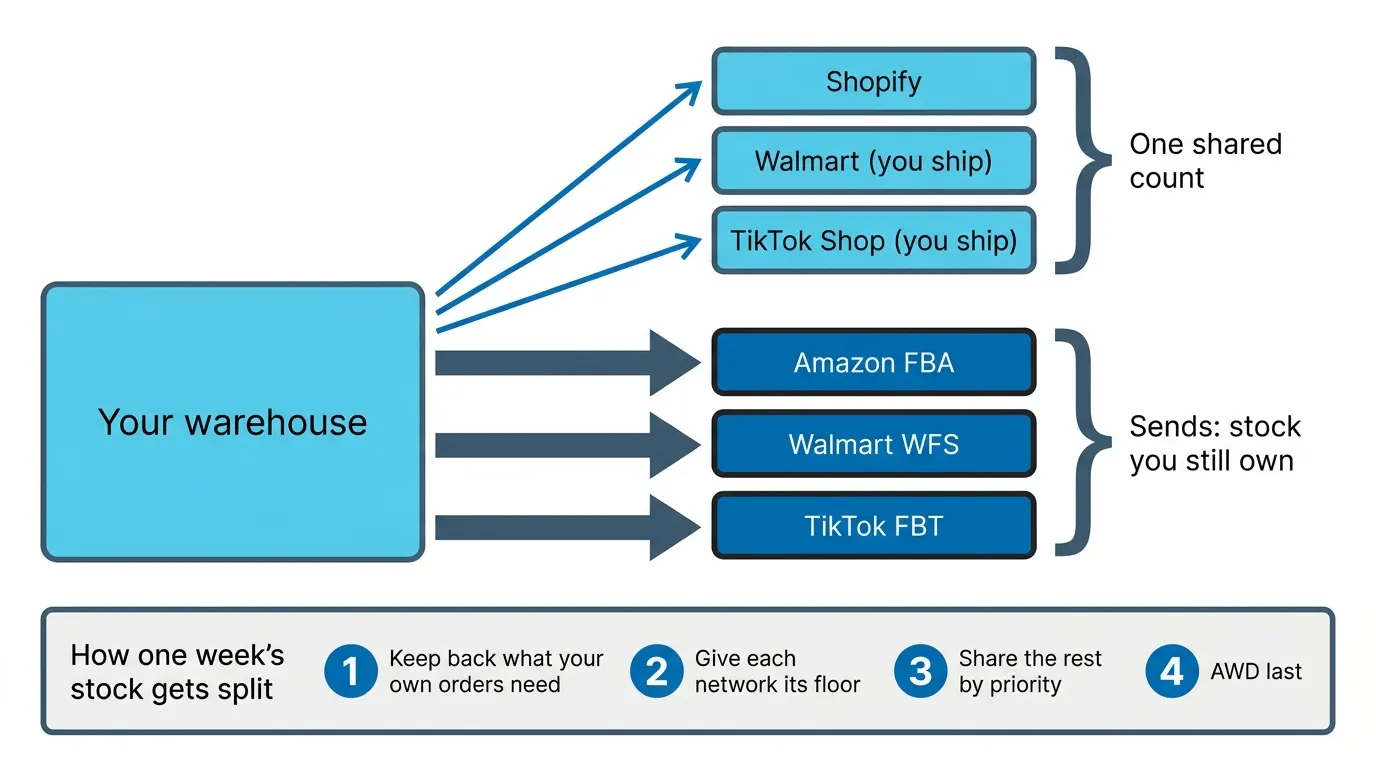
Each send becomes a draft shipment for that network. For WFS and FBT, submitting holds the stock at your warehouse, and it leaves your count when the marketplace reports the shipment on its way.
TikTok adds one rule of its own. Its logistics overview says “FBT inventory will be used first”, and your own warehouse fills TikTok orders once FBT runs out. So when an FBT send is late, the orders it would have covered ship from your shelf, out of stock that Shopify and Amazon were counting on. More in how Fulfilled by TikTok draws on your stock, and the shipping options in TikTok Shop fulfillment.
Our 12 units at WFS
At my other company we sent 12 units of a product that sells well for us elsewhere into WFS. A few weeks later all 12 were still there, unsold. When the team went through it I said I’d sent them “hoping that this would result in higher visibility or higher sales.” Neither happened.
Those 12 units couldn’t be sold on Shopify or anywhere else while they sat there. A network with no sales history has nothing to forecast from, so its first send should be small and treated as a test. In the Send Planner a listing with no sales history gets a first-send quantity instead of a forecast share.
Questions to ask in a demo
Bring one real SKU with stock in your warehouse and at least one network, and ask the vendor to do these on screen:
- Approve a wholesale order for that SKU. Show me the new number each channel will be sent.
- Put a buffer on Walmart only. Does Shopify’s number change? How often does each channel get a new number?
- Run one component of a bundle out. What does the bundle listing show?
- Plan this week’s sends to FBA, WFS and FBT from one warehouse that can’t cover all three. Who gets what, and why?
- Send 40 units to WFS. Where does their cost go, and what does the warehouse show when the shipment is created?
- Show me a listing whose channel quantity doesn’t match what you sent.
Question 4 is where I’d expect most tools to fall short. If the answer is three separate replenishment screens, you’re doing the split yourself, in a spreadsheet.
What SKU.io doesn’t do
It isn’t a listing tool for dozens of marketplaces. It connects to the main US ones, and a seller whose work is mostly listing across many marketplaces is better served by a listing-first tool. It doesn’t keep a number for FBA offers, because Amazon does. It plans sends to FBA, AWD, WFS and FBT, but each marketplace still decides which of its buildings receives them. And it’s built for operators between about $1M and $50M a year. If you sell $300,000 a year mostly on Shopify, it’s more system than you need, and your store’s own connectors plus Zoho Inventory or inFlow will do.
If you sell on all four and the split happens in a spreadsheet today, pick a time with me.
How we checked this page
This lists the facts on this page you can open and check yourself, plus the recorded calls the quotes come from. A vendor's integrations page not listing a channel means only that: ask them. Prepared by Kalvin Mizzi, founder, SKU.io. Last checked . Marketplace rules and other vendors' prices and integration lists were read on their own pages on the date shown. SKU.io behavior was read in the product's code on November 24, 2026, and is linked here to our user documentation. Call quotes are from recorded calls, unattributed. The worked examples' numbers are made up.
| Claim | Source | Plan or version | Checked | How we know |
|---|---|---|---|---|
| Walmart's cancellation rate standard is "Maintain a rate of 2% or below", and out-of-stock is a seller-fault cancellation that counts against it. Missing standards can lead to suppression, suspension or termination. | marketplacelearn.walmart.com | Walmart Marketplace Learn, Seller performance standards | Vendor documented | |
| When FBT and your own warehouse both hold stock, FBT inventory is used first, and your own warehouse fulfills the order once FBT runs out. | seller-us.tiktok.com | TikTok Shop US Logistics Services Overview, updated 07/06/2026 | Vendor documented | |
| A TikTok Shop order must be In Transit within 2 business days of Awaiting Shipment or it is a late dispatch. | seller-us.tiktok.com | Fulfillment Policy, updated 09/28/2026 | Vendor documented | |
| Shopify Marketplace Connect sells on Amazon, Target Plus, Walmart and eBay; the first 50 marketplace-synced orders a month are free, then 1% per synced order, capped at $99 a month. TikTok Shop is not on the list. | apps.shopify.com | Shopify App Store listing, USD | Vendor documented | |
| Zoho Inventory's Standard plan is $29 per organization per month, billed annually; the free plan covers 50 orders, 1 user and 1 location. The page lists a Walmart integration and does not mention TikTok. | zoho.com | US pricing page, annual billing | Vendor documented | |
| Zoho Inventory names direct integrations with Shopify and Amazon, among other marketplaces. | zoho.com | US FAQ | Vendor documented | |
| inFlow Inventory's Lite plan is $99 a month billed annually ($129 billed monthly), with 2 team members and 1 location; there is no free plan. | inflowinventory.com | inFlow Inventory Lite, annual billing | Vendor documented | |
| inFlow lists Shopify and Amazon integrations "via inFlow" and Walmart Marketplace "via Extensiv Integration Manager"; TikTok Shop is not listed. | inflowinventory.com | — | Vendor documented | |
| Linnworks' integrations page lists Shopify, Amazon, Walmart and TikTok. | linnworks.com | — | Vendor documented | |
| Linnworks publishes no prices: pricing is tiered on monthly orders and quoted by a specialist. | linnworks.com | — | Vendor documented | |
| SKU.io starts at $1,000 a month. | sku.io | — | Vendor documented | |
| SKU.io sends each listing its Available to Sell quantity (available minus open backorders) from the warehouses chosen for that channel, counts bundles from their components, applies Max, Min and buffer rules, and sends no quantity to FBA offers. An approved wholesale order lowers every channel's number. | sku.io | — | Vendor documented | |
| Inventory rules (Max as Fixed Allocation or % of Available, Min, Subtract Buffer Stock) are set per connection, with overrides per Shopify location and per listing. | sku.io | — | Vendor documented | |
| The Send Planner plans sends from your own warehouses to Amazon FBA and AWD, Walmart WFS and TikTok FBT, keeps stock back for self-fulfilled orders, gives each network its floor first, shares the rest by priority, and plans AWD last. | sku.io | — | Vendor documented | |
| A WFS inbound holds the stock at the source warehouse and creates a warehouse transfer to the WFS warehouse. | sku.io | — | Vendor documented | |
| The founder describing a send to FBA, WFS or FBT as a transfer of stock you still own (2026), and an operations lead at a multichannel brand describing overselling a channel by a thousand units (2026). | Recorded sales calls (internal archive) | — | Recorded call | |
| The 12 units sent into WFS at the founder's other company, still unsold weeks later. | Recorded internal operations call, October 2026 (internal archive) | — | Recorded call |