
To short-close a purchase order line is to lower the quantity you still expect to what will actually arrive, because the supplier isn’t sending the rest. You ordered 100, 60 came, the supplier says the last 40 won’t ship: you short-close the line at 60. The 40 stop counting as on order, the orders that were waiting on them go looking for the next PO, and your next buy includes them.
It’s one line, not the order. Closing ends the whole purchase order. SAP users know the same idea as the “delivery completed” indicator, which makes the open quantity zero even if the full amount never came.
I founded SKU.io, so weigh what I say about it accordingly. I also run a company that sells parts and other brands’ products online, and I’ve had POs come up short in every way this page covers.
Written November 2026. SKU.io’s behavior was checked in the product’s code on November 23, 2026. The SAP definition is linked in “How we checked this page” at the bottom.
Which way out fits your line?
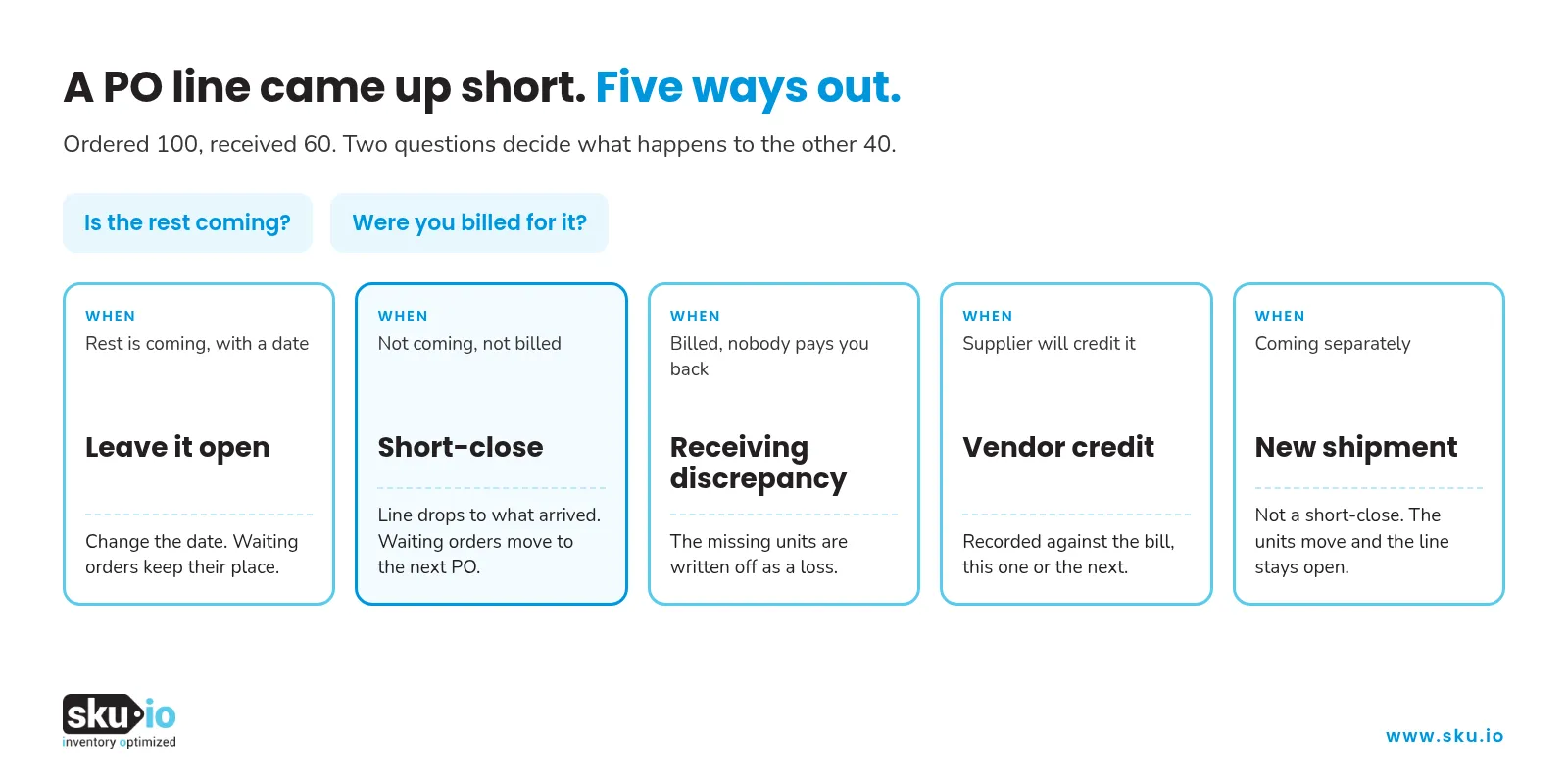
Two questions decide it: is the rest coming, and were you billed for it?
- Leave the line open if the supplier gave you a date for the rest. Put the date on the PO and on the inbound shipment, and the orders waiting keep their place.
- Short-close it if the rest isn’t coming and nobody billed you for it. That’s the common case: they ran out, discontinued a color, or packed less than the PO said.
- Close it with a receiving discrepancy if you were billed for units that never arrived and nobody is paying you back. That one writes them off as a loss.
- Take a vendor credit if the supplier agrees to credit the missing units against this bill or the next.
- Move the units to a new shipment if they’re coming separately. That isn’t a short-close at all.
- Close the whole PO when every line is done, received or not. Delete a line only when it was ordered by mistake.
- A spreadsheet and Zoho Inventory or inFlow are enough if you sell on one channel, under about $1M a year, with a couple of suppliers. You’ll close POs by hand and nothing much depends on them.
A six-minute walkthrough of four purchase orders on a home and gift brand we made up:
Watch on YouTube. Narrated with an AI voice; the brand, its people and its numbers are made up.
Chapters:
- 0:00 What a short-close is
- 1:00 Short-close one line
- 2:26 Shipped short, or lost on the way?
- 3:45 Close, short-close or delete
- 4:29 Clear many lines, and the stale ones
What short-closing a line does
Take the example from the video. A line for 100 units at $8.50 is $850. Sixty arrived, and the factory has said the last 40 won’t ship. Short-close it at 60 and the line reads 60 ordered, 60 received, $510. You can’t take it below the 60 that arrived, and you can close less than all 40 if some are still coming.
In SKU.io four other things happen at that moment:
- The line keeps a record of what you ordered. The quantity on the line changes, but the short-close record keeps the original 100, who closed it, when, and the reason you typed. Type a real reason. In a year nobody will remember why a line says 60.
- Orders waiting on those 40 move on. Sales orders that were counting on the missing units are let go and matched to the next open PO line for that product, if there is one. If there isn’t one, they’re left with no PO behind them.
- Nothing posts to your books. You never received the 40, so there was nothing on the balance sheet to reverse. A plain short-close changes what you expect, not what you own.
- Nobody tells the supplier. It doesn’t email them or send a revised PO. Agree it with them first, in writing.
And if the box turns up after all, undo the short-close and the line expects 100 again.
When is a shortfall too small to chase? A buyer I talked to put it better than I can, about one missing sign on a big order: “one sign for 30 cents, like whatever. Like let’s just push this forward.” I’d agree. Set a number with your team, in units or dollars, below which you short-close the line the day it’s noticed and take it as a cost of buying. Above it, someone writes to the supplier. What I wouldn’t do is leave small ones open “just in case”. A line with three units outstanding looks exactly like one with three hundred on a boat, and after six months nobody can ask the supplier anything.
One thing to watch. In SKU.io the supplier scorecard’s fill rate is units received over units ordered. A short-close lowers “ordered”, so a line you short-closed with no shortfall recorded on the shipment reads as 100% filled. SKU.io asks whether the supplier shipped short only when the missing units were on a shipment that has already left (next section). Say yes there and it counts against them.
Close, short-close or delete
These get mixed up, and they do different things.
| Close | Short-close | Delete | |
|---|---|---|---|
| Acts on | The whole purchase order | One line | One line |
| Use it when | You're done with every line, received or not | Some came and the rest won't | The line was a mistake |
| What it keeps | Everything, plus an optional reason as a note | What arrived, and a record of what you ordered | Nothing |
| Can you undo it? | Yes, Reopen | Yes, Undo short-close | No |
| When it's blocked | Only open POs close | Never below what arrived | Once anything on the line was received |
A PO also closes itself once nothing on it is still expected, so short-closing the last open line closes the order. If you’d rather a PO stay open until it’s paid, there’s a setting for that.
One more case gets the wrong button: stock you’d already received before you started using a system. An operations manager cleaning up old POs after go-live told me, “Short close. That’s what we’re doing.” It isn’t the right tool for it. Short-close is for goods that never came. Goods that came before your start date are already in your opening count. For those, SKU.io suggests marking the PO as an opening-balance purchase order, which closes it as fully received with no write-off, so nothing is counted twice. If some of its units are still on an open inbound shipment, it stays open until they arrive.
Did the supplier ship it?
This is the question that decides what kind of shortfall you have, and SKU.io asks it when the missing units are on a shipment that’s already left:
- No, they shipped short. The shipment drops to what arrived, a shortfall is recorded against it, and it counts against the supplier’s fill rate. What to do when a supplier short-ships a PO takes the rest of it one step at a time: count, give out the units, find out if the rest is coming, pay for what came.
- They’re coming separately. Then it isn’t a short-close. The units move to a new shipment and the line stays open.
- They shipped and never arrived. Then it isn’t a short-close either. The supplier did its job, so its fill rate isn’t touched. You close the units as lost in transit, either with a receiving discrepancy (a write-off of what you were billed for) or with a draft vendor credit if someone is paying you back. The units land on a Discrepancies list, and File claim opens a claim against the carrier with the units and value filled in. You still file it with the carrier yourself, and SKU.io tracks where it stands and what came back. There’s more on a PO lost in transit: the claim, the write-off, and what an OS&D report is for.
The difference matters most when you buy again. A supplier that short-ships three POs in ten needs earlier orders and later promises. A carrier that loses a pallet needs a claim against the carrier, and the supplier keeps its score.
Paying for what came
Expect the bill for the full quantity, because that’s usually what was invoiced before anyone counted. In SKU.io each bill line is matched against what you ordered and what you received. A line billed above received is flagged as a quantity variance and the bill waits for approval. There’s also a setting that blocks payment until someone overrides it with a reason. The match uses the short-closed quantity and nets off any vendor credits.
So what happens depends on the bill:
- Not billed for the missing units: short-close and you’re done.
- Billed, and the supplier will credit them: record the credit against the bill. I’ve written up how to record that vendor credit: applying it, whether to lower the cost of the stock, and what syncs to QuickBooks or Xero. If you’re the one asking for it, that request is a debit memo. Which side writes a debit memo and which a credit memo trips people up.
- Billed, and nobody will pay you back: close with a receiving discrepancy. It records the loss to the account you mapped for receiving discrepancies (SKU.io won’t run it until one is set), so the gap shows up as an expense instead of hiding in inventory.
If your bookkeeper asks why received and billed don’t agree at month end, send them the page on goods received not invoiced. For deposits and paying before it ships, see supplier deposits and the three-way match.
When the supplier sends more
Some suppliers can’t hit an exact number. Printed boxes and labels are the usual case. A brand that buys shipping boxes told me: “I order 3,000 units and they have like a 10%, like kind of like fluctuate. Like they can send me 10% more, 10% less.” Then the receipt says 3,050, and in his old system the only way to record it was to change the PO, which he didn’t want: “I want to have record of what I ordered, what I received.”
SKU.io lets you receive more than you ordered. It doesn’t warn you, and there’s no tolerance setting. The extra units go on as a new shipment, a line added to the PO, or a stock adjustment, so the original order stays as it was. That puts the decision on you, which I think is right: before you receive the extra, decide whether you’re keeping it and paying for it. If you’re keeping it, add it to the PO so the bill matches. If you’re not, don’t receive it, and send it back.
Clearing old open lines
Open lines that will never fill make every number that reads “on order” wrong, and your next purchase comes out light by the same amount. I’d go through them once a week, oldest first.
In SKU.io there are two places to do it:
- On one PO, when several lines came up short, a banner counts them and Reconcile shortfall asks, line by line, what happened: still shipping (leave it), never coming and never billed (short-close), billed (write off, or take a vendor credit).
- Across POs, Advanced Filters on the purchase order list can check for stale lines. A line is stale when it has gone 90 days without being received, was never billed, and you’ve since ordered and received the same product from the same supplier. That last part is what makes it safe to clear: you obviously bought around it. Short-close stale lines clears them with the reason already filled in, naming the later order.
The list also has an overdue filter for open POs past their expected date. It works per PO, not per line, and lines have no date of their own. The weekly routine and the columns I’d use are in what belongs on an open purchase orders report.
What SKU.io doesn’t do
It has no tolerance for over- or under-receiving, and it won’t short-close a line automatically below a threshold. It doesn’t record damaged units at receiving as their own thing, and it doesn’t compare a receipt against the supplier’s shipping notice. It tracks a claim against a carrier but can’t file one: you do that with the carrier. And it’s built for operators between about $1M and $50M a year on several channels.
If a PO at your company came up short and the bill didn’t, book a call with me. Bring that one PO.
How we checked this page
This lists the facts on this page about another vendor that you can open and check yourself, and the recorded calls the quotes come from. Prepared by Kalvin Mizzi, founder, SKU.io. Last checked . SAP's definition was read on its own help site on the date shown. SKU.io behavior was read in the product's code on November 23, 2026, and is stated in the body. The worked example's numbers are made up, as in the video.
| Claim | Source | Plan or version | Checked | How we know |
|---|---|---|---|---|
| In SAP, the "delivery completed" indicator marks a purchase order item as closed, and the open purchase order quantity becomes zero even if the full quantity has not been delivered. | help.sap.com | SAP ERP help, Underdeliveries, Overdeliveries, and Final Deliveries | Vendor documented | |
| Quotes from a buyer (the 30-cent sign), an operations manager ("Short close. That's what we're doing.") and a brand that buys shipping boxes (the 10% more or less) are from recorded calls, anonymized. | Recorded sales calls (internal archive) | Calls from August 2025 to August 2026 | Recorded call |