
Product Information Management
SKU and PO Numbering: SKUs by Product Type, PO Numbers From the Order Date
Give each product type its own SKU prefix and its own counter, and put only things that never change into the SKU. Build PO numbers from the order date, plus a one-letter code for a new product’s first run or a reorder. Then a SKU tells you what kind of product it is, a PO number tells you when it was raised and what kind of run it is, and neither has to be looked up in a spreadsheet first.
A buyer who orders from overseas factories described how they do it now: “we have a manual counter basically for each product category and that’s what basically dictates what the next [SKU] number will be… The first part is basically the product category and maybe part of that could be the year.” And for purchase orders: “I’d love these to be basically generated based on the date that were created. The only differentiator would be a new order versus a reorder so that we can quickly identify what’s in that order just by that number.”
I’d keep that scheme. What I wouldn’t keep is a counter that lives in one person’s sheet, because the day two people add products at once, two of them get the same next number.
What goes in a SKU, and what stays out
The SKU I remember best from my own business was for returns. Every unit that came back to our 3PL got Z_<model>_R-<return date>.1. The Z_ sorted returns to the bottom of every list, the date tied the unit to the day it came back, and the .1 meant there was one of it. On November 7, 2019, a large floor machine came back and got exactly that SKU. When it turned up months later, refurbished and unsold at the 3PL, the SKU still told us where it had come from.
That worked because everything in it stayed true for the life of that unit. That’s my rule for the parts of a SKU:
- In: what the product is (a product-type or category prefix), and when that’s useful, the year it was created. A counter to make it unique.
- Out: anything that can change. The supplier, because the same product may come from two factories, which happens in my business. The price. A color name marketing might rename. A warehouse.
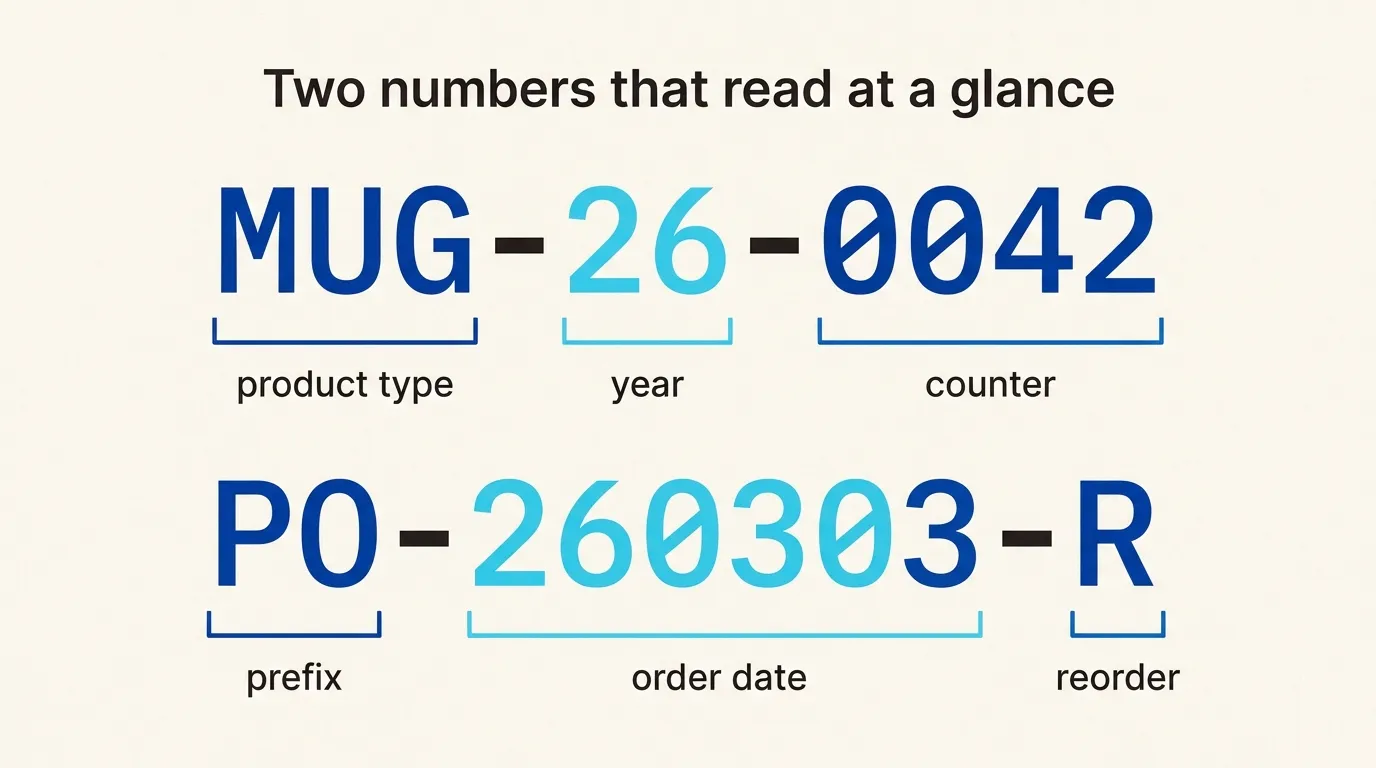
A counter per product type keeps the numbers short and counts how many products of that type you’ve created. Someone looking at MUG-26-0042 knows it’s a mug, added in 2026, and the 42nd mug SKU created that year if the counter resets each January. If you’re still choosing a format, the free SKU generator builds codes from your attributes so you can see how they read before you commit.
PO numbers from the order date
A PO number gets read in more places than a SKU: in the factory’s email subject, on the packing slip, on a bank transfer, in a freight forwarder’s booking. A running number like PO-01042 tells you the order it was raised in and not much else. A date tells the person reading the bank statement which order it is.
Take the format PO- + year, month, day + order type. A reorder raised on March 3, 2026 is PO-260303-R. A new product’s first run the same day is PO-260303-N. The second reorder that day is PO-260303-R-2. A finance person matching a transfer to an order can see the date without opening anything, and a factory sees from the R that it has made this before.
The reorder code is there for a reason the buyer gave: a first run usually needs more from you. In their case, new products go to third-party testing and repeats don’t. A code in the number means nobody has to open the PO to know which kind it is.
If you’d rather keep a running counter, you can still add the type: PO-0418-N. What I’d avoid is the supplier’s name in the PO number, for the same reason as in a SKU: a supplier can be renamed or replaced, and the old POs keep the old name forever.
A co-owner of another business told me how they reconcile payments now: “I run a spreadsheet and I put every PO number… So when I go reconcile I use that spreadsheet to figure it out.” The sheet is there to turn a number on a bank line back into an order and a date. When the number already carries the date, half of that lookup is done.
How SKU.io handles it
SKU numbering is a list of rules in the product settings. Each rule applies to a product type, a primary category, or everything else, and has a pattern such as MUG-{YY}-{####}, a next number, an optional yearly reset, and an Active or Paused switch. The dialog shows the next SKUs as you type. The most specific rule wins: the product type’s rule (or its nearest parent type’s), then the primary category’s rule (or its nearest parent’s), then the default. Secondary categories never count, so a product in three categories still gets one answer.
Leave the SKU blank on a new product and it takes the rule’s next number. Type one and yours is kept. SKUs already in use, current or previous, are skipped. A CSV import numbers blank-SKU rows one by one, and the review step shows which rule will number them. With no rule that matches, a SKU is still required. One limit: the quick-create product dialog you reach from other screens, such as mapping an order line, still asks you to type a SKU.
PO numbers can follow a format in the purchase order settings, built from the prefix, a counter, the year, month and day of the PO’s order date, and an order type. You define the order types yourself, each a code, a name and a default, with a one-click “New order (N) / Reorder (R)” preset. When types are set up, a new PO asks for one, or takes the default. A PO with no type drops the code and its dash, so you don’t get PO-260303-. A format without a counter adds -2, -3 for a second PO on the same day and type. Changing a draft’s order type rewrites that part of its number, unless someone typed the number by hand. Existing accounts keep prefix plus counter until they set a format. The numbering settings are in set purchase order numbering and defaults.
Who this isn’t for
If you have a few dozen SKUs and a handful of POs a year, a sequence in a spreadsheet is fine. Renumbering live SKUs to fit a new scheme is a different job, because channel listings, barcodes and 3PL records all point at the old ones. Start the scheme with new products and leave the rest.
The PO side of this is part of ordering from the factory, and what else belongs on the PO is in what to put on a purchase order for a factory. If your SKU counter lives in someone’s head, book a demo and bring the sheet.