
Product Information Management
Replacing a Product: Hand the Sales History and the Page to the New SKU
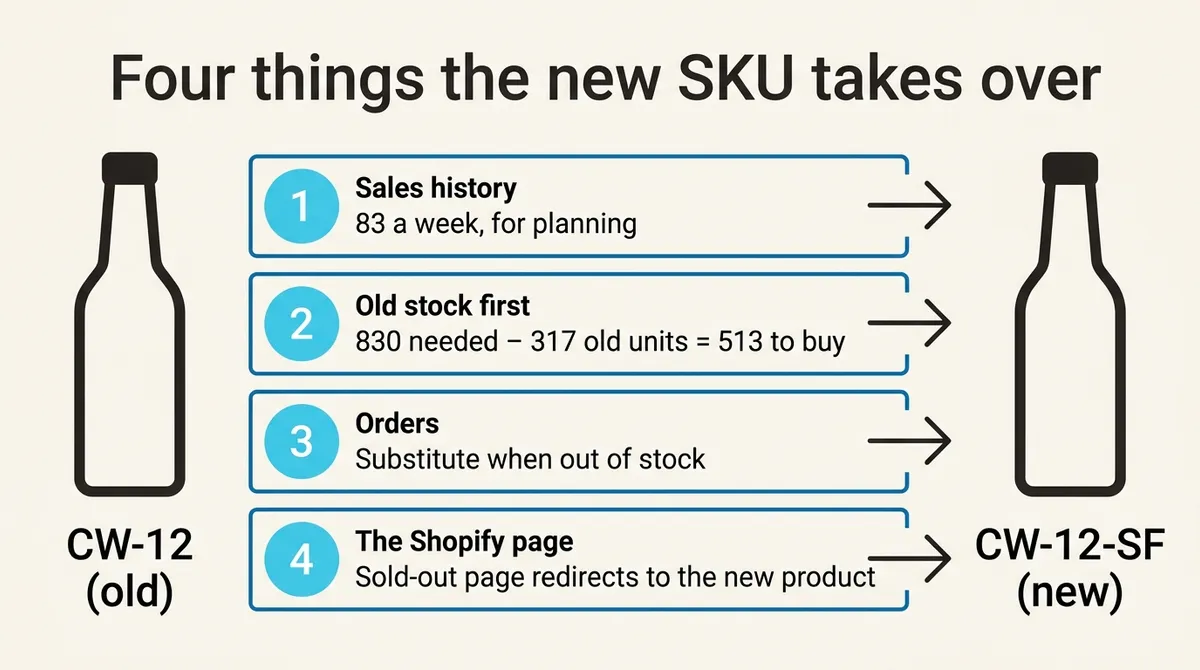
When a new version replaces a product, decide first whether it’s a new SKU, and make that decision in every system that holds the SKU. Then the new SKU should inherit the old one’s sales history for planning, the old stock should be counted before anything new is bought, orders for the old SKU should be filled with the new one once the old stock is gone, and the old product page should send visitors to the new one. If you sell from one Shopify store and replace a couple of products a year, a spreadsheet and Shopify’s own redirect screen will cover it.
All of this is part of selling through. It’s also easy to get half right, which is what happened in my own business.
What happened when our units changed
One product line we sell started arriving with Amazon Transparency codes on the units. By October the coded units had their own SKUs with a -TC suffix, because our 3PL said mixing them in with the uncoded stock would be chaos on their side. In that meeting we agreed to account for it on our side too, so we’d know how many had been converted.
In January we sat down to check. The 3PL had its -TC SKUs. On our side, the coded units had been mapped to the old SKUs, so the listings were selling one SKU while the warehouse shipped another. When I lined the two lists up, one had 16 coded SKUs and the other 15, and the missing one was a coded product that didn’t exist in our system at all. Working out what had actually shipped meant going back through the order history for those SKUs. The purchase orders since we started buying coded units were probably all wrong.
Amazon had two listings per product, one for coded units and one without. I’d assumed we had ordered labels and converted all the old uncoded stock. We hadn’t. We still held some, and someone on my team pointed out that coded units can be sent to the uncoded listing too.
The quick fix was to create the missing SKU and adjust stock into it. We didn’t. Those units came in on purchase orders, and an adjustment would have said they appeared from nowhere at whatever cost someone typed. We created records for coded items that had already sold through, too, because they’d been in our inventory history once.
That meeting didn’t settle how to correct the received purchase orders. Fixing one means changing the PO line, the receipt, the stock movements and the cost layers, all of which point at the product. The option we weighed for the long run was to buy extra labels, convert every remaining uncoded unit, and go back to one SKU per product, since once every unit carries a code, mixing them in a bin does no harm.
Decide whether it’s a new SKU
My rule: if a picker, a returns clerk, a 3PL or a marketplace has to tell the two versions apart, it’s a new SKU. In our case the 3PL and Amazon both did. If nobody could tell them apart on the shelf, keep the SKU.
| What changed | My call | Why |
|---|---|---|
| Formula, ingredients, or anything on the label | New SKU | Lots, expiry and returns need to name the version |
| Size or pack count | New SKU | The unit changed, so history has to be converted |
| New barcode or marketplace code | New SKU | Catalogs and warehouses match on it |
| Outer packaging only, same contents and barcode | Same SKU | Nothing downstream needs to tell them apart |
| Supplier only, same spec | Same SKU | Add the supplier to the product |
| Only the code, in a renumbering | Same product, renamed | Keep the old code findable |
I think most brands make new SKUs too rarely. Whatever you decide, make it in the warehouse system, the listings and your own records on the same day, before the first changed unit is received.
Renaming carries a trap of its own. It’s safe in a system that tracks products by an internal ID and risky in one that matches on the code. A consultant cleaning up one brand’s catalog changed a SKU and a connected system lost the product: “it wouldn’t connect the two SKUs in the two systems, even though they were the same text. Whatever back end identifier it’s using, I don’t know what it is or how to make them match.” Find out what each connected system matches on before you rename anything.
Give the new SKU the old one’s sales history
A new SKU has no sales, and a forecast built on no sales says to buy nothing. The customers who bought the old version will buy the new one, so for planning, the new SKU should start from the old one’s demand. For reporting it shouldn’t: keep each product’s own sales, or you’ll never know whether the new version sells better. If the new version costs more or leaves a channel, plan on less than all of the old demand.
Count the old stock before you buy
The old units still on the shelf are the first part of the new SKU’s supply. For example, a product selling 83 a week with 10 weeks of cover and 317 old units needs 830 − 317 = 513 of the new version, not 830. Keep one listing live while the old stock sells. With both up, shoppers pick the new version and the old units stall.
Clean up the open purchase orders
Lines still to arrive should name the version that will actually come in. Received ones that name the wrong version should be corrected on the order itself, not covered with a stock adjustment, because the purchase order is where the units’ cost and origin are recorded.
Fill orders for the old SKU
Orders for the old SKU keep arriving after you stop buying it, from a marketplace listing, a stockist’s old order sheet or a subscription. One operator described what he wanted as “So it will substitute this until. And then once inventory is depleted, now move to this product.” Fill them with the new version when it’s the same thing in a new form. When the new version is a different size or price, ask the customer first.
Retire the old listings
A sold-out product page has links pointing at it, and it should send visitors to the new version. Shopify only redirects a URL that’s broken. Its help page says “You can redirect only from broken URLs,” so the old product has to be archived before its redirect can exist. Amazon has no redirect: an old listing set to zero just goes inactive, so with two listings per product, as we had, someone has to manage each one.
How sku.io hands over to a successor
I founded SKU.io, so weigh this accordingly. You link the old product to its successor. The successor’s forecast then includes the old product’s sales, net of returns, at a share you choose, while reports keep each product’s own sales. The planner subtracts the old product’s available stock from what it suggests buying of the successor, but only once the old product is phasing out or discontinued; while it’s still active, nothing is subtracted, so change its state when you add the link. The link can create a substitution rule that fills old-SKU orders with the successor when the old one is out of stock, or always; it’s off by default. When the old product sells out and its sell-out action ends listings (the default is Keep, which leaves the page live at zero), its Shopify product is archived once every variant has sold out, and with the redirect setting on, which is the default, the page redirects to the first live successor on that store, or to a fallback collection. A renamed product keeps its old code as a previous SKU, so orders and imports that still use it find the product.
The setup steps are in link a successor product, and the channel sell-out options are in how to discontinue a product. Replacing is one part of selling through and phasing out in the product lifecycle guide. If a version change is coming up, book a demo and bring the old product’s last six months of sales.