
Product Information Management
A Product Launch Checklist That Checks Itself
In February 2025, my other company had 146 products published on Walmart, and every one of them showed a quantity of zero. I’d held stock back on purpose until the channel’s inventory feed was running, which left us with a channel that looked launched and couldn’t sell a thing.
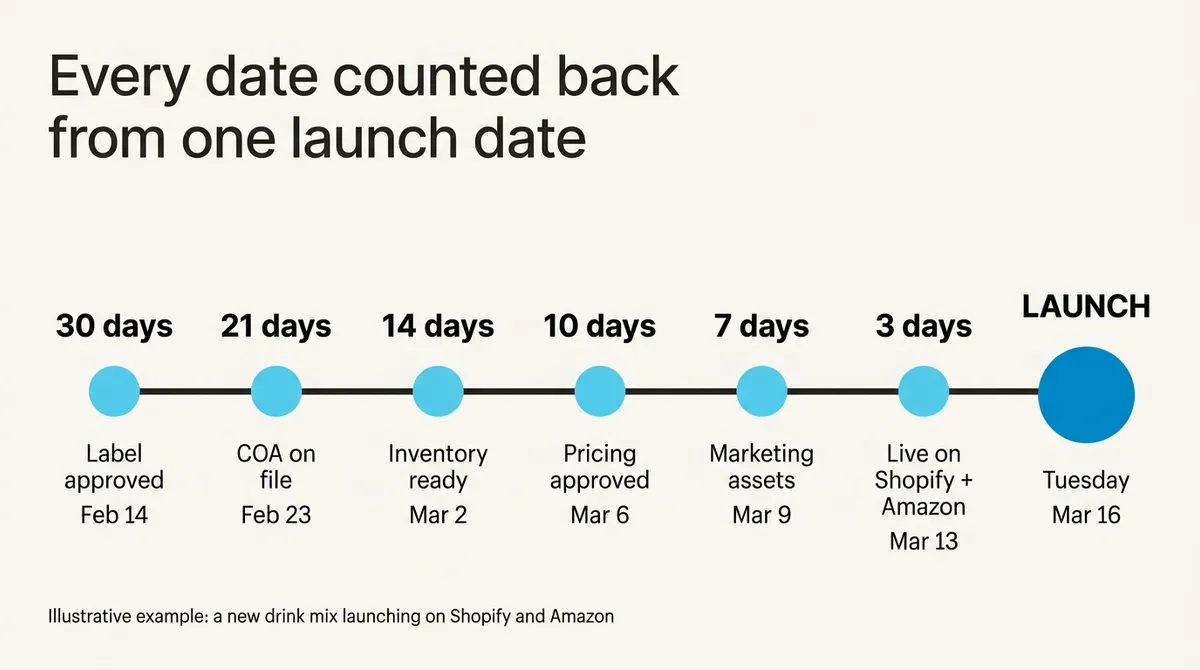
A product launch checklist covers six things, each with an owner and a due date counted back from the launch: the label (30 days out in sku.io’s defaults), certificates or a COA (21), stock or an inbound purchase order (14), pricing (10), marketing assets (7) and a live listing on each channel (3). On a new channel the same list runs for every product at once, and what stalls is usually the work underneath the listings.
I founded SKU.io, so weigh what I say about it accordingly. If you sell on one channel and launch two or three products a year, a sheet with the launch date in the top cell and the due dates as formulas is enough, and so is Zoho Inventory or inFlow under a million dollars a year.
Walmart, the channel that looked live
My other company resells other brands’ products, mostly on Amazon, eBay and our own sites. When the Walmart listings went up, the only ones attached to existing Walmart pages were the products that matched on UPC. Everything else needed a new listing.
So I pulled up the codes that didn’t match. One supplier’s were 13 digits. My guess was a leading zero dropped somewhere, either in the file the supplier sent us or when we keyed it in, and nothing on the screen said which. I asked the person running the channel to go back to the supplier and find out whose data was wrong. Other Walmart pages carried a bad UPC that some other seller had submitted. We could ask Walmart to correct those, with proof, or just list on whichever page already had the right code.
The person running the channel had flagged one listing as a mismatch even though its UPC was right, because the part number was off. I thought that was wrong. I went back to the source and it was a different product entirely.
Products with no UPC at all needed an exemption, and Walmart wanted a sheet for each category with the items, a competitor’s listing and the supplier’s page. They built it, and two weeks later the categories were approved and she started adding the missing products from our master list. One brand’s uploads were still throwing errors well into April.
In April we sat down to test the channel together. I opened it and the mappings between our SKUs and the Walmart listings hadn’t been done, and automatic sync wasn’t switched on. Both were ours to do.
By June, Walmart sales were small, about level with our eBay account, and one supplier’s line was picking up fast enough that the question had become whether we’d have stock. The barcodes, the category paperwork and the mappings had taken months. Looking back, none of that was on a list with dates. Each piece came up because I asked about it in a meeting.
The checklist
| Item | Done when | Due (days before launch) |
|---|---|---|
| Label approved | The approved label version is on file for the product | 30 |
| Certifications / COA on file | A certificate of analysis, NSF or GMP certificate is on file for the product or one of its lots | 21 |
| Inventory ready | Stock on hand, or units on an open purchase order | 14 |
| Pricing approved | Someone with the authority signs off | 10 |
| Marketing assets ready | A marketing asset is on file, or the product has at least 3 images | 7 |
| Listing live, per channel | The listing is live on that channel, one item for each channel | 3 |
I care more about the order than the day counts. Labels go first because a label change can mean new printing, and that is usually the longest wait. Listings go last because a listing that goes live a month early starts selling a month early. Change the numbers to fit your suppliers and keep the order. Put one person’s name on each item, not a team’s. Counted back from a Tuesday launch on March 16, 2027, the six dates fall on February 14, February 23, March 2, March 6, March 9 and March 13, and three of them are weekends, so move those by hand.
Identifiers and paperwork before the listing
A “listing live” item that only asks whether a page exists is the easy part. Before it, check that each product’s barcode is the right length and actually belongs to it, that any category needing an exemption has one, and that each listing is mapped to the SKU that will ship. Each of those can take a round trip with a supplier or a marketplace, so give them the label’s lead time, not the listing’s.
Mapping is where a new channel quietly goes wrong. The co-owner of an online store described launching on a new marketplace through a listing tool: “when we listed products, the images became all messed up. So we have incorrect images for incorrect products.” Spot-check a dozen live listings against the products they’re mapped to before you call the item done.
Documents need a home too. A label version or spec sheet belongs with the product. A certificate of analysis usually belongs with the lot it was issued for, because it was tested on one batch. When the label changes, file the new one as a new version of the same document rather than a second document, so nobody reorders from last year’s artwork.
When “inventory ready” isn’t
Ready should mean stock on hand or units on an open purchase order. Waiting for stock on the shelf turns the item red for weeks on every launch, and people stop reading it. The catch is the ETA. A PO that lands six days after launch looks just as ready as one that lands six days before, so read the date on the PO, and if it’s late, move the launch or cut what you promise on day one.
Stock that was ready can stop being ready. A pilot batch sent to creators, or a wholesale opening order shipped early, can empty the shelf before the main PO is placed. Check the item again the week of launch, not just the day it first went green.
Launch day is a sync problem
When one operator at a multichannel brand was asked what goes wrong at launch, the answer was about the day, not the prep: “the oversell has been a pretty big issue in the past for us, the syncing between platforms.” The fix is to make the channel that sells fastest get every stock change right away for the first week or so, and to know which of your channels can’t do that.
How sku.io runs the checklist
Every launch copies your checklist settings when it starts, so later edits reach new launches only. Due dates count back from the target date and move with it, except ones set by hand. Stock, documents, images and one listing item per channel check themselves nightly and when someone opens the launch, show what they found, and fall back to To do if the fact stops being true. Three limits to plan around. The inventory check passes on any open PO and doesn’t compare its ETA with your launch date. An automatic item someone ticked by hand stays done, so a slipped PO won’t reopen it. And launch mode, which pushes every quantity change within seconds, works on Shopify only; see the flash sale inventory guide for a launch-week spike. The steps are in run a product launch, and where launching sits in a product’s life is in launching in the product lifecycle guide. A launch doesn’t change how the product is planned or bought.
Before you publish on a new channel, it’s worth finding what each listing is still missing there. This guide is part of launching new products in the product lifecycle guide. If your next launch goes to three channels and you want to see the checklist check itself, book a demo and bring the launch date.