
Product Information Management
How to Discontinue a Product Without Stranding Stock or Orders
To discontinue a product, set the date it stops, buy only what will sell before that date, and before you confirm the change, deal with everything still pointing at it: purchase order lines not yet received, customer backorders that will never be filled, and the wholesale accounts that bought it in the last 12 months. Then let it sell through the stock you really have, and decide per channel what happens to the listing when the last unit goes. If you sell on one channel and retire a few products a season, a spreadsheet column and a Shopify tag will do this; the rest of the page is for when the same product sits on a PO, in a backorder and in a wholesale buyer’s reorder habit at once.
Most advice on discontinued products stops at the product page: keep the URL, redirect it, show a “no longer available” badge. That’s the last step. The stock you strand and the orders you break come earlier, when someone flips a status to inactive while a PO is still on the water and customers are waiting on backorders.
”Discontinued” covers more than one decision
Ask an operator what discontinued means and you often get more than one answer in the same breath. The owner of a distributor, explaining how they label products, started with a supplier that can’t ship yet: “if we order something and they say hey we’re out of stock of this but … it’ll be available in March. So we need to make sure that we note that so that you know, okay, let’s not order it until March and also that we can let customers know”. A sentence later he was on a different case altogether, stock being sold down: “this was a clearance so it’s being priced a certain way to get down on stock and also it’s non returnable so we need to see that you know on the customer order it was a clearance item.”
Add the product you’ll never buy again and one inactive flag is being asked to mean opposite things. Late stock should keep taking backorders with an honest date. Gone-for-good stock should never promise another unit.
| What you mean | What should happen | How it’s done in SKU.io |
|---|---|---|
| Gone for good | Buying stops, new backorders are blocked, remaining stock sells through. | Discontinue it now, or phase it out with a final buy and let it discontinue itself on the date. |
| Back on a date | Keep selling and backordering, stop ordering from that supplier, tell customers when. | A supplier hold on that product at that supplier. The product stays active. |
| Selling down | Sells at a markdown, and the order shows it can’t be returned. | Discontinue it, add it to a clearance plan, and turn on final sale for the plan. |
The middle row is the easy one to get wrong. Discontinue a product that’s only late and you block the backorders that would have carried you to the restock. The selling-through stage of the product lifecycle guide shows where each of these sits between launch and closeout.
Size the final buy to the discontinue date
A final buy is the last purchase order for a product you’re retiring. Size it to the demand you expect before the discontinue date, minus what you already hold.
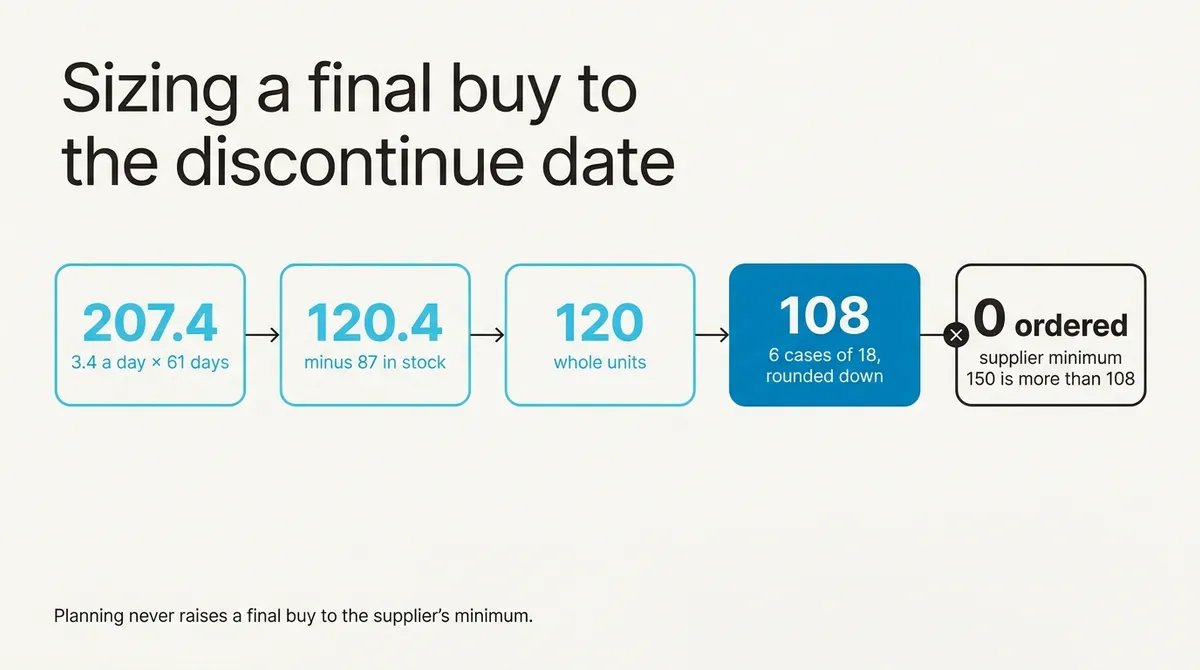
Take a homewares brand retiring a stoneware planter that sells about 3.4 a day. There are 87 on hand and 61 days to go, so it needs 3.4 × 61 − 87, about 120 more. The supplier packs 18 to a case, which rounds down to 108, and won’t take an order under 150.
SKU.io plans a phasing-out product the same way (I founded SKU.io, so weigh what I say about it accordingly): it counts only the days left, rounds down to cases, and never pushes an order up to the supplier’s minimum. For the planter it orders nothing and says why. Buying the 150 anyway leaves roughly 30 planters you don’t expect to sell before the date. My default is to skip it. I’d rather run out a week or two early on a product I’ve already decided to kill than own 30 of them afterwards.
Two limits to plan around. The cap only knows the discontinue date you typed: put the product in a custom state that caps planning but give it no date and it plans as if nothing changed. And it sizes demand, not timing, so if the stock on hand runs out before the final buy arrives, that gap is yours to see. The dialog does suggest a last order date, the discontinue date minus your longest supplier lead time, and after it planning stops ordering.
What the change touches before you confirm it
SKU.io’s change dialog shows the impact while you fill it in: stock that keeps selling and where, listings that switch to real stock only, bundles and kits that use the product, open PO lines not yet received, open backorders, and the wholesale customers who bought it in the last 12 months.
The dialog also offers follow-ups. Cancelling PO lines short-closes each one for whatever hasn’t arrived, with the reason “Product discontinued”, so a line for 54 with 18 received closes the other 36. It’s off by default, which I agree with, because the supplier may already have made the goods. Cancelling backorders takes the backordered quantity off each open sales order line, in whole units. The third emails each wholesale customer once, listing every product of theirs in the change, with room in the template for the last order date, the stock left and the successor.
The undo is shorter than it looks. You get 24 hours to put the state back, but cancelled PO lines and backorders stay cancelled, and the emails stay sent.
Short-closing a line also changes only your copy of the order. The supplier still has theirs. In my own business a supplier told me, after I’d already submitted a PO, that some of the items on it were discontinued. I edited the PO and resubmitted it, so they had the latest official version of what the order should be, rather than an email thread to reconcile against the shipment when it landed.
A discontinued product keeps selling, within limits
This surprises people coming from systems where discontinued means hidden. Listings stop publishing more than you physically hold, so channels sell down real stock instead of promising more. New backorders are blocked on orders you enter, but channel orders are never refused: one that oversells comes in flagged for you to substitute or cancel, which is better than a marketplace order bouncing. Planning and low-stock alerts drop it, and anything already on a PO is still received. The full set of rules, and how to change them, is in how product lifecycle works.
One case it handles awkwardly is sizes. The operator of a brand that backorders an extended catalog described the pileup as “individual SKU variants that we don’t have, want or need,” and the hard part being “unpopular sizes of a best selling product, it’s really hard to clear them because we don’t want to put the product as a whole on discounted pricing.” You can discontinue just the dead variants. But on Shopify a sold-out variant sits at zero, greyed out, while its siblings sell, because SKU.io never deletes a variant, and the sell-out step only acts once every variant is gone.
When the supplier discontinues it before you do
In the parts business I run on Amazon, we stock about 90 days of cover. That has gone wrong in two opposite ways. Some items go out at the supplier with no date at all, and the wait can run past our 90 days; there was nothing to do but track those by hand and wait. And one month the SKU doing best for us turned out to be already discontinued by its supplier, which we found out only when we went to buy more. We couldn’t.
The second one taught me a habit. When a supplier discontinues something, every reseller of it runs out on its own schedule, and the last few left holding stock see a spike. That spike is the market emptying, not demand you can buy against, so don’t let a forecast read it as growth.
The first one is what a supplier hold is for. You mark the product unavailable at that supplier until a day, a month or a quarter, and the product stays active. Planning switches to another supplier if there is one, or orders with the arrival pushed out if the held supplier still takes orders, or waits. Customers only see a date when nothing else covers them, and then at the supplier’s precision, “expected March 2027” rather than an invented day. A hold whose date passes sits as due until someone asks the supplier again. The limit is the no-date case: planning assumes a 60-day wait unless you change it, which would have been wrong for us. Set it to what your suppliers actually do. Setup is in mark a product unavailable at a supplier.
Selling down with final sale on
For stock you want gone, discontinue the product and put it on a clearance plan with final sale turned on. Every order line sold while the plan runs is final sale for good: your team is warned before taking one back, and customers can’t start a return for it in the customer portal. Valuing what still won’t sell is a separate job, covered in inventory write-downs.
Ending the listings once it’s really gone
SKU.io counts a product as sold out only when nothing is left anywhere: no stock in any warehouse, FBA and 3PLs included, nothing in transit, allocated or still due on an open PO. That’s strict for a reason, and it bites in two places. A PO line you know won’t ship, left open, means the sell-out step never runs, so short-close it. And units at Amazon count, while SKU.io can’t pull stock out of Amazon’s warehouses for you, so a few stranded FBA units hold the whole product open until you remove them at Amazon.
Once it is sold out, SKU.io waits a grace period, 3 days unless you change it (up to 30), for returns already on their way. Then each listing gets the action you chose for its channel:
| Setting | What happens to the listing |
|---|---|
| Keep live at zero (the default) | Stays up showing sold out, and keeps its page and search ranking. |
| End | Ended the channel’s own way. Amazon goes to quantity 0, so the offer is inactive but can be reopened and the SKU isn’t deleted. Shopify archives the product once every variant on it has sold out, and with Redirect to the successor when archived at sell-out on (it is by default) its page then redirects to the successor. |
| End and archive | Ends every listing, then archives the product once every channel has reached its end state. |
Stock that turns up later, from a late PO or a return, brings an archived product back as discontinued, never active, with an alert. Its ended listings stay ended unless you’ve turned on relisting.
That redirect only happens when the sell-out action ends listings. The default action is Keep, which leaves the page live at zero with no redirect. When you do end them, the redirect is why the successor matters. Set up the replacement product before the old one sells out, so a shopper following an old link lands on the new page instead of an error.
The step-by-step is in phase out with a final buy, and this guide is part of selling through and phasing out in the product lifecycle guide. If you have a product to retire this season and open POs against it, book a demo and bring the SKU.