
Launch Day and Flash Sales: Stop Overselling the Last Units
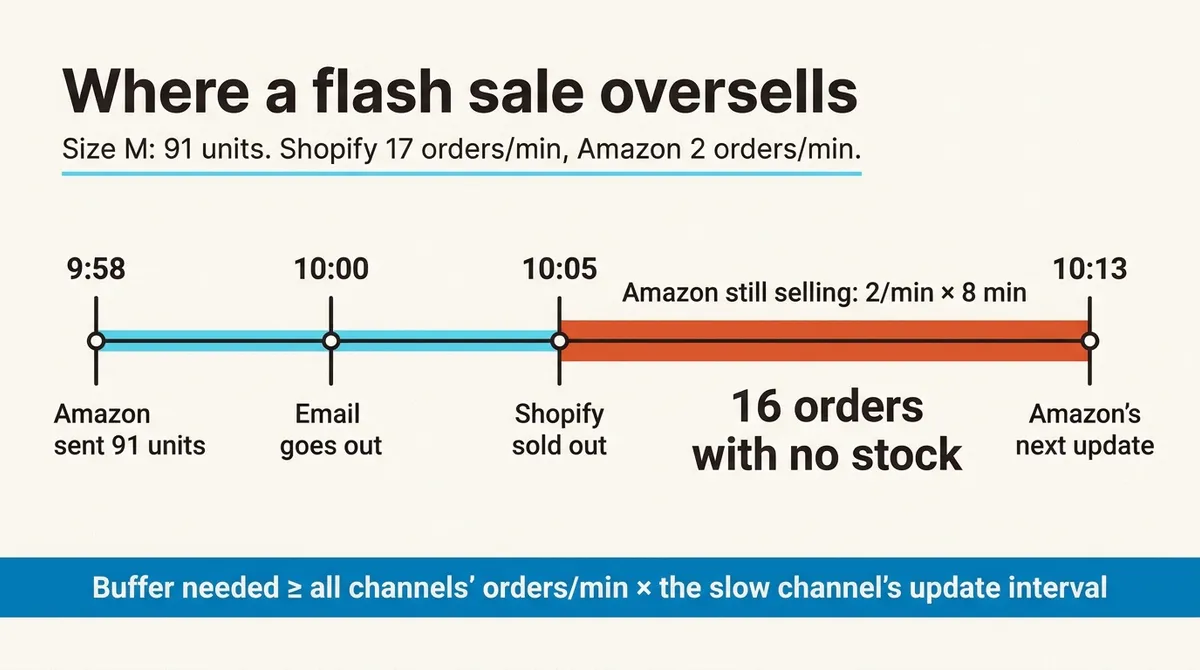
A flash sale oversells on whichever channel finds out last that the stock is gone. The size of the oversell is that channel’s orders per minute times the minutes between the sell-out and its next stock update: 2 orders a minute on a marketplace that won’t hear for another 8 minutes is 16 orders for units you don’t have. Shopify’s own “stop selling when out of stock” setting can’t prevent it, because it only knows about Shopify’s orders.
If Shopify is your only channel, that setting, a couple of spare units and a spreadsheet are enough, and under about $1M on one channel Zoho Inventory or inFlow covers the rest. On two or more channels, a launch needs the units kept away from the channels that update slowly, every stock change sent to the store running the sale, and both undone afterwards. I founded SKU.io, so weigh what I say about it accordingly; the arithmetic is the same in a spreadsheet. This is the stock side of launching a product in the product lifecycle guide.
A sell-out, minute by minute
Take a brand dropping a limited fleece colourway, sold on Shopify and merchant-fulfilled on Amazon from the same shelf. Size M has 91 units. Say Amazon’s quantity is refreshed every 15 minutes in their setup, last at 9:58. The email goes at 10:00, Shopify takes 17 orders a minute and Amazon 2, so 91 units last about 4.8 minutes and size M is gone a little before 10:05. Shopify stops at zero because it was counting. Amazon is still showing its 9:58 number until 10:13, and 8 minutes at 2 a minute is 16 orders with nothing behind them.
The Shopify side of the same sale barely moves. Shopify hears about Amazon’s sales within a minute, and Amazon only sells 2 a minute, so at worst Shopify is showing 2 units that Amazon has already sold, against Amazon’s 16. The damage collects on the slow channel.
Why Shopify’s checkbox can’t see Amazon
Left off, Continue selling when out of stock stops Shopify selling a tracked item at zero. But Shopify’s count only goes down for Shopify’s orders. An Amazon sale, or a wholesale order a rep keyed in at night, reaches Shopify when your inventory system next sends a quantity. Shopify’s help page on the setting doesn’t mention other sales channels at all.
Shopify alone can still oversell a few. A merchant on Shopify’s community forum sells numbered editions of 400 that go in a couple of minutes, and reported 4 to 8 oversold per drop with the setting off. Nobody in the thread pinned it down; the likeliest cause is several checkouts paying for the last units at once. Eight of 400 is 2%, so on 91 units I’d keep 2 back on the Shopify side.
The buffer Amazon would need is bigger than the stock
An e-commerce lead at a multichannel retailer described the default most brands run as having “opened up the taps and then each channel sells as much as it can”, and said that without someone watching “like a hawk” they’d oversell “a thousand units on a channel.” A buffer is the usual answer, and it only works if the slow channel’s last update before the sell-out already shows zero. So it has to cover what every channel sells between two of that channel’s updates:
buffer ≥ all channels’ orders per minute × the slow channel’s update interval in minutes
For the fleece that’s 19 × 15 = 285 units of buffer, against 91 in stock. When the buffer is bigger than the stock, take the product off that channel for the sale. My preference is that the marketplace sits out the first hour of a launch and gets the leftovers. Plenty of brands won’t agree, since a launch is when search traffic peaks; the formula is the price of having both.
The advice to pause inventory sync for the sale and set counts by hand gets it backwards. Pausing freezes every channel at its last number, which is the stale number that oversells.
The 91 is a count, and counts drift
All of that arithmetic starts from the number on the shelf, and that number is the part I’ve had the most trouble with in my own company. We ship through a 3PL. In January I went through their system with them SKU by SKU because our numbers and theirs disagreed. They had about 1,600 SKUs on file for us, and only about 400 actually held stock. A lot of the extras were Amazon’s own merchant SKUs. My best guess was that units coming back from Amazon still wore Amazon’s barcode, got scanned in as they were, and turned into duplicate SKUs our system had never heard of. Kits were their own mess. We receive components and send Amazon assembled kits, and some components didn’t show as part of any kit on their side. We cleaned it up and I did a stock take. By August, two months after the last time I’d lined the two up, we were way out of sync again, selling units our system said were there that the 3PL couldn’t find, on orders already past the point where they could be pulled back.
The habit I took from it: when stock comes back from Amazon, it gets your own barcode before it goes on a shelf, and if a warehouse does that for you, check they actually do. For a launch, count the drop item the day before and set everything else from that count. A cycle count of one SKU is a short job. If the shelf holds 84 and the plan says 91, the sale oversells by 7 before any sync is involved.
Keep the launch units for Shopify
In SKU.io the cleanest way to keep the units off Amazon is a stock hold reserved for the Shopify channel. Every other channel’s quantity drops by the held units and their orders can’t take them, while Shopify keeps counting them and draws on them first. Put it on at least one full Amazon update before the email, because Amazon only sees the drop on its next update, and give it an expiry the day after the sale so the leftovers go back to general stock without anyone remembering to release them. It covers one warehouse, so size M split across two needs two holds. The steps are in placing a stock hold. A buffer or a Max rule on the Amazon connection or listing does a rougher version of the same job, and stays until someone changes it back. Brands that set stock aside for stores all year make the same choice, covered in holding stock back for retail accounts.
One surprise if the fleece is also inside a gift set. A bundle’s quantity is built from its components’ general stock, and held units aren’t general stock, so reserving all 91 for Shopify takes the gift set to zero on Shopify too. That’s right if the set shouldn’t eat launch units. If it was meant to sell, hold fewer.
For a limited run, also turn on Never ship below zero on the product. Where your warehouse allows shipping into negative stock, it makes an oversold order wait as a backorder instead of shipping units you’ll never receive.
What launch mode does, and where it stops
SKU.io normally sends stock changes to Shopify on an every-minute run. Sell-outs, back-in-stock and anything at or below the store’s low-stock number, 10 units by default, go within seconds. At 17 orders a minute a single minute moves more than 10 units, so the change that matters, a wholesale order approved mid-sale or a buffer you changed at 10:02, can land while the quantity is still above that line. Launch mode is the per-product fix: every change to that product goes to Shopify within seconds, whatever the level, until a last day you choose. On a matrix product one switch covers every size. Launch mode: real-time pushes has the details.
Its limits are worth planning around. It pushes stock in real time to Shopify and to no other channel; Amazon and every other channel keep their normal scheduled sync, launch mode or not, which is why Amazon needed the hold. “Within seconds” is not a promise under load: changes are batched per store, there’s a cap on how many listings per store go real-time in a minute, and when the store is close to Shopify’s request limit SKU.io stops sending real-time and leaves the work to the next minute’s run. Nothing is lost, it’s a minute late, and in a sell-out a minute is the whole window.
It’s per product, so a bundle needs its own switch. Turn it on for the fleece and the gift set containing it stays on the normal rules.
And it can’t help a variant Shopify isn’t tracking. If someone created the new colourway’s variants in the Shopify admin with Track quantity off and linked them afterwards, Shopify keeps whatever number it’s sent but never takes stock off on a sale and never sells the variant out, so SKU.io skips those listings and shows them as Not Tracked in Shopify on the store’s inventory tab. Products published from SKU.io go up with tracking on; it’s variants made in Shopify for a drop that catch people. Check that card the day before.
Two shoppers paying for the last unit at the same moment is between them and Shopify. That’s what the 2 spare units are for.
The morning after the sale
Launch mode with a last day turns itself off. Without one it stays on, and nothing visibly breaks: every change to those products keeps going out within seconds, from the same Shopify request budget the rest of your catalog uses, and weeks later nobody remembers why a few dozen products are on. The Shopify connection’s inventory sync settings show how many products have launch mode on, with a link to the list. A hold with an expiry has already returned what didn’t sell. A buffer or Max rule added for the sale is the one that lingers, and the marketplace only gets its leftovers on its next sync after someone removes it.
For the rest of a launch, from listing the product to the first reorder, use the product launch checklist. This piece is part of launching a product in the product lifecycle guide. If you’ve oversold a launch and want to see where the minutes went, book a demo and bring the order times.