Connect Faire
You connect Faire by choosing who ships its orders and then signing in to Faire as a brand admin. The fulfillment mode can't be changed later, so if you use both, connect Faire twice: once for FBM and once for FBF.
Before you begin
- You must be signed in to Faire as a brand admin. Faire blocks the connection for anyone else.
- You need permission to connect integrations in SKU.io.
- Faire allows one login per brand. If you already have a Faire connection in the other fulfillment mode, reuse it rather than signing in again, since a second login could disconnect the first.
Connect your Faire account
-
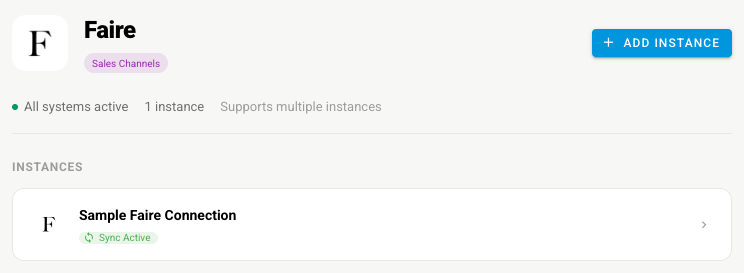
Go to Apps & Integrations, open Sales Channels, and choose Faire.
-
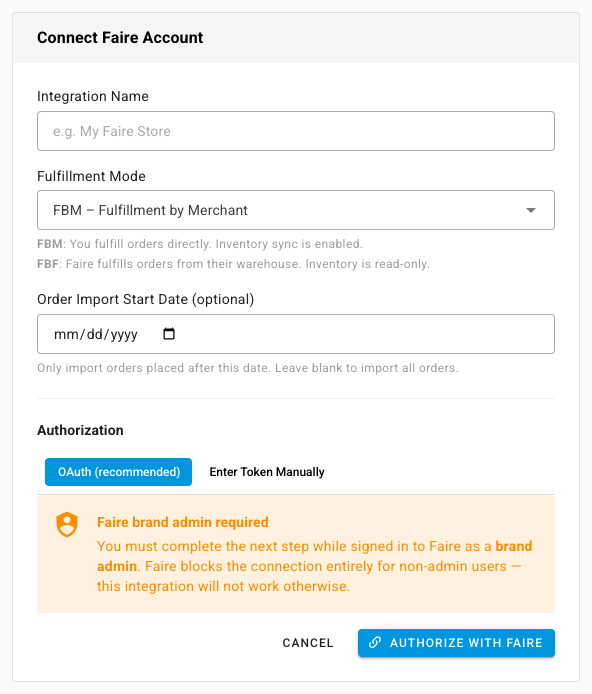
Click Connect Faire, or Add Instance if Faire is already connected. The Connect Faire Account page opens.
-
Type an Integration Name.
-
Choose the Fulfillment Mode:
- FBM – Fulfillment by Merchant: you ship the orders, and SKU.io sends stock and tracking to Faire.
- FBF – Fulfillment by Faire: Faire ships from its warehouse, and stock is read-only.
-
Optionally set an Order Import Start Date. Orders placed before it aren't imported.
-
Under Authorization, choose how to sign in:
- OAuth (recommended): click Authorize with Faire, sign in as a brand admin, and approve the request.
- Enter Token Manually: paste an access token you already have.
- Reuse existing connection: shown when you have a connection in the other fulfillment mode. Pick it to share its Faire login.
Set it up
| Settings tab | What to check |
|---|---|
| General | The name, and the connection. Reconnect via OAuth or Replace Token Manually if Faire stops accepting it |
| Sync | The What syncs switches for orders, products, tracking, stock, and prices. See Manage a connected app |
| Orders | The import start date, and which of your financial line types Faire's commission, payout fees, and covered shipping post to |
| Products | Auto Create/Link SKU Products, which matches Faire products to yours by SKU and creates any that don't match |
| Inventory Sync | Master of Stock. Set it to SKU.io to send stock to Faire |
| Pricing Sync | Master of Price, which price to send, and guardrails. See Sync prices with your sales channels |
| Shipping | The Shipping Method given to every Faire order. Faire doesn't send one, because you choose the carrier when you ship |
| Content Sync | Whether SKU.io watches your Faire products for content changes. See Content Sync |
Next steps
- Faire overview — what moves each way.
- Set up sub sales channels — how marketplace and Faire Direct orders are told apart.
Last verified:
Was this helpful?