NuORDER orders and customers reference
This page lists what each status, column, filter and panel on the NuORDER Orders and Customers pages means. For how orders move between NuORDER and SKU.io, see How NuORDER works with SKU.io. To work an order, see Handle NuORDER orders.
Order statuses
The Status column shows the order's status in NuORDER, not the status of its SKU.io sales order.
| Status | What it means in NuORDER | What SKU.io does |
|---|---|---|
| Draft | The retailer hasn't submitted the order yet | Never imports it |
| Review | Submitted and waiting for review | Shows the order, and never creates a sales order on its own, whichever setting you chose |
| Pending | Submitted and waiting for your approval | Creates the sales order only when Create SKU.io sales orders when a NuORDER order is is set to Pending |
| Approved | You approved it | Creates the sales order |
| Processed | The order has been picked up for fulfillment. SKU.io sets this status itself once the sales order exists, when Mark Imported Orders Processed in NuORDER is on | Keeps the sales order up to date |
| Shipped | Every unit has shipped | Keeps the sales order up to date, and records any shipment made in NuORDER |
| Cancelled | The order was cancelled | Cancels the sales order |
The Status filter offers every status except Draft. If NuORDER ever sends a status SKU.io doesn't recognize, the order shows it as sent with a warning, and SKU.io neither creates nor closes a sales order for it until it moves to a known status.
Orders list
Go to NuORDER → Orders. The list shows every order imported from the portal you selected.
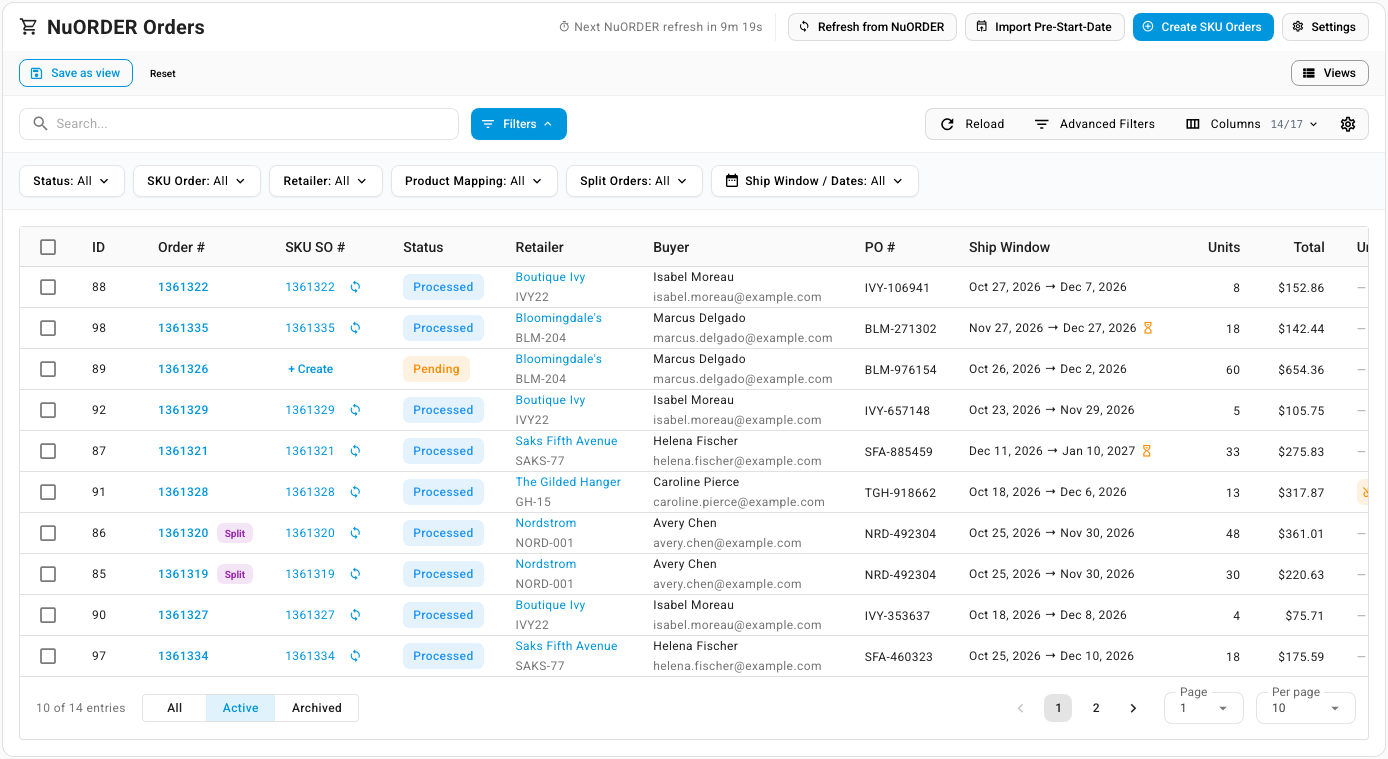
Header buttons
| Button | What it does |
|---|---|
| Next NuORDER refresh in | Counts down to the next scheduled order check |
| Refresh from NuORDER | Checks NuORDER for new and changed orders now, or fetches orders by number. Greyed out while a refresh of the portal's orders is already running |
| Import Pre-Start-Date | Imports orders placed before your Order Import Start Date |
| Create SKU Orders | Creates sales orders for orders that don't have one yet |
| Settings | Opens the connection's Orders settings |
These buttons run in the background. Follow their progress in the job tray. See Follow background jobs.
Columns
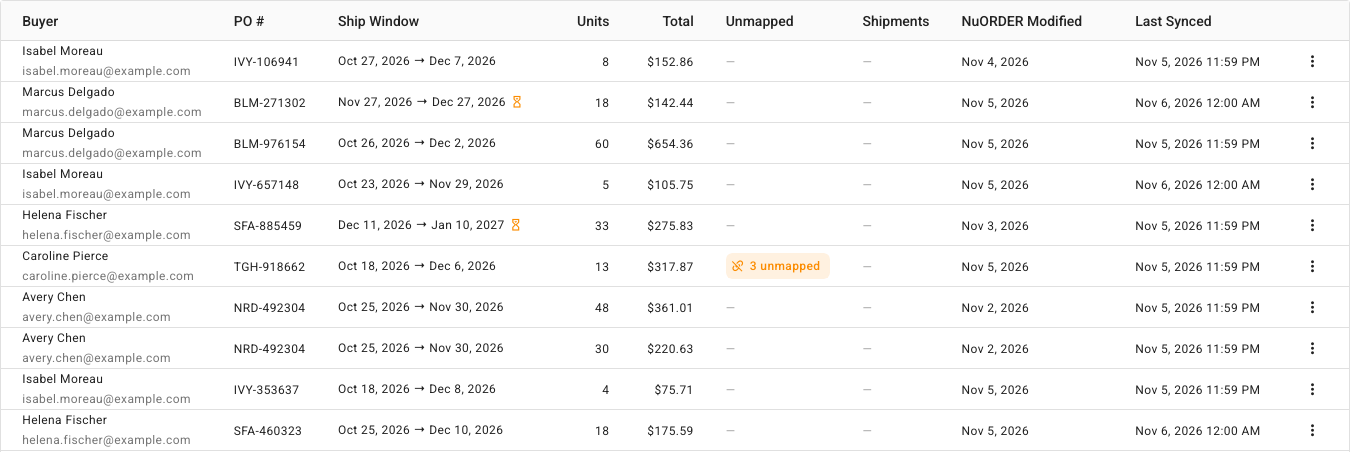
| Column | What it shows |
|---|---|
| ID | SKU.io's own number for the imported order. See Show internal IDs |
| Order # | The NuORDER order number. Opens the order page. A Split chip marks one part of a split order |
| NuORDER ID | NuORDER's own ID for the order. Hidden by default |
| SKU SO # | The sales order number, with a link to it. + Create means the order has no sales order yet |
| Status | The order's status in NuORDER. See Order statuses |
| Retailer | The retailer's name and NuORDER code |
| Buyer | The buyer's name and email |
| PO # | The retailer's purchase order number |
| Ship Window | The start ship and end ship dates. An hourglass means the sales order is held until start ship |
| Units | The order's quantity in units, with prepacks counted as units |
| Total | The order total |
| Unmapped | How many sizes on the order aren't linked to a SKU.io product, for example 2 unmapped |
| Shipments | Shipments recorded in NuORDER, with their tracking numbers |
| NuORDER Created | When the order was placed in NuORDER. Hidden by default |
| NuORDER Modified | When the order last changed in NuORDER |
| Last Synced | When SKU.io last updated the order from NuORDER |
| Archived | Whether you archived the order in SKU.io. Hidden by default |
To show a hidden column, use Columns. See Choose and freeze table columns.
The footer toggle switches between All, Active and Archived orders. The list opens on Active.
Row actions
Click the ⋮ menu (Order actions) at the end of a row. The actions depend on whether the order has a sales order yet.
| Action | When it shows | What it does |
|---|---|---|
| View Details | Always | Opens the order page |
| Create SKU Order | The order has no sales order | Creates its sales order |
| Refresh from NuORDER | The order has a sales order | Gets the latest version of the order from NuORDER and updates the sales order |
| Send to NuORDER | The order has a sales order | Sends its shipments to NuORDER |
| Delete SKU Order | The order has a sales order | Removes the linked sales order only, and keeps the NuORDER order in the list |
| Archive | Always | Moves the order to the Archived view |
| Delete | Always | Removes the imported order from SKU.io |
Bulk actions
Tick orders to show the bar above the list. It says how many you ticked, for example 1 order selected, and offers Selected Only or All Filtered to set which orders an action applies to.
| Action | What it does |
|---|---|
| Create SKU Orders | Creates sales orders for the orders that don't have one |
| Update SKU Orders | Applies NuORDER's latest version to each linked sales order. Orders without one are skipped |
| Archive | Asks you to confirm, then moves the orders to the Archived view. Archived orders are hidden and skipped by syncs until unarchived |
| Delete | Removes the imported orders and their linked sales orders from SKU.io |
| Delete SKU Orders | Deletes only the linked sales orders. Tick Also archive the NuORDER orders (prevents re-creation on the next sync) to stop SKU.io creating them again |
| Clear Selection | Clears the ticks from every order |
Search and filters
Search finds orders by order number, PO number, retailer name or code, buyer email, sales order number, or style number.
| Quick filter | Options |
|---|---|
| Status | Review, Pending, Approved, Processed, Shipped, Cancelled |
| SKU Order | With SKU Order, Without SKU Order |
| Retailer | Each retailer that has ordered |
| Product Mapping | Missing Mappings, All Mapped |
| Split Orders | Split Orders, Not Split |
| Ship Window / Dates | A date range on Start Ship, End Ship, Created in NuORDER, Modified in NuORDER or Acknowledged |
Advanced Filters adds conditions grouped as:
| Group | Filters |
|---|---|
| Order | Order #, Status, PO #, Split Group, Split Orders, Payment Status, Acknowledged, Archived |
| Retailer | Retailer, Retailer Code, Sales Rep |
| Money | Total, Units, Currency |
| Dates | Start Ship, End Ship, Created in NuORDER, Modified in NuORDER, Acknowledged |
| Workflow | SKU Order, Product Mapping, Pre-Start-Date Import |
You can save any combination as a view with Save as view, and right-click a cell to show only matching orders or filter them out. See Save and pin table views.
Order page
Click an order number to open its page.
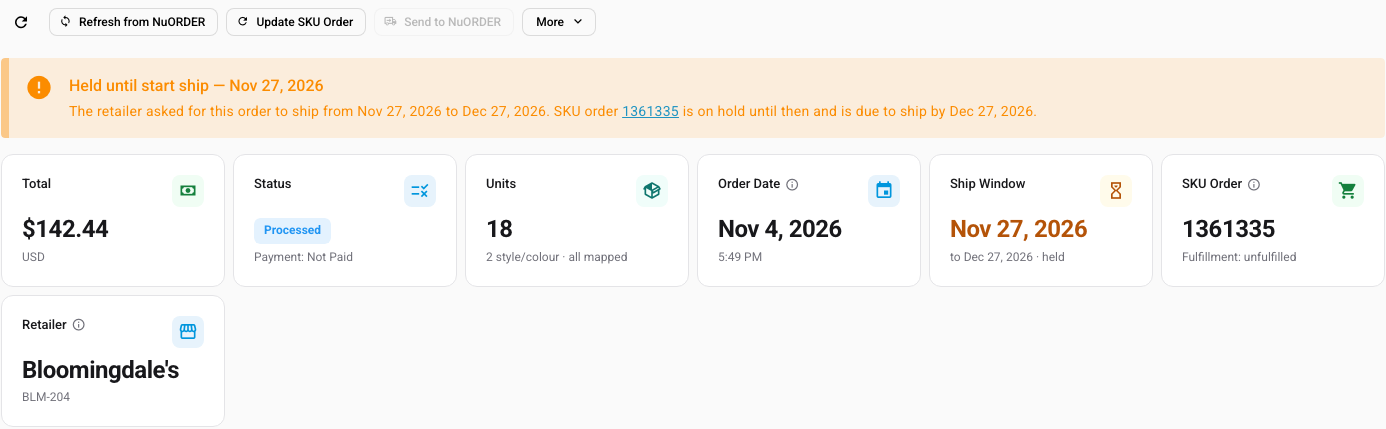
Header
Under the order number, the header shows when the order was Placed, its NuORDER ID, its SKU.io ID, and when it was Last synced.
| Button | What it does |
|---|---|
| Reload icon | Reloads the page from SKU.io without checking NuORDER |
| Refresh from NuORDER | Gets the latest version of this order from NuORDER |
| Create SKU Order / Update SKU Order | Creates the sales order, or applies NuORDER's latest version to the one that exists |
| Send to NuORDER | Sends the sales order's shipments to NuORDER. It's unavailable while the sales order has nothing to send, for example while it's held, or when the only unsent fulfillments failed; retry or dismiss those on the Failed tab of Fulfillments |
| More | Delete SKU Order (removes the linked sales order only), Archive and Delete |
Banners
| Banner | When it shows |
|---|---|
| Held until start ship | The start ship date is still in the future, so the sales order is on hold until then |
| Some NuORDER changes could not be applied to the SKU order | NuORDER lowered a line below what has already shipped or been committed. See How NuORDER works with SKU.io |
| This NuORDER order is cancelled. | The order was cancelled in NuORDER |
Summary cards
| Card | What it shows |
|---|---|
| Total | The order total and currency |
| Status | The NuORDER status, and whether NuORDER marked the order paid |
| Units | Total units, the number of style/color lines, and whether all sizes are linked |
| Order Date | When the order was placed |
| Ship Window | Start ship to end ship, and held when the sales order is on hold |
| SKU Order | The sales order number and its fulfillment status |
| Retailer | The retailer's name and code |
Panels
| Panel | What it shows |
|---|---|
| SKU Sales Order | The linked sales order's number, status, fulfillment and payment, with View Sales Order |
| Retailer & Addresses | Under Retailer & Order: the retailer, buyer, Sales rep, PO #, currency, Payment, when the order was created, modified and acknowledged, its External ID (the SKU.io order number saved in NuORDER) and whether it's Locked. Locked: Yes — edits closed in NuORDER means NuORDER no longer lets anyone edit the order. Then the Ship To and Bill To addresses, each with its NuORDER address code |
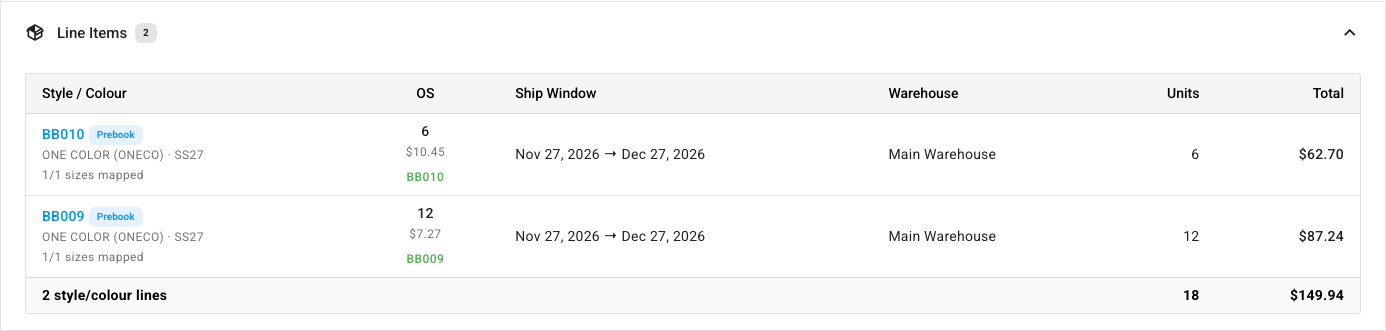
| Line Items | One row per style and color, with a column per size, the line's Ship Window and the NuORDER Warehouse it ships from. Each cell shows the quantity, the price, and the SKU.io product the size is linked to, or Map when it isn't linked. Map opens Map to SKU Product or Offering, where you can also choose Map as Revenue Line or Create New SKU Product. A prepack shows as packs × pack size, such as 1 × 6. A Prebook chip marks a line that ships in its own window |
| Financial Summary | Lines subtotal, Order discount, Shipping and Order Total |
| Ship Window | Start ship, End ship, SKU order hold until and SKU order ship by, and each line's window with Matches order |
| Shipping & Tracking | The Requested service, Carrier, Service code and Shipping charge, and every shipment recorded in NuORDER with its tracking number. No shipments recorded in NuORDER yet when there are none |
| Split Group | For a split order, the other orders from the same split, with their status, total and sales order |
| Order Notes | The notes on the order in NuORDER |
| Fulfillments | The sales order's fulfillments, with their Type (for example Manual, or Sales Channel for a shipment recorded in NuORDER), warehouse, tracking, items, and Submitted to Channel: when NuORDER received it, or Not submitted. A chip such as 1 not sent to NuORDER counts the ones still waiting |
| Activity Log | Every change SKU.io made to this order. See Track changes in the activity log |
| Raw NuORDER Data | The order exactly as NuORDER holds it now, fetched when you click Load Raw Data from NuORDER. Useful when you contact support |
Customers page
Go to NuORDER → Customers. The page lists every retailer that has ordered through the portal, collected from the imported orders. A retailer's buyer and address follow its most recent order. The page is read-only; you edit the customer itself under Contacts → Customers.
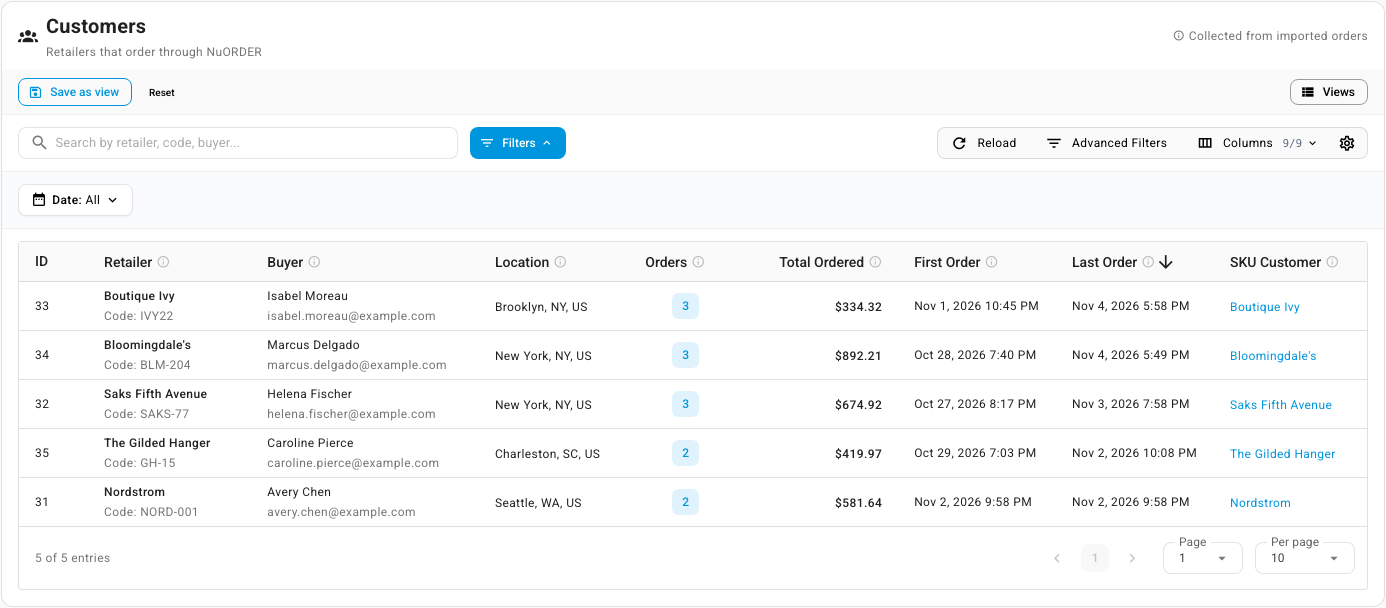
| Column | What it shows |
|---|---|
| ID | SKU.io's own number for the retailer |
| Retailer | The retailer's name and its NuORDER Code |
| Buyer | The buyer's name and email on the latest order |
| Location | The city, state and country on the latest order |
| Orders | How many NuORDER orders the retailer has placed, not counting cancelled ones. Click it to open those orders on the Orders page |
| Total Ordered | The sum of those orders' totals |
| First Order | When its first order was placed |
| Last Order | When its latest order was placed |
| SKU Customer | The SKU.io customer its orders go to. Empty until the retailer's first sales order is created |
Search finds a retailer by name, code, or buyer. The Date filter narrows the list by First Order or Last Order date. Advanced Filters add conditions on any column, plus the buyer's email, city, state, and country. Right-click a row for View Orders and View SKU Customer, or to show or filter out matching rows. You can save the list's filters as a view with Save as view.
When one retailer has become two SKU.io customers, for example after its buyer's email changed, merge the duplicate customers. To change a customer's details, see Create and edit a customer.