How NuORDER works with SKU.io
A wholesale order in NuORDER follows rules a web-store order doesn't: retailers buy in packs, ask for delivery inside a ship window, and keep editing an order after they place it. This page explains how SKU.io carries each of those rules over to the sales order, so you know what to expect before you set up the connection.
How SKU.io stays in step with NuORDER
NuORDER doesn't tell SKU.io when something changes. Instead, SKU.io checks NuORDER on a schedule, and sends stock and shipments back the moment they change on its side. The Sync Status card on the NuORDER Dashboard shows each schedule, when it last ran, and when it runs next:
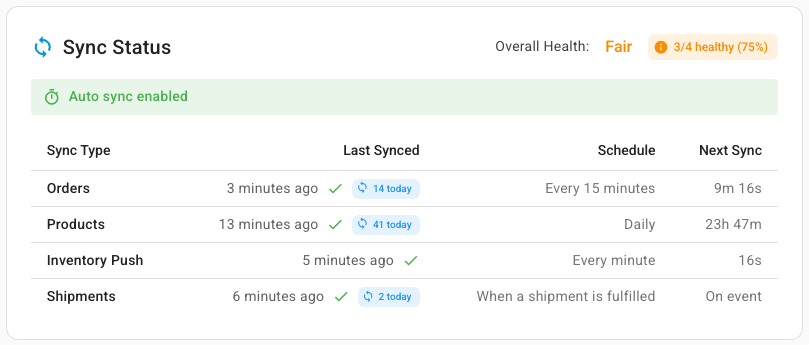
| What | How often | What it does |
|---|---|---|
| Orders | Every 15 minutes | Brings in new orders, and any change to an order already imported: edits, cancellations, a new ship window, or a shipment recorded in NuORDER |
| Products | Daily | Brings in new and changed styles, colors and sizes |
| Inventory Push | Every minute | Sends NuORDER each size's available-to-sell stock when it has changed, one style and color at a time, for each NuORDER warehouse you've chosen stock warehouses for |
| Shipments | When a shipment is fulfilled | Sends the shipment and its tracking to NuORDER |
Overall Health at the top of the card counts the syncs that have run and how many of them are healthy, the same states the Sync Health card lower on the Dashboard shows. For example, a shipment NuORDER refused makes Shipments sent Failing there, and the card reads Fair with 3/4 healthy (75%). A portal that isn't connected yet shows Not Connected.
The Orders and Products pages show Next NuORDER refresh in with a countdown. You don't have to wait for it: Refresh from NuORDER on either page checks NuORDER straight away. Retailers' unsubmitted drafts never come across, and neither do orders placed before your Order Import Start Date.
You can pause every schedule at once, or turn off one direction. See Pause sync or turn one direction off.
The life of an order
-
The retailer submits an order. It appears on the NuORDER Orders page at the next order check, whatever its status.
-
SKU.io creates the sales order once the order reaches the status you chose under Settings → Orders:
- Approved (recommended): only after you approve it in NuORDER, so retailers can still edit pending orders without touching your stock.
- Pending: once the order reaches Pending in NuORDER, for brands that skip NuORDER's approval step.
An order still in Review in NuORDER never gets a sales order on its own.
Until then, the order shows + Create in the SKU SO # column instead of a sales order number. See Set up NuORDER order, shipping and email settings.
-
NuORDER hears back. With the settings on, SKU.io moves the NuORDER order to Processed and saves the sales order number on it, so your reps can look the order up from either side.
-
You fulfill the sales order the way you fulfill any other. If the retailer asked for a later start ship date, the sales order is on hold until then.
-
The shipment goes back. As soon as a fulfillment ships, SKU.io sends NuORDER the shipment with its tracking numbers. Once every unit has shipped, the order becomes Shipped in NuORDER. See Send shipments and cancellations to NuORDER.
How a NuORDER order maps to a sales order
| In NuORDER | On the SKU.io sales order |
|---|---|
| Order number | The order number, so both sides use the same number |
| Customer PO number | Customer PO# |
| Retailer and buyer | The customer. See Retailers become customers |
| Ship-to and bill-to addresses | Ship To and Bill To. With no bill-to, the ship-to is used for both |
| Each size on each style line | One product line, in units, for the SKU.io product the size is linked to |
| Order discount | The sales order's discount |
| Shipping charge | A Shipping revenue line |
| Requested shipping service | The shipping method you mapped it to under Settings → Shipping |
| Payment terms | The payment term with the same name, when you have one |
| End ship | Ship By |
| Start ship, when it's in the future | Hold Until |
| Order notes and the sales rep | Notes on the sales order's Notes tab, for example NuORDER sales rep: Priya Raman |
NuORDER sends no tax and charges no marketplace fee, so NuORDER sales orders carry no tax and no cost lines.
Wholesale orders usually run on terms, so the sales order starts Unpaid. It becomes Paid only when NuORDER marks the order paid, and a later update never moves it back.
Sizes that aren't linked to a product yet
A size that isn't linked to a SKU.io product doesn't stop the sales order from being created. The size still comes across as a line, but that line has no product, so it doesn't allocate stock and no stock is sent to NuORDER for it. The NuORDER order page shows Map in place of the SKU for each such size, and the Unmapped sizes card on the Dashboard counts them. See Link NuORDER sizes to SKU.io products.
Packs and units
Brands often sell in prepacks, for example a pack of six of one item. NuORDER counts packs, and SKU.io stocks units, so SKU.io multiplies each prepack line's quantity by its pack size. Three packs of six become 18 units on the sales order.
On the NuORDER order page a prepack line shows its quantity as packs × pack size (1 × 6), and the Units column shows both the units and the packs:
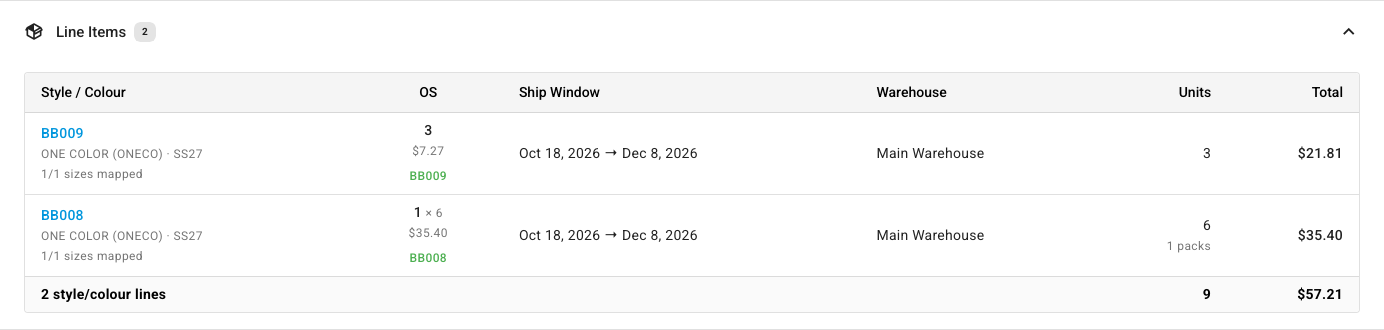
Line descriptions on the sales order and its fulfillments end with the pack size, for example (pack of 6). Cancellations from NuORDER convert to units the same way. When you ship, units convert back to packs, and NuORDER accepts only whole packs. A fulfillment that ships part of a pack can't be sent, and SKU.io tells you which line to record in NuORDER yourself. See Send shipments and cancellations to NuORDER.
The ship window
Each NuORDER order carries a ship window, a Start ship and End ship date the retailer asked you to deliver between. SKU.io uses it so you don't ship too early or too late:
- End ship becomes the sales order's Ship By date.
- While Start ship is still in the future, the sales order is held until that date, so it isn't picked and shipped early. When start ship is today, already past, or on or after end ship, there's no hold.
A held order shows a banner at the top of its NuORDER order page, and an hourglass next to its ship window on the Orders list:

The Ship Window panel on the order page shows the window, the hold and the ship-by date SKU.io set:

Some lines carry a window of their own, for example a Prebook line ordered ahead of production. The panel lists each window, and Matches order shows whether a line's window is the same as the order's. When lines have different windows, the earliest line end ship sets the sales order's Ship By. When NuORDER changes a window, the hold and the ship-by date follow at the next order check.
To see the held orders that are coming due, use the Ship-by and release schedules.
Split orders
NuORDER can split one retailer order into several orders, usually one per ship window. Each part is its own NuORDER order, and each becomes its own sales order with its own ship window and ship-to address. On the Orders list each part shows a Split chip. On the order page, the Split Group panel lists the other orders from the same split, with their status, total and sales order:

Retailers become customers
The NuORDER retailer becomes the SKU.io customer, and its buyer becomes the customer's contact. SKU.io matches a retailer to an existing customer by its name, the buyer's email and the bill-to address, so a retailer that ships to many stores or distribution centers stays one customer.
If the buyer's email changes in NuORDER, the next order can create a second customer. Merge the duplicate customers to bring their orders together. The NuORDER Customers page lists every retailer with the SKU.io customer its orders go to. See NuORDER orders and customers reference.
Bundles
You can link a NuORDER size to a SKU.io bundle. The sales order then gets the bundle's component lines, at the bundle quantity times each component's recipe quantity. For example, three of a set made of a tumbler and two straw packs become 3 tumblers and 6 straw packs:

Edits and cancellations from NuORDER scale the components the same way. The order's price is split across the components when the sales order is created, and isn't recalculated afterward. NuORDER hears about bundles only as whole sets: a shipment is reported once a fulfillment completes a whole bundle, and the stock sent to NuORDER is the number of whole bundles your component stock can make.
For how bundles work everywhere in SKU.io, see Kits vs bundles and Bundle pricing and proration. A NuORDER prepack isn't a bundle: it's one product counted in packs.
When the order changes in NuORDER
Retailers and your reps can keep changing an order in NuORDER after its sales order exists. At the next order check, or when you click Refresh from NuORDER or Update SKU Order on the order, SKU.io applies the changes to the sales order:
- New lines are added, and quantities follow NuORDER.
- A line removed in NuORDER is deleted from the sales order if nothing on it has shipped. Otherwise only its open remainder is cancelled.
- Units cancelled in NuORDER are cancelled on the line.
- The shipping charge, discount, ship-by date and hold follow NuORDER.
- Prices change only on lines where nothing has shipped yet.
- Lines and charges you added to the sales order yourself are left alone.
SKU.io never takes back units that have already shipped. For example, if a line was for 10 units, 4 have shipped, and NuORDER lowers it to 6, the sales order keeps the 4 shipped units and leaves 2 to ship.
When NuORDER lowers a line below what has already shipped or been committed to a fulfillment, SKU.io can't apply that change. It keeps what shipped and shows a banner on the NuORDER order page that says exactly what it couldn't do:

To clear it, see Fix a change SKU.io couldn't apply.
When an order is cancelled in NuORDER, SKU.io cancels its sales order at the next order check, and the order page says This NuORDER order is cancelled.
Shipments made in NuORDER
Sometimes an order ships without going through SKU.io, and the shipment is recorded in NuORDER instead. SKU.io picks that shipment up at the next order check and records it on the sales order as a fulfillment, with NuORDER's carrier, tracking number and ship date, so the order doesn't sit open waiting to be shipped again. The order page lists those shipments under Shipping & Tracking:

- A shipment dated before your inventory start date is recorded without taking stock out, because that stock was never in SKU.io.
- Units shipped on a size that isn't linked to a product wait until you link it, and are recorded then.
- Shipments SKU.io sent to NuORDER itself are never counted twice.
As a safety net, SKU.io also looks for orders where NuORDER shows more units shipped than SKU.io has recorded, and checks them again. To understand how that works for every channel, see How channel orders sync and Close orders that shipped before tracking.
What runs on its own, and what you do
| On its own | Your part |
|---|---|
| Bringing in orders, changes and cancellations every 15 minutes | Approve orders in NuORDER, when you use the Approved setting |
| Creating the sales order and marking the NuORDER order Processed | Link new sizes to products the first time they appear |
| Holding orders until their start ship date | Fulfill the sales order |
| Sending each shipment and its tracking to NuORDER | Retry a shipment NuORDER refused, or record a part pack in NuORDER |
| Sending available-to-sell stock every minute, once you've chosen stock warehouses | Choose which warehouses' stock NuORDER is offered. A new connection sends none until you do |
| Recording shipments made in NuORDER | Clear a change SKU.io couldn't apply |
For how stock levels for any channel are worked out, see How channel stock is calculated. Terms such as prepack, ship window and style are in the glossary.