Send shipments and cancellations to NuORDER
When you ship a NuORDER order in SKU.io, SKU.io tells NuORDER on its own: the shipment goes over with its tracking numbers, and NuORDER marks the order Shipped once every unit has shipped. Units you cancel are recorded on the NuORDER order too. Use the NuORDER Fulfillments page to check that everything arrived, send anything still waiting, and deal with a send NuORDER refused.
Before you begin
- Connect NuORDER.
- To send or retry by hand, your role needs the Fulfill permission for sales orders. See Sales order permissions and Create a role.
How shipments reach NuORDER
You don't send anything by hand in the normal course of things. When a fulfillment of a NuORDER order ships in SKU.io, SKU.io sends it to NuORDER as one shipment with its carrier, every tracking number, and the sizes and quantities it contains. Ship the order the way you ship any sales order; see Fulfill a sales order.
Automatic sends depend on Submit tracking to NuORDER on Settings → Sync. While it's off, nothing goes on its own, but you can still send by hand from this page. See Pause sync or turn one direction off.
Check what NuORDER has
- In the NuORDER menu, under Fulfillment, click Fulfillments.
- Read the line at the top right. Tracking is sent to NuORDER when a fulfillment ships, and cancelled quantities when they're cancelled means automatic sends are on.
The page has three tabs:
| Tab | What it lists |
|---|---|
| All Fulfillments | Every shipped fulfillment of this portal's orders, with its NuORDER Status and when it was Sent to NuORDER. |
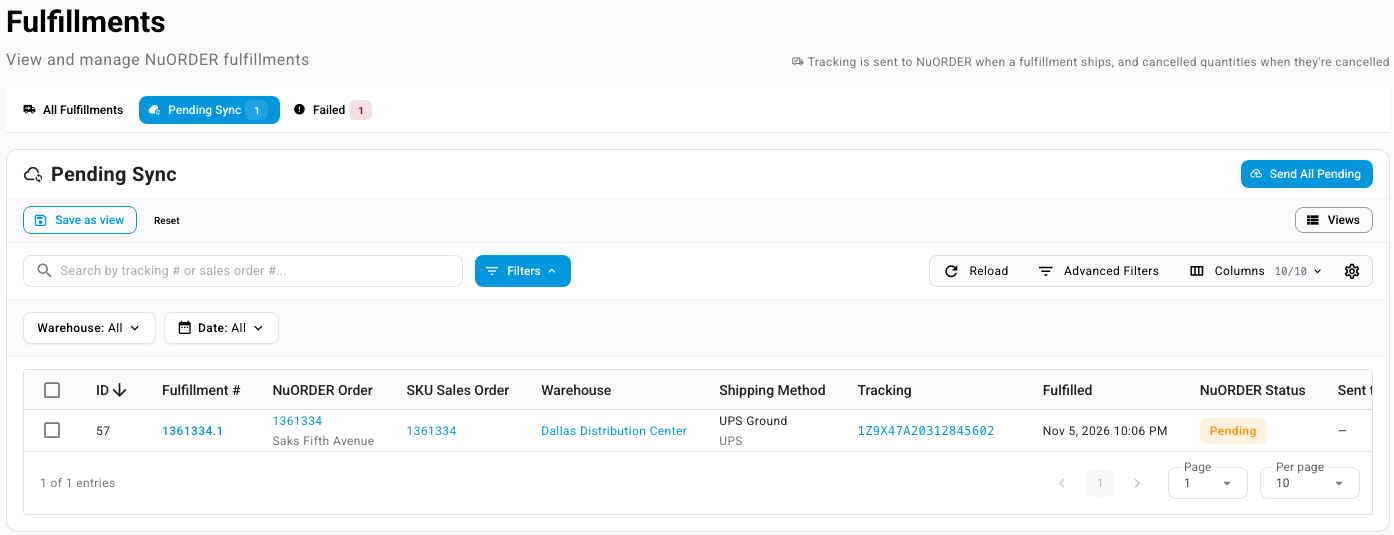
| Pending Sync | Shipped fulfillments NuORDER does not have yet and that haven't failed. The badge counts them. |
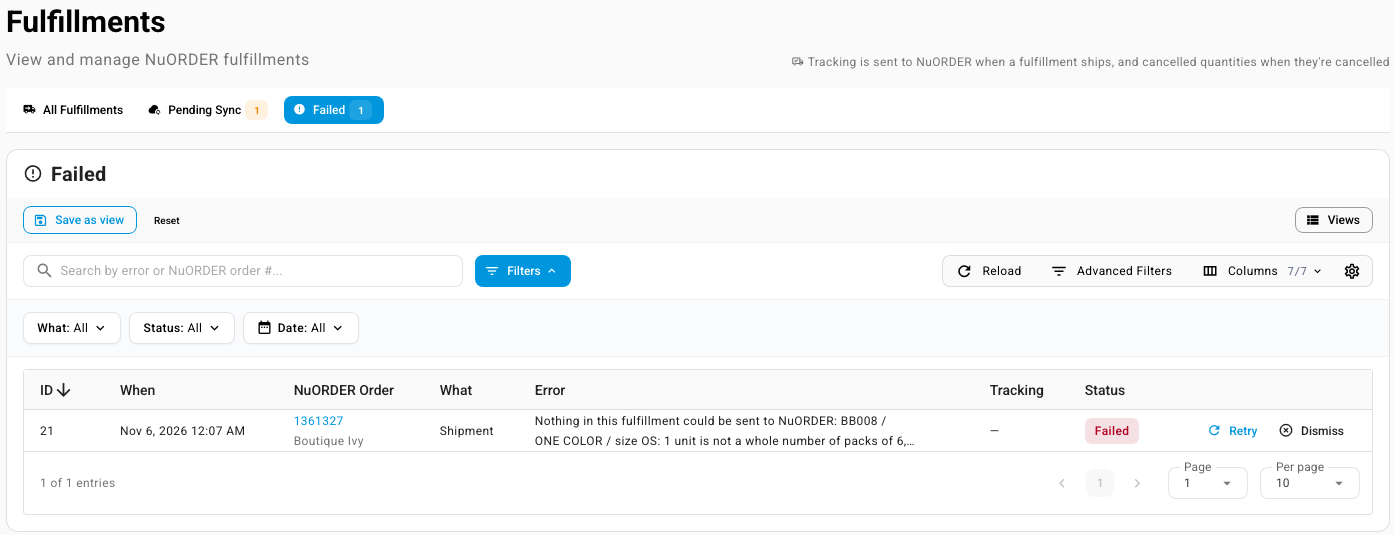
| Failed | Sends NuORDER refused that haven't been retried or dismissed. The badge counts them. |
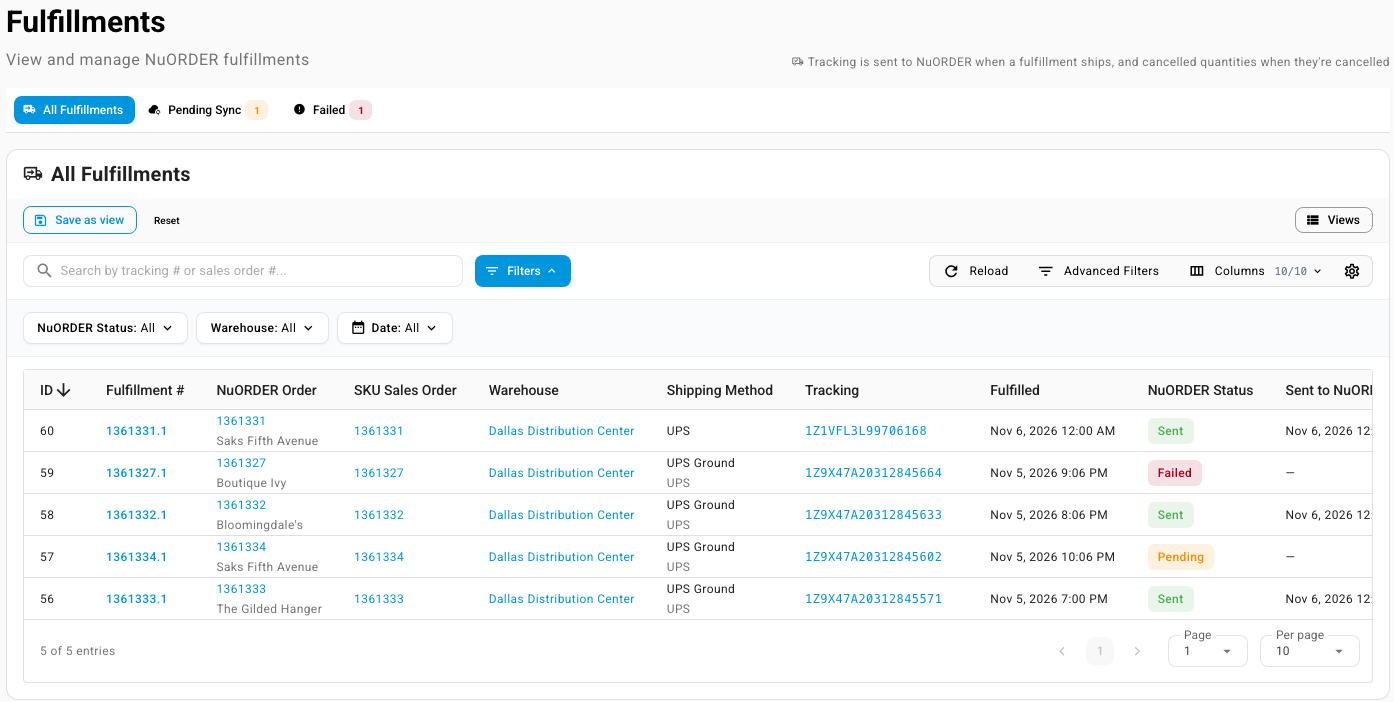
Each row links to its Fulfillment #, NuORDER Order and SKU Sales Order, and the tracking number opens the carrier's tracking page. A shipment that was recorded in NuORDER rather than shipped through SKU.io also appears here as Sent. See Shipments made in NuORDER.
Filter NuORDER Status to narrow the list. The values are Sent, Pending, Failed, Outcome Unknown, Order Cancelled, Partial Bundle, Not on NuORDER Order and Dismissed; each is explained in the NuORDER products, inventory and fulfillments reference.
Send fulfillments that are still waiting
A fulfillment waits on Pending Sync when it shipped while automatic sends were off, or when its send hasn't gone through yet. A fulfillment whose last send failed isn't listed here, and Send All Pending doesn't send it again: it waits on the Failed tab until you retry or dismiss it. See Retry or dismiss a send NuORDER refused.
-
Click the Pending Sync tab.
-
Send them in whichever way suits you:
-
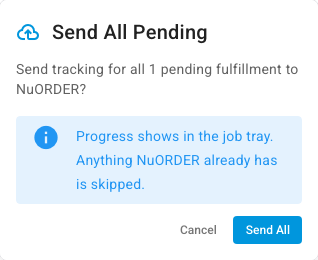
All of them: click Send All Pending. The confirmation says how many it sends, for example Send tracking for all 1 pending fulfillment to NuORDER? Click Send All.
-
Some of them: tick the rows, then click Send Selected to NuORDER.

-
One of them: click the send icon (Send to NuORDER) at the end of its row.

-
The sends run in the background; follow them in the job tray. See Follow background jobs. Anything NuORDER already has is skipped, so sending twice never creates a duplicate shipment. A sent fulfillment moves to Sent and drops off Pending Sync.
Send from the order page
On a NuORDER order page, the Fulfillments panel shows a chip such as 1 not sent to NuORDER when a fulfillment hasn't reached NuORDER. Click the chip to open that order's fulfillments on Pending Sync.

To send them, click Send to NuORDER at the top of the order page.

The button is greyed out when there's nothing to send. Hover over it to see why, for example Nothing to send yet — fulfill the SKU order first., Create the SKU order first — tracking comes from its fulfillments., or Cancelled NuORDER orders don't accept shipments. It's also greyed out when the order's only unsent fulfillments failed: The unsent fulfillments failed or are being checked with NuORDER — retry or dismiss them on the Fulfillments page's Failed tab.
Retry or dismiss a send NuORDER refused
-
Click the Failed tab. Each row shows When it failed, the NuORDER Order, What was being sent (Shipment, Cancelled Quantities or Order Cancellation) and the Error.
-
Read the error and fix the cause, in SKU.io or in NuORDER.
-
Choose what to do with the row:
- Click Retry to send it again.
- Click Dismiss to stop retrying it. Use it when NuORDER can never accept the send, or when you recorded it in NuORDER yourself.
A row disappears from Failed once it's retried or dismissed. The Failed · 24h card on the dashboard and the Shipments sent row of Sync Health also show failed sends; see Monitor and manage the NuORDER connection.
Outcome Unknown means an earlier send didn't confirm. You don't need to do anything: SKU.io checks NuORDER before it sends that shipment again, so it's never sent twice.
Why something wasn't sent
| What you see | Why | What to do |
|---|---|---|
| Failed, with an error like …1 unit is not a whole number of packs of 6, so it was left out of the shipment. Record it in NuORDER. | NuORDER counts that size in packs, and the units you shipped don't make whole packs. When every line is left out, the whole send fails. When only some lines are, the rest is sent and the left-out line is noted in the job tray and the Activity Log. | Record the loose units in NuORDER, then Dismiss the row. Retry sends the same quantity and fails again. See Packs and units. |
| Not on NuORDER Order | Everything in the fulfillment is on lines you added to the sales order in SKU.io, which NuORDER doesn't know about. | Nothing to send. Record those units in NuORDER if the retailer should see them. |
| Partial Bundle | The fulfillment doesn't complete a whole bundle yet. NuORDER hears about bundles only as whole sets. | Ship the rest of the set; it's sent once the bundle is complete. See Bundles. |
| Order Cancelled | The NuORDER order is cancelled, and a cancelled order doesn't accept shipments. | Check the order in NuORDER. |
| Pending, and nothing goes on its own | Submit tracking to NuORDER is off on Settings → Sync. | Turn it back on, or send by hand. |
Only shipped fulfillments are sent; a fulfillment that hasn't shipped or was voided never appears on this page.
Carrier names
SKU.io sends the carrier with the tracking numbers, taken from the fulfillment's shipping method. There's no carrier mapping to set up. On the Fulfillments page, Shipping Method shows the method and carrier, for example UPS Ground and UPS. A shipment recorded in NuORDER shows only its carrier, for example UPS.
To control which shipping method an order gets in the first place, map NuORDER's shipping services. See Map NuORDER shipping services to your shipping methods.
Send cancellations to NuORDER
When you cancel units on a NuORDER sales order, or cancel the whole order, SKU.io records the cancellation on the NuORDER order while Send Cancellations to NuORDER is on; see Choose what happens with shipments and cancellations. A cancellation NuORDER refuses appears on the Failed tab as Cancelled Quantities or Order Cancellation, and you retry or dismiss it like a shipment. Cancellations made in NuORDER come the other way; see When an order is cancelled.
Which shipment emails the retailer gets, from NuORDER, SKU.io or both, is set on Settings → Customer Emails. See Choose which shipment emails retailers get.