NuORDER products, inventory and fulfillments reference
Look up what a column, status or message on the NuORDER Products, Inventory and Fulfillments pages means. For the tasks behind them, see Link NuORDER sizes to SKU.io products, Map NuORDER warehouses and send stock and Send shipments and cancellations to NuORDER. Orders and retailers are in the NuORDER orders and customers reference.
Products page
One row per size of a NuORDER style and color.
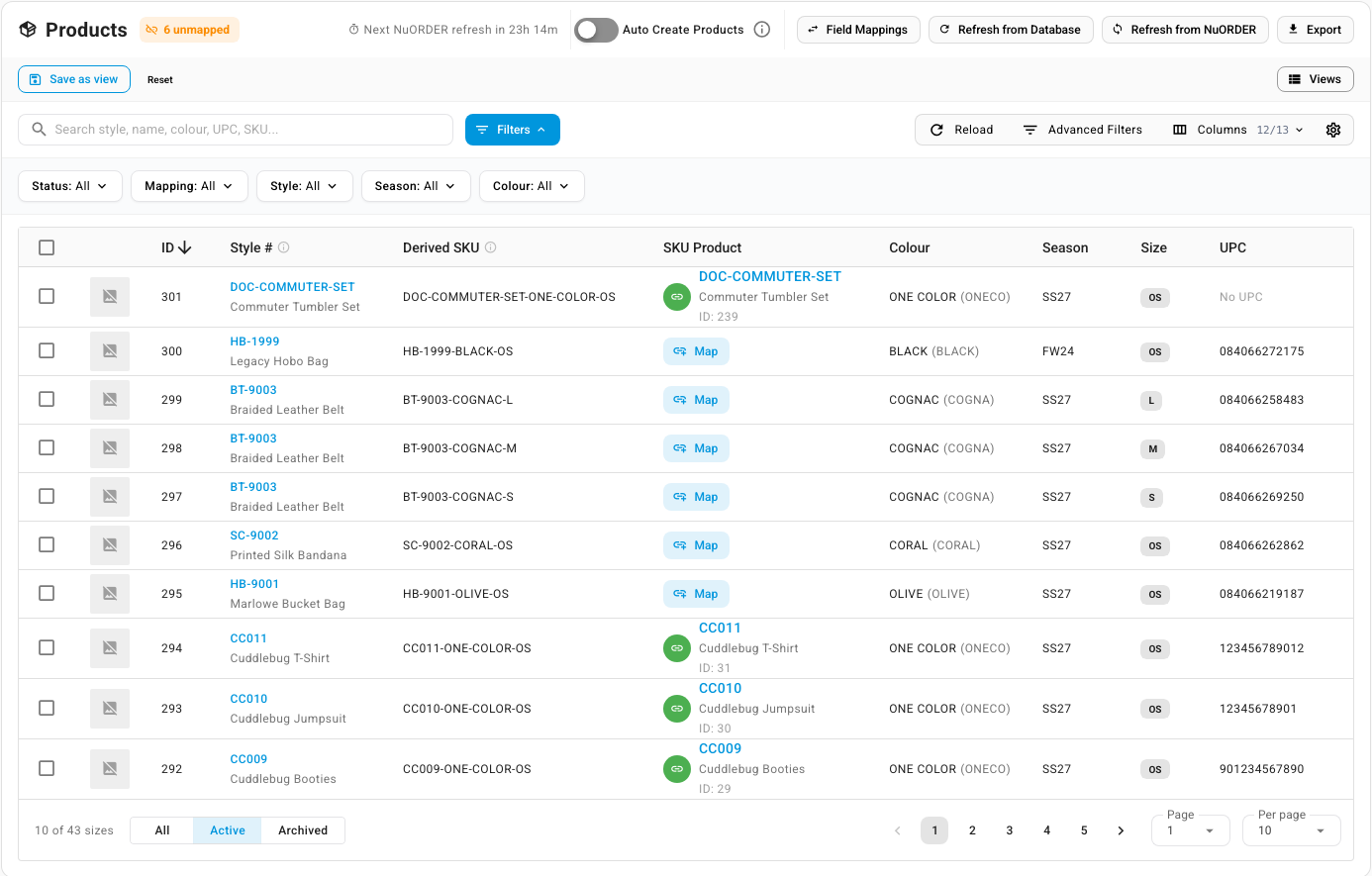
Header
| Item | What it does |
|---|---|
| N unmapped chip | Counts sizes not linked to a SKU.io product (archived sizes aren't counted). Click it to list only those |
| Next NuORDER refresh in … | Time until the next scheduled catalog check |
| Auto Create Products | The same setting as on Settings → General. See Let SKU.io match sizes automatically |
| Field Mappings | Which NuORDER fields fill products created from sizes |
| Refresh from Database | Reloads the list from SKU.io. Nothing is fetched from NuORDER |
| Refresh from NuORDER | Fetches new and changed styles from NuORDER, or the whole catalog |
| Export | Downloads the list. See Export NuORDER products |
Columns
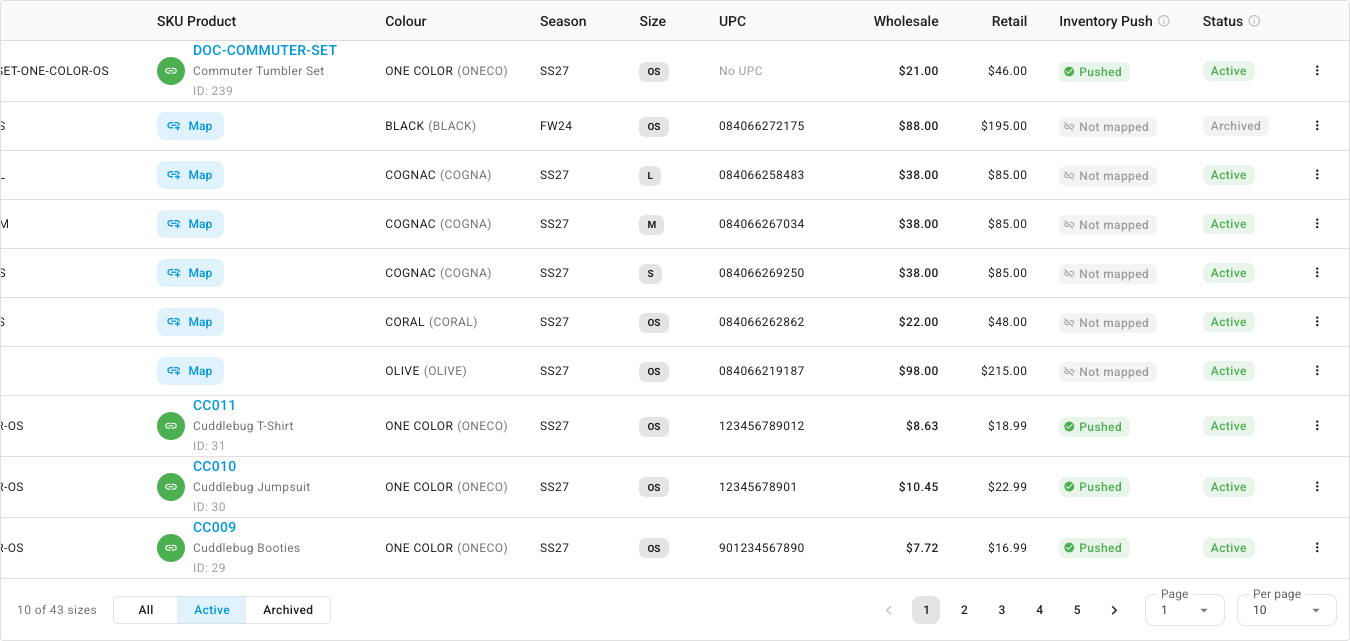
| Column | What it shows |
|---|---|
| Image | The style's image, when NuORDER has one |
| ID | The size's SKU.io ID. Shown when internal IDs are turned on. See Show internal IDs |
| Style # | NuORDER style number and name. Click it to open the size |
| Derived SKU | The SKU that SKU.io builds as style-color-size, used to match and create SKU.io products. Spaces become hyphens, for example CC011-ONE-COLOR-OS |
| SKU Product | The linked SKU.io product (SKU, name and ID), or a Map button when the size isn't linked |
| Colour | Color name, with NuORDER's color code in brackets |
| Season | NuORDER season |
| Size | The size |
| UPC | The size's UPC, or No UPC. A size with no UPC can only match on its SKU |
| Wholesale / Retail | Prices from NuORDER, in one currency. The detail page lists every currency |
| Inventory Push | Result of the last inventory push for this style and color. See Inventory Push values |
| Last Modified | When the style last changed in NuORDER. Hidden by default |
| Status | The style's status in NuORDER, plus an Archived chip when the size is archived in SKU.io |
Each row's ⋮ menu has View Details, View Inventory, Manage Mapping, Refresh from NuORDER, Archive (or Unarchive) and Delete.
Product Status values
The Status column and the Status filter show the style's state in NuORDER.
| Status | Meaning | Inventory pushed? |
|---|---|---|
| Active | The style is live in NuORDER | Yes |
| Inactive | NuORDER marks the style inactive | Yes |
| Archived | The style is archived in NuORDER | No |
| Cancelled | The style is cancelled in NuORDER | No |
| Removed from NuORDER | A full catalog refresh no longer found the style. It becomes Active again if NuORDER lists it later | No |
A style keeps its mapping and order history whatever its status.
Archived in NuORDER or archived in SKU.io
These are different things:
- Archived in the Status column means NuORDER archived the style. The size still shows on the Active view.
- The grey Archived chip beside the status means the size is archived in SKU.io. Hover over it to see why: either NuORDER no longer lists the size on the style, so SKU.io archived it (it returns if NuORDER lists it again), or someone archived it in SKU.io. Either way, it's hidden from the Active view and its inventory isn't pushed. NuORDER isn't changed.
The All | Active | Archived toggle under the list uses SKU.io's archive. The Status filter uses NuORDER's status.
Inventory Push values
| Value | Meaning |
|---|---|
| Pushed | The last push succeeded. Hover over it for the time |
| Never pushed | No push has run for this style yet |
| Not pushed | The style is Archived, Cancelled or Removed from NuORDER in NuORDER, so SKU.io doesn't push its stock |
| Not mapped | The size isn't linked to a SKU.io product, so there's no stock to push |
| Push error | The last push failed. Hover over it for the error. It clears after the next successful push |
All sizes of the same style and color share one result, because NuORDER receives stock per style and color.
Search and filters
- Search (Search style, name, colour, UPC, SKU...) can look in Style #, Name, Colour, Size, UPC, Derived SKU, External key, Brand ID and ID.
- Quick filters: Status, Mapping (Mapped / Unmapped), Style, Season and Colour.
- Advanced Filters add NuORDER Status, Mapped, Style #, Season, Colour, Size, UPC, Derived SKU, Wholesale Price and Retail Price.
- The list opens sorted by newest first. SKU Product, Inventory Push and Status can't be sorted.
You can save and pin views of the list. See Save and pin table views.
| Message | Meaning |
|---|---|
| No NuORDER products yet | Nothing has synced yet. Click Refresh from NuORDER |
| No archived sizes — NuORDER still lists every synced size of this portal. | The Archived view is empty |
| No products found | Nothing matches the search or filters. Click Clear filters |
| Couldn't load NuORDER products: … | The list didn't load. Click Retry |
Product detail page
Click a size's Style # to open it.
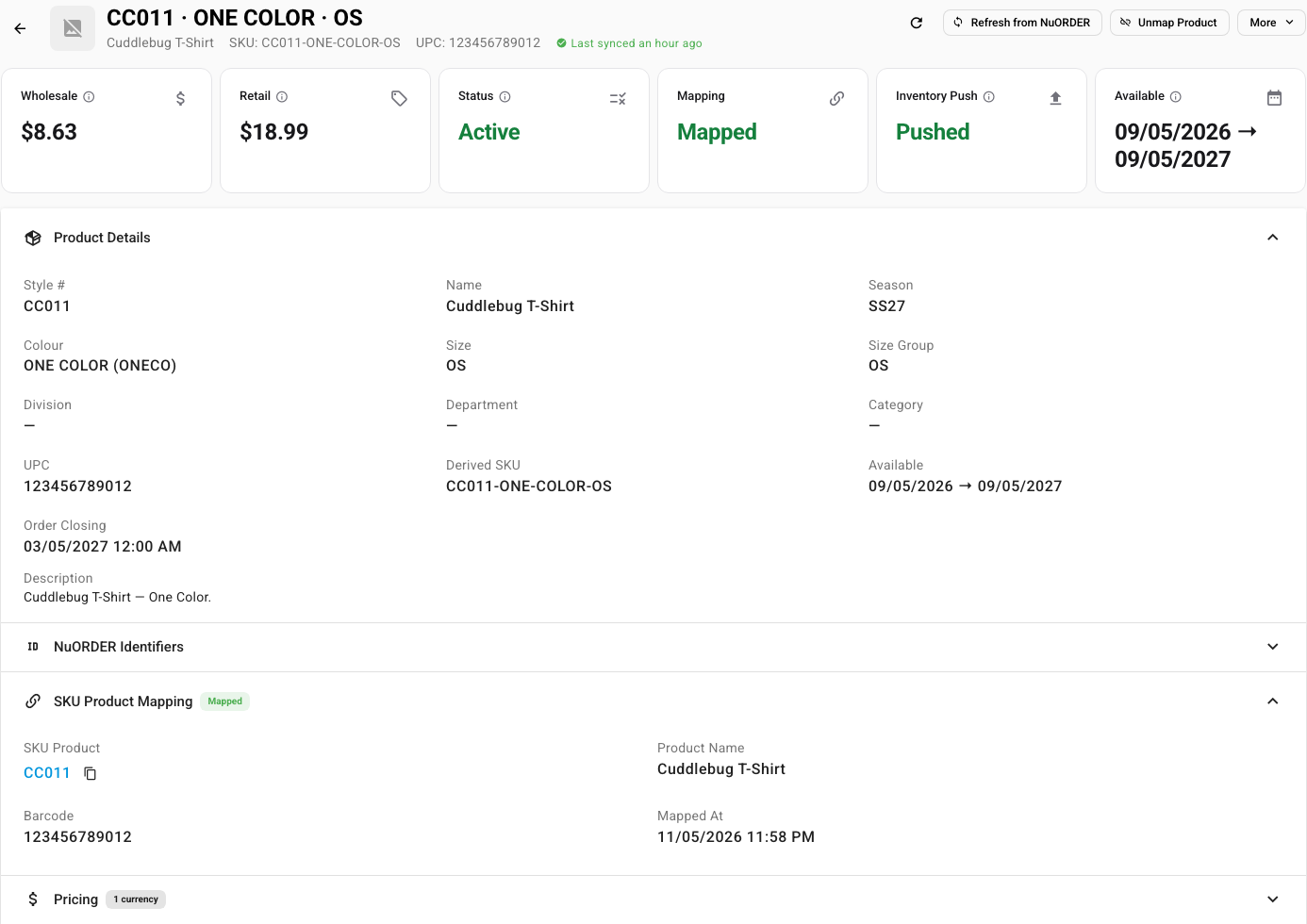
Header: style, color and size, the name, SKU, UPC and Last synced. The buttons are Refresh from NuORDER, then Map to SKU Product (or Unmap Product when linked), then More. More offers Create & Map SKU Product and Find Matching SKU Product for an unlinked size, then View Inventory, Archive and Delete.
Cards: Wholesale, Retail, Status, Mapping, Inventory Push and Available (NuORDER's availability dates).
| Panel | What it shows |
|---|---|
| Product Details | Style #, Name, Season, Colour, Size, Size Group, Division, Department, Category, UPC, Derived SKU, Available, Order Closing and Description |
| NuORDER Identifiers | Internal ID, NuORDER Product ID, Brand ID, External Key, NuORDER Size ID, and the portal's ID. Use these when you contact NuORDER about a style |
| SKU Product Mapping | SKU Product, Product Name, Barcode and Mapped At. Only shown when the size is linked |
| Pricing | Under Product pricing, one row per currency with Wholesale, Retail and Enabled. Load Price Sheets from NuORDER reads this style's rows from your NuORDER price sheets. Price sheets are read-only, and SKU.io never sends prices to NuORDER |
| Other Sizes of this Style | The other sizes in the same style and color, with their Derived SKU, UPC, Wholesale and SKU Product |
| Inventory Push | Pushable, Last Pushed, any Last Push Error, and View per-warehouse quantities |
| Orders Containing This Size | Click Load Orders Containing This Size to list the imported NuORDER orders with this size |
| Timestamps | Created At, Updated At, Modified in NuORDER, Archived At and Removed from NuORDER |
| Raw NuORDER Data | The style as NuORDER sent it, for troubleshooting |
Inventory page
One row per size and NuORDER warehouse. How these quantities are worked out, and how to change them, is on Map NuORDER warehouses and send stock.
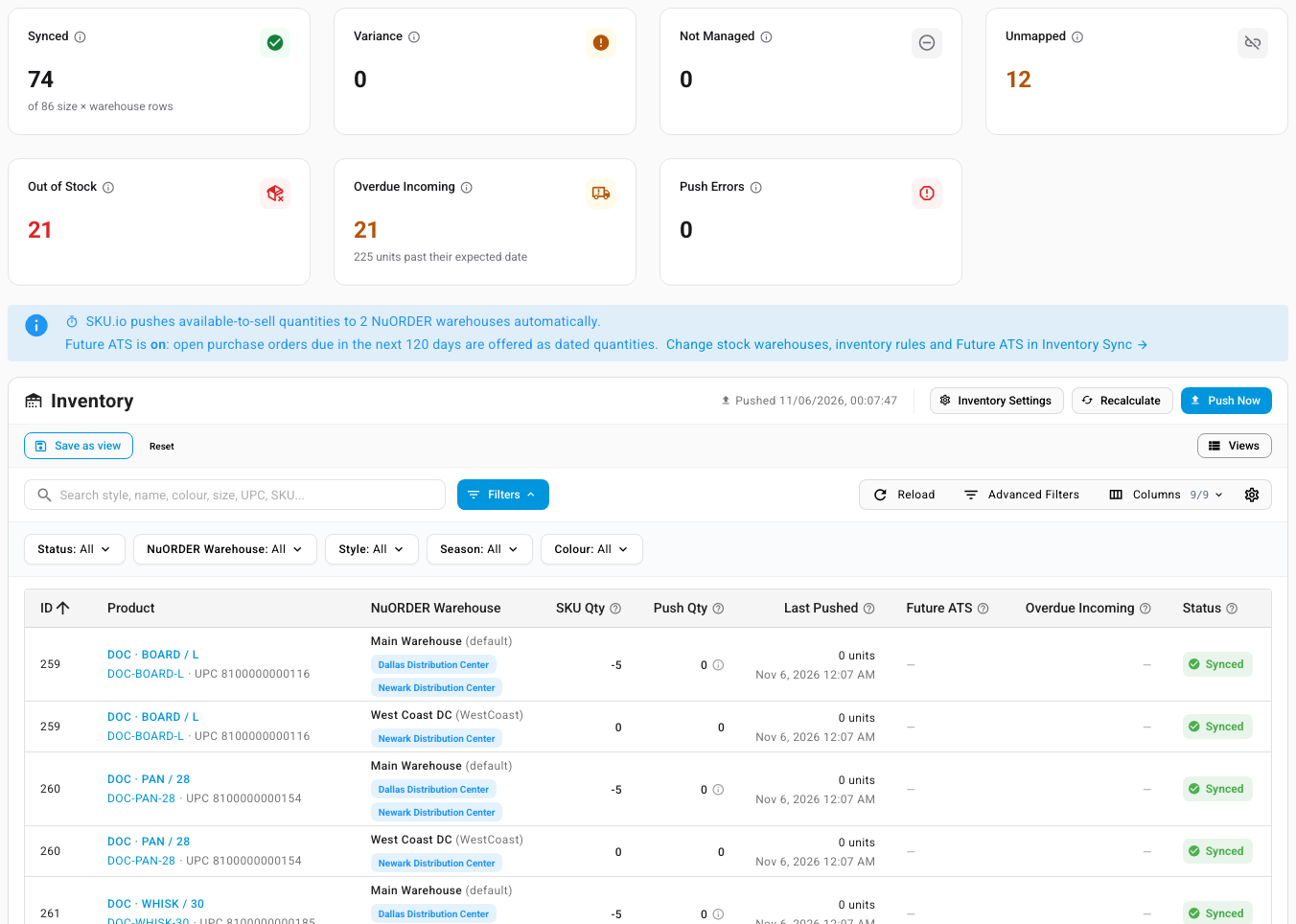
Summary cards
Click a card to filter the list to its rows.
| Card | Counts rows where |
|---|---|
| Synced | NuORDER already holds the quantity SKU.io would push now. The card also says how many rows there are in all, for example of 86 size × warehouse rows |
| Variance | The quantity SKU.io would push differs from what NuORDER was last sent. The next push updates them |
| Not Managed | SKU.io doesn't push stock for this NuORDER warehouse, or the style's NuORDER status stops pushes |
| Unmapped | The size isn't linked, or the NuORDER warehouse has no SKU.io warehouses chosen |
| Out of Stock | The next push sends 0 available now |
| Overdue Incoming | Purchase-order stock is past its expected date, with the units in total |
| Push Errors | The last push for the style failed |
The header shows when stock was last pushed, and the Inventory Settings, Recalculate and Push Now buttons.
Columns
| Column | What it shows |
|---|---|
| ID | The size's SKU.io ID |
| Product | Style, color and size, with the Derived SKU and UPC |
| NuORDER Warehouse | The NuORDER warehouse, with the SKU.io warehouses whose stock it receives |
| SKU Qty | Available stock in those SKU.io warehouses |
| Push Qty | What the next push sends as available now, after the warehouse's inventory rules |
| Last Pushed | The quantity last sent to NuORDER, such as 0 units, and when |
| Future ATS | Dated quantities from open purchase orders, shown as Available from <date> amounts |
| Overdue Incoming | Units on purchase orders past their expected date. They aren't offered as future stock until the purchase order is updated |
| Status | See below |
Inventory Status values
Hover over a status for the reason.
| Status | Reasons you may see |
|---|---|
| Synced | NuORDER holds the quantity SKU.io would push |
| Variance | Not pushed to NuORDER yet. · SKU.io quantity differs from the last push. · SKU.io is recalculating this quantity; it is pushed to NuORDER once that finishes (or use Recalculate). |
| Not Managed | SKU.io is not the master of stock for this NuORDER warehouse (Settings → Inventory Sync). · This product is archived in NuORDER, so SKU.io does not push its stock. |
| Unmapped | This size is not mapped to a SKU.io product, so NuORDER keeps its own quantity. · No SKU.io warehouses are selected for this NuORDER warehouse (Settings → Inventory Sync). |
Quick filters: Status, NuORDER Warehouse, Style, Season and Colour. Advanced Filters add NuORDER Product Status, Size, UPC, Derived SKU, SKU.io SKU, Mapped to SKU.io, SKU Qty, Push Qty, Last Pushed Qty, Last Pushed At, Overdue Incoming, Has Overdue Incoming, Out of Stock and Last Push Failed.
Fulfillments page
One row per SKU.io fulfillment of a NuORDER order. The tabs are All Fulfillments, Pending Sync (shipped fulfillments NuORDER doesn't have yet, not counting failed sends) and Failed (sends NuORDER refused that haven't been retried or dismissed).
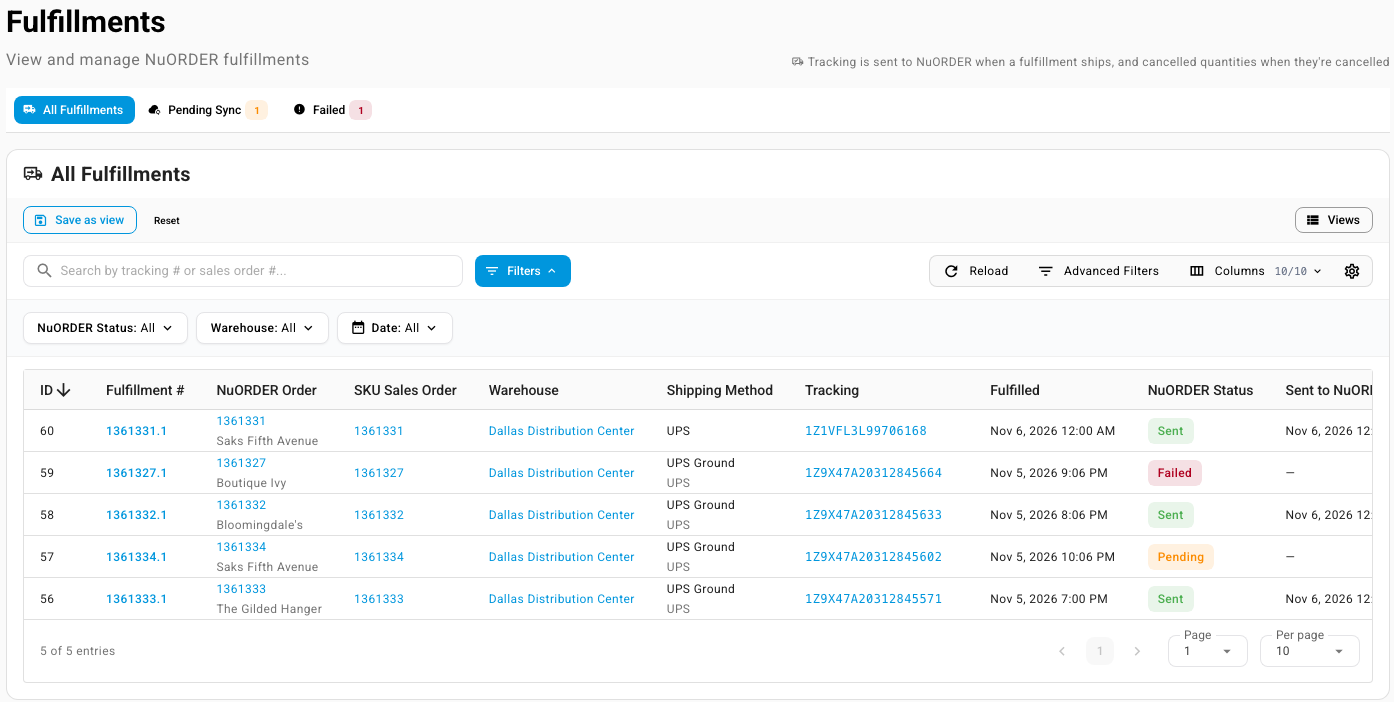
Columns
| Column | What it shows |
|---|---|
| ID | The fulfillment's SKU.io ID |
| Fulfillment # | The sales order number and the fulfillment's sequence, for example 1361333.1 |
| NuORDER Order | The NuORDER order number, with the retailer |
| SKU Sales Order | The SKU.io sales order |
| Warehouse | The warehouse that shipped it |
| Shipping Method | The shipping method, with the carrier below it. A shipment recorded in NuORDER shows only the carrier, for example UPS |
| Tracking | The tracking numbers. Each one opens the carrier's tracking page. Once a send was attempted, these are the numbers sent to NuORDER |
| Fulfilled | When it shipped |
| NuORDER Status | Whether NuORDER has this shipment. See below |
| Sent to NuORDER | When NuORDER received it |
A row that can still be sent has a send icon (Send to NuORDER) at the end.
NuORDER Status values

| Status | Meaning | What to do |
|---|---|---|
| Sent | NuORDER has the shipment and its tracking | Nothing |
| Pending | Shipped in SKU.io, and NuORDER doesn't have it yet | Wait for the next send, or click Send to NuORDER on the Pending Sync tab |
| Failed | NuORDER refused the last send. Hover over it for NuORDER's reason. It isn't on Pending Sync, and Send All Pending skips it | Fix the cause, then retry or dismiss it on the Failed tab |
| Outcome Unknown | An earlier send didn't confirm. The next send checks NuORDER first, so nothing is sent twice | Nothing |
| Order Cancelled | The NuORDER order is cancelled, so the shipment isn't sent | Nothing. It doesn't count as pending |
| Partial Bundle | The fulfillment shipped only part of a bundle, so nothing was sent for it. NuORDER is told about the bundle with the fulfillment that completes it | Ship the rest of the bundle |
| Not on NuORDER Order | Everything in the fulfillment was added in SKU.io and isn't on the NuORDER order, so there's nothing to send | Nothing |
| Dismissed | A failed send was dismissed, so NuORDER doesn't have this shipment | Record the shipment in NuORDER if the retailer needs it |
Order Cancelled, Partial Bundle, Not on NuORDER Order and Dismissed all leave Pending Sync, but NuORDER never received them as a shipment.
Search and filters
- Search (Search by tracking # or sales order #...) also finds NuORDER order numbers.
- Quick filters: NuORDER Status, Warehouse and Date.
- Advanced Filters add Tracking Number, NuORDER Order #, Shipping Method, Fulfilled and Sent to NuORDER.
- ID, Fulfilled and Sent to NuORDER can be sorted. Right-click a cell to show only matching rows or filter them out.