
Phantom Inventory: What to Do When the Bin Is Empty
Phantom inventory is stock your system says you have that isn’t on the shelf. Most of what’s written about it is for retail stores, where it shows up as a product that stops selling. In an online seller’s warehouse it shows up faster and more exactly: a picker stands at a bin the system says holds six, and it holds none.
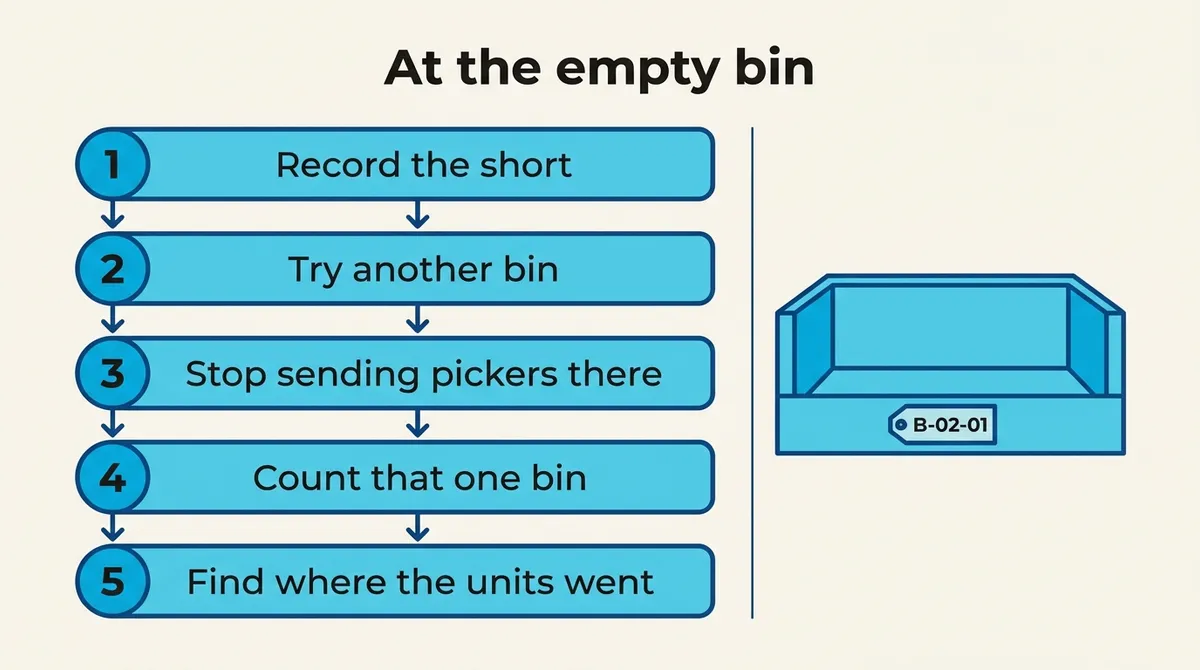
What happens in the next five minutes decides whether you have one problem or a week of them. Done well, the picker records the short, gets sent to another bin, nobody else is sent to the empty one, and that one bin is counted the same day. Done the usual way, the picker finds some elsewhere, says nothing, and tomorrow the system sends someone back to the same empty bin.
This is the counting part of a barcode inventory system.
Why it’s worse when you sell online
In a store, phantom stock sits on the shelf record and costs you sales of that product. In a warehouse that feeds several channels, the same wrong number is published. Your store, Amazon and your wholesale portal all read “6 available” from the bin record. They keep taking orders for units that aren’t there, and every one of those orders becomes a short pick, a cancellation or a delayed shipment.
So the empty bin isn’t a counting problem you can leave for the month-end count. It’s a stock number that’s wrong on every channel at once, starting now.
What the picker should do at the empty bin
Four things, and none of them should take more than a tap.
- Record the short. The pick didn’t happen, and the record should say so, with the reason. If the picker found two of the three, the two count and the third is short.
- Try another bin. If the product is in a second bin, the picker should be sent there for the rest, with the bin and how many it holds.
- Stop sending people to the empty bin. Until someone counts it, the bin shouldn’t be offered for that product on any new pick list.
- Ask for that one bin to be counted. Not the aisle and not the warehouse. One bin and one product takes a minute.
What the picker shouldn’t do is the thing that feels helpful: fetch some from reserve, or from a bin they happen to know about, without recording the move. The order ships, and now two bins are wrong.
In SKU.io the four steps are one button. When a picker taps Not here, the pick is recorded short (units already scanned from that bin stay picked). If another bin has the item, a new pick for the rest appears straight after, labeled as an alternate, with a banner such as Try D-01-03 (9 available) · Bin check filed. The empty bin is held for that product, so new pick lists don’t send anyone there until it’s counted, and a hold never stops a manual pick, a transfer or a count. And a count of that bin is filed, with who reported it, on which pick list and when. If no other bin has the item, the line closes short and the order keeps the missing units.
Counting the one bin
A good bin count is short and blind. The counter scans the bin label to prove they’re at the right bin, scans each item they find, and submits. They shouldn’t see what the system expects, or they’ll find it.
In SKU.io, bins reported empty are listed first under Count on the scanner, oldest first, and the count is blind: the screen doesn’t show what the system expects. The counter scans the bin, scans each unit (or presses and holds an item to type a quantity), and taps Bin is empty if there’s nothing. Anything they don’t scan is counted as zero.
The count doesn’t change stock by itself. It waits for a manager, who sees who tapped Not here, on which pick list, and what was found, and finalizes it. Finalizing adjusts the stock and releases the hold. If you’d rather small differences go straight through, you set a tolerance: a count within that many units is applied at once. And until bin checks are done, the warehouse gets an alert such as 3 bins reported empty need a count.
Why a manager? Because the empty bin is a symptom. A count that silently sets six to zero fixes the number and hides the reason, and the reason will make another empty bin next week.
Where the units usually went
When a bin the system says holds six is empty, the six went somewhere. In a small warehouse it’s nearly always one of these:
| What happened | How you’d see it | What stops it |
|---|---|---|
| Put away in the wrong bin | A neighboring bin counts high for the same product | Scan the bin at put-away, not just the product |
| Moved without a record | Found in a “better” bin or on a cart | Every move is a scanned transfer |
| Picked as the wrong look-alike | A similar product’s bin counts low, and returns mention the wrong item | Scan each unit at picking, and keep look-alikes apart |
| Received short, typed as full | The PO line says 144; the cases held 140 | Scan cases on receipt, close lines short |
| Damaged or taken, not written off | Nothing nearby explains it | A write-off with a reason, and a count schedule |
The first three are moves the system didn’t see, which is why most of the fix for phantom inventory is at receiving and put-away, not at the count.
So the order is always the same: count the one bin now, then ask which move wasn’t recorded.
The other kind: stock that isn’t on the record
The opposite also happens. A picker finds units in a bin the system says is empty. That’s usually the same mistake seen from the other end: units put away in the wrong place, which makes one bin phantom and another one hidden. When an empty-bin count comes back short, check the neighbors before writing anything off. A transfer between bins fixes both records. A write-off fixes one and leaves stock you’ll never sell.
When you need any of this
If one person picks from one room and knows every shelf, they’ll notice an empty bin and fix it in their head. Once two people pick, or the same product lives in two bins, the knowledge has to be in the system, because the second person was never told.
How bins get set up so this happens less is in bin locations without the spreadsheet. The steps for Not here and the bin count are in the guide to reporting an empty bin. If your channels keep selling stock your pickers can’t find, book a call with me and bring a list of the bins you counted last month.