
TikTok Shop Payouts: What One Payout Contains and How to Book It
TikTok Shop settles your sales in daily statements and pays the balance to your bank on a schedule you pick. My own shop, which runs on SKU.io, is paid weekly, so a deposit usually pays a week of daily statements, and each one lists its sales, refunds, fees and adjustments line by line.
To book a payout, post one sales invoice and one fee bill that net to the deposit. The reserve TikTok holds back and any negative balance it carries go on the sales invoice too, but pointed at a balance-sheet clearing account instead of revenue. Keeping them on the invoice, not in a separate journal, means the invoice and the bill alone net to the deposit, so every bank line matches exactly two documents.
The usual mistake is booking the deposit as the sale. A 10,000 deposit is what’s left after TikTok’s cut; if the sale was 12,000 and the fees 2,000, booking 10,000 understates revenue every week and hides the fees completely.
How the orders ship changes some lines but not the method. If you’re still choosing, the TikTok Shop fulfillment guide compares your own warehouse, TikTok’s shipping labels, a 3PL and Fulfilled by TikTok.
What’s in one TikTok payout?
| Kind of line | What it is | Where it goes |
|---|---|---|
| Revenue: subtotal, seller discounts, customer-paid shipping | What the buyer paid | Sales, on the invoice |
| Revenue: refund subtotal | Money returned to buyers | Sales returns, on the invoice |
| Fees: referral, transaction, affiliate commission, campaign, refund administration | What TikTok keeps for the sale | Fees, on the bill |
| Shipping: TikTok shipping labels, return labels, FBT fulfillment fees | Shipping and fulfillment TikTok did for you | Shipping and fulfillment, on the bill |
| GMV payment for TikTok ads | Ads paid out of your balance | Advertising, on the bill |
| Reserve collected and released | Money TikTok holds, then pays | Clearing account, on the invoice |
| Net earnings balance, net earnings deduction, bill payment | A negative day topped up, taken back, or paid off | Clearing account, on the invoice |
The refund administration fee in that table surprised me on my own books. In August 2026 an order notification never reached us, two orders weren’t handed to the carrier in time, and TikTok cancelled them. I’d assumed a cancelled order nets to zero. It doesn’t: both settled with no revenue and a refund administration fee of a dollar or two each, kept by TikTok, while a buyer who cancelled before shipping cost us nothing. On a payout that fee is a line on the fee bill with no sale beside it, so map it to fees, not to refunds, and don’t let anyone zero out a cancelled order’s costs by hand.
The same orders taught me to keep TikTok’s signs as they come: it reports what you pay as negative and a rebate as positive, so a positive fee line is money back, not a second charge.
We keep TikTok’s clearing account, 153 in our chart, apart from eBay’s 152, so a TikTok reserve still waiting to come back can’t sit on top of an eBay difference and hide it.
The reserve is your money, held for 30 days
TikTok can hold part of each delivered order for 30 days from delivery and release it if it isn’t needed. How much depends on the reserve level it gives your shop each month, under its settlement and reserve policy. The sale still posts in full. The held part is money TikTok owes you, so it goes into clearing when TikTok collects it and comes out when TikTok releases it.
What happens on a day that ends below zero?
A day with more refunds and label charges than sales ends below zero. Say Tuesday’s statement comes to −40.00. TikTok adds a net earnings balance line of +40.00, so Tuesday closes at zero, and takes the 40.00 back later as a deduction from your balance, or charges the card on file (Finances FAQ). The +40.00 top-up and the later 40.00 deduction both go to clearing and cancel there. Tuesday’s refunds still land in sales returns and its labels in shipping. A whole week can net to zero this way, and then nothing reaches the bank at all; there’s no deposit to match, but the lines still need booking. If TikTok charged your card, book that charge to the same clearing account, or the +40.00 sits there forever.
A worked example
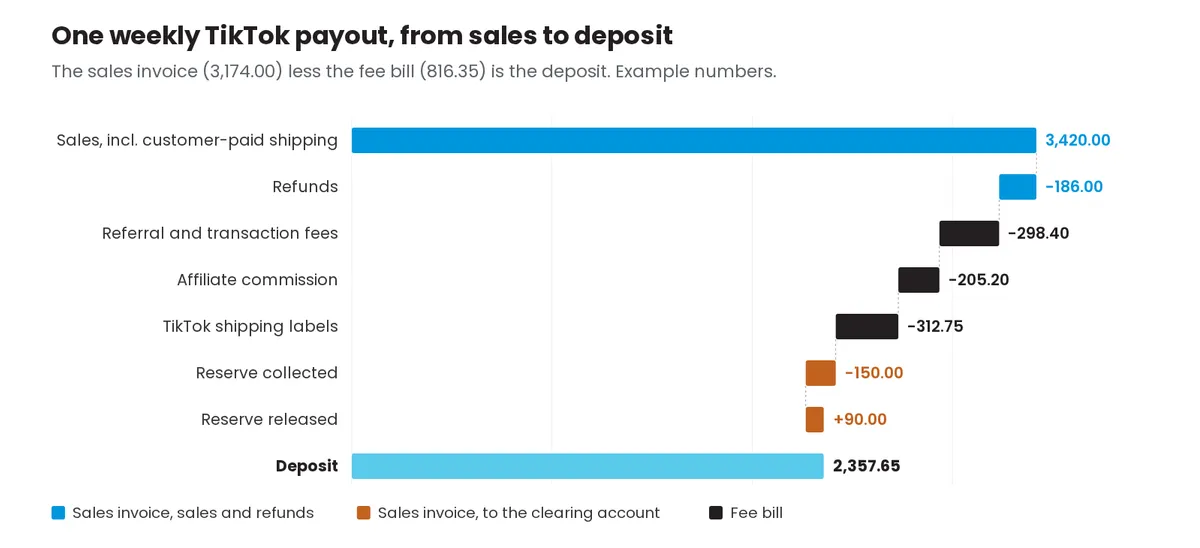
Here’s one weekly payout, with made-up numbers:
| Line | Amount |
|---|---|
| Sales, including customer-paid shipping | 3,420.00 |
| Refunds | −186.00 |
| Referral and transaction fees | −298.40 |
| Affiliate commission | −205.20 |
| TikTok shipping labels | −312.75 |
| Reserve collected this week | −150.00 |
| Reserve released from an earlier week | 90.00 |
| Deposit | 2,357.65 |
The sales invoice carries 3,420.00 of sales, less 186.00 of refunds, less the 150.00 moved into the clearing account, plus the 90.00 released from it: 3,174.00. The fee bill carries 298.40, 205.20 and 312.75: 816.35. The deposit, 3,174.00 less 816.35, is 2,357.65.
Your profit and loss shows 3,420.00 of sales, 186.00 of returns and 816.35 of fees and shipping. The clearing account moves up by 60.00, what TikTok collected less what it released. Over time its balance should equal the reserve TikTok is holding, less any negative balance it hasn’t taken back yet.
Switching to payouts can count sales twice
TikTok’s clock starts at delivery, not at shipment. A new shop is paid 31 days after an order is delivered, an established shop 8, and the best-scoring shops as little as 1, per its Finance & Settlement 101. So when you switch from an invoice per order to booking payouts, your first payouts pay orders whose invoices are already in your accounting system. Post those orders’ sales to a clearing account instead of revenue, so they aren’t booked twice. Their fees still post as fees, because a per-order invoice normally carries the sale but not TikTok’s cut.
Start on the first deposit your books haven’t recorded yet. If you’ve been coding TikTok deposits by hand, that’s the date you stop.
How do you check your TikTok Shop books?
- Take three recent TikTok deposits. Find the invoice and bill behind each. They should net to the deposit.
- Compare the clearing account with the reserve and negative balance TikTok shows in Seller Center. They should agree.
- If your sales are booked from deposits, compare them with TikTok’s own sales for the month. They’ll run low by the refunds, the fees and whatever’s in reserve.
- In the month you switched, look for TikTok orders booked both ways.
The same method works for every marketplace; it’s in how to account for marketplace payouts.
How SKU.io handles TikTok Shop payouts
SKU.io posts its accounting to Xero or QuickBooks Online. It reads your TikTok payouts every day. On Per Payout accounting, each payout posts a sales invoice and a fee bill that net to the deposit, with the reserve and negative-balance lines on a clearing account you pick. When a fee bill comes out the wrong way round, more fee refunds than fees, it goes over as a vendor credit instead of a negative bill. The steps are in the TikTok Shop payouts guide:
It holds a payout back rather than post something you’d have to unpick: the clearing lines have to point at a balance-sheet account, not Accounts Receivable or Payable and not revenue or expenses; orders already invoiced one by one need an account under Orders Already Invoiced Per Order; and the statement lines have to add up to what TikTok paid. A payout that crosses a month end can post one part per month, and a mapping change applies from a date you pick. Switching to Per Payout never voids an invoice already in your accounting system. That’s what you want: the old per-order invoices stay, and the payout books their sales to clearing instead of revenue a second time.
If TikTok Shop is a test channel with a few orders a month, book each deposit by hand into sales, fees and the reserve. Zoho Inventory or inFlow beside Xero or QuickBooks fits that size better than SKU.io. If it’s growing and paid in batches you can’t trace, book a demo and bring a payout with a negative day in it.