
Backorders Across Online and Wholesale: Who Gets the Next Delivery
When online orders, wholesale orders and pre-orders are all waiting on the same delivery, SKU.io fills them oldest order first, whatever channel each came from. A delivery smaller than the orders waiting on it fills the oldest orders until it runs out, and splits the last order it reaches. You can change that for one order, either by reserving units for it on the PO line or by moving it up the queue by hand.
That default is a choice we made, and it’s the one I’d defend. This is part of keeping stock straight across online and wholesale, and it’s for whoever has to tell a stockist when its order ships.
Why oldest first, and not wholesale first
Brands that sell both ways often have a rule in their heads, usually “wholesale comes first” because the orders are bigger, or “the site comes first” because those customers paid already. Then they look for software that ranks by channel.
I think that’s the wrong rule, for a practical reason. Someone on your team has to explain the order to a customer whose pendant hasn’t shipped, and “you ordered after these people” is an answer anyone can give. “A department store came first” isn’t. So the default is the order date, and the exceptions are made on one order at a time, by a person, where everyone can see them. A rule by channel also can’t tell a stockist order with a fixed delivery date from one that could wait a month. You can.
An e-commerce lead described the version of this that goes wrong when nothing ranks the demand at all: how do you “balance that available to promise against all of the channels so that they don’t all think that they have 60,000 units on available for pre sell.” Every channel thinks the incoming stock is its own.
One delivery that doesn’t go to plan
Wrenmere Jewelry is made up, and so are its numbers. It has a PO for 120 gold-fill Arc pendants due in six weeks and none on the shelf. Over five weeks the orders come in, in this order:
| Waiting, oldest first | Units |
|---|---|
| 18 site orders | 18 |
| A boutique stockist | 40 |
| 12 more site orders | 12 |
| A department store | 60 |
| Total | 130 |
Each order is matched to the PO as it comes in, and it shows the PO’s arrival date. That date is the inbound shipment’s expected arrival if there is one, otherwise the PO’s own estimate, which is why keeping arrival dates current on the PO matters more than anything you do in the queue.
In week four the supplier pushes the shipment back a week. Every one of those orders now shows the later date, and nobody had to touch them. If you had two POs for the Arc, a rebalance would rematch them so the earliest stock goes to the oldest orders. That’s correct, and it also means the date you gave the department store on Monday can be different on Friday.
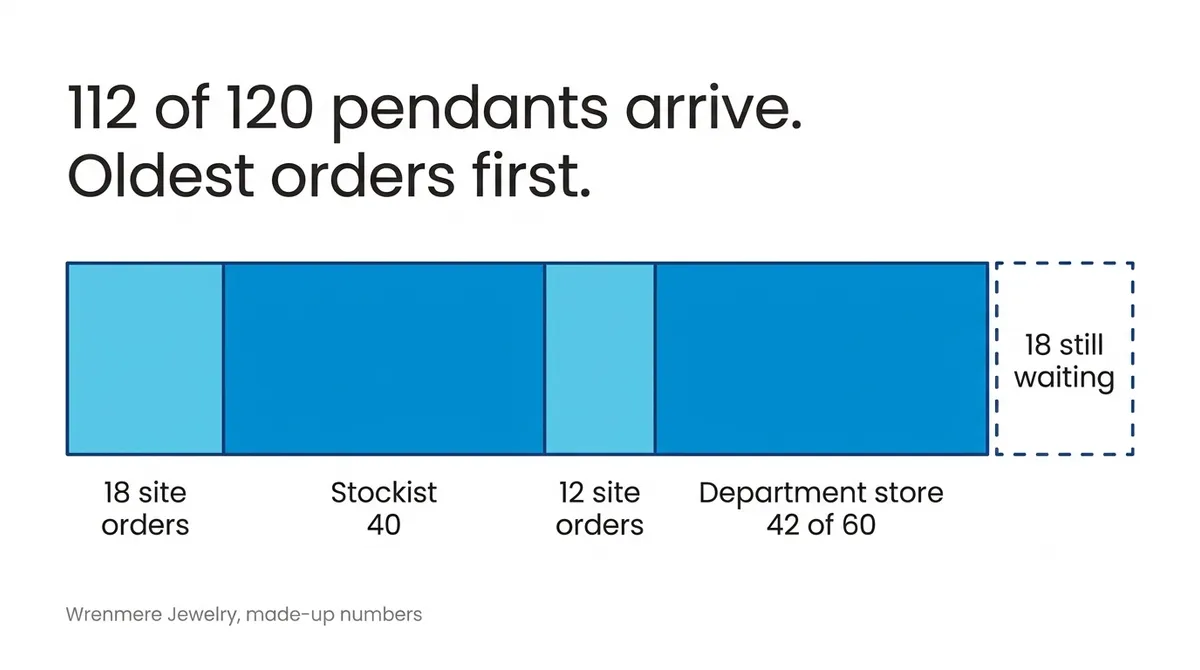
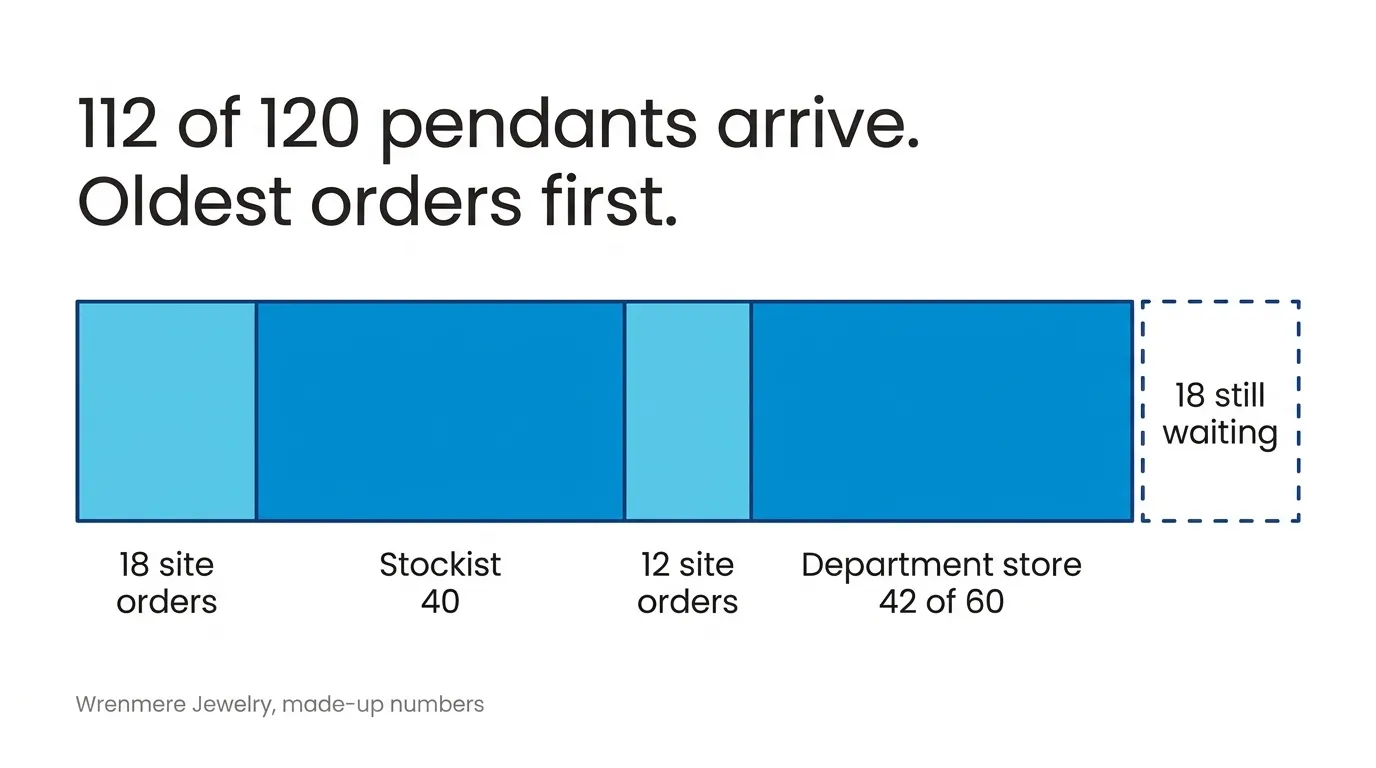
In week seven the supplier ships 112, not 120, with 8 to follow. The 112 go oldest first: 18, 40, 12, and 42 of the department store’s 60. Its line is split. 42 units are allocated and 18 wait, 8 of them for the rest of this PO and 10 for the next one. Whether the 42 go now or wait is down to your partial dispatch settings. For a store with a delivery appointment, I’d check that before the truck is booked, not after.
If the Arc were a new piece with a release date, all 130 orders would be pre-orders and none of this would change. Pre-orders queue by order date like everything else, take their units when stock arrives, and then wait for launch day.
Putting the department store first
Say its terms carry a delivery date and a short delivery costs you more than late site orders do. You can reserve 60 of the PO line’s 120 for its order. On receipt it’s filled before anyone else. With the 112 that actually arrived, it gets its 60, and the other 52 go 18 site orders, then 34 of the stockist’s 40. The reservation ties the order to this PO only, so a different PO landing first won’t fill it. There’s more on that in reserving incoming stock for a wholesale order.
Or you can move the order to the top of that product’s queue by hand. That puts it first for every source of stock, not just this PO. A later reset of priorities puts it back where its order date says.
I’d reserve for a wholesale order with an agreed date, and move rows by hand only for one-off cases, like a customer who has been waiting far too long.
The alternative people ask for is a fixed share. An ops lead at a beauty brand that sells through department stores wanted to “hold back certain inventory” for them. In this example a 50% share for wholesale is 60 pendants. The wholesale orders total 100, so the stockist and the store split 60 between them, while the 30 site orders take 30 and the other 30 sit unsold.
Before you promise anyone a date
Each PO line has an Allocations column that shows the orders the line already covers, marked as covered, reserved, or released once stock arrived. Before telling a stockist its pieces are on a shipment, open it and check how far down the line goes. On the Arc PO, the 120 run out before they reach the end of the department store’s order.
When the PO is received, waiting orders are filled on their own, with the default settings. One thing to watch: if you ever take released stock back off orders in the queue, its dialog has a checkbox that turns off automatic filling for the whole account. Leave it unticked unless that’s what you mean. The rest of the queue’s tasks are in work the backorder queue, and what to say to the customers who wait is in an older post on handling backorders with customers.
A maker who sells only on her own site, under about $1M a year, has one kind of customer in the queue, and Zoho Inventory or inFlow is plenty. A jewelry store with repairs and appraisals needs store software. If your stockists and your site keep waiting on the same POs, book a demo. Bring one PO and the orders waiting on it, and we’ll go through who gets what.