Track ShipBob shipments and exceptions
ShipBob ships an order as one or more shipments, one per parcel. The Shipments tab lists every parcel with its progress, problem, tracking, and cost. Use it to find a parcel that's stuck, see why, and fix the cause.
Before you begin
- Read How orders flow to ShipBob for how a shipment becomes a SKU.io fulfillment.
- Many fixes happen in ShipBob's own app, so keep your ShipBob sign-in handy.
Find a shipment
-
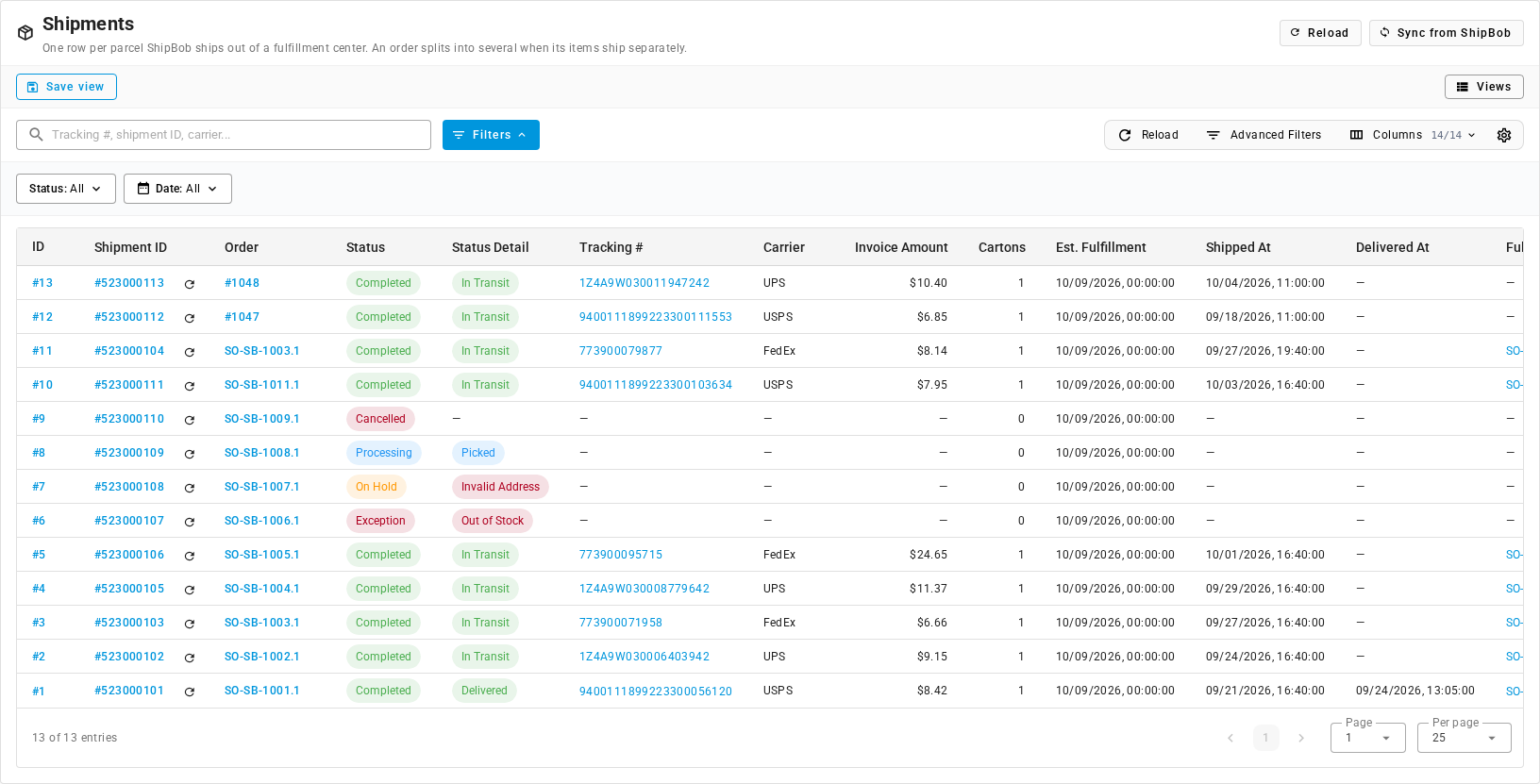
Go to Apps & Integrations, open ShipBob, and click the Shipments tab.
-
To find one parcel, type its tracking number, shipment ID, or carrier in the search box.
-
To see only stuck parcels, click Status: All and choose Exception or On Hold.
-
To see what one fulfillment center shipped, click Advanced Filters and filter on Fulfillment Center.
| Column | What it shows |
|---|---|
| ID | SKU.io's number for the shipment. Opens it. |
| Shipment ID | ShipBob's shipment number. Click the refresh icon next to it to fetch this parcel from ShipBob now. |
| Order | The ShipBob order the parcel belongs to. |
| Status | ShipBob's shipment status, such as Processing, Completed, Exception, On Hold, Cancelled, Label Created, or Clean Sweeped. See ShipBob statuses reference. |
| Status Detail | The latest milestone or problem, such as Picked, In Transit, Delivered, Out of Stock, or Invalid Address. |
| Tracking # / Carrier | The tracking number, linked to the carrier's tracking page, and the carrier. |
| Invoice Amount | What ShipBob charges to ship the parcel. With Record shipping costs on, SKU.io adds it to the fulfillment as its shipping cost. |
| Cartons | How many cartons ShipBob packed. |
| Est. Fulfillment | When ShipBob expects to ship it. |
| Shipped At / Delivered At | When it left the warehouse and when the carrier delivered it. |
| Fulfillment | The number of the SKU.io fulfillment recorded for this parcel, for example SO-SB-1003.2. Shows — until the parcel ships, and on parcels from your other ShipBob channels. |
| Last Synced At | When SKU.io last refreshed the parcel from ShipBob. |
Open a shipment
Click a shipment's ID to open it. The header shows the shipment number, its status, a chip for each milestone it has reached, and the fulfillment center it ships from (FC).
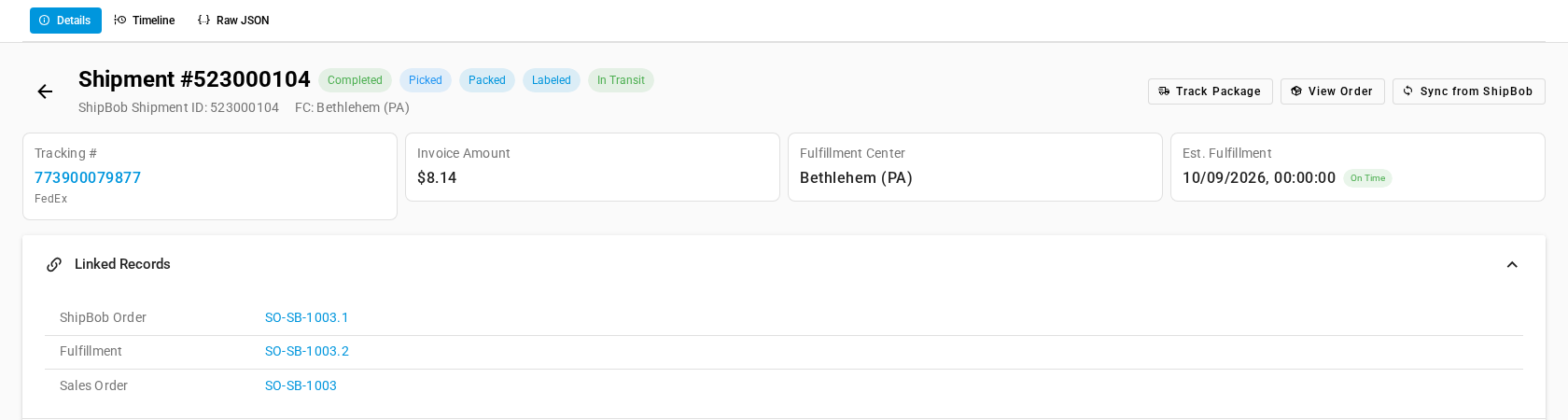
- Track Package opens the carrier's tracking page. It appears once the parcel has a tracking number.
- View Order opens the ShipBob order the parcel belongs to.
- Sync from ShipBob fetches the parcel from ShipBob now. If it has shipped, SKU.io records the fulfillment at the same time.
The Details tab has four cards: Tracking #, Invoice Amount, Fulfillment Center, and Est. Fulfillment, marked On Time or Late. Below them:
- Linked Records: the ShipBob Order, the SKU.io Fulfillment once the parcel has shipped, and the Sales Order. The sales order shows even before the parcel ships. Click a record to open it.
- Shipment Details: status, carrier, tracking, invoice amount, insurance value, fulfillment center, cartons, estimated fulfillment, ship and delivery dates, and when SKU.io first and last synced it.
- Cartons: each carton's ID, type, weight, and tracking number.
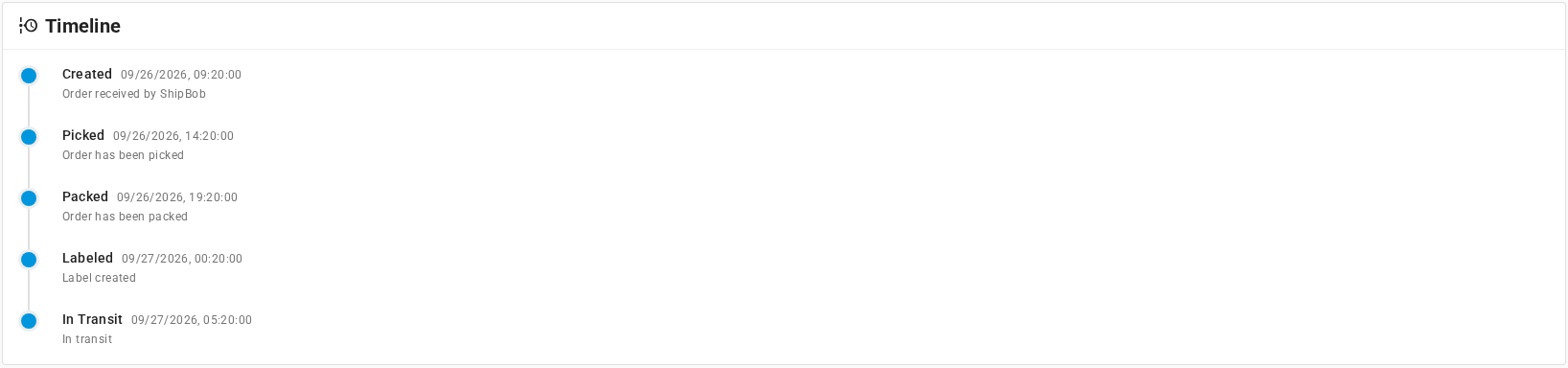
The Timeline tab lists each milestone with its date and time, from Created (Order received by ShipBob) through Picked, Packed, Labeled, and In Transit to delivery.
On the Raw JSON tab, click Load Raw Data from ShipBob to load the full shipment record ShipBob holds. Use it when a field looks wrong. Copy JSON copies it, for example to send to ShipBob support.
Follow an order ShipBob split
When no single fulfillment center holds every item, ShipBob ships the order from several centers, as one shipment each. In the demo data, SO-SB-1003.1 shipped as two parcels:
| Shipment | Fulfillment center | Tracking # | SKU.io fulfillment |
|---|---|---|---|
| 523000103 | Moreno Valley (CA) | 773900071958 | SO-SB-1003.1 |
| 523000104 | Bethlehem (PA) | 773900079877 | SO-SB-1003.2 |
To follow a split order:
- On the Orders tab, find the order. Its Shipments column shows 2, and its Tracking # column shows 2 tracking #s.
- Click 2 tracking #s to list both tracking numbers.
- Open the order. The Shipments panel shows one card per parcel.
- To see which center shipped a parcel, click its shipment number on the card and read Fulfillment Center.
Each parcel becomes its own fulfillment on the sales order, with its own tracking number and shipping cost. Each tracking number goes to the sales channel as its parcel ships. The fulfillment order closes once the last parcel ships.
SKU.io takes the stock for every parcel from the fulfillment order's warehouse, even when ShipBob ships part of it from another center. If that leaves your counts out of step, the difference appears on the Inventory tab.
Clear an exception or a hold
A parcel with status Exception or On Hold won't ship until the problem is fixed. In SKU.io, its fulfillment order stays Submitted. The Status Detail chip on the Shipments tab and on the shipment page names the problem. On the order page, the parcel's card in the Shipments panel describes it in a sentence, such as One or more items are out of stock at the fulfillment center.

Each fix has two parts: unblock the order that's already at ShipBob, and stop it happening to the next one.
| Status Detail | What it means | Fix this order | Stop it next time |
|---|---|---|---|
| Out of Stock | ShipBob can't allocate the units the order needs at the fulfillment center it assigned the order to. SO-SB-1006.1 shows this at Moreno Valley (CA). It doesn't always mean the center is empty: the Inventory tab can still show units there. If it does, ask ShipBob why it can't allocate them. It also happens when an unmapped product went to ShipBob, which created a new product with no stock for it. See How each product is sent. | If stock is short, send stock to ShipBob with a receiving order, or wait for one already on its way. ShipBob ships the order once it can allocate the units. If the product wasn't mapped, change the item on the order in ShipBob to the right product, or cancel the fulfillment order in SKU.io, map the product, and submit the new fulfillment order SKU.io creates. | Check Fulfillable stock on the Inventory tab, and map the product before you submit. |
| Unknown SKU | ShipBob can't match an item on the order to a product in its catalog. This isn't the unmapped-product case, which shows Out of Stock. | Correct the item on the order in ShipBob. Or cancel the fulfillment order in SKU.io, fix the product, and submit the new fulfillment order SKU.io creates. | Map the product to its ShipBob product. |
| Invalid Address | ShipBob can't validate the shipping address. SO-SB-1007.1 is on hold for this. | Correct the shipping address on the sales order. SKU.io sends the corrected address to ShipBob automatically. See Correct the shipping address. If the hold stays, release it in ShipBob. | Check addresses before you submit. |
| Missing Tariff Information | An international order has no customs details for an item. | Add the customs value and tariff code to the product in ShipBob. | Same fix: it's stored on the product in ShipBob. |
| No Package Preference Set | ShipBob doesn't know how to pack an item. | Set the packaging preference on the product in ShipBob. | Same fix: it's stored on the product in ShipBob. |
| Manual | Someone placed the order on hold in ShipBob. | Release the hold in ShipBob when the order is ready. | — |
| Delivery Exception | The carrier hit a problem after the parcel shipped, such as a failed delivery. | Follow up with the carrier through Track Package. The fulfillment is already recorded in SKU.io. | — |

Once ShipBob clears the problem, it notifies SKU.io and the parcel's status updates. If it doesn't update, click Sync from ShipBob on the shipment. When the parcel ships, SKU.io records the fulfillment and sends the tracking to the sales channel as usual.
If the order can't ship at all, cancel it. See Change or cancel a ShipBob order.
Next steps
- Change or cancel a ShipBob order
- Track shipments across all your providers
- ShipBob troubleshooting