Map FNSKUs to products
Amazon tracks the stock you send to FBA by FNSKU, its own label code. Until an FNSKU is mapped to one of your products, SKU.io can't put its stock, costs or Amazon events on a product: units sit unattributed, and costs such as storage fees can't be allocated. The FNSKU Product Mapper is where you link them, and where you fix a link that was wrong or that changed.
Before you begin
- Amazon is connected with FBA tracking on.
- The products exist in SKU.io.
- You can update integrations.
Open the mapper
Go to Apps & Integrations → Amazon → FBA → FNSKU Product Mapper. Tiles count Unmapped ASINs, Mapped ASINs, Unmapped FNSKUs and Mapped FNSKUs. Use All Integrations at the top to look at one Amazon account.
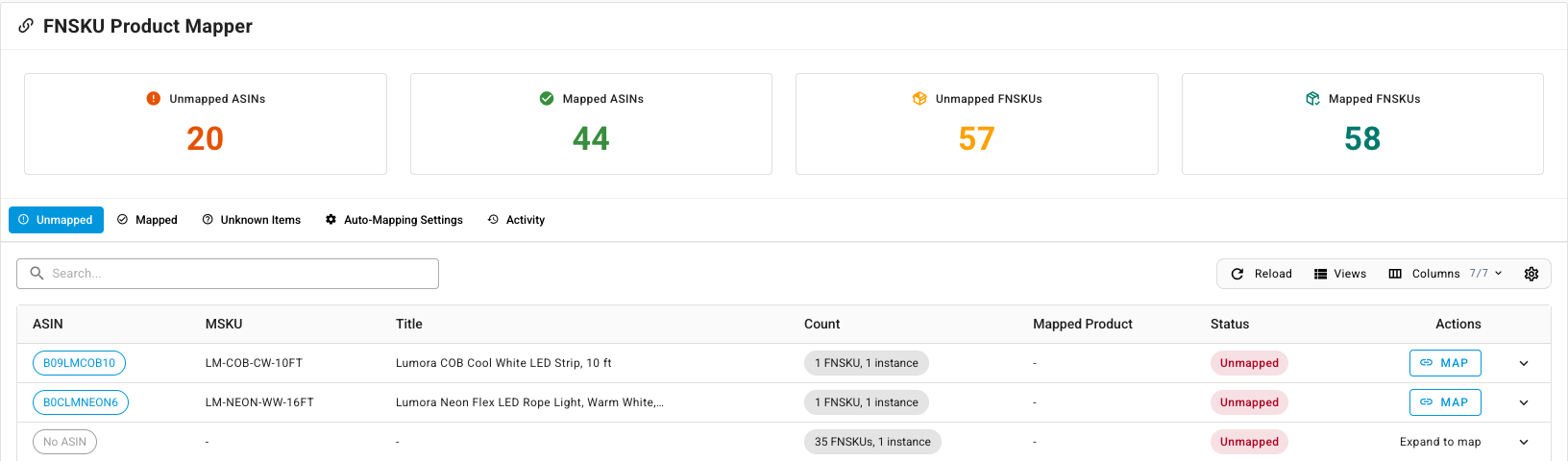
The tabs:
| Tab | What it's for |
|---|---|
| Unmapped | FNSKUs still waiting for a product, grouped by ASIN. |
| Mapped | FNSKUs already linked, with Remap, Unmap and the history of each FNSKU. |
| Unknown Items | FNSKUs you've set aside as not yours. |
| Auto-Mapping Settings | Map new FNSKUs automatically when their ASIN is already mapped. |
| Activity | Every mapping change: who made it, from which product to which, and why. |
Map an ASIN
One ASIN can have several FNSKUs, for example one per Amazon account or condition. Mapping the ASIN maps all of them at once.
- On Unmapped, find the ASIN. The Count column shows how many FNSKUs it has.
- Click Map.
- In Search for SKU Product, type part of the SKU or name, and pick the product. Expand View … FNSKU(s) that will be mapped to check which FNSKUs it covers.
- Click Map 1 FNSKU(s) (the count matches the ASIN).
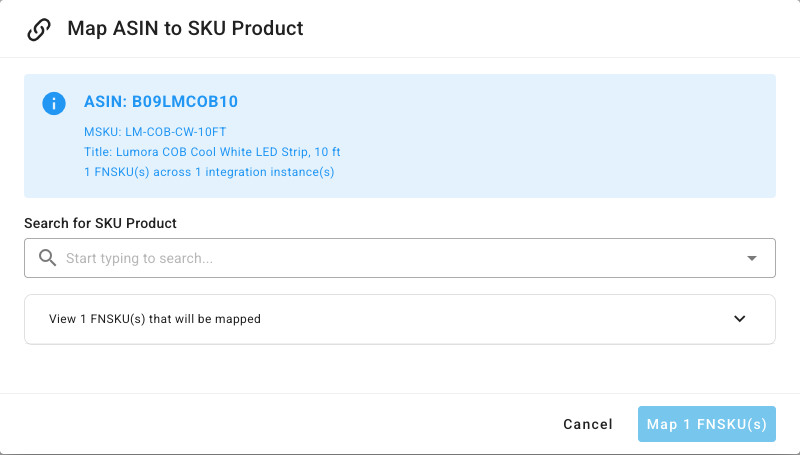
To map one FNSKU on its own, expand the ASIN's row with the arrow at the end and click Map on that FNSKU. An ASIN with some FNSKUs mapped and some not reads Partially Mapped. Click Complete mapping on the Mapped tab to map the rest to the same product.
FNSKUs with no ASIN
Amazon sometimes reports an FNSKU only on a removal or return, with no ASIN. Those collect under No ASIN, marked Expand to map. Expand the row and map each FNSKU, or, if it isn't one of your products, click Mark as Unknown. Hover over a row's source to see the Amazon report it came from. A marked FNSKU moves to Unknown Items, and its removal shipments can be discarded without mapping. Click Unmark there to put it back on Unmapped.
Map new FNSKUs automatically
- Open Auto-Mapping Settings.
- Turn on Enable Auto-Mapping.
- Click Save Settings.
When Amazon reports a new FNSKU whose ASIN is already mapped, it's mapped to the same product, and the change appears on Activity as Auto. To be emailed about FNSKUs that still need you, set up the Unmapped FNSKUs alert under Notification Settings.
Remap an FNSKU or ASIN
Remap when an FNSKU was linked to the wrong product, or when Amazon's label moved to a different product from a certain day. Remapping moves the Amazon history, stock and costs of the FNSKU to the new product, so the dialog shows you the effect before anything changes.
-
On Mapped, click Remap on the ASIN, or on one FNSKU in its expanded row.
-
Under Map to product, pick the product.
-
Under What happened?, choose one:
- Correction — this ASIN was always … when the old link was a mistake. Everything back to the first Amazon event moves to the new product.
- Change — from a date … this ASIN is … when the FNSKU really did change product on that day. Events before the date stay on the current product. The date can't be in the future, or before the current mapping started.
The dialog picks a starting choice for you, and it's always one you can apply. If the new product already existed when the current mapping began, it starts on Correction. Otherwise it starts on Change, dated within the current mapping. Change it if you know better.
-
Read the Impact panel:
- Blast radius: for an ASIN, how many FNSKUs move, and from which products.
- Re-attributed: how many Amazon ledger events, cost layers and units, and their value.
- Accounting: any closed or locked months the change reaches. A change that touches a locked month is blocked.
- Open documents on the current product, such as pending inbound shipments or transfer lines. They stay as they are.
- Cost for the new product: where its cost will come from. If it has none, you can tick Carry to bring the current product's cost across, or the first layer opens as a cost exception until you set one.
- Also remap: on a single FNSKU, tick it to move its sibling FNSKUs on the same ASIN too.
-
Add a Reason (optional), and click Remap ASIN, or Remap FNSKU when you started from one FNSKU (Remap 2 FNSKUs and so on when its siblings come too).
If the remap can't be applied as set up, a red Blocked banner at the top says why and what to do instead. For example, a change dated before the current mapping began reads "A change can't start before the current mapping began. Choose a later date, or use Correction." A change that reaches a locked month names the month and asks you to unlock it or choose a later date. The remap button stays unavailable until you fix it.
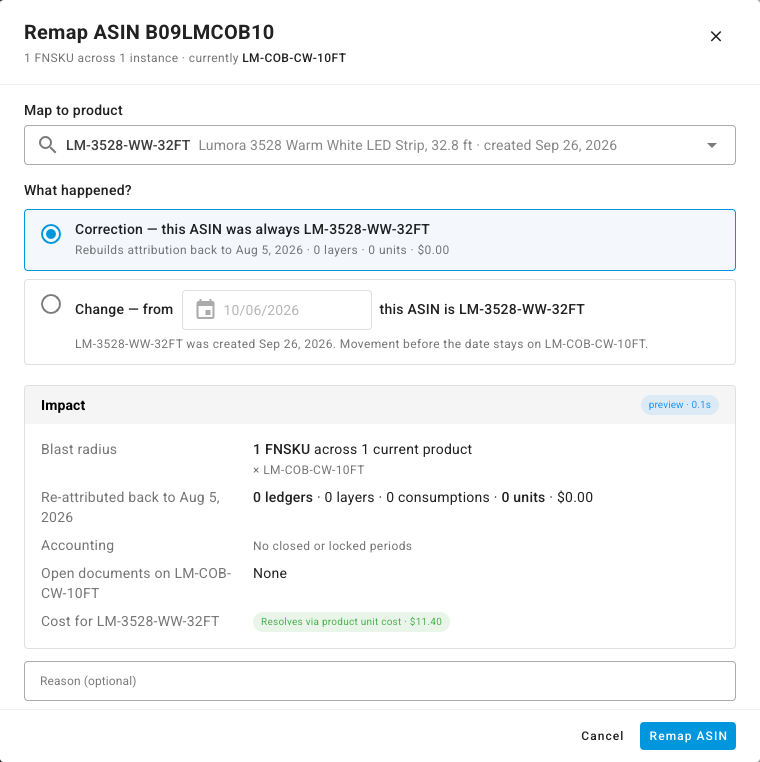
On the Mapped tab, the History chip on each FNSKU lists the products it has been mapped to and from when. Unmap removes a mapping after you confirm, and returns the FNSKU to Unmapped.