
Product Information Management
Shopify Metafields for Jewelry: Metal, Stone and Chain Length From One Product Record
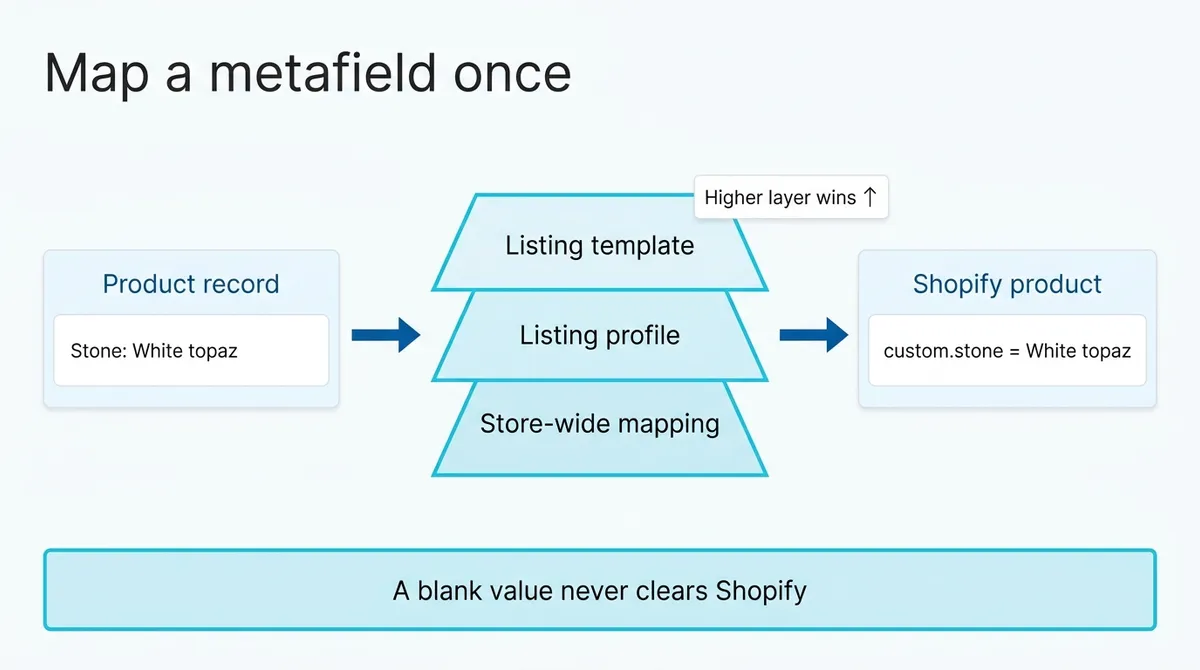
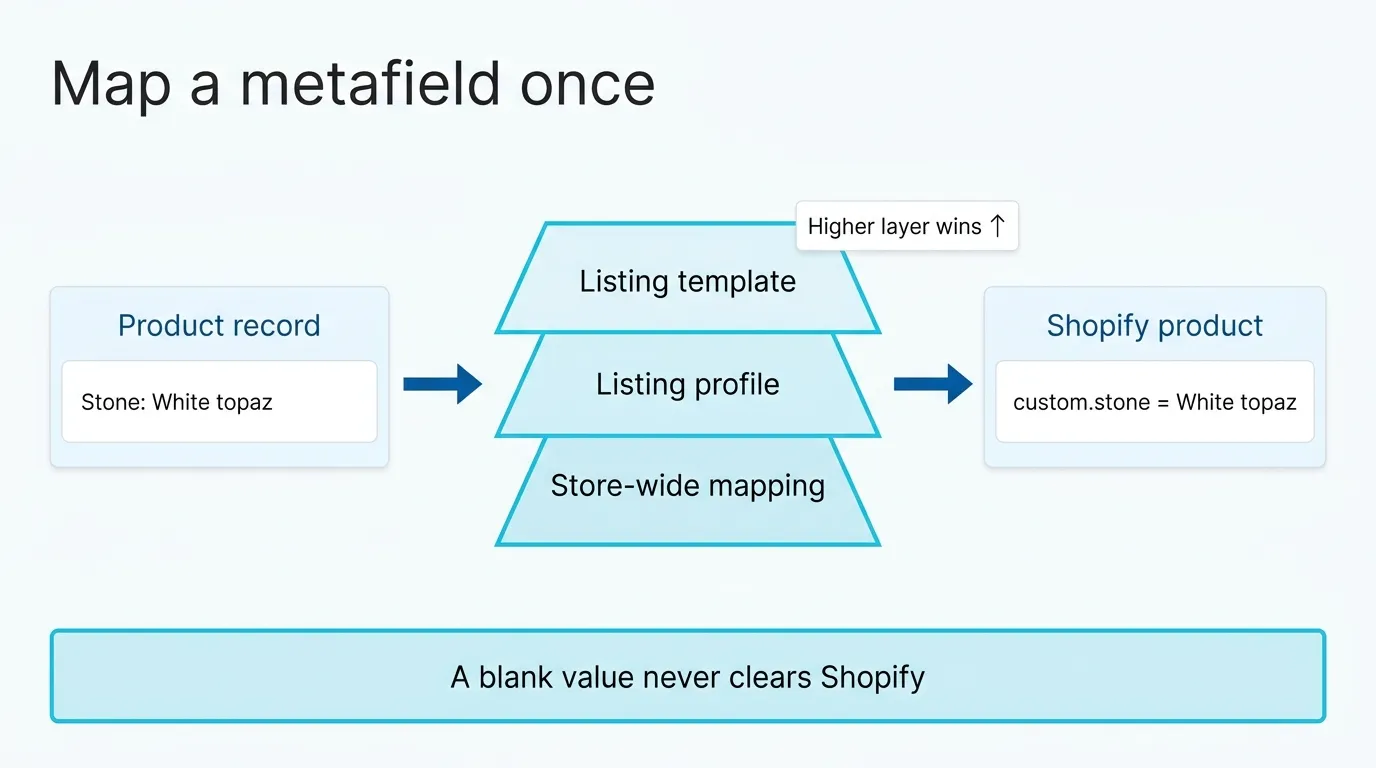
A Shopify metafield is an extra field on a product, like its stone or its chain length, that your theme reads to show on the product page. In SKU.io you map each metafield once, for example custom.stone from the product’s Stone attribute, and every product you publish to that store gets the value. The detail lives on the product record, and Shopify gets it on the first publish and on every update you publish after.
It’s one part of running the catalog for a jewelry brand that sells online and wholesale. Jewelry leans on metafields harder than most categories. A Shopify product has at most three options, and a ring has more than three things a buyer wants to know.
If you have one Shopify store and add a few products a month, typing metafields in Shopify’s own editor is fine, and a one-person maker on one channel under about $1M a year is better served by Craftybase, Zoho Inventory or inFlow than by us. A jewelry store that needs repairs, appraisals and a point of sale wants store software. Mapping from the product record pays off when you publish many styles, or to more than one store.
Three options, and everything else
The co-founder of a jewelry brand described restructuring their catalog around “the metafield functionality to extend some of those attributes down.” The options go to what changes the unit on the shelf, usually metal and size, and those come from generating the variants. The rest of what describes the piece goes into metafields.
Here’s the split for a ring from Wrenmere Jewelry, an invented brand:
| Detail | Goes in | Same on every variant? |
|---|---|---|
| Metal: 14K yellow gold, 14K rose gold, sterling silver | Option | No |
| Ring size 5 to 9 | Option | No |
| Stone: white topaz | Metafield custom.stone, on the product | Yes |
| Stone origin: natural | Metafield custom.stone_origin, on the product | Yes |
| Band width: 2 mm | Metafield custom.band_width, on the product | Yes |
| Care: avoid chlorine | Metafield custom.care, on the product | Yes |
The last column is the test. If a detail is the same on every variant, it’s a product metafield. If it follows the variant without being something the shopper picks, like the stamp inside the band, 14K on the gold and 925 on the silver, it’s a variant metafield, which SKU.io sends to each variant.
Chain length is the one I’d argue about. If you stock a 16-inch and an 18-inch chain as separate units, it’s an option. If every pendant ships on the same 18-inch chain, it’s a metafield, and an option for it is a dropdown with one choice in it. If the chain length metafield is a measurement in Shopify (a dimension, like 18 in), SKU.io sends it in Shopify’s own format with its unit.
Map it once, at the store
Your store’s metafields come into SKU.io on their own. On the store’s Listing Metafields tab, every metafield defined in Shopify has a row with its key, whether it belongs to the product or the variant, its type, and where its value comes from. The list refreshes every night, and you can refresh it by hand after adding one in Shopify.
You map a metafield to a source, such as a product attribute, and from then on every listing you publish to that store fills it. Stone maps to the Stone attribute once, and every ring, pendant and stud gets it.
A mapping can also sit in a listing profile or a listing template. A template beats a profile, and a profile beats the store-wide mapping. I’d keep nearly all of them store-wide. When a product page shows the wrong stone, you want one place to look, not three.
The same co-founder had a second ask: “Even if you could create the metafields from here.” You can. Create metafield on that tab takes a name, the owner and a type, and creates it in Shopify ready to map.
For a text metafield you can give it allowed values, and for stone names I would. Without a list, one person types “Lab diamond”, the next types “Lab-grown diamond”, and the stone filter on your collection page has two entries for one stone. Adding a new stone to the list is quick. Fixing a split filter later means finding every product spelled the other way.
The one-off piece
A single piece that’s different, like the one ring in a collection set with a sapphire, doesn’t need its own mapping. On that product’s draft for the store, you switch to custom values for this channel, give the stone metafield a static value of Sapphire, and save. SKU.io checks the value against the metafield’s definition, its type, allowed values and limits, and flags it on the row if it won’t fit. If Sapphire isn’t on the allowed list yet, you find out there, before anything is published.
When Shopify gets the change
Metafields go to Shopify when you first publish the listing and whenever you publish an update. Changing a product’s Stone attribute doesn’t touch the live product page by itself. You edit the live listing, publish the update, and the new value goes with it.
A blank value sends nothing, and never clears what’s already in Shopify. So if a ring used to list a care line you no longer want, deleting it in SKU.io won’t remove it from the store. Remove it in Shopify.
Shopify’s category attributes, such as Color, are sent as Shopify’s own category values. A value your store doesn’t have yet is skipped, and the draft lists what wasn’t sent.
Is it live after you publish?
A new Shopify product gets its status from the listing profile’s Product status: Active, Draft or Archived. With nothing set, it’s created as Draft, and nobody can buy it until you activate it in Shopify.
That setting applies only when SKU.io creates the product. An update never sends a status. A ring you activated in Shopify stays Active when you publish new metafield values to it, and a draft stays a draft. From SKU.io’s listings you can end a listing, which archives the product in Shopify, or recover it, which makes it active again. Any other change, like Active back to Draft, you make in Shopify.
For a jewelry brand I’d leave the profile on Draft. A new piece should be seen by a person in your theme, photos and metafields together, before a shopper sees it, and Draft makes that the default instead of something you remember. A brand that launches collections at a set time might want Active so everything goes live at once. That’s a fair call. The profile only makes it once, at creation.
The metafields guide has every field. If someone on your team fills metafields by hand today, book a demo and bring the list.